Do Projectors Need Ventilation to Prevent Overheating
Yes, projectors absolutely need ventilation to prevent overheating and maintain peak performance. Without proper airflow, projector lamps and internal components can reach dangerous temperatures, leading to shutdowns, reduced image quality, and a shorter device lifespan. This guide covers everything you need to know about projector cooling, from placement tips to common mistakes that trap heat.
Do projectors need ventilation? The short answer is yes. If you own a projector or are thinking about buying one, understanding how your device manages heat is one of the most important things you can do. Projectors work hard. They push bright light through lenses, process high-resolution images, and run for hours at a time. All of that effort creates heat. Without proper ventilation, that heat builds up fast and causes real problems.
Many people set up their projectors and forget about them. They mount the device, connect the cables, and start watching movies. But over time, poor airflow can lead to overheating. This can shorten your projector’s life, dim the image, or even cause permanent damage to internal parts. The good news is that keeping your projector cool is not complicated. With a few simple steps, you can ensure your device runs smoothly for years.
In this article, we will walk through everything you need to know about projector ventilation. We will cover why projectors heat up, what happens when they overheat, and how you can improve airflow in any setup. Whether you use a portable projector in your bedroom or a large home theater system in your basement, this guide has you covered.
Key Takeaways
- Ventilation is essential: Projectors generate significant heat and rely on airflow to stay within safe operating temperatures.
- Placement matters: Where you put your projector directly affects how well it cools down during use.
- Dust is a silent killer: Clogged filters and vents are the most common cause of projector overheating.
- Enclosure designs need airflow: Even custom projector cabinets must include proper ventilation openings.
- Watch for warning signs: Strange noises, brightness drops, and unexpected shutdowns all signal cooling problems.
- Maintenance keeps things cool: Regular cleaning and filter replacement go a long way in preventing heat buildup.
📑 Table of Contents
- Why Do Projectors Generate So Much Heat?
- What Happens When a Projector Overheats?
- How Projector Ventilation Works
- Best Practices for Projector Ventilation
- Common Mistakes That Block Projector Ventilation
- Portable Projectors and Ventilation
- Projector Ventilation and Display Setup Tips
- How to Tell If Your Projector Needs Better Ventilation
- Final Thoughts on Projector Ventilation
Why Do Projectors Generate So Much Heat?
Projectors are essentially small computers with very bright lights inside. That light source is the biggest reason these devices get hot. Let us break down the main heat sources so you understand what is happening inside your projector.
The Lamp or Laser Engine
Traditional projectors use a high-intensity lamp to create the image you see on the wall. These lamps can reach temperatures over 1,000 degrees Fahrenheit. That is an incredible amount of heat for a device sitting on your shelf. Even modern laser projectors, which run cooler than lamps, still produce a significant amount of thermal energy. The light engine is the primary heat source in any projector.
The Color Wheel and Optics
Many projectors also have a color wheel that spins rapidly to create full-color images. This spinning part creates friction, which adds more heat. The optics inside the projector, including lenses and mirrors, also absorb and redirect heat as light passes through them. Together, these components raise the internal temperature of the device quite a bit.
The Processing Chip
Projectors also have small chips that process video signals and manage image quality. These chips work hard, especially when you are watching high-resolution content. They generate heat similar to what you would find inside a computer. In a compact projector, all of that chip heat has nowhere to go without proper ventilation.
What Happens When a Projector Overheats?
Understanding the consequences of poor ventilation helps you appreciate why airflow matters so much. Overheating is not just a minor inconvenience. It can cause a chain of problems that affect both your viewing experience and your wallet.
Sudden Shutdowns
Most modern projectors have a built-in safety feature. When the internal temperature crosses a certain threshold, the device shuts itself off automatically. This protects the hardware from melting or catching fire. However, nothing is more frustrating than a projector that turns off in the middle of a movie or a big presentation. If this keeps happening, poor ventilation is likely the culprit.
Reduced Image Brightness
When a projector gets too hot, it often dims the lamp to cool down. You will notice the image becoming less vibrant and washed out. This is a clear sign that your projector is struggling to manage its internal temperature. Over time, repeated dimming can also wear out the lamp faster than normal.
Shortened Device Lifespan
Constant exposure to high temperatures damages electronic components. Capacitors dry out, solder joints weaken, and the lens can warp slightly. A projector that overheats regularly may only last a few years, while a well-ventilated one can run for a decade or more. The difference in longevity is huge.
Noise and Fan Wear
When a projector gets hot, the internal fans spin faster to compensate. This means louder operation. Over time, the fans wear out from running at maximum speed all the time. Replacing fans is an avoidable repair that proper ventilation can prevent entirely.
How Projector Ventilation Works
Projectors are designed with built-in cooling systems, but they depend on the surrounding environment to work effectively. Understanding how this system works helps you make smarter setup decisions.
Intake and Exhaust Vents
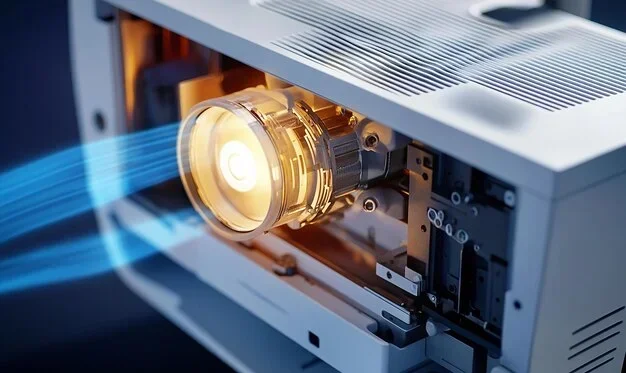
Most projectors have two sets of vents. Intake vents pull cool air into the device, and exhaust vents push hot air out. These vents are carefully positioned by the manufacturer to create a flow of air across the hottest components. If you block either set of vents, the cooling system breaks down. This is the most common mistake people make with projector placement.
Internal Fans
Inside the projector, one or more small fans help move air through the chassis. These fans are designed to operate quietly, but they work harder when the device is hot. If dust clogs the fan blades, they become less effective. This is another reason regular maintenance matters so much for projector cooling.
Heat Sinks
Many projectors also include heat sinks. These are metal components that absorb heat from the chips and lamps and dissipate it into the surrounding air. Heat sinks work best when there is steady airflow moving across them. Without ventilation, the heat sink just becomes a hot block sitting inside the projector.
Best Practices for Projector Ventilation
Now that you understand why ventilation matters, let us look at practical steps you can take to keep your projector cool. These tips apply to almost every type of projector, from small portable models to large home theater units.
Give Your Projector Space
The single most important thing you can do is give your projector enough room around it. Most manufacturers recommend at least a few inches of clearance on all sides. Do not push the device flush against a wall or tuck it into a tight shelf. Air needs to flow in and out freely.
If you are using a ceiling-mounted projector, make sure there is enough space between the ceiling and the device. Check the owner’s manual for the specific clearance requirements. A projector mounted too close to the ceiling can trap heat and cause serious problems over time.
Place the Projector in a Cool Room
The temperature of the room affects how well your projector can cool itself. A cool, air-conditioned room is ideal. Avoid placing the projector in a hot attic, a sunlit room with windows, or anywhere that gets warm easily. The cooler the surrounding air, the less work the internal fans have to do.
If you must set up in a warm room, consider using a portable fan to improve the ambient temperature around the projector. Even a small amount of extra airflow in the room can make a meaningful difference in projector temperature.
Clean the Vents Regularly
Dust is the enemy of projector ventilation. Over time, dust settles on the intake vents and blocks airflow. It also gets inside the device and coats the heat sinks and fans. This buildup acts like insulation, trapping heat inside the projector.
Make it a habit to clean the exterior vents every few weeks. Use a soft brush or a can of compressed air to gently remove dust. For deeper cleaning, you may need to open the projector casing, but only do this if you are comfortable with the process. Many users also find that placing the projector in a dust-free environment helps a lot.
Use a Surge Protector with Built-In Cooling
Some surge protectors and power strips come with built-in fans. These can help move air around the area where your projector sits. While they are not a substitute for proper projector ventilation, they add a helpful layer of cooling, especially in warm environments.
Avoid Stacking Devices
It is tempting to stack your projector next to a streaming device, a soundbar, or a router. But stacking devices traps heat between them. Each device generates its own warmth, and when they are sitting on top of each other, none of that heat can escape. Give each device its own space and keep your projector on a separate shelf or mount.
Similarly, if you are wondering whether you can repurpose an old device as a projector controller, it is worth checking what you can do with an old laptop before adding it to the same crowded shelf as your projector.
Consider a Projector Enclosure
If you want a clean, hidden setup, a projector enclosure can be a great solution. These are boxes or cabinets designed to house the projector while keeping it out of sight. However, not all enclosures are created equal. A sealed enclosure with no ventilation will cause your projector to overheat in minutes.
Look for enclosures that have built-in ventilation holes or active fan cooling. Some premium models even include USB-powered fans that pull hot air out of the cabinet. Before buying an enclosure, check the projector’s manual to see what airflow requirements the manufacturer specifies.
Monitor the Room Temperature
In larger setups, such as dedicated home theaters, room temperature can rise during long viewing sessions. Multiple devices running at once, combined with poor room ventilation, can create a warm microclimate that affects your projector. If you notice your projector getting hot during long movie nights, consider improving the room’s overall airflow with a ceiling fan or an open vent.
Common Mistakes That Block Projector Ventilation
Even well-meaning projector owners can make mistakes that choke off airflow. Here are the most common errors to avoid.
Placing the Projector in a Closed Cabinet
A closed cabinet looks neat, but it is a death trap for projector ventilation. Without open airflow, heat builds up quickly inside the cabinet. If you must store your projector in a cabinet, make sure the doors are open during use and that the cabinet has ventilation grilles.
Ignoring the Manufacturer’s Guidelines
Every projector model is different. The manufacturer knows the device best and provides specific guidance on clearance, operating temperature, and ventilation needs. Ignoring these guidelines is the fastest way to void your warranty and damage your device. Always read the manual before setting up your projector.
Using the Projector on Soft Surfaces
Placing a projector on a carpet, bed, or soft fabric can block the intake vents. These surfaces conform around the device and seal off the gaps that allow air to enter. Always place your projector on a hard, flat surface with uncovered vents.
Forgetting About Filter Maintenance
Many projectors have internal air filters that trap dust before it reaches the sensitive components. These filters clog over time and need to be cleaned or replaced. A clogged filter is like a blocked airway. The projector may look fine on the outside, but inside, the cooling system is struggling. Check your filter every month or two, depending on how dusty your environment is.
Running the Projector in a Dusty Environment
Workshops, garages, and rooms with open windows collect dust quickly. If your projector operates in a dusty space, the vents will clog faster than normal. Consider moving the projector to a cleaner area or using an air purifier in the room to reduce airborne particles.
Portable Projectors and Ventilation
Portable projectors are smaller and more compact than traditional models. This makes ventilation even more important. Because the internal components are packed tightly together, heat builds up faster in a portable projector. Many portable models have small, high-speed fans designed to fit in tight spaces. But even the best fan cannot compensate for poor placement.
If you use a portable projector, avoid placing it on soft surfaces like pillows or blankets. These block the tiny vents on the bottom and sides. Instead, set the projector on a hard, flat table or use the included stand. Some users also buy small portable cooling pads designed for laptops, which can work well for portable projectors too.
When traveling with a portable projector, be mindful of the environment. A hot car or a stuffy hotel room can cause the projector to overheat quickly. Give the device time to acclimate to the room temperature before turning it on, and make sure nothing is blocking the vents during use.
Projector Ventilation and Display Setup Tips
How you set up your display ecosystem can also affect projector cooling. For example, if you are deciding between devices for your setup, keep in mind that the overall heat load in your entertainment area matters. If you are trying to decide between a tablet and a phone for controlling your projector, you might want to read about whether you need an iPad if you already have an iPhone before adding another device that generates heat to your setup.
Similarly, if you are using a laptop to connect to your projector for presentations, make sure the laptop itself has good ventilation. A hot laptop sitting next to a projector doubles the heat load in the area. If you are wondering whether your laptop has the software you need for presentations, you can check whether all laptops come with Microsoft Office built in, so you do not need to run extra applications that push your laptop’s processor harder.
How to Tell If Your Projector Needs Better Ventilation
Your projector will give you warning signs when the ventilation is not enough. Learning to recognize these signs early can save you from costly repairs or permanent damage.
- Frequent shutdowns: The projector turns off during use, especially after 30 minutes or more. This is the most common overheating symptom.
- Loud fan noise: The internal fans are running louder than usual. The projector is working overtime to push out excess heat.
- Dimming image: The picture gets noticeably dimmer over time. The projector is reducing lamp power to lower the temperature.
- Burning smell: Any unusual odor coming from the projector is a serious warning sign. Turn it off immediately and check for ventilation problems.
- Error messages: Many projectors display a temperature warning on the screen. Do not ignore these messages.
- Slow startup: If the projector takes longer than usual to turn on, it may be trying to cool down before it can safely start the lamp.
If you notice any of these signs, take action right away. Check the vents for dust, move the projector to a cooler location, and make sure nothing is blocking the airflow. Addressing ventilation problems early can add years to your projector’s life.
Final Thoughts on Projector Ventilation
Do projectors need ventilation? The answer is a clear and definitive yes. Proper airflow is not optional. It is a fundamental requirement for any projector to work safely and perform well. Whether you have a small portable projector for movie nights or a large home theater setup for your family, ventilation should always be part of your setup plan.
The good news is that keeping your projector cool does not require expensive equipment or technical expertise. A little awareness about placement, a regular cleaning routine, and attention to warning signs are all you need. Treat your projector’s ventilation with the same care you give any other electronic device, and you will enjoy bright, clear images for many years to come.
Take a few minutes today to check your projector’s setup. Look at the vents, feel the airflow, and make sure nothing is blocking the circulation. A small effort now can prevent big problems later. Your projector will thank you with reliable performance and a longer life.
Frequently Asked Questions
Can I use a projector in a closed room without ventilation?
You can, but it is not recommended. A closed room traps heat and raises the ambient temperature, making it harder for the projector to cool itself. Even a small fan or an open window can dramatically improve airflow and keep your projector running safely.
How often should I clean my projector’s ventilation vents?
You should clean the exterior vents every two to four weeks, depending on your environment. If you have pets, smokers, or a lot of dust in your home, clean them more frequently. For the internal filter, check it monthly and replace it when it looks clogged.
What is the ideal room temperature for a projector?
Most projectors work best in rooms between 60 and 75 degrees Fahrenheit. Avoid running your projector in environments above 95 degrees Fahrenheit, as this can cause overheating even with good ventilation. A cool, climate-controlled room is ideal for long viewing sessions.
Do ceiling-mounted projectors need special ventilation?
Yes, ceiling-mounted projectors need extra attention because hot air rises and can get trapped between the ceiling and the projector. Make sure there is enough clearance above the device and that the ceiling area has some airflow. Avoid mounting the projector directly against an insulated ceiling, which can act as a heat trap.
Can I put my projector inside a cabinet when not in use?
Storing the projector in a closed cabinet when it is cool and powered off is fine. However, never run the projector while it is inside a sealed cabinet. The device needs open airflow during operation to prevent heat buildup. Keep the cabinet doors open anytime the projector is on.
Do portable projectors overheat more easily than full-size projectors?
Portable projectors can overheat more easily because their components are packed into a smaller space with less room for airflow. However, most modern portable models are designed with efficient cooling systems. As long as you place them on hard, flat surfaces and keep the vents unobstructed, they should run cool and perform well.