Do Bluetooth Dongles Work For Any Device Full Guide
Bluetooth dongles are small adapters that add wireless capability to devices that lack built-in Bluetooth. They generally work across many devices, but compatibility depends on the Bluetooth version, operating system, and hardware support. This guide walks you through how they work, which devices they fit, and how to pick the right one for your setup.
You have a device that does not have Bluetooth built in. Maybe it is an older TV, a desktop computer, or a stereo system. You want to go wireless. The easiest fix is a Bluetooth dongle. But here is the big question. Do Bluetooth dongles work for any device? The short answer is almost, but not quite. Let us break this down so you know exactly what to expect.
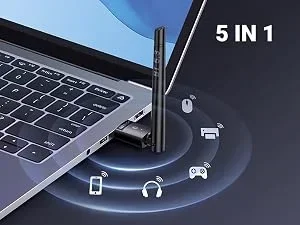
A Bluetooth dongle is a tiny adapter that plugs into a USB port and gives your device the ability to connect wirelessly. Think of it as a small bridge between your device and Bluetooth accessories like headphones, speakers, keyboards, and mice. They are cheap, easy to use, and widely available. But not every dongle works with every device, and that is what we are here to explore.
In this guide, we will cover how Bluetooth dongles work, which devices they are compatible with, what to look for when buying one, and common mistakes that trip people up. Whether you want to connect wireless headphones to your TV or add Bluetooth to your old laptop, you will find practical answers here.
Key Takeaways
- Broad Compatibility: Most Bluetooth dongles work with devices that have a USB port, including PCs, laptops, TVs, and speakers.
- Version Matters: Bluetooth 5.0 and newer offer better range, speed, and stability than older versions like Bluetooth 4.0.
- Plug and Play Simplicity: Many dongles install automatically, but some require manual driver setup depending on your device.
- Not Universal: Some smart TVs, gaming consoles, and older electronics may not support all dongles without extra steps.
- Audio Quality Varies: The Bluetooth codec your dongle supports affects sound quality and latency for music and video.
- Range Is Usually 30 Feet: Most dongles work well within 10 meters, though walls and interference can reduce this.
📑 Table of Contents
- What Is a Bluetooth Dongle and How Does It Work?
- Do Bluetooth Dongles Work With All Devices?
- What to Look for When Buying a Bluetooth Dongle
- Common Devices That Work Great With Bluetooth Dongles
- Devices That May Not Work With a Bluetooth Dongle
- Quick Tips for Getting the Best Performance From Your Bluetooth Dongle
- Common Mistakes People Make With Bluetooth Dongles
- Can You Use a Bluetooth Dongle With Any TV?
- Final Thoughts
What Is a Bluetooth Dongle and How Does It Work?
A Bluetooth dongle is a small USB device that sends and receives Bluetooth signals. When you plug it into a port, it acts like a built-in Bluetooth chip. Your device can then find and connect to other Bluetooth accessories nearby.
Here is how it works in simple steps. You plug the dongle into a USB port. Your device recognizes it, either automatically or after a quick install. The dongle broadcasts a Bluetooth signal. Your Bluetooth accessory, like headphones or a speaker, detects that signal. You pair the two. Now you have a wireless connection.
Most dongles use Bluetooth 4.0 or Bluetooth 5.0. The newer versions offer faster data transfer, better range, and lower power use. If you are buying a dongle today, look for Bluetooth 5.0 or higher. It makes a real difference in performance.
Some dongles are audio-only. They handle sound but nothing else. Others are multi-purpose. They support input devices like keyboards and mice, as well as audio output. Knowing which type you need helps you pick the right one.
Bluetooth Dongle vs Built-In Bluetooth
You might wonder why bother with a dongle if you can just buy a device with built-in Bluetooth. Fair question. Built-in Bluetooth is convenient. It is already there. You do not need extra hardware. But many older devices and budget electronics do not include it. That is where a dongle saves the day. It adds wireless capability without replacing your entire setup.
Dongles also give you flexibility. You can unplug them and move them between devices. You can use one dongle with your TV and another with your laptop. Built-in Bluetooth locks you into one device. A dongle gives you options.
Do Bluetooth Dongles Work With All Devices?
This is the question everyone wants answered. The truth is that Bluetooth dongles work with a wide range of devices, but there are limits. Let us look at the most common device types and what you can expect.
Desktop Computers and Laptops
Most desktop computers and laptops work great with Bluetooth dongles. If your PC or laptop has a USB port, you can likely add Bluetooth. Windows PCs are the most straightforward. They usually recognize a dongle right away and install drivers automatically. Mac computers also work with most dongles, though some may need a bit more setup.
Older laptops that do not have built-in Bluetooth benefit the most from a dongle. Even some newer laptops that have Bluetooth but experience connectivity issues can use a dedicated dongle for a stronger, more stable connection.
Televisions
Smart TVs are a mixed bag. Some modern TVs come with built-in Bluetooth. Others do not. If your TV does not have Bluetooth, a dongle can add it. But here is the catch. Not all smart TVs support external Bluetooth adapters easily. Some brands lock down their USB ports to only work with their own accessories.
If you are trying to add Bluetooth to your TV, check whether your TV allows third-party Bluetooth devices. Many users have had success using a dongle to connect wireless headphones to their TV for late-night watching without disturbing anyone in the house. This is a popular use case that works well with the right dongle.
For those who want a simpler solution, some Bluetooth transmitters do the same job as a dongle but connect through a 3.5mm audio jack instead of USB. These are worth considering if your TV has limited USB functionality.
Speakers and Audio Systems
If you have a speaker or stereo system without Bluetooth, a dongle can bring wireless capability. You plug the dongle into the USB port (if available) or use a 3.5mm audio output. Many people use dongles to make their old Bose Wave radio or similar systems Bluetooth-enabled. It is a cost-effective way to enjoy wireless music without buying a whole new system.
Keep in mind that the audio quality you get depends on the Bluetooth codec the dongle supports. Higher-quality codecs like aptX or LDAC deliver better sound than basic codecs. If audio quality matters to you, choose a dongle that supports these codecs.
Gaming Consoles and Other Devices
Gaming consoles like the PlayStation and Xbox have their own wireless protocols. They do not always work with standard Bluetooth dongles. However, some consoles do support Bluetooth for specific accessories. Always check the console’s compatibility list before buying a dongle for gaming.
Roku devices, for example, work with certain Bluetooth headphones through a direct pairing method. If you are looking to connect wireless headphones to your Roku for private listening, a Bluetooth dongle can sometimes help, though Roku has its own built-in wireless features in many models.
What to Look for When Buying a Bluetooth Dongle
Not all Bluetooth dongles are the same. Buying the right one means understanding a few key specs. Here is what matters most.
Bluetooth Version
The Bluetooth version determines speed, range, and power efficiency. Bluetooth 5.0 is the current sweet spot. It offers a range of up to 800 feet in ideal conditions, faster data transfer, and lower battery drain. Bluetooth 4.0 is still workable but has shorter range and slower speeds. If you can, always go with Bluetooth 5.0 or newer.
Compatibility With Your Device
Check whether your device supports USB Bluetooth adapters. Most do. But some devices, especially certain smart TVs and media players, may have limited support. Read the product description carefully. Look for mentions of Windows, macOS, ChromeOS, Linux, or specific TV brands that the dongle supports.
Audio Codec Support
If you plan to use the dongle for audio, codec support matters. The most common codecs are SBC, aptX, aptX HD, and LDAC. SBC is the baseline and works with almost everything. aptX and LDAC deliver much better sound quality. If you are an audiophile or just want good sound, pick a dongle that supports at least aptX.
Range and Stability
Most Bluetooth dongles have a range of about 30 to 50 feet. Walls, furniture, and other electronics can weaken the signal. If you need a longer range, look for dongles with external antennas or those rated for Bluetooth 5.0 with enhanced range capabilities.
Plug and Play vs Manual Setup
Some dongles work the moment you plug them in. Others require you to download drivers or software. Plug and play dongles are the most convenient. They save you time and hassle. If you are not tech-savvy, stick with ones that advertise easy setup and automatic driver installation.
Common Devices That Work Great With Bluetooth Dongles
Let us get practical. Here are some common devices where Bluetooth dongles shine. These are real-world examples that show how versatile these little adapters can be.
- Desktop PCs without Bluetooth: Plug in a dongle and instantly connect wireless headphones, keyboards, and mice. It is one of the easiest upgrades you can make.
- Older laptops: Many older laptops lack Bluetooth. A dongle brings them up to date without spending money on a new machine.
- Non-smart TVs: Some older or budget TVs do not have smart features. A Bluetooth dongle can add wireless audio output so you can connect headphones or speakers.
- Smart TVs without Bluetooth: Even some newer smart TVs skip Bluetooth to save costs. A dongle fills that gap perfectly.
- Tablets and e-readers: Devices like certain Amazon Fire tablets work well with Bluetooth dongles when you need to connect accessories.
- Car audio systems: Some cars have USB ports but no Bluetooth. A dongle can add wireless streaming to your car’s audio system.
The beauty of a Bluetooth dongle is how versatile it is. You can use it to add wireless capability to almost anything with a USB port or audio output. It opens up a world of wireless accessories that you might not have been able to use otherwise.
Devices That May Not Work With a Bluetooth Dongle
While Bluetooth dongles are versatile, they are not magic. Some devices will not work with them, or the experience may be limited. Here are some examples.
- Gaming consoles with proprietary wireless systems: PlayStation and Xbox use their own wireless tech. Standard Bluetooth dongles may not connect.
- Some smart TVs with locked USB ports: Certain TV brands only allow their own branded accessories to work through USB. Check before buying.
- Devices without USB ports: If your device has no USB port and no audio output, a dongle cannot help. You would need a different adapter.
- Very old devices with USB 1.0 or 2.0 only: While they may technically work, the connection speed and stability can be poor.
Before purchasing any dongle, check the product listing for a compatibility list. Most reputable brands list the devices and operating systems their dongles support. This saves you time and frustration.
Quick Tips for Getting the Best Performance From Your Bluetooth Dongle
Getting the most out of your Bluetooth dongle is easy with a few simple tips. Follow these and your wireless experience will be much smoother.
- Plug the dongle into a USB 2.0 or 3.0 port directly. Avoid USB hubs when possible. A direct connection gives the best signal strength and stability.
- Keep the dongle away from other USB devices that cause interference. USB 3.0 ports can sometimes interfere with Bluetooth signals. If you notice issues, try a USB 2.0 port instead.
- Update your device drivers regularly. Updated drivers ensure the best compatibility and performance with your dongle.
- Place the dongle with a clear line of sight to your Bluetooth device. Walls and obstacles reduce the signal. Positioning matters more than you might think.
- Keep your devices close together. Most dongles work best within 30 feet. The closer you are, the stronger and more stable the connection.
- Restart both devices if you experience connection issues. A simple restart often fixes pairing problems and refreshes the Bluetooth connection.
These tips apply whether you are using a dongle with a TV, computer, or speaker system. A little care in setup goes a long way toward a reliable wireless experience.
Common Mistakes People Make With Bluetooth Dongles
Even with the best dongle, mistakes can cause frustration. Here are the most common ones and how to avoid them.
- Buying the wrong Bluetooth version: An older Bluetooth 4.0 dongle may not deliver the speed or range you need. Always check the version before purchasing.
- Ignoring codec support: If you care about audio quality, a basic dongle with only SBC support will not give you the best sound. Look for aptX or LDAC support.
- Using a USB hub instead of a direct port: Hubs can weaken the Bluetooth signal. Plug the dongle directly into your device whenever possible.
- Not checking TV compatibility: Some smart TVs block third-party Bluetooth adapters. If your dongle does not work with your TV, this could be why.
- Placing the dongle behind the TV or under a desk: Enclosed spaces block Bluetooth signals. Keep the dongle in an open, visible spot for the best performance.
- Assuming all dongles work the same way: Some dongles are audio-only. Others support multiple device types. Read the product description to know what you are getting.
Avoiding these mistakes will save you time, money, and the headache of dealing with a dongle that does not perform as expected.
Can You Use a Bluetooth Dongle With Any TV?
This is one of the most common questions we see. The answer is mostly yes, but with some caveats. Many modern smart TVs have USB ports that support Bluetooth dongles. However, some TV manufacturers limit USB functionality to their own accessories only. If you are trying to add Bluetooth to a TV, check the TV manual or contact the manufacturer first.
If your TV does not support third-party Bluetooth dongles, you can use a Bluetooth transmitter instead. These devices connect through the 3.5mm audio jack or optical output and broadcast Bluetooth from your TV. They are not dongles in the traditional sense, but they solve the same problem. Many users have had great success with transmitters for adding wireless headphone support to their TV setup.
For those who want to pair Bluetooth headphones directly to their television, the method depends on your TV model. Some newer TVs have a native Bluetooth settings menu where you can pair headphones directly. Others require an external adapter like a dongle or transmitter. Knowing which route to take makes the process much smoother.
Final Thoughts
So, do Bluetooth dongles work for any device? The honest answer is most devices with a USB port or compatible audio output. They are one of the simplest and most affordable ways to add wireless capability to your favorite gadgets. Whether you want to connect wireless headphones to your TV, add Bluetooth to your desktop, or stream audio from your old stereo, a Bluetooth dongle can make it happen.
The key is choosing the right dongle for your specific needs. Check the Bluetooth version, codec support, and device compatibility before you buy. Avoid the common mistakes we covered, and follow the setup tips for the best experience. With the right dongle in hand, you can go wireless with almost any device in your home.
Bluetooth technology keeps getting better. Dongles keep getting smaller and faster. The days of tangled cables and limited mobility are fading. A small investment in a quality Bluetooth dongle can transform how you use your devices. It is one of those upgrades that is simple, effective, and surprisingly impactful.
Frequently Asked Questions
Do Bluetooth dongles work with Windows and Mac computers?
Yes, most Bluetooth dongles work with both Windows and Mac computers. Windows PCs usually recognize dongles automatically. Mac computers may require you to check compatibility in the product description before buying. Always look for dongles that list both operating systems as supported for the best experience.
Can I use a Bluetooth dongle to connect headphones to my TV?
Yes, you can use a Bluetooth dongle to connect wireless headphones to your TV. However, some smart TVs block third-party Bluetooth adapters. If your TV does not support a dongle, consider using a Bluetooth transmitter instead. This is a popular workaround that works with most television models.
What is the difference between a Bluetooth dongle and a Bluetooth transmitter?
A Bluetooth dongle plugs into a USB port and adds Bluetooth capability to a device. A Bluetooth transmitter connects through an audio jack or optical port and sends Bluetooth signals from a device like a TV. Dongles add wireless support. Transmitters send wireless audio from one device to another. They serve different but related purposes.
Do I need to install drivers for a Bluetooth dongle?
Many modern Bluetooth dongles are plug and play. They work without any manual driver installation. However, some dongles, especially older or budget models, may require you to download drivers from the manufacturer website. Check the product description before buying to know what to expect.
How far can a Bluetooth dongle work from the connected device?
Most Bluetooth dongles work within 30 to 50 feet in open space. Bluetooth 5.0 dongles offer the best range. Walls, furniture, and other electronics can reduce the effective distance. Keeping the dongle and your Bluetooth device close together gives the most stable connection.
Can a Bluetooth dongle improve audio quality for wireless headphones?
Yes, a good Bluetooth dongle can improve audio quality. Dongsles that support advanced codecs like aptX or LDAC deliver better sound than basic ones. The codec your dongle uses affects both sound quality and latency. If you care about audio performance, choose a dongle that supports high-quality codecs for the best wireless listening experience.
=== CONCLUSION ===
Bluetooth dongles are a simple, affordable way to bring wireless capability to almost any device. They work with most computers, TVs, speakers, and audio systems that have a USB port or audio output. The key to success is picking the right dongle for your device and needs. Check the Bluetooth version, codec support, and compatibility list before you buy. Avoid common setup mistakes, keep your devices close, and enjoy the freedom of wireless connectivity. Whether you are streaming music, watching movies, or just going cord-free, a Bluetooth dongle is one of the best investments you can make for your entertainment setup.