Can You Tell The Difference Between Bluetooth And Aux
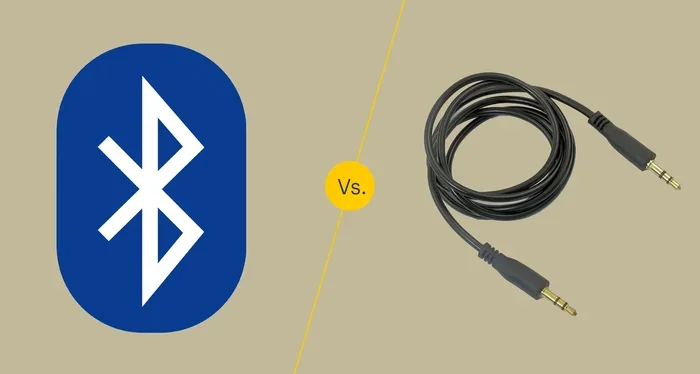
Bluetooth and aux are two of the most common ways to connect audio devices, but they work in very different ways. Bluetooth sends sound wirelessly, while aux relies on a physical cable. Understanding the difference helps you choose the best option for your setup, whether you care about sound quality, convenience, or compatibility.
Have you ever wondered about the difference between Bluetooth and aux? Maybe you are trying to connect your phone to a speaker or your car stereo and are not sure which option to pick. You are not alone. These two connection types are everywhere, but most people do not really think about how they work until something goes wrong.
The short answer is that Bluetooth sends audio wirelessly through the air, while aux uses a physical cable to carry sound from one device to another. That is the basic idea. But there is a lot more to know, and it matters more than you might think. Whether you care about sound quality, ease of use, or just want to avoid tangled cords, understanding these two technologies will save you time and frustration.
In this guide, we will walk through everything you need to know. We will compare how each one works, look at their pros and cons, and help you figure out which one fits your life best. Let us get into it.
Key Takeaways
- Bluetooth is wireless: It uses radio waves to connect devices without any cables, giving you freedom of movement.
- Aux is wired and simple: A 3.5mm cable delivers a direct analog signal with no latency or pairing needed.
- Sound quality differs: Aux generally offers cleaner audio, while Bluetooth has improved a lot with modern codecs.
- Convenience favors Bluetooth: No cables to manage, and it works with phones, speakers, and cars alike.
- Compatibility matters: Not all devices support both, so knowing your options helps you stay prepared.
- Bluetooth range is limited: Most devices work within 30 feet, while aux works as long as the cable reaches.
- Both have their place: The best choice depends on your use case, device, and personal preferences.
📑 Table of Contents
What Is Bluetooth?
Bluetooth is a wireless technology that lets devices talk to each other without cables. It uses short-range radio waves to send data, including audio, between paired devices. You probably use Bluetooth every day without even thinking about it.
How Bluetooth Works
When you pair two Bluetooth devices, they create a small personal network called a piconet. One device acts as the master, and the other acts as the slave. The master sends data packets through the air, and the receiver picks them up and turns them back into sound. This whole process happens in milliseconds.
Bluetooth operates on the 2.4 GHz frequency band, which is the same band used by Wi-Fi and microwaves. But Bluetooth uses very low power, which is why it does not interfere much with other devices. Modern Bluetooth versions, like Bluetooth 5.0 and 5.3, offer better range, faster speeds, and improved audio quality.
Common Devices That Use Bluetooth
Bluetooth is built into almost everything these days. Here are some common examples:
- Wireless headphones and earbuds
- Portable Bluetooth speakers
- Smartphones and tablets
- Car audio systems
- Smart TVs and streaming devices
- Gaming controllers and consoles
If you have ever connected headphones to your phone without plugging anything in, you have used Bluetooth. It is that simple. And the technology keeps getting better every few years.
Pros of Bluetooth
- No cables needed: You can move freely around a room without being tethered to your device.
- Wide compatibility: Most modern devices support Bluetooth out of the box.
- Hands-free convenience: You can take calls and control music from a distance.
- Multiple device support: Many devices can remember several paired connections.
Cons of Bluetooth
- Audio latency: There can be a slight delay between the source and the speaker, which matters for video and gaming.
- Range limits: Bluetooth typically works within 30 feet, and walls and obstacles can reduce that.
- Battery drain: Wireless connections use more power than wired ones.
- Interference: Other wireless devices in the same area can sometimes cause disruptions.
What Is an Aux Connection?
An aux connection, short for auxiliary, is a wired way to send audio from one device to another. The most common type is the 3.5mm audio jack, the same plug you find on headphones, laptops, and car stereos. It has been around for decades and remains one of the most reliable audio connections.
How an Aux Connection Works
An aux cable carries an analog electrical signal directly from the source device to the output device. There is no conversion to wireless signals, no pairing, and no delay. When you plug in a cable, the audio starts flowing immediately. That is what makes aux so dependable.
The signal travels through copper wires inside the cable. The tip, ring, and sleeve of the 3.5mm plug each handle a different part of the audio signal. The left channel, right channel, and ground are all carried through the same cable. It is a straightforward and proven design.
Common Devices That Use Aux
You will find aux inputs on a surprising number of devices:
- Car stereos and factory audio systems
- Home stereo receivers
- Older laptops and desktop computers
- Portable speakers with wired inputs
- Mixing boards and audio equipment
- Gaming consoles and controllers
Even though many newer devices are dropping the aux jack, plenty of still have one. And you can always use an adapter to connect older devices to newer ones.
Pros of Aux
- No latency at all: The audio is instant because it travels through a wire.
- Consistent quality: There is no signal loss from wireless interference.
- No pairing required: Just plug it in and go.
- Works without battery: The cable carries the signal, so it does not drain your device.
Cons of Aux
- Cables can tangle: Wires are annoying and easy to trip over.
- Limited range: You can only move as far as the cable allows.
- Wear and tear: Plugs and jacks can get bent or dirty over time.
- Not always available: Many newer phones and laptops no longer include an aux port.
Bluetooth vs Aux: Key Differences
Now let us get to the heart of the matter. How do these two connection types actually compare? Here is a side-by-side look at what matters most.
Sound Quality
When it comes to pure audio quality, aux has a slight edge. Because it sends a direct analog signal, there is no compression or conversion involved. The sound you hear is as close to the original recording as the device can produce.
Bluetooth audio has come a long way, though. Modern Bluetooth codecs like aptX, LDAC, and AAC compress audio in smarter ways. For most casual listeners, the difference between Bluetooth and aux is hard to notice in everyday use. You would need high-end headphones and a trained ear to really pick apart the nuances.
That said, if you are an audiophile or you care about every detail in your music, aux will give you the cleanest signal possible. For everyone else, Bluetooth is more than good enough.
Convenience and Portability
Bluetooth wins this category hands down. You can connect your phone to a speaker from across the room. You can take calls while walking around your house. There is no cable to find, no plug to force in the right direction.
Aux requires you to be physically close to the device you are connecting to. The cable limits your movement. But for situations where you want a set-it-and-forget-it connection, aux is actually simpler. You plug in, and it just works every single time.
Latency and Delay
Latency is the tiny delay between when audio is sent and when you hear it. With aux, latency is essentially zero. The signal moves through the wire at nearly the speed of light.
Bluetooth introduces a small delay, usually between 40 and 200 milliseconds. For listening to music, this does not matter. But for watching videos or playing games, that delay can cause audio and video to fall out of sync. If you notice lip movements not matching the sound, Bluetooth latency might be the culprit.
Range and Mobility
Bluetooth works within about 30 feet under ideal conditions. Walls, furniture, and other electronic devices can shrink that range. But for most home and car uses, 30 feet is plenty.
Aux has no range limit of its own. You can run a cable as long as you need. Want to connect your phone to a speaker on the other side of the room? Just use a longer cable. This makes aux a great choice for setups where you need a reliable, extended connection.
Connection Stability
An aux cable provides a rock-solid connection. As long as the plug is clean and the jack is not damaged, you will get uninterrupted audio. There are no dropouts, no interference, and no unexpected disconnections.
Bluetooth connections can sometimes be less stable. Other wireless devices, microwaves, and even walls can cause interference. In crowded environments like airports or busy offices, you might notice occasional audio glitches. Newer Bluetooth versions have improved stability significantly, but it is still not as reliable as a wire.
Tip: If you experience Bluetooth dropouts, try moving closer to the source device or reducing the number of wireless devices in the area. This simple fix often solves the problem.
Which One Should You Choose?
The right choice depends on what you are trying to do. Here are some quick scenarios to help you decide.
Choose Bluetooth When
- You want to move freely without being tied to a cable.
- Your device does not have an aux port.
- You are connecting to a car stereo that supports wireless audio.
- You want to connect multiple devices quickly.
- You are using portable speakers or headphones on the go.
If you are looking for a wireless audio experience, Bluetooth is the clear winner. It is fast, easy, and works with almost everything. And if you want to learn more about using Bluetooth with specific devices, check out our guide on using Bluetooth headphones with Roku for helpful tips.
Choose Aux When
- You need perfect audio sync for video or gaming.
- You want the best possible sound quality without compression.
- Your device has an aux jack but no Bluetooth.
- You are setting up a home audio system where stability matters.
- You do not want to worry about battery life on your connection.
Aux is the go-to choice for reliable, high-quality audio. It is especially useful in cars, home stereos, and professional audio setups. If you are curious about using Bluetooth in the shower or other unique environments, you might enjoy our article on using a Bose speaker in the shower for some creative ideas.
Can You Use Both at the Same Time?
In some cases, yes. Many modern devices let you connect via both Bluetooth and aux simultaneously. For example, some car stereos allow you to play music through Bluetooth while charging your phone through a wired connection. However, you usually cannot play audio through both at the same time without a special splitter or adapter.
Using an aux cable with Bluetooth can be a great backup plan. If your Bluetooth connection drops, you can quickly switch to the cable and keep listening without interruption. It is always smart to have both options available.
Common Problems and How to Fix Them
Bluetooth Problems
Bluetooth issues are usually easy to solve. Here are the most common ones:
- Device will not pair: Make sure both devices have Bluetooth turned on and are in pairing mode. Restart both devices if needed.
- Audio keeps cutting out: Move closer to the source device. Remove any obstacles between the two devices.
- Sound quality is poor: Check if your device supports a better Bluetooth codec. Update your firmware if possible.
- Bluetooth will not turn on: Try turning it off and back on. If that fails, restart your device.
Aux Problems
Aux connections are simple, but they are not immune to issues:
- No sound at all: Check that the cable is fully plugged in. Try a different cable or a different port.
- Sound only comes from one side: The cable or plug may be damaged. Inspect for bent or dirty contacts.
- Static or buzzing noise: This is often caused by a loose connection or a damaged cable. Replace the cable to fix it.
- Plug does not fit: Some devices use different sizes. Make sure you have the right adapter for your setup.
Keeping your aux cables clean and coiled properly can extend their life significantly. A small investment in good cables pays off over time.
The Future of Audio Connections
The audio world is changing fast. More devices are dropping the aux jack in favor of wireless options like Bluetooth and Wi-Fi audio streaming. Companies like Apple were early movers in this direction, removing the aux port from the iPhone back in 2016. Since then, many other manufacturers have followed suit.
But aux is not disappearing overnight. Many car manufacturers still include aux inputs because they are cheap, reliable, and work with any device. Audiophiles and professionals also prefer aux for its uncompromised sound quality. And in situations where wireless connections are not practical, aux remains the best choice.
Bluetooth is also evolving rapidly. The latest versions offer longer range, lower power consumption, and higher quality audio. Technologies like LE Audio and the LC3 codec are set to make Bluetooth even better in the coming years. So while aux has its place today, Bluetooth is clearly where the industry is heading.
For those who want to explore more about wireless audio setups, our article on pairing Bluetooth headphones to your LG TV offers practical steps you can follow right away.
Final Thoughts
So, can you tell the difference between Bluetooth and aux? Now you can. Bluetooth gives you wireless freedom and modern convenience, while aux delivers reliable, high-quality sound through a simple cable. Both have strengths, and both have weaknesses. The best choice is the one that fits your needs in the moment.
Keep both options in your toolkit. A Bluetooth connection is perfect for everyday listening, while an aux cable is your backup for when quality and reliability matter most. Understanding the difference between these two technologies puts you ahead of most people, and it makes your audio experience better every single day.
Next time you need to connect your device, you will know exactly what to reach for. And if you ever get stuck, you now have the knowledge to troubleshoot and find the best solution. Happy listening!
Frequently Asked Questions
Is Bluetooth or aux better for sound quality?
Aux generally offers better sound quality because it sends an uncompressed analog signal directly through a wire. Bluetooth compresses audio to transmit it wirelessly, which can cause minor quality loss. However, with modern codecs like aptX, the difference is very small for most listeners.
Can I use Bluetooth and aux at the same time on one device?
Some devices allow both connections simultaneously, but you usually cannot play audio through both at the same time. A Bluetooth-to-aux adapter or splitter can help you switch between the two quickly when needed.
Why does my Bluetooth audio have a delay?
Bluetooth latency is the most common cause of audio delay. The wireless signal takes a few milliseconds to travel between devices. This delay is usually not noticeable for music, but it can cause audio and video to be out of sync when watching content.
Does aux use battery power from my device?
Aux does not use Bluetooth or Wi-Fi, so it does not drain your battery in the same way. However, the source device still uses a small amount of power to send the audio signal through the cable. The difference is minimal compared to wireless connections.
Can I convert Bluetooth to aux or aux to Bluetooth?
Yes. You can buy a Bluetooth receiver that plugs into an aux port to add wireless capability to any device. Similarly, a Bluetooth transmitter can send audio from a Bluetooth source to an aux-only device. These adapters are affordable and very useful.
Is aux faster than Bluetooth for audio?
Aux is essentially instantaneous because the signal travels through a wire. Bluetooth has a small delay due to wireless transmission and processing. For most everyday uses, this delay is not noticeable, but it can matter for gaming and video synchronization.