How Can I Use My Phone While On A Cruise Ship Guide
Using your phone on a cruise ship is easier than you think, but it requires the right strategy to avoid surprise charges and stay connected. This guide covers everything from onboard WiFi packages and maritime cellular service to offline phone features and the best apps for cruising. You will learn how to use your phone on vacation without the stress, save money on roaming charges, and stay in touch with loved ones while you are out on the open ocean.
You have been looking forward to this cruise for months. The sun, the ocean, the relaxation. But there is one thing on your mind. How can I use my phone while on a cruise ship? You do not want to be disconnected from the world, but you also do not want a massive bill waiting for you when you get home.
The good news is that staying connected at sea is totally doable. You just need to know what options are available and how to use them wisely. This guide walks you through everything you need to know about cruise ship phone service, from WiFi packages to offline tricks that keep your phone useful even without a signal.
Whether you are a first-time cruiser or a seasoned traveler, you will find practical tips here that make a real difference. Let us dive in and make sure your phone works for you, not against you, while you are out on the water.
Key Takeaways
- Cruise ship WiFi works differently: It uses satellite connections that are slower and more expensive than home internet, so manage your expectations.
- Onboard WiFi packages save money: Most cruise lines offer daily or whole-voyage internet bundles that are far cheaper than pay-per-use plans.
- Airplane mode is your best friend: Switching to airplane mode and using WiFi selectively keeps roaming charges at zero.
- Offline features are a lifesaver: Download maps, playlists, and movies before your cruise so you never need the internet.
- Maritime cellular service exists: Some ships support cellular coverage over ocean, but it comes at a premium cost.
- Shipboard communication apps help: Many cruise lines offer free apps for messaging other passengers and crew onboard.
- Planning ahead prevents bill shock: A little prep before departure goes a long way toward a stress-free connected cruise.
📑 Table of Contents
How Cruise Ship Phone Service Works
Understanding how your phone connects on a cruise ship is the first step. Unlike at home or in a hotel, your phone is not connecting to a nearby cell tower on land. Instead, it is connecting to systems that are very different from what you are used to.
Cellular Coverage Over the Ocean
When you are far from shore, your phone cannot reach regular cell towers. Instead, cruise ships use maritime cellular service or satellite technology to provide a signal. This signal comes from the ship itself, not from a land-based tower.
Here is how it works in simple terms:
- The ship has a special antenna that connects to satellites or cell towers near the coast.
- Your phone connects to the ship’s system as if it were a cell tower.
- Your carrier charges you based on this maritime connection.
This is why roaming charges at sea can be so high. Your phone thinks it is roaming internationally, and the cruise ship’s system adds its own markup on top of that. The result can be a very expensive data session if you are not careful.
What to Expect From Cruise Ship Signal
The signal strength on a cruise ship varies a lot. It depends on the ship size, the cruise line, and where you are sailing. Ships near the coast tend to have better connections. Ships in the middle of the ocean rely entirely on satellite links.
Some passengers report fast and reliable cruise ship internet. Others experience slow speeds and dropped connections. It is a mixed bag. The key is to plan for the worst and hope for the best.
WiFi Options Available On Cruise Ships
Most modern cruise ships offer onboard WiFi, but the packages and quality vary widely from one line to another. Knowing your options helps you choose the right plan for your needs and budget.
Free vs Paid WiFi Packages
Some cruise lines still offer limited free WiFi. This might be a few minutes per day or access to certain sites only. But the trend is moving toward paid packages for better speeds and unlimited use.
Here is a quick look at the common WiFi package types:
- Basic package: Slow speeds, enough for messaging and email only. Usually the cheapest option.
- Standard package: Moderate speeds that handle browsing and social media well.
- Premium package: Fast speeds that support video calls and streaming. Pricier but worth it for some travelers.
- Whole-voyage bundle: A flat rate for the entire cruise. Often the best value if you need internet every day.
Which Cruise Lines Offer the Best WiFi?
Not all cruise lines are equal when it comes to cruise ship connectivity. Some have invested heavily in their internet infrastructure, while others are still catching up. Here is a general idea of what to expect:
- Royal Caribbean: Offers Voom WiFi with two tiers. Their newer ships have solid speeds.
- Norwegian Cruise Line: Free at Sea package includes some WiFi on select sailings.
- Carnival Cruise Line: Voom WiFi available with various pricing tiers.
- Disney Cruise Line: Good WiFi but on the pricier side.
- Celebrity Cruises: Seamless connectivity with their Wi-Fi package options.
Before booking, check the specific cruise line’s internet offerings. Read recent reviews to get a sense of real-world cruise internet speed. Things improve every year, but there is still a big gap between ship WiFi and home broadband.
Using Your Phone Without WiFi
Not everyone wants to pay for cruise ship WiFi. The good news is that you can still use your phone in many ways without being online. This approach saves money and can actually improve your cruise experience.
Airplane Mode and Why It Matters
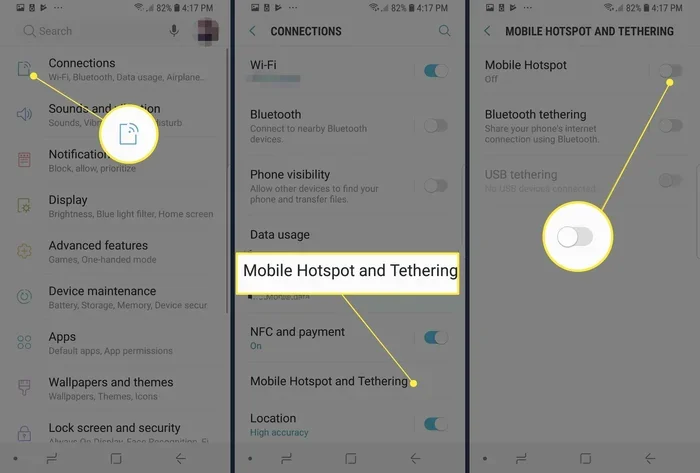
One of the best things you can do is turn on airplane mode as soon as you board. This disables all wireless connections, including cellular and WiFi. It stops your phone from searching for signals that do not exist or that cost a fortune to use.
Here is a simple routine to follow:
- Turn on airplane mode right after you leave the port.
- Only turn off airplane mode when you need to connect to the ship’s WiFi.
- Re-enable airplane mode as soon as you are done.
This habit alone can save you from hundreds of dollars in unexpected roaming charges. Many people forget about this and end up with a shock when they get home.
Offline Phone Features You Should Use
Your phone is full of features that work without any internet connection at all. These offline phone features can keep you entertained and productive throughout your cruise.
- Offline maps: Download Google Maps or Apple Maps for your destination before you leave. You can navigate without data.
- Music and podcasts: Download your favorites to your phone before departure. Spotify and Apple Music both support offline downloads.
- Movies and shows: Netflix, Disney+, and other streaming apps let you download content for offline viewing.
- Games: Most phone games work without any connection.
- Photos and notes: Your camera, photo editing, and note-taking apps all work offline.
Taking a few minutes to set up these features before your cruise pays off big time. You will have a fully functional phone even in the middle of the ocean.
Tips For Saving Money On Phone Charges
Nobody wants to come home from a dream vacation to a terrifying phone bill. The good news is that there are simple ways to keep your charges low or even zero.
Buy a WiFi Package Early
Most cruise lines let you purchase onboard WiFi packages before your trip or once you are onboard. Buying in advance usually saves money. Some lines offer early-bird discounts of 20% or more.
Also, look for packages that match your actual usage. If you only need to check messages, a basic package is enough. Do not pay for premium speeds if you are not going to use them.
Use Messaging Apps Over WiFi
Once you connect to the ship’s WiFi, use apps like WhatsApp, Facebook Messenger, or iMessage for communication. These apps use very little data compared to traditional texting or calling.
WhatsApp is especially great because it supports voice and video calls over WiFi. This means you can call home for free as long as you have a WiFi connection.
Disable Background Data
Apps on your phone constantly use data in the background. Email sync, app updates, and social media feeds all consume data without you realizing it.
Here is what to do:
- Go to your phone settings and turn off background app refresh.
- Disable automatic updates for apps.
- Turn off push email and check manually instead.
- Disable location services for apps that do not need it.
These small changes add up. They reduce data usage and help you stay within your WiFi package limits.
Consider a Cruise-Specific Phone Plan
Some mobile carriers offer special cruise phone plans or international add-ons. These plans often include data packages designed for use at sea. They are usually much cheaper than paying standard roaming rates.
Check with your carrier before your trip. Ask specifically about their cruise or maritime data options. It is one of the smartest things you can do to avoid bill shock.
Best Apps For Cruise Ship Use
The right apps can transform your cruise experience. Some help you stay connected, while others make your time on the ship more fun and convenient.
Communication Apps
When you have access to ship WiFi, these apps keep you in touch:
- WhatsApp: Free messaging and calls over WiFi. Works great for staying in touch with family back home.
- Zoom or Skype: Video calls over WiFi. Perfect for quick check-ins with loved ones.
- Shipboard apps: Many cruise lines offer their own free apps for messaging other passengers and crew.
Entertainment Apps
You do not need the internet to enjoy your phone on a cruise. These apps work fully offline:
- Netflix or Disney+: Download shows before you leave and watch them offline.
- Podcast apps: Download episodes in advance for hours of entertainment.
- Kindle or reading apps: Download books before your trip.
- Spotify or Apple Music: Download playlists for offline listening.
Navigation and Planning Apps
Even though you are on a cruise, you will want to explore ports of call. These apps help:
- Google Maps: Download offline maps for each port before arrival.
- TripAdvisor: Great for finding restaurants and activities at ports (works partially offline).
- Cruise-specific apps: Apps like Cruise Critic or your cruise line’s own app help you plan shore excursions.
Setting up these apps before your departure is a simple step that makes a huge difference. You will have everything you need without relying on ship WiFi.
Common Mistakes To Avoid
Even experienced travelers make mistakes with their phones on cruise ships. Avoiding these pitfalls saves money and frustration.
Forgetting to Switch to Airplane Mode
This is the number one mistake. People leave their phones on cellular data the entire cruise without realizing the cost. Always enable airplane mode first and only disable it when you intentionally want to connect to the ship’s WiFi.
Assuming All WiFi Is Free
Some cruise lines used to offer free basic WiFi. Today, most charge for anything beyond minimal access. Do not assume you can browse and stream for free. Check your specific cruise line’s policy and budget accordingly.
Not Downloading Content Before Boarding
Once the ship leaves port, your ability to download new content drops dramatically. Slow satellite WiFi makes downloading large files painful or impossible. Always download movies, maps, and playlists before you depart.
Ignoring Time Zone Differences
Cruises cross multiple time zones. If you are calling home, make sure you know what time it is for the person you are calling. A surprise 3 AM call is not fun for anyone.
Relying on Cellular Coverage at Sea
Some people think their phone will work normally because they see a signal bar. But that signal is the ship’s system, and it costs a premium to use. Treat it as a last resort, not a regular connection method.
Expert Insights On Staying Connected at Sea
We spoke with frequent cruisers and tech experts to gather the best advice for managing your phone on a cruise. Here is what they recommend:
Start with a data-free day. Many cruisers suggest taking the first day offline. Use it to explore the ship, enjoy activities, and get into vacation mode. You can always connect later when you need to.
Use a WiFi finder app. Apps like WiFi Finder help you locate free WiFi hotspots at ports. This is a great way to check in with family or download last-minute content without paying for ship WiFi.
Set data alerts on your phone. Both iPhone and Android let you set data usage warnings. Set a low limit so you get notified if any data sneaks through while airplane mode is off.
Bring a portable charger. Using your phone for offline entertainment, navigation, and photography drains the battery fast. A good portable charger keeps your phone powered throughout the day.
Communicate your plan to family. Let people know when you will be available. This sets expectations and reduces the pressure to stay online 24/7. Most people are understanding and appreciate the heads-up.
Key Takeaways
- Cruise ship phone service relies on satellite and maritime technology: It is different from home service, so adjust your expectations and usage habits accordingly.
- Onboard WiFi packages are the most practical option: Buy early, choose the right tier, and use it intentionally to get the best value.
- Airplane mode is essential: It prevents accidental data usage and roaming charges that can quickly add up.
- Offline features make your phone useful without internet: Download maps, entertainment, and documents before your cruise starts.
- The right apps make a big difference: Communication, entertainment, and navigation apps designed for offline use keep you connected in smart ways.
- Avoid common mistakes to save money: Simple habits like disabling background data and checking time zones prevent costly errors.
- Planning ahead is the key to a stress-free connected cruise: A little preparation before departure ensures you stay in control of your phone and your budget.
Conclusion
So, how can I use my phone while on a cruise ship? The answer is simpler than you might think. With the right approach, you can stay connected, entertained, and informed without spending a fortune. The secret is preparation and intention.
Use airplane mode to protect yourself from surprise charges. Invest in a WiFi package that matches your actual needs. Download everything you need before you leave the port. And take advantage of the many offline phone features that work without any connection at all.
A cruise is about relaxation and adventure. Your phone should support that experience, not distract from it. When you use it wisely, it becomes a tool that enhances your trip rather than a source of stress and extra costs.
Now you have everything you need to make your phone work for you on the water. Plan ahead, stay smart, and enjoy every moment of your cruise. The ocean is waiting, and your phone is ready to go.
Frequently Asked Questions
Can I use my phone normally on a cruise ship?
You can use your phone, but “normally” depends on how you define it. Without WiFi or a special plan, your phone has limited functionality at sea. Airplane mode and offline features keep it useful, but streaming and calling require WiFi or an expensive cellular connection. Plan ahead to get the best experience.
How much does WiFi cost on a cruise ship?
WiFi prices vary by cruise line and package. Basic packages can start around $10 to $15 per day. Premium packages may cost $25 to $50 per day or more. Whole-voyage bundles often offer better value. Check your specific cruise line for current pricing before you book.
Will I get charged roaming fees if I do not turn on airplane mode?
Yes. If your phone connects to the ship’s cellular system without airplane mode, your carrier will charge roaming fees. These can range from a few dollars to several dollars per megabyte. Always enable airplane mode as soon as you board to avoid these charges entirely.
Can I make phone calls from a cruise ship?
You can make calls using the ship’s cellular service, but it is very expensive. A better option is to use WiFi calling or messaging apps like WhatsApp and Skype once you connect to the ship’s WiFi. These are much cheaper and often free if you already have a WiFi package.
What is the best way to stay connected on a cruise without spending too much?
The best approach is a combination of strategies. Buy a WiFi package that fits your needs, use airplane mode when you are not online, download content before departure, and use messaging apps over WiFi. This keeps you connected while minimizing costs significantly.
Do all cruise ships have WiFi now?
Most modern cruise ships offer WiFi, but the quality and pricing vary. Some budget or older ships may have very limited or slow connections. Newer ships from major lines tend to have better infrastructure. Always check the specific ship and cruise line before booking if internet access is important to you.