Can I Open My Liftmaster Garage Door With My Phone
Yes, you can open your Liftmaster garage door with your phone using the myQ smart technology. This guide walks you through setup, compatible models, and pro tips for seamless smartphone garage door control. Learn how Liftmaster phone control works, what equipment you need, and how to avoid common setup mistakes.
Have you ever stood in your car, groceries in hand, and wished you could just open your garage door from your phone? It is a small convenience that makes a huge difference in your daily routine. The good news is that opening your Liftmaster garage door with your phone is not only possible but also easier than you might think.
Modern Liftmaster openers come packed with smart technology that lets you control your garage door from almost anywhere. Whether you want to let a delivery driver in, check if you left the door open, or simply avoid fumbling for a remote, phone control has you covered. In this guide, we will walk you through everything you need to know about Liftmaster phone control, from setup to compatibility and everything in between.
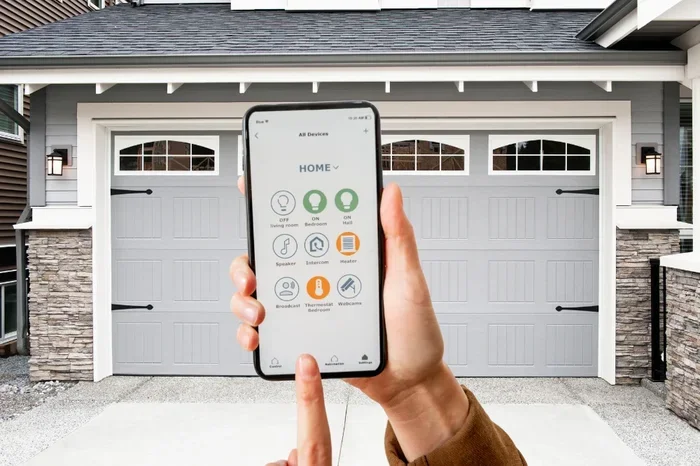
The myQ smart garage door system is the backbone of this technology. It connects your existing Liftmaster opener to your home Wi-Fi network, which then talks to your smartphone through a dedicated app. You do not need to replace your entire garage door opener. In most cases, a simple upgrade or adapter is all it takes to bring your system into the smart home era.
Key Takeaways
- Phone control is possible: Most modern Liftmaster openers support smartphone control through the myQ app and Wi-Fi connectivity.
- You need the right hardware: A myQ-compatible controller or Wi-Fi adapter is essential for phone-based garage door operation.
- Setup is straightforward: Downloading the app, connecting to Wi-Fi, and linking your opener takes less than 30 minutes.
- Security features are robust: Phone control includes encryption, activity logs, and real-time alerts for enhanced garage door security.
- Not all models are compatible: Check your Liftmaster model number before purchasing any smart accessories.
- Common mistakes slow setup: Avoid Wi-Fi distance issues, outdated firmware, and incorrect app pairing to save time.
📑 Table of Contents
- How Does Opening a Liftmaster Garage Door With Your Phone Work?
- What You Need to Get Started With Phone Control
- Step-by-Step Setup Guide for Phone-Controlled Garage Doors
- Benefits of Using Your Phone to Open Your Liftmaster
- Compatible Liftmaster Models for Smartphone Control
- Common Mistakes to Avoid When Setting Up Phone Control
- Expert Tips for Getting the Most From Phone Control
- Is Phone Control Worth It for Your Liftmaster?
How Does Opening a Liftmaster Garage Door With Your Phone Work?
The process behind phone-controlled garage doors is simpler than it sounds. Your Liftmaster opener gets a small controller module added to it. This module connects to your home Wi-Fi network and creates a bridge between your opener and the myQ app on your phone. When you tap the button on your screen, a signal travels from your phone to the cloud, then back down to your garage door opener.
The myQ Technology Explained
myQ technology is Liftmaster’s proprietary smart system. It uses a combination of Wi-Fi connectivity and cloud-based servers to send commands back and forth. Here is how the flow works in simple terms:
- You open the myQ app on your phone.
- You tap the open or close button.
- The app sends a signal to the myQ cloud server.
- The cloud server relays the command to your Liftmaster opener.
- Your garage door moves up or down.
All of this happens in just a few seconds. The entire process relies on wireless garage door opener technology and internet connectivity. As long as your phone has a data connection or Wi-Fi, you can control your door from virtually anywhere in the world.
What Makes This Different From a Regular Remote?
A traditional garage door remote sends a radio signal directly to your opener. The range is limited to about 100 to 200 feet. With phone control, the range is essentially unlimited because it uses the internet. You can be at work, on vacation, or at the grocery store, and your Liftmaster will still respond to your commands.
Another big difference is garage door monitoring. With a standard remote, you can only send commands. With the myQ system, you get real-time status updates. The app tells you whether your door is open, closed, or in motion. This is a game-changer for garage door security and peace of mind.
What You Need to Get Started With Phone Control
Before you dive into setup, you need to know what equipment and conditions are required. Not every Liftmaster opener is ready for phone control out of the box, but most can be upgraded easily.
Required Equipment
- A compatible Liftmaster opener: Most models made after 2010 support myQ. Check your model number to be sure.
- A myQ-compatible controller: This is the small device that connects your opener to your Wi-Fi network.
- A smartphone: iPhone or Android, as long as it can run the latest myQ app.
- A home Wi-Fi network: A stable 2.4 GHz connection is required for reliable communication.
Optional but Helpful Add-Ons
While not required, a few extras can enhance your experience with smart garage door control:
- Liftmaster battery backup: Keeps your opener working during power outages so you can still use phone control.
- A Wi-Fi range extender: If your garage is far from your router, an extender ensures a strong and stable connection.
- Smart home hubs: Devices like Amazon Alexa or Google Home can integrate with myQ for voice commands.
Step-by-Step Setup Guide for Phone-Controlled Garage Doors
Setting up phone control for your Liftmaster opener is a straightforward process. Most people complete it in under 30 minutes. Here is a detailed walkthrough.
Step 1: Download the myQ App
Go to the App Store or Google Play Store and search for “myQ.” Download the free app and create an account. You will need a valid email address and a password. The app is well-designed and intuitive, so you should feel comfortable navigating it right away.
Step 2: Connect the myQ Controller to Your Opener
Plug the myQ controller into the diagnostic port on your Liftmaster opener. The port is usually located near the motor unit on the ceiling. If you are not sure where it is, check your owner’s manual. The controller will blink to show it is powered on.
Step 3: Connect the Controller to Your Wi-Fi
Open the myQ app and follow the on-screen prompts to connect the controller to your home Wi-Fi network. Make sure you are using the 2.4 GHz band, as most Liftmaster smart controllers do not support 5 GHz networks. Enter your Wi-Fi password when prompted and wait for the confirmation signal.
Step 4: Name and Test Your Opener
Once connected, the app will ask you to name your opener. You can call it something like “Garage Door” or “Front Garage.” After naming it, test the connection by tapping the open button on your phone. Your garage door should respond within a few seconds.
Quick Tips for a Smooth Setup
- Keep your phone close to the opener during initial setup to ensure a strong signal.
- Restart your router if the connection fails the first time.
- Update the myQ app to the latest version before starting.
- Make sure your Liftmaster firmware is up to date for the best compatibility.
Benefits of Using Your Phone to Open Your Liftmaster
Switching to smartphone garage door control brings a range of practical benefits that go far beyond simple convenience. Here is why so many homeowners are making the switch.
Convenience and Accessibility
The biggest advantage is sheer convenience. You can open your garage door from your car before you even pull into the driveway. You can let a friend or family member in while you are at work. You can check the door status while lying in bed at night. Garage door automation fits seamlessly into your lifestyle.
For families with kids, this feature is especially valuable. You can grant temporary access to babysitters, dog walkers, or delivery drivers without handing over a physical remote. The app lets you create unique user profiles with different permission levels.
Enhanced Security Features
Liftmaster security gets a major boost with phone control. The myQ app includes:
- Real-time alerts: Get notified every time your door opens or closes.
- Activity logs: View a complete history of all door activity, including dates and times.
- Encryption: Commands are encrypted to prevent unauthorized access.
- Auto-close feature: Set a timer to automatically close the door after a set period.
These features give you control and visibility that a traditional remote simply cannot match. If you ever wonder whether you left the garage door open, just check the app. It is that simple.
Integration With Smart Home Systems
The myQ system plays nicely with other smart home devices. You can link your garage door to Amazon Alexa, Google Assistant, or Apple HomeKit. This means you can open your door with a voice command or set up automated routines. For example, you could program your door to close automatically when you arm your security system at night.
Smart home integration is one of the fastest-growing trends in home automation, and Liftmaster is well-positioned in this space. Adding your garage door to your smart home ecosystem creates a more connected and responsive living environment.
Compatible Liftmaster Models for Smartphone Control
Not all Liftmaster openers support phone control equally. Here is a breakdown of the most popular compatible models and how they compare.
Comparison Table: Liftmaster Models With Phone Control
- Liftmaster 8550W: Belt-drive smart opener with built-in Wi-Fi. No extra adapter needed. Works directly with the myQ app.
- Liftmaster 8500W: Another top-tier belt-drive model. Requires a separate myQ controller for phone connectivity.
- Liftmaster 8300W: Chain-drive model with strong performance. Needs a myQ Wi-Fi adapter for smartphone control.
- Liftmaster 5500W: Mid-range chain-drive opener. Fully compatible with myQ after adding the Wi-Fi module.
- Liftmaster 5300W: Budget-friendly option. Also supports myQ with the right adapter installed.
If you are unsure whether your current opener is compatible, check the model number on the motor unit. You can also visit the Liftmaster website and use their compatibility checker tool. For those looking to upgrade, the 8550W and 8500W models offer the best built-in smart features without any extra hardware.
Which Model Should You Choose?
If you are buying new and want the simplest setup, go with a model that has built-in Wi-Fi like the 8550W. If you already own a compatible opener, a myQ Wi-Fi adapter is a cost-effective way to add phone control without replacing the entire unit.
Common Mistakes to Avoid When Setting Up Phone Control
Even though the setup process is simple, people do run into issues. Here are the most common mistakes and how to avoid them.
Using the Wrong Wi-Fi Band
This is the number one cause of setup failures. Most Liftmaster myQ controllers only work with 2.4 GHz Wi-Fi networks. If your router is set to 5 GHz only, the controller will not connect. Check your router settings and make sure the 2.4 GHz band is active.
Placing the Controller Too Far From the Router
Wi-Fi signal strength matters. If your garage is at the far end of your house, the signal may be too weak for reliable communication. A Wi-Fi range extender placed halfway between your router and the garage can solve this problem easily.
Skipping Firmware Updates
Outdated firmware on your Liftmaster opener can cause connectivity issues. Always check for updates through the myQ app after initial setup. The app will prompt you when an update is available, and installing it takes just a few minutes.
Not Resetting the Controller After a Power Outage
If your power goes out and comes back on, the myQ controller may lose its Wi-Fi connection. Simply open the app and follow the reconnection steps. This takes less than two minutes and saves you a lot of frustration.
Expert Tips for Getting the Most From Phone Control
Once you have your phone-controlled garage door up and running, a few pro tips can take your experience to the next level.
- Enable push notifications: Turn on alerts so you know every time the door is opened or closed. This is one of the best garage door security features available.
- Set up shared access: Give family members their own myQ login so everyone can control the door from their own phone.
- Use the auto-close timer: Set it to close the door automatically after 5 or 10 minutes if you forget.
- Pair with a video doorbell: Some homeowners pair myQ with a security camera at the garage entry point for full visual verification before granting access.
- Keep your app updated: Regular app updates bring new features and security patches that keep your system running smoothly.
- Test monthly: Periodically test the phone control feature to make sure everything is working as expected.
These small habits add up over time. They keep your garage door connectivity strong and your home secure. Think of them as part of your regular home maintenance routine.
Is Phone Control Worth It for Your Liftmaster?
The short answer is yes. If you use your garage door daily, phone control adds a layer of convenience that quickly becomes indispensable. The cost of a myQ controller is modest compared to the daily benefit you get. Plus, the added garage door security and monitoring capabilities make your home safer overall.
Whether you are a tech enthusiast looking to build a full smart home setup or simply someone who wants to never worry about leaving the garage door open again, Liftmaster phone control delivers real value. It is one of those upgrades that you do not realize you need until you have it.
Take a few minutes to check your model compatibility, grab the right controller if needed, and follow the setup steps outlined above. You will be opening your garage door from your phone in less than half an hour. Once you experience that convenience, you will wonder how you ever lived without it.
The future of home control is here, and it starts right at your garage. Open your Liftmaster garage door with your phone and enjoy the freedom, security, and peace of mind that smart technology brings to your everyday life.
Frequently Asked Questions
Can I Open My Liftmaster Garage Door With My Phone if I Do Not Have Wi-Fi?
Phone control requires an active internet connection. If your home Wi-Fi goes down, you will not be able to send commands through the app. However, you can still use your physical remote or wall button as a backup. A battery backup on your opener keeps the system powered during outages, but internet access is still needed for phone control.
Is It Safe to Open My Garage Door With My Phone?
Yes, Liftmaster security measures are robust. The myQ app uses encrypted communication to send commands, which prevents unauthorized access. You can also set up multi-factor authentication and shared access with individual user logins for added protection.
What If My Liftmaster Model Is Not Compatible With myQ?
If your current opener does not support myQ, you have a couple of options. You can upgrade to a newer compatible model like the 8550W, or in some cases, a universal myQ-compatible controller may work. Check the Liftmaster compatibility tool on their website for your specific model number.
Can I Control My Liftmaster Garage Door From Anywhere in the World?
Yes, as long as you have an internet connection on your phone, you can control your Liftmaster from anywhere. The myQ app uses cloud-based servers, so the distance does not matter. You can open your door while sitting at a cafe across town or while on vacation overseas.
How Much Does It Cost to Add Phone Control to My Liftmaster?
The myQ Wi-Fi controller typically costs between $30 and $60. If you need a full new opener with built-in smart features, prices range from $200 to $500 depending on the model. Installation is simple enough for most DIYers, but a professional can also handle it for a small fee.
Can I Use Voice Commands to Open My Liftmaster Garage Door?
Yes, if you integrate myQ with Amazon Alexa or Google Assistant, you can open your garage door using voice commands. Simply link your myQ account to your smart home app and create a routine or voice command. This adds another layer of hands-free convenience to your garage door automation setup.
=== CONCLUSION ===
Opening your Liftmaster garage door with your phone is a practical, secure, and incredibly convenient upgrade that fits most modern homes. From the simple myQ setup process to the wide range of compatible models, getting started is easier than ever. The benefits of smartphone garage door control extend well beyond just opening and closing your door. You gain real-time monitoring, enhanced security alerts, smart home integration, and the peace of mind that comes from knowing your garage is always under your control.
Follow the setup steps carefully, avoid the common mistakes outlined above, and take advantage of the expert tips to get the most from your system. Whether you are upgrading an existing opener or purchasing a new one, phone control is a smart investment that pays dividends every single day. Embrace the future of garage door technology and enjoy the freedom of Liftmaster phone control at your fingertips.