Can You Sell Old Laptops That Dont Work Yes Heres How
Yes, you absolutely can sell old laptops that dont work. Whether your laptop has a dead battery, a cracked screen, or a completely fried motherboard, there are buyers ready to purchase it for parts, repair, or recycling. In this guide, we will show you how to sell broken laptops, where to list them, and how to maximize your earnings from selling non-functional laptops.
Key Takeaways
- Broken laptops still have value: Even non-functional laptops contain usable parts like screens, hard drives, keyboards, and motherboards that buyers want.
- Multiple selling options exist: You can sell to recyclers, part resellers, repair shops, or online marketplaces like eBay and Facebook Marketplace.
- Preparation increases your price: Cleaning the laptop, removing personal data, and gathering original accessories can boost your sale price significantly.
- Know your laptops condition: Accurately describing the issue helps set the right price and builds trust with buyers.
- Avoid common scams: Be cautious of lowball offers and always use secure payment methods when selling broken laptops.
- Recycling is a responsible alternative: If selling isnt profitable, recycling ensures your e-waste is handled properly and sustainably.
📑 Table of Contents
- Can You Sell Old Laptops That Dont Work? Heres How
- Why You Should Sell Your Non-Working Laptop
- How to Assess the Value of a Broken Laptop
- Best Places to Sell Old Laptops That Dont Work
- How to Prepare Your Laptop for Sale
- How Much Money Can You Expect?
- Common Mistakes to Avoid When Selling Broken Laptops
- When Should You Recycle Instead of Sell?
- Final Thoughts on Selling Non-Working Laptops
Can You Sell Old Laptops That Dont Work? Heres How
So your laptop stopped working. Maybe the screen went black, the battery died, or it simply refused to turn on one morning. Now it sits in a drawer collecting dust. But here is the thing most people dont realize. A broken laptop is not worthless. You can absolutely sell old laptops that dont work and get some money back. Its not only possible. Its actually a pretty smart move.
Every year, millions of people toss their broken laptops into the trash. That is a huge mistake. These devices still hold value. The parts inside them. The materials. Even the brand name. Someone out there wants your broken laptop. Maybe they need a replacement screen. Maybe they want the hard drive for data recovery. Maybe they buy broken laptops just to refurbish them. The point is. There is a market. And you can tap into it.
In this guide, we will walk you through everything you need to know about selling non-functional laptops. You will learn how to assess what your laptop is worth, where to sell it, how to prepare it, and how much money you can expect. Lets get into it.
Why You Should Sell Your Non-Working Laptop
Before we dive into the how, lets talk about the why. Selling a broken laptop makes sense for several reasons. Heres why you should consider it.
You Earn Cash From Something Useless
Think about it. That broken laptop is just taking up space. You are not using it. You are not going to fix it. So why let it sit there? Selling it means you turn junk into cash. Even if you only get $20 or $30, that is money you did not have before. Some broken laptops sell for over $100 depending on the brand and model. Every little bit helps.
You Help the Environment
E-waste is a massive problem. Old electronics pile up in landfills. They leak toxic chemicals into the soil and water. When you sell your broken laptop for parts or recycling, you keep it out of the landfill. You support the laptop recycling economy. You help reduce e-waste. That is a win for the planet.
Someone Else Can Still Use It
A laptop that does not work for you might work perfectly for someone else. A repair technician can fix it. A hobbyist can use the parts. A student might need a cheap laptop for basic tasks. By selling it, you give it a second life. That is better than sending it to the garbage heap.
How to Assess the Value of a Broken Laptop
Not all broken laptops are created equal. Some fetch a decent price. Others barely cover the cost of shipping. Before you list your sell broken electronics listing, you need to know what your laptop is actually worth.
Identify the Problem
Start by figuring out exactly what is wrong. Is the screen cracked? Is the battery dead? Does the laptop not power on at all? Is the keyboard damaged? The specific issue matters a lot.
Here is a quick breakdown of common problems and how they affect value:
- Cracked screen: The laptop might still work fine otherwise. Buyers love these because replacement screens are available. Value stays relatively high.
- Dead battery: The laptop still works when plugged in. This is an easy fix. Buyers will pay good money for this.
- No power on: This could mean a dead motherboard. A hard drive, or a faulty power jack. The value depends on what is still salvageable.
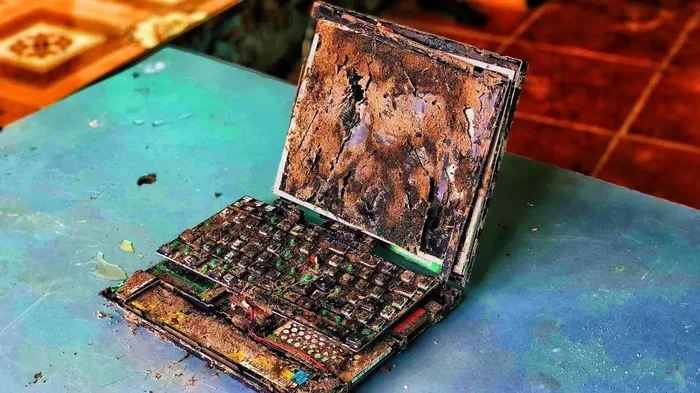
- Water damage: This is tricky. Some parts might work. Others might not. Buyers will offer less because of the uncertainty.
- Keyboard or trackpad issues: These are cheap to replace. The rest of the laptop might be fine. Value does not drop much.
Know Your Laptop Model and Specs
The brand and model matter hugely. A broken Dell XPS or MacBook will sell for more than a broken budget Chromebook. Write down the exact model number. Check the processor, RAM, storage, and screen size. These specs help determine the laptop value.
Research Similar Listings
Go to eBay and search for your exact laptop model. Filter the results to show only broken or parts listings. Look at what people are actually selling theirs for. This gives you a realistic price range. Do not guess. Use real data.
Best Places to Sell Old Laptops That Dont Work
Now comes the fun part. Where do you actually sell a laptop that does not work? The good news. You have more options than you think.
Online Marketplaces
Platforms like eBay, Facebook Marketplace, and Craigslist are great for selling broken laptops. You set your own price. You reach thousands of buyers. You can describe the issue in detail and include photos.
eBay is especially good for this. Millions of people search for broken laptop parts there every day. Just make sure to ship safely. Use plenty of padding. A damaged laptop during shipping can cause problems for both of you.
Electronics Repair Shops
Local repair shops often buy broken laptops for parts. They know exactly what is salvageable. They can offer you a fair price based on part availability. Walk into a few shops near you. Get multiple quotes. This is one of the easiest ways to sell damaged laptop devices quickly.
Laptop Recyclers and Buy-Back Programs
Companies that specialize in laptop recycling and buy-back programs are another solid option. They pay for old electronics regardless of condition. Some even offer free shipping labels. Just pack your laptop, print the label, and drop it at a post office. Companies like Gazelle, Decluttr, and BuyBackWorld handle this.
These programs are not always the highest-paying option. But they are fast, simple, and responsible.
Social Media Groups and Forums
Dont overlook local social media groups. Facebook has groups dedicated to electronics resale. Reddit has communities like r/hardwareswap. These buyers often specifically look for broken laptops. They want parts. They understand value. You might get a better deal here than on big platforms.
Trade-In Programs
Some manufacturers and retailers offer trade-in programs. Apple, Dell, and Lenovo all have them. You will not get rich. But you get store credit or gift cards. This works well if you plan to buy a new laptop anyway.
How to Prepare Your Laptop for Sale
Once you know where to sell, it is time to prepare. Proper preparation helps you get a better price. It also protects you from problems later.
Back Up Your Data
This is the most important step. Before you sell anything, back up all your personal files. Photos, documents, passwords, browser bookmarks. Transfer everything to a new device or an external drive. You do not want your personal information ending up in the wrong hands.
Wipe the Hard Drive
After backing up, erase the hard drive completely. For traditional hard drives, use a factory reset. For SSDs, use the manufacturer’s wipe tool. If you want to be extra safe, remove the hard drive entirely and destroy it or keep it. This protects your privacy. It is a critical step when you sell old computer devices.
Clean the Laptop
Sounds simple. But a clean laptop sells faster and for more money. Wipe down the exterior. Clean the screen with a microfiber cloth. Remove dust from the keyboard. You do not need it to look brand new. Just make it presentable. First impressions matter.
Gather All Accessories
Include the charger, any original boxes, and documentation. Buyers pay more when accessories are included. A missing charger can drop your price by 15 to 20 percent. So dig around. Find that lost power adapter. It is worth it.
Take Clear Photos
Good photos make a huge difference. Take clear, well-lit pictures of the laptop from multiple angles. Show the damage honestly. Include shots of the serial number and model label. Buyers trust sellers who are upfront about condition.
How Much Money Can You Expect?
This is the question everyone wants answered. How much cash can you actually make? The honest answer. It depends.
Factors That Affect Your Price
Several things determine what buyers will pay:
- Brand and model: Premium brands like Apple, Dell, and Lenovo command higher prices.
- Age: Newer laptops are worth more. A two-year-old broken laptop beats a five-year-old one every time.
- Working parts: If key components still function, the price goes up.
- Demand for parts: Some parts are harder to find. Those parts drive up the price.
- Completeness: A laptop with its charger and box sells for more.
Price Range Examples
Here is a rough guide to what you might expect:
- Broken MacBook: $50 to $200 depending on the model and issue.
- Broken Dell XPS or Inspiron: $30 to $150.
- Broken HP laptop: $20 to $100.
- Broken budget Chromebook: $10 to $40.
- Laptop sold purely for parts: $15 to $80 on average.
These are general ranges. Your mileage may vary. But this gives you a ballpark idea. Even the lowest amounts are better than zero.
Common Mistakes to Avoid When Selling Broken Laptops
Selling a non-functional laptop is straightforward. But people make mistakes. Here are the most common ones to avoid.
Not Describing the Problem Clearly
Honesty sells. When you list your laptop, describe the issue in detail. Do not say it is broken and leave it at that. Explain what works and what does not. Mention any visible damage. This builds trust and reduces returns.
Ignoring Data Security
We cannot stress this enough. Always wipe your data before selling. Do not skip this step. A single forgotten file can cause serious identity theft or privacy issues. Selling non-functional laptops without clearing data is a major risk.
Accepting the First Offer
Always get multiple quotes. Whether you are talking to repair shops, recyclers, or online buyers. One buyer might offer $30. Another might offer $60 for the same laptop. Take the time to compare. The extra effort pays off.
Using Unsafe Payment Methods
When selling locally, avoid wire transfers and random payment apps. Meet in a public place. Accept cash or verified payment apps. For online sales, use platforms with buyer and seller protection. Stay safe. Always.
Giving Up Too Quickly
Sometimes a laptop does not sell right away. That happens. Do not panic and throw it away. Lower the price a bit. Update the listing. Try a different platform. Patience often leads to a sale.
Quick Tips for Selling Broken Laptops Successfully
- List your laptop on multiple platforms at the same time for maximum exposure.
- Use the word parts or repair in your listing title to attract the right buyers.
- Respond quickly to messages. Fast replies lead to faster sales.
- Offer free local pickup to save on shipping costs and attract more buyers.
- Check if your laptop qualifies for a manufacturer buy-back program before listing it online.
- Include a short video showing the laptop and explaining the issue. This builds buyer confidence.
When Should You Recycle Instead of Sell?
Not every broken laptop is worth selling. If your laptop is very old. If it is severely damaged. If no parts are worth anything. Then recycling is your best bet.
Look for local e-waste recycling centers. Many cities have drop-off locations. Some even offer pickup services. Recycling ensures harmful materials are disposed of properly. It also recovers valuable metals and components for future use.
You can also check with your local government. Many areas host electronics collection events. These are free and convenient. It is a responsible way to handle equipment that truly has no resale value.
Final Thoughts on Selling Non-Working Laptops
So can you sell old laptops that dont work? Absolutely yes. A broken laptop is not dead weight. It has value. It has parts. It has buyers. The key is knowing what you have, finding the right platform, and presenting it honestly.
Whether you choose online marketplaces, local repair shops, or recycling programs, you are making a smart decision. You are earning cash. You are reducing waste. You are helping someone else get what they need. Do not let that broken laptop collect dust. Take action today. Assess it. List it. Sell it. You might be surprised at what it is worth.
The next time a laptop dies on you, remember this guide. Selling non-functional laptops is easy. The money is real. And the process is worth your time. Now go turn that broken device into something valuable.
Frequently Asked Questions
Can I sell a laptop that won’t turn on at all?
Yes, you can. Many buyers purchase laptops that do not power on for parts. Be honest about the issue in your listing. Mention that it does not turn on and describe any visible damage. Repair shops and parts resellers are often interested in these.
How do I find out what my broken laptop is worth?
Search for your exact model on eBay and look at completed listings for broken laptops. Check buy-back programs like Decluttr or Gazelle for instant quotes. Visit local repair shops and ask for an estimate. Comparing multiple sources gives you the most accurate value.
Is it safe to sell a laptop with a cracked screen?
Yes, it is completely safe. A cracked screen is a common issue and many buyers specifically look for these. The screen can be replaced affordably. Just make sure to clearly describe the screen damage and any other issues in your listing.
What should I do with my data before selling a broken laptop?
Back up all important files first. Then wipe the hard drive using a factory reset or dedicated wipe tool. For extra security, remove the hard drive entirely and destroy it physically. Never sell a laptop without clearing your personal data first.
Can I sell a laptop with a dead battery?
Absolutely. A dead battery is one of the easiest issues to fix. Many buyers will purchase a laptop that works fine when plugged in. Make sure to mention the battery issue clearly. This keeps buyers happy and reduces the chance of returns.
Where is the best place to sell a non-working laptop for the most money?
Online marketplaces like eBay and Facebook Marketplace typically offer the highest prices because you set your own price and reach a large audience. Repair shops offer convenience but usually pay less. For the best price, list on multiple platforms simultaneously and wait for the right buyer.