Do Old TV Antennas Still Work With Digital Channels
Yes, old TV antennas can still work with digital channels, but it depends on several factors like antenna type, placement, and signal strength. Many people kept their antennas from the analog era and assumed they were useless after the digital switch. The truth is that most analog antennas can pick up digital signals just fine, especially if they are positioned correctly and are in good condition. In this guide, we will walk you through everything you need to know about using an old antenna with digital TV, including setup tips, common problems, and when it is time to upgrade.
If you have an old TV antenna sitting in your attic or garage, you might be wondering whether it still has any use. The short answer is yes. Old TV antennas can absolutely still work with digital channels. When the United States made the switch from analog to digital broadcasting back in 2009, many people tossed out their antennas thinking they were obsolete. That turned out to be a big mistake.
The digital television transition changed how signals were transmitted, but it did not change the basic physics of how antennas receive those signals. An antenna picks up electromagnetic waves in the air, and those waves still exist whether the signal is analog or digital. So your trusty old antenna is not useless at all. It just might need a little help to perform at its best in a digital world.
In this article, we will cover everything you need to know about using an old TV antenna with digital channels. We will look at how digital signals differ from analog, what kind of antennas work best, and how to get the strongest possible reception. By the end, you will know exactly whether your old antenna is good enough or if it is time to invest in something new.
Key Takeaways
- Old antennas can work with digital channels: Most analog-era antennas are fully capable of receiving digital over-the-air broadcasts.
- Antenna placement matters a lot: Proper positioning near a window or outside dramatically improves digital signal reception.
- VHF and UHF bands are key: Digital channels use both frequency bands, so your antenna must support both for full channel access.
- A digital converter box may be needed: Older TVs without built-in digital tuners require a converter box to decode digital signals.
- Signal strength varies by location: Distance from broadcast towers and physical obstacles affect how well your antenna performs.
- Upgrading is not always necessary: Before buying a new antenna, try repositioning your old one and rescanning for channels.
📑 Table of Contents
- How Digital TV Signals Differ From Analog
- Can Your Old Antenna Receive Digital Channels?
- How to Set Up Your Old Antenna for Digital Channels
- Do You Need a Digital Converter Box?
- When Should You Replace Your Old Antenna?
- Quick Tips for Better Digital Reception with an Old Antenna
- Common Mistakes People Make with Old Antennas
- Expert Insights on Old Antennas and Digital TV
- Final Thoughts
How Digital TV Signals Differ From Analog
Understanding the difference between analog and digital signals helps you see why your old antenna might still work. Analog signals were continuous waves that carried picture and sound together. Digital signals are different. They use discrete data packets to deliver a much cleaner picture and sound. Think of it like the difference between a handwritten letter and a digital email. Both get the message across, but one is more precise.
Why the Switch Happened
The digital television transition happened because digital signals are more efficient. They take up less bandwidth, which means more channels can fit in the same space. Digital signals also resist interference better than analog ones. Snowy pictures and static noise became a thing of the past for most viewers. Broadcasters loved the efficiency, and viewers got better picture quality.
But here is the thing that trips people up. Digital signals do not behave exactly the same way as analog signals when it comes to reception. With analog, you could have a weak signal and still watch something, even if it was fuzzy. With digital, the signal either works perfectly or it does not work at all. This is called the cliff effect. If your antenna is not strong enough, you will get no picture instead of a fuzzy one.
What This Means for Old Antennas
Your old antenna does not care whether the signal is analog or digital. It still captures the same radio waves. However, digital signals can be more sensitive to certain types of interference. Things like distance from broadcast towers, buildings, trees, and even weather can affect digital reception more than analog did. So while your antenna is still capable of receiving digital channels, its performance might depend on where you put it.
Can Your Old Antenna Receive Digital Channels?
The honest answer is maybe. It depends on the type of antenna you have and what kind of digital channels are available in your area. Let us break this down so you can figure out exactly where your old antenna stands.
Types of Old Antennas and Their Compatibility
Not all old antennas are created equal. Some were designed to pick up a wide range of frequencies, while others were more specialized. Here is a quick look at the most common types of old antennas and whether they can handle digital signals.
- Rabbit ear antennas: These classic bunny-ear antennas can work for digital channels, but they are limited. They usually pick up VHF signals well but struggle with UHF signals, which many digital channels use.
- Flat panel antennas: These were popular in the 1980s and 1990s. Many flat panel antennas can receive digital signals, especially if they are large enough and positioned correctly.
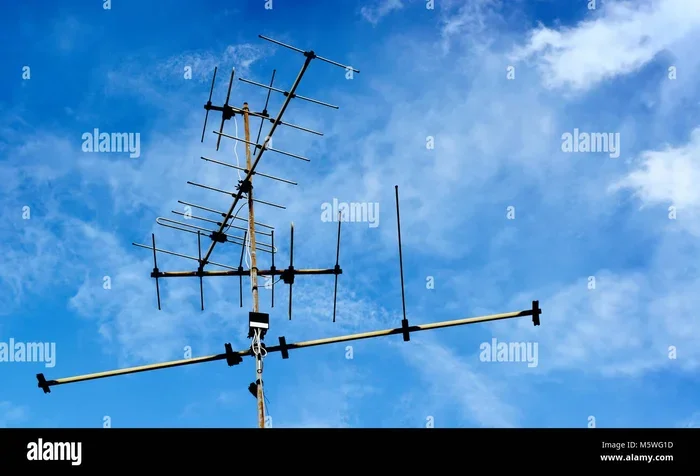
- Yagi antennas: These directional antennas are great for picking up signals from a specific direction. They work well with digital channels if pointed toward the broadcast tower.
- Outdoor antennas: Big, rooftop outdoor antennas are usually the best at receiving digital signals. If you have one of these, you are in good shape.
The VHF and UHF Factor
One of the most important things to know about digital TV is that channels broadcast on two different frequency bands: VHF (Very High Frequency) and UHF (Ultra High Frequency). Many digital channels use UHF, which means an antenna that only picks up VHF will miss a lot of channels. Check what bands your old antenna supports. If it covers both VHF and UHF, you have a solid chance of getting digital channels.
If you are not sure what your antenna picks up, look for markings on the antenna itself or check the original packaging if you still have it. Antennas that cover both bands are sometimes labeled as broadband or full-band antennas. If yours only covers one band, you might still get some channels but not all of them.
How to Set Up Your Old Antenna for Digital Channels
So you have decided to give your old antenna a try. Good choice. Setting it up properly makes a huge difference in the quality of the digital channels you receive. Here is a step-by-step guide to getting the best results.
Step 1: Find Your Broadcast Towers
Start by figuring out where the broadcast towers are in your area. You can use online tools like the FCC DTV Reception Maps website. Enter your address, and the tool will show you the direction and distance of the towers. This helps you position your antenna in the right direction for the strongest digital signal reception.
Step 2: Position the Antenna Correctly
Placement is everything when it comes to antenna performance. Try placing your antenna near a window or on the highest floor of your home. Walls, roofs, and other obstacles can weaken the signal. If you have a directional antenna, point it directly toward the broadcast towers you found in Step 1.
Keep the antenna away from large metal objects, microwaves, and other electronics that can cause interference. Even a big bookshelf or a metal roof can weaken your signal. The more open space around the antenna, the better it will work.
Step 3: Run Your Antenna Cable Properly
If you need to run cable from your antenna to your TV, keep the cable as short as possible. Longer cables can lose signal strength, especially with digital broadcasts. If you are running TV cable behind a wall, use high-quality coaxial cable and avoid sharp bends. Every bit of signal loss matters when you are dealing with digital channels.
Step 4: Rescan for Channels
Once your antenna is set up, go into your TV settings and run a channel scan. This tells your TV to search for all available digital channels in your area. If you move the antenna even slightly, you should run the scan again. Sometimes small adjustments make a big difference in which channels you can pick up.
Step 5: Consider an Antenna Amplifier
If you are still not getting enough channels, an antenna amplifier might help. These devices boost the signal strength before it reaches your TV. They are especially useful if you live far from broadcast towers or if you have a long cable run. However, amplifiers do not fix every problem. If the signal is too weak to begin with, an amplifier might just boost a poor signal.
Do You Need a Digital Converter Box?
This is one of the most common questions people ask about old antennas and digital channels. The answer depends on what kind of TV you have. If your TV was made after 2007, it almost certainly has a built-in digital tuner. That means you can connect your antenna directly to the TV and start watching digital channels right away. No converter box needed.
However, if you have an older TV that only has an analog tuner, you will need a digital converter box. This small device sits between your antenna and your TV. It takes the digital signal and converts it into something your old TV can understand. Converter boxes are relatively inexpensive and can be found online or at most electronics stores.
Some people also wonder if they can use their old antenna with a streaming device or a modern setup. The answer is yes. Many people use their antennas with devices like streaming boxes that do not rely on Wi-Fi to access free over-the-air channels alongside their streaming services. This gives you access to local channels without paying for cable.
When Should You Replace Your Old Antenna?
Not every old antenna is worth keeping. While many can still work with digital channels, some are simply outdated and will not give you the reception you need. Here are some signs that it might be time to replace your old antenna.
You Are Missing Key Channels
If you have tried repositioning your antenna and rescanning multiple times, but you are still missing important channels, your antenna might not be capable of picking up the right frequencies. Many digital channels broadcast on UHF, and older antennas that only handle VHF will miss them entirely.
Your Reception Is Unreliable
Do you get a picture sometimes but not others? Does the signal drop out when the wind blows or when someone walks near the antenna? These are signs of a weak or failing antenna. An old antenna with damaged elements or a broken connector will not give you consistent digital reception.
You Want HD or 4K Quality
Old antennas can still receive digital channels, but they might not support the higher quality signals that modern broadcasts use. If you want to watch channels in HD or even 4K, a newer antenna designed for digital signals will give you a much better experience. Look for antennas that are rated for digital and HDTV reception.
Your Area Has New Broadcast Towers
Broadcast towers change over time. New towers get built, and old ones get relocated. If it has been many years since you last set up your antenna, the tower locations in your area might have changed. A newer antenna with better range and directionality can help you pick up signals from updated tower positions.
Quick Tips for Better Digital Reception with an Old Antenna
Getting the most out of your old antenna does not have to be complicated. Here are some quick tips that can improve your digital reception without spending a dime.
- Place the antenna as high as possible. Height reduces obstacles between the antenna and broadcast towers.
- Keep it away from electronics. Computers, microwaves, and other devices can cause interference.
- Try different positions. Even moving the antenna a few inches can change which channels you receive.
- Use shorter cables. Less cable means less signal loss.
- Rescan regularly. Channels can change, and rescanning helps your TV find all available digital channels.
- Check your connections. Loose or corroded connectors can weaken your signal. Make sure everything is tight and clean.
- Consider weather conditions. Digital signals can be affected by heavy rain, snow, and storms. If your reception is poor during bad weather, that is normal.
Common Mistakes People Make with Old Antennas
There are a few mistakes that people make over and over again when trying to use old antennas with digital channels. Avoiding these pitfalls can save you a lot of frustration.
- Assuming all old antennas are useless: As we have covered, many old antennas work perfectly fine with digital signals. Do not throw yours away just yet.
- Not scanning for channels after moving: Even a small move can change which channels you receive. Always rescan after repositioning.
- Using damaged cables: A frayed or kinked cable can kill your signal. Replace old cables if you notice any damage.
- Ignoring VHF and UHF differences: If your antenna only picks up one band, you will miss channels on the other. Check your antenna specifications.
- Placing the antenna in a closet or cabinet: Enclosed spaces block signals. Always keep your antenna in the open for the best results.
- Buying a converter box you do not need: If your TV has a built-in digital tuner, a converter box is unnecessary. Check your TV manual first.
Expert Insights on Old Antennas and Digital TV
We spoke with a broadcast technician who has been setting up antenna systems for over 15 years. Here is what they had to say about using old antennas with digital channels.
“I see people throw away perfectly good antennas all the time because they think the digital switch made them obsolete. That is just not true. Most antennas from the last 30 years can still pick up digital signals. The real issue is usually placement and positioning, not the antenna itself.”
The technician also emphasized the importance of knowing your local broadcast towers. “If you know where the towers are and point your antenna in the right direction, you will be surprised how well an old antenna can still perform. We recommend using free online tools to map your towers before you even touch the antenna.”
Another expert tip from the technician is to check for multipath interference. This happens when the signal bounces off buildings or other structures before reaching your antenna. It can cause ghosting or signal drops with digital channels. Moving the antenna slightly can often fix this problem.
Final Thoughts
So, do old TV antennas still work with digital channels? The answer is a resounding yes for most antennas. The digital television transition changed how signals are broadcast, but it did not make old antennas useless. With the right setup, placement, and a little patience, your old antenna can still deliver great digital channels for free.
Start by checking what type of antenna you have and what frequency bands it supports. Position it correctly, run your cables properly, and rescan for channels. If you still have trouble, consider an amplifier or a repositioning attempt. Only if none of that works should you think about buying a new antenna.
The beauty of over-the-air television is that it is free. You do not need a cable subscription or a streaming service to watch local channels. A working antenna and a digital TV give you access to news, sports, and entertainment without paying a monthly fee. Your old antenna might just be the key to unlocking that free content.
Before you spend money on a new setup, give your old antenna another chance. You might be surprised at what it can still do. With digital channels becoming more available and broadcast quality improving every year, there has never been a better time to dust off that old antenna and give it a try.
Frequently Asked Questions
Can I use my old rabbit ear antenna with digital channels?
Yes, rabbit ear antennas can work with digital channels, but they are limited. They usually pick up VHF signals well but may struggle with UHF channels. Try positioning them near a window and rescanning for channels to see what you can pick up.
Do I need a new antenna to watch digital TV?
Not necessarily. Many old antennas can still receive digital signals. Before buying a new one, try repositioning your existing antenna, checking your cables, and running a channel scan. If those steps do not work, then upgrading might be the right move.
Why do I lose some channels after the digital switch?
Digital signals are more sensitive to weak reception than analog signals. If your antenna cannot pick up a strong enough signal, you will lose the channel entirely instead of getting a fuzzy picture. This is called the cliff effect. Repositioning your antenna or adding an amplifier can often fix this.
What is the difference between VHF and UHF digital channels?
VHF channels use lower frequencies and travel farther but are more prone to interference. UHF channels use higher frequencies and carry more data, which is why many digital channels broadcast on UHF. Your antenna needs to support both bands to receive all available channels.
Can I connect my old antenna to a smart TV?
Yes, smart TVs have built-in digital tuners, so you can connect your old antenna directly to them. Simply plug the antenna cable into the TV’s antenna input, go to your settings, and run a channel scan to find all available digital channels.
How far can an old antenna pick up digital signals?
The range depends on the antenna type, its condition, and your location. In general, a good outdoor antenna can pick up signals from 50 to 80 miles away. Indoor antennas usually have a shorter range of 20 to 40 miles. Living far from broadcast towers reduces the number of channels you can receive.