Can You Get 1080p With Component Cables Full Guide
Yes, you can get 1080p with component cables, but there are important limitations you need to know. Component video can carry high-definition signals up to 1080p, but only on certain devices and with the right setup. This full guide breaks down how component cables work, what devices support 1080p over component, and how to get the best video quality possible. Whether you are using retro gaming consoles, DVD players, or older HDTVs, understanding component connections helps you make the right choice. Read on to learn everything about 1080p component video and how it compares to modern alternatives.
Have you ever wondered if your old component cables can handle 1080p? Maybe you have a retro gaming setup, a vintage DVD player, or an older HDTV sitting in your living room. The answer might surprise you. You can actually get 1080p with component cables, but the full story is more nuanced than a simple yes or no.
Component video has been around for decades. It was once the go-to connection for high-quality analog video. Many people still have these cables lying around. But can they really deliver full high-definition resolution? Let us dive deep into this topic and find out everything you need to know about getting 1080p through component cables. By the end of this guide, you will understand exactly what is possible and what is not.
Key Takeaways
- Component cables can carry 1080p signals: But only specific devices support this resolution over component connections.
- YPbPr is the standard for HD component video: This analog format splits the signal into three separate cables for better color accuracy.
- Not all devices support 1080p over component: Many newer TVs and players have dropped component support entirely in favor of HDMI.
- Signal degradation can affect quality: Longer cables and older equipment may reduce the sharpness of your 1080p picture.
- Upscaling plays a big role: Some devices can upscale lower-resolution content to 1080p when using component cables.
- Component cables are still useful today: For retro gaming, older equipment, and specific setups, they remain a viable option.
- HDMI is the better modern choice: If you have the option, HDMI delivers digital 1080p with better reliability and audio support.
📑 Table of Contents
- What Are Component Cables and How Do They Work?
- Can You Actually Get 1080p Through Component Cables?
- Understanding 1080p Resolution and Component Video Quality
- Limitations of Getting 1080p With Component Cables
- How to Get the Best 1080p Quality With Component Cables
- Component Cables vs HDMI: Which Is Better for 1080p?
- Common Mistakes When Using Component Cables for 1080p
- Expert Insights on Component Video in the Modern Age
- Final Thoughts on Getting 1080p With Component Cables
What Are Component Cables and How Do They Work?
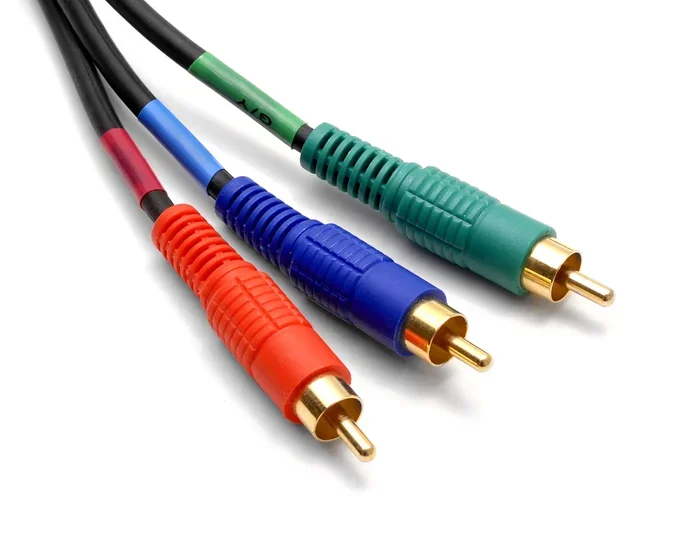
Component cables are an analog video connection standard. They split the video signal into three separate channels. Each cable carries a different part of the image. This separation helps reduce interference and improves picture quality compared to older composite or S-Video connections.
The Three Cables: YPbPr Explained
Component cables use a color-coded system. The green cable carries the luminance signal. This is the brightness and detail of the image. The blue cable carries the blue color difference. The red cable carries the red color difference. Together, these three signals reconstruct the full picture on your display.
This system is known as YPbPr in professional terms. It stands for luminance and blue and red color difference signals. The green cable does not carry a separate signal on its own. Instead, it derives the green information from the other two signals. This clever design allows component cables to carry very detailed video information.
Component cables were the standard for high-quality video for many years. They were used in DVD players, early HDTVs, and home theater systems. Many people still prefer the analog warmth and color accuracy of component video today.
Can You Actually Get 1080p Through Component Cables?
The short answer is yes, but with important caveats. The longer answer depends on several factors. Let us break this down so you understand exactly what is happening with your setup.
The Technical Capability
Component cables were designed to handle high-definition signals. The original component standard, known as analog component video, can technically carry resolutions up to 1080p. This is because the three separate cables provide enough bandwidth for detailed HD content. The YPbPr format was widely used for 1080i and 1080p signals in the early days of HDTV.
However, the actual resolution you get depends on your source device. Not every device that uses component cables can output 1080p. Many older devices max out at 720p or 1080i. The cable itself is not always the limiting factor. Instead, it is the hardware on either end of the connection.
Devices That Support 1080p Over Component
Several types of devices can output 1080p through component cables. Here are the most common ones:
- Certain Blu-ray players: Many older models support 1080p output via component.
- Gaming consoles: The PlayStation 2 and some Xbox models support 1080p over component.
- Older HDTVs: Many 1080p HDTVs from the mid-2000s accepted 1080p component input.
- Upconverting DVD players: These devices upscale standard DVD content to 1080p for component output.
- Certain AV receivers: Some receivers can pass through 1080p component signals.
If you are trying to get 1080p through component, check your device specifications first. Look for “1080p component output” or “1080p YPbPr support.” This tells you the device can send a full HD signal through the component connection.
Understanding 1080p Resolution and Component Video Quality
Now let us talk about what 1080p actually means and how it looks over component cables. Understanding the basics helps you set realistic expectations for your setup.
What Is 1080p Resolution?
1080p stands for Full High Definition. The number 1080 refers to the vertical pixel count. The letter p stands for progressive scan. This means every frame displays all 1080 lines of resolution in sequence. This creates a smooth, detailed image with no interlacing artifacts.
1080p has a total resolution of 1920 by 1080 pixels. That is over two million pixels per frame. This is a significant amount of detail for any display. When you get true 1080p over component cables, the picture quality can be quite impressive.
Progressive Scan vs Interlaced Video
It is important to understand the difference between progressive and interlaced video. 1080p is progressive, meaning each frame is complete. 1080i is interlaced, meaning each frame is split into two fields. The interlaced format can show motion artifacts called combing.
Component cables can carry both 1080p and 1080i signals. However, 1080p provides a noticeably smoother picture. If your device supports 1080p output over component, always choose that option for the best results.
Video Quality Expectations Over Component
The analog nature of component cables means there is no digital compression. The signal travels directly from the source to the display without being converted to digital format first. This can result in a very clean, natural picture. Many audiophiles and videophiles prefer the analog warmth of component video.
However, analog signals are also susceptible to interference. Electromagnetic interference from nearby cables or electronics can degrade the picture. This is why cable quality and placement matter when using component cables for 1080p content.
Limitations of Getting 1080p With Component Cables
While it is possible to get 1080p through component cables, there are real limitations you should understand. These limitations affect the overall experience and help explain why HDMI has become the dominant standard.
Signal Degradation Over Distance
Analog signals weaken over distance. This is a fundamental limitation of component cables. The longer your cable run, the more the signal can degrade. For 1080p content, this means you might notice a loss of sharpness or color accuracy if your cables are too long.
As a general rule, keep component cables under 25 feet for best results. If you need longer runs, consider using an amplifier or a signal booster. These devices help maintain the quality of the 1080p signal over extended distances.
No Audio Support
Component cables carry video only. They do not transmit any audio signal. This means you need a separate audio connection, such as RCA cables or an optical cable. This adds complexity to your setup and creates more cables to manage.
With HDMI, both video and audio travel through a single cable. This is one of the biggest advantages of digital connections over analog ones. If you are trying to simplify your setup, component cables add extra steps.
Limited Device Compatibility Today
Many modern devices no longer include component video outputs. Manufacturers have shifted almost entirely to HDMI. This means finding new devices that support 1080p over component can be challenging. You may need to rely on older equipment or specialized adapters.
If you are building a new setup, HDMI is almost always the better choice. It supports higher resolutions, carries audio, and is universally supported by modern devices. Component cables are best suited for legacy equipment and retro setups.
How to Get the Best 1080p Quality With Component Cables
If you are committed to using component cables for 1080p content, there are steps you can take to maximize your picture quality. Follow these practical tips to get the best results from your setup.
Use High-Quality Component Cables
Not all component cables are created equal. Cheap cables may have poor shielding, thin conductors, or cheap connectors. These factors can introduce noise and signal loss into your 1080p picture. Invest in well-built cables from reputable brands.
Look for cables with good shielding against interference. Gold-plated connectors help prevent corrosion and maintain a solid connection. Thick, well-constructed cables carry the signal more reliably over longer distances.
Keep Cables Short and Away From Power Sources
As mentioned earlier, analog signals degrade over distance. Keep your component cables as short as possible for the best 1080p quality. Also, route them away from power cables and other sources of electromagnetic interference.
If you must run cables near power sources, use cables with heavy shielding. This reduces the chance of interference affecting your picture quality. Proper cable management makes a real difference in the final image.
Check Your Source Device Settings
Make sure your source device is actually outputting 1080p through the component connection. Some devices default to lower resolutions or may not automatically detect the best output format.
Go into your device settings and manually select 1080p as the output resolution. Look for options related to component video or YPbPr output. Setting the correct resolution ensures you are getting the full 1080p experience through your component cables.
Consider a Scan Converter for Modern Displays
If you have a modern TV that does not support component input, you can use a scan converter. These devices convert the component signal to HDMI. This allows you to connect older component-output devices to modern displays.
Some scan converters can also upscale the signal to 1080p or even 4K. This is a great option if you want to use component cables with newer equipment. Just be aware that the conversion process can introduce slight quality loss.
Component Cables vs HDMI: Which Is Better for 1080p?
It is natural to compare component cables and HDMI when discussing 1080p video. Both can deliver full HD resolution, but they do so in very different ways. Understanding the differences helps you choose the right connection for your needs.
Digital vs Analog
HDMI is a digital connection. It transmits video as a series of ones and zeros. This means the signal is exact and does not degrade with distance the same way analog signals do. Component cables are analog. The signal is a continuous electrical waveform that can be affected by interference and distance.
For pure 1080p quality, HDMI has a clear advantage. The digital signal is more reliable and consistent. You get exactly the same picture quality at any cable length up to the maximum supported distance.
Audio Capabilities
HDMI carries both video and audio in a single cable. This is a huge convenience factor. Component cables only carry video, requiring separate audio connections. If you want a clean, simple setup, HDMI wins hands down.
When Component Cables Still Make Sense
Despite HDMI’s advantages, component cables still have their place. For retro gaming setups, vintage equipment, and certain home theater configurations, component remains a solid choice. Some people also prefer the analog character of component video for its color reproduction and warmth.
If you already own component cables and your devices support 1080p over component, there is no need to replace everything. Use what works for your setup and enjoy the content you have.
Common Mistakes When Using Component Cables for 1080p
Even experienced users make mistakes when setting up component cables for 1080p content. Avoid these common pitfalls to ensure you get the best possible picture quality.
- Using cables that are too long: Long runs cause signal loss and reduced picture quality at 1080p.
- Mixing up the cables: Plugging the red and blue cables into the wrong ports scrambles the color output.
- Ignoring device settings: Failing to set the output resolution to 1080p means you may not get the full HD picture.
- Running cables near power sources: Electromagnetic interference from power cables can introduce visual noise.
- Assuming all devices support 1080p over component: Always check the specifications of both your source and display devices.
- Using damaged or worn cables: Frayed or corroded connectors degrade the signal and reduce picture quality.
By avoiding these mistakes, you can enjoy a clean, sharp 1080p picture through your component cables. Take the time to set up your connections properly and you will see a noticeable difference.
Expert Insights on Component Video in the Modern Age
Industry experts have mixed opinions about using component cables for 1080p content today. Some view them as a legacy technology that has served its purpose. Others appreciate the unique qualities that analog component video still offers.
Many AV specialists recommend component cables for retro gaming setups. The analog signal can sometimes look smoother on older CRT televisions. This nostalgic display style pairs well with the component connection that was designed for that era of gaming.
For modern home theater setups, experts generally recommend HDMI. The digital connection provides more reliable 1080p quality with the added benefit of audio transmission. However, if your equipment only has component outputs, there is no shame in using them. You can still get excellent 1080p picture quality with the right setup.
The key is understanding your equipment and setting realistic expectations. Component cables are not obsolete. They simply serve a different purpose in today’s technology landscape. When used correctly, they deliver a quality 1080p experience that many people still appreciate.
Final Thoughts on Getting 1080p With Component Cables
So, can you get 1080p with component cables? Absolutely. The technology supports it, and many devices can output full HD resolution through YPbPr connections. However, success depends on your specific equipment, cable quality, and setup.
If you have older devices that only offer component output, do not worry. You can still enjoy 1080p content with the right configuration. Invest in good-quality cables, keep your runs short, and check your device settings carefully.
For those considering new equipment, HDMI remains the best overall choice. It offers superior reliability, audio support, and future-proofing. But for those already invested in the component ecosystem, there is plenty of life left in these versatile cables.
Take what you have learned from this guide and apply it to your own setup. Whether you are a retro gaming enthusiast, a home theater hobbyist, or simply someone who wants to make the most of existing equipment, understanding component video opens up new possibilities. Enjoy your 1080p content and happy viewing.
Frequently Asked Questions
Can any TV accept 1080p through component cables?
Not all TVs support 1080p input via component cables. Many older HDTVs from the 2000s do accept 1080p component signals. However, some TVs only support 1080i or lower resolutions over component. Check your TV’s specifications or user manual to confirm its maximum supported resolution through the component inputs.
Do component cables support 1080p on gaming consoles?
Some gaming consoles support 1080p over component cables. The PlayStation 2 is the most well-known example. Certain Xbox models also support 1080p component output. Newer consoles like the PlayStation 5 and Xbox Series X do not include component outputs, so you would need a converter to use component cables with them.
Why does my 1080p picture look blurry on component cables?
A blurry picture over component cables can result from several factors. Long cable runs cause signal degradation in analog connections. Poor cable quality or damaged connectors also reduce picture sharpness. Make sure your source device is set to output 1080p and that your cables are in good condition and kept short.
Can I use a component to HDMI converter for 1080p?
Yes, you can use a component to HDMI converter to connect your component-output devices to modern HDMI displays. Many converters upscale the signal to 1080p or higher. The quality of the conversion depends on the converter’s quality. Look for converters that support 1080p input and output for the best results.
Are expensive component cables worth it for 1080p?
Premium component cables can offer better shielding and construction, which helps maintain signal quality at 1080p. However, the difference between cheap and expensive cables is often subtle. As long as you use well-built cables from a reputable brand, you should get excellent 1080p quality without spending a fortune.
What is the maximum resolution component cables can support?
Component cables in the YPbPr format can theoretically support resolutions up to 1080p and beyond. In practice, most consumer devices cap at 1080p over component. The analog nature of the connection means the actual resolution depends on the source device, cable quality, and display capabilities. For most users, 1080p is the maximum practical resolution achievable with component cables.
=== CONCLUSION ===
Getting 1080p with component cables is absolutely possible and can deliver a great viewing experience. While HDMI has become the modern standard, component video still has a place in today’s technology world. Understanding your equipment, choosing the right cables, and setting up your system correctly are the keys to success.
Whether you are using retro gaming consoles, older Blu-ray players, or vintage HDTVs, component cables can handle 1080p content with the right setup. Follow the tips in this guide, avoid common mistakes, and enjoy the full high-definition picture that your component cables can deliver. The technology may be older, but it still works remarkably well for those who know how to use it.