Can You Bluetooth More Than One Device At A Time
Yes, you can Bluetooth more than one device at a time, but it depends on your device and Bluetooth version. Bluetooth multipoint technology lets you stay connected to two or more sources simultaneously. This guide covers how it works, which devices support it, and how to avoid common connection problems.
Have you ever sat on the couch with your phone in one hand and a laptop open on your lap, wondering if your Bluetooth headphones could handle both? Maybe you were listening to music on your phone and got a call on your computer. Or perhaps you wanted to watch a movie on your tablet while your phone sat quietly on the table. The question can you Bluetooth more than one device at a time comes up a lot, and the answer is more interesting than you might think.
The short answer is yes. But the full answer depends on your device, your Bluetooth version, and the type of gear you are using. Some devices handle multiple connections with ease. Others need a little help or simply cannot do it at all. In this guide, we will walk through everything you need to know about Bluetooth connectivity with multiple devices. We will cover how the technology works, which devices support it, and how you can get the best experience at home or on the go.
Key Takeaways
- Bluetooth multipoint is real: Many modern devices can connect to multiple sources at once.
- Not all gear supports it: Older Bluetooth versions and budget devices often lack this feature.
- Device switching is common: Even without multipoint, many devices let you quickly switch between paired devices.
- Bluetooth 5.0 and up help: Newer versions offer better range, stability, and multi-device handling.
- Common issues are fixable: Interference, low battery, and outdated firmware cause most problems.
- Audio sharing is growing: Newer phones and earbuds let you split audio across two pairs of headphones.
📑 Table of Contents
- What Is Bluetooth and How Does It Work?
- Can You Bluetooth More Than One Device At A Time?
- How Bluetooth Multipoint Technology Works
- Best Devices That Support Multiple Bluetooth Connections
- Common Problems When Connecting Multiple Devices
- Tips for Managing Multiple Bluetooth Connections
- The Future of Multi-Device Bluetooth
- Final Thoughts
What Is Bluetooth and How Does It Work?
Before we dive into the multi-device question, let us quickly cover the basics. Bluetooth is a wireless technology that lets devices talk to each other over short distances. It uses radio waves in the 2.4 GHz frequency band to send and receive data. You use it every day for wireless pairing with headphones, speakers, keyboards, and more.
Here is how it works in simple terms. When you pair two devices, they create a small wireless network between them. One device acts as the sender, and the other acts as the receiver. Your phone sends audio signals to your Bluetooth headphones, for example. The headphones pick up those signals and turn them into sound. This whole process happens in milliseconds, which is why it feels instant.
Bluetooth Versions Matter
Not all Bluetooth is the same. The technology has improved a lot over the years. Bluetooth 5.0, which came out in 2016, brought bigger range and faster speeds. Bluetooth 5.2 and 5.3 added even more improvements, including better energy efficiency and stronger wireless connection stability. If your device runs an older version, it may struggle with multiple devices or drop connections more often.
Here is a quick look at how Bluetooth versions compare when it comes to handling connected devices:
| Bluetooth Version | Max Range | Multi-Device Support | Best For |
|---|---|---|---|
| Bluetooth 4.0 | About 60 meters | Limited | Basic accessories |
| Bluetooth 4.2 | About 60 meters | Basic switching | Phones and tablets |
| Bluetooth 5.0 | Up to 240 meters | Better multi-device | Modern headphones and speakers |
| Bluetooth 5.2+ | Up to 240 meters | Multipoint and audio sharing | Premium audio gear |
As you can see, newer versions handle wireless connection with multiple devices much better. If your gear is older, that could be the reason you run into trouble when trying to pair devices with more than one source.
Can You Bluetooth More Than One Device At A Time?
Now for the big question. Can you Bluetooth more than one device at a time? The answer is yes, but with some important caveats. There are two main ways this works. The first is Bluetooth multipoint, which lets your headphones or speaker stay connected to two devices at the same time. The second is device switching, where your gear connects to one device at a time but jumps quickly between them.
Multipoint Bluetooth Explained
Bluetooth multipoint is a feature that allows a single audio device to maintain active connections with two or more source devices. For example, your headphones might be connected to both your phone and your laptop at the same time. When a call comes in on your phone, the headphones switch to your phone automatically. When the call ends, they go back to your laptop and the music keeps playing.
This is incredibly useful if you work from home or move between devices throughout the day. You do not have to constantly disconnect and reconnect. The seamless connection just happens in the background.
Not all Bluetooth headphones support multipoint. It is more common in mid-range and premium models. Brands like Sony, Jabra, Bose, and Apple have built this feature into many of their products. If you are shopping for new wireless connection gear, look for the term “multipoint” in the product description.
Device Switching vs. True Multipoint
It is important to understand the difference between device switching and true multipoint. Device switching means your headphones connect to one device at a time. But when you start playing audio on a different device, they switch over. Apple calls this “automatic switching” and it works across iPhones, iPads, and Macs. Android phones have a similar feature called “Switchable Accessory” or “Dual Audio” in some cases.
True multipoint keeps both connections alive at the same time. This means you can hear notifications on your laptop while listening to music on your phone. You do not have to wait for one device to pause before the other kicks in.
Here is a quick comparison of the two approaches:
| Feature | Device Switching | Bluetooth Multipoint |
|---|---|---|
| Active Connections | One at a time | Two or more at once |
| Switching Speed | A few seconds | Instant or near-instant |
| Notifications | May interrupt audio | Can alert without pausing |
| Battery Use | Lower | Slightly higher |
| Availability | Very common | Mostly mid to premium gear |
Most people are happy with device switching. But if you juggle many connected devices and want a smooth audio streaming experience, multipoint is the way to go.
How Bluetooth Multipoint Technology Works
Bluetooth multipoint might sound like magic, but it is based on a clever use of the Bluetooth protocol. Instead of treating each device as a separate connection, multipoint-capable gear manages multiple connection profiles at the same time. A profile is basically a set of rules that tells the device how to handle a specific type of data, like audio or calls.
The Role of Bluetooth Profiles
Every Bluetooth device uses profiles to define what it can do. The most common ones for audio are A2DP (Advanced Audio Distribution Profile) for streaming music and HFP (Hands-Free Profile) for calls. When you pair devices, these profiles are negotiated between the two gadgets. Multipoint devices handle these profile negotiations for multiple sources at once.
For example, your headphones might use A2DP to stream music from your phone while using HFP to monitor your laptop for incoming calls. When a call arrives, the headphones briefly pause the music, answer the call, and then resume the music when the call ends. All of this happens without you lifting a finger.
Does Multipoint Drain Your Battery?
A fair question. Maintaining two active wireless connections does use a bit more power than staying connected to just one device. In most cases, the difference is small and you will not notice it during a normal day of use. If you are using Bluetooth headphones for a long flight or a full workday, you might see the battery drop a little faster. But the trade-off is usually worth it for the convenience.
Expert Insight: According to audio engineers, the battery impact of multipoint is typically around 10 to 15 percent more drain compared to single-device mode. Modern Bluetooth 5.0 and later chips have made this difference even smaller thanks to better power management.
Best Devices That Support Multiple Bluetooth Connections
Not all Bluetooth devices are created equal when it comes to handling multiple devices. Some are built for it, and others are not. Here is a look at some of the best options on the market right now.
Headphones with Multipoint
- Sony WH-1000XM5: Excellent multipoint support with easy switching between devices.
- Jabra Elite 85h: Great for work and play, handles two connections smoothly.
- Bose QuietComfort 45: Reliable wireless connection with decent multi-device handling.
- Apple AirPods Pro 2: Works best within the Apple ecosystem with automatic switching.
Speakers That Handle Multiple Sources
- JBL Charge 5: Supports Bluetooth 5.1 and can pair with two phones at once.
- Sony SRS-XB43: Offers audio sharing and can connect to multiple source devices.
- Bose SoundLink Flex: Compact and capable, with solid Bluetooth connectivity for everyday use.
Key Takeaway for Shoppers
When buying new Bluetooth gear, always check the specs for multipoint support. If you plan to use your headphones or speaker with more than one device regularly, this feature is a game-changer. It saves you from the hassle of constant device switching and keeps your audio streaming flowing without interruption.
Common Problems When Connecting Multiple Devices
Even with the best gear, connecting multiple devices over Bluetooth can sometimes cause headaches. Here are the most common issues and what you can do about them.
Interference From Other Devices
Bluetooth operates on the same 2.4 GHz frequency band as Wi-Fi routers, microwaves, and other wireless devices. When too many wireless connections are fighting for space, you can experience dropouts, static, or lag. This is especially common in apartments or offices with lots of electronics.
Quick Tip: Keep your Bluetooth device close to the source device you are actively using. Also, try to distance it from Wi-Fi routers and microwaves to reduce interference.
Outdated Firmware
Just like your phone needs software updates, your Bluetooth devices need firmware updates too. Manufacturers often release updates that improve Bluetooth connectivity and fix bugs related to multi-device handling. If your gear is not playing nicely with multiple devices, check the manufacturer’s app for any available updates.
Reaching the Bluetooth Range Limit
Every Bluetooth device has a maximum range. For most Class 2 devices (which includes most phones and headphones), that range is about 10 meters (33 feet). Walls, furniture, and other obstacles can reduce that distance. If you are trying to pair devices that are in different rooms, you may run into connection issues.
Common Mistake: People often assume Bluetooth works through walls as easily as Wi-Fi. It does not. Keep your source device in the same room or nearby for the best seamless connection.
Too Many Paired Devices
Your phone or laptop might have a long list of paired devices saved in memory. While this does not directly cause problems, it can slow down the wireless pairing process when you try to connect a new device. Go through your list and remove any devices you no longer use. This keeps things clean and helps your gear stay responsive.
Tips for Managing Multiple Bluetooth Connections
Getting the most out of your Bluetooth devices when juggling multiple sources is all about a few smart habits. Here are some practical tips that make a big difference.
1. Keep Your Devices Updated
Software and firmware updates often include improvements to Bluetooth connectivity. Make sure your phone, laptop, and accessories are running the latest versions. This simple step can fix many connection issues and improve performance with multiple devices.
2. Use a Bluetooth Adapter for Older Devices
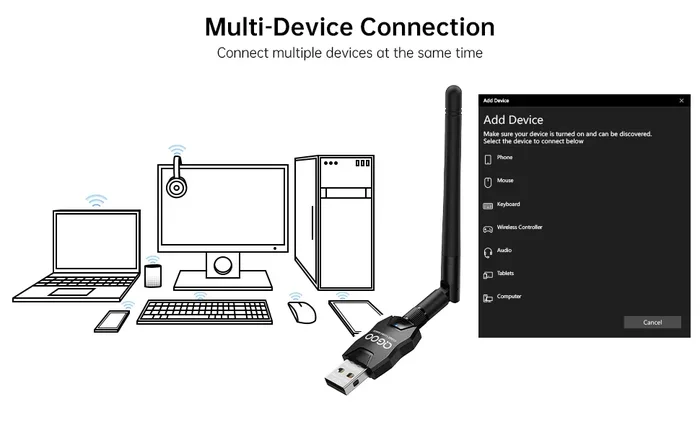
If your laptop or desktop computer has an older Bluetooth chip, consider buying a Bluetooth adapter. These small USB dongles plug into your computer and give it a Bluetooth 5.0 or 5.2 connection. This can unlock multipoint support and improve range for wireless connection with your headphones and speakers.
3. Turn Off Bluetooth on Unused Devices
When you are not using a device, turn its Bluetooth off. This reduces interference and frees up bandwidth for your active connected devices. It also saves battery on both the source device and your audio gear.
4. Reset Your Bluetooth Connections
If things get glitchy, sometimes the simplest fix is to reset your Bluetooth connections. Turn Bluetooth off on all devices, wait 30 seconds, and turn it back on. This clears temporary glitches and refreshes the Bluetooth protocol handshake between devices.
5. Prioritize Your Primary Device
If your gear supports multipoint, it usually picks which device gets priority based on recent activity. But you can often set preferences in the companion app. For example, you might want your phone to take priority over your laptop for calls. Check your device settings to see if this option is available.
Quick Tip: If you are in a meeting and need your headphones to focus on your laptop audio, pause the Bluetooth connection on your phone temporarily. This ensures you get a clean, uninterrupted audio streaming experience.
6. Explore Audio Sharing Features
Many newer phones and Bluetooth headphones now support audio sharing, which lets you split the audio signal between two pairs of headphones or two speakers. This is different from multipoint but equally useful. You and a friend can watch a movie on your tablet and both hear the sound through your own headphones. Apple and Samsung both offer versions of this feature.
Expert Insight: Audio sharing is one of the fastest-growing Bluetooth features in 2024. It is especially popular for families, couples, and anyone who shares devices often. Look for “Share Audio” or “Audio Sharing” in your device settings to see if your gear supports it.
The Future of Multi-Device Bluetooth
The Bluetooth protocol continues to evolve, and the future looks bright for anyone who uses multiple devices daily. Bluetooth LE Audio, which launched with Bluetooth 5.2, introduces new features like Auracast broadcasting. This technology could eventually let you broadcast audio to unlimited devices in a public space, like an airport or gym.
For now, multipoint and audio sharing are the most practical ways to enjoy Bluetooth connectivity with more than one device. As Bluetooth 5.3 and future versions roll out, we can expect even smoother device switching, better battery efficiency, and stronger wireless connections across the board.
The bottom line is that Bluetooth technology is getting better at handling the way we actually live and work. We use many devices throughout the day, and our wireless gear is finally catching up to that reality.
Final Thoughts
So, can you Bluetooth more than one device at a time? Absolutely. Whether you use Bluetooth multipoint headphones, a speaker that handles two source devices, or a phone with automatic switching built in, there are plenty of ways to stay connected without the hassle of constant reconnecting. The key is knowing what your gear can do and setting it up the right way.
Take a few minutes to check your device settings, update your firmware, and explore the features available to you. A little setup goes a long way toward a smooth wireless connection experience. With the right gear and a few good habits, you can move freely between your phone, laptop, and tablet without ever missing a beat.
Enjoy your wireless connection, and happy listening!
Frequently Asked Questions
Can you connect two phones to the same Bluetooth speaker?
Yes, many Bluetooth speakers allow you to pair with two phones at the same time. Some models let you take turns playing music, while others support audio sharing so both phones can stream simultaneously. Check your speaker’s manual to see if it supports this feature.
Does Bluetooth multipoint drain more battery?
It does use slightly more battery than single-device mode, typically around 10 to 15 percent more. However, modern Bluetooth chips and Bluetooth 5.0 technology have made this difference very small. Most users do not notice a significant drop in battery life.
Can you use Bluetooth on more than one device at the same time?
Yes, you can use Bluetooth on more than one device at the same time, but how it works depends on your device and gear. Bluetooth multipoint headphones can stay connected to two sources simultaneously, while other devices may require manual switching between paired connected devices.
Why does my Bluetooth keep disconnecting from one device when I connect to another?
This usually happens because your device does not support multipoint and can only maintain one active wireless connection at a time. When you connect to a second device, it drops the first. Updating firmware or using a Bluetooth adapter with newer technology can help reduce this issue.
Is Bluetooth 5.0 necessary for connecting multiple devices?
Bluetooth 5.0 is not strictly necessary, but it makes a big difference. It offers better range, faster data transfer, and improved handling of multiple devices. If you plan to use Bluetooth connectivity with several gadgets regularly, Bluetooth 5.0 or newer is highly recommended.
Can I share audio between two pairs of Bluetooth headphones?
Yes, many modern phones and tablets support audio sharing. This feature splits the audio signal so two pairs of Bluetooth headphones can play the same content at the same time. Apple and Samsung devices both offer this feature, and some third-party apps provide similar functionality for other platforms.
=== SEO TITLE ===
Can You Bluetooth More Than One Device At A Time
=== META TITLE ===
Can You Bluetooth More Than One Device At A Time? Full Guide
=== URL SLUG ===
/bluetooth-multiple-devices-at-once