Can I Use An IP Camera Without Internet Yes You Can
Yes, you can absolutely use an IP camera without internet. You can set up local network surveillance, record footage to an SD card or NVR, and monitor your property in real time — all without a single Wi-Fi connection. This guide walks you through every method, from wired security camera setups to standalone solutions that keep your home safe even when the internet goes down.
Can you use an IP camera without internet? The short answer is a confident yes. Many homeowners and business owners assume that an IP camera needs a constant internet connection to work. That is simply not true. You can set up a fully functional security camera system with zero internet access.
Whether you live in a rural area with poor connectivity, want a backup system for outages, or simply prefer not to rely on cloud services, an offline IP camera setup makes a lot of sense. This guide covers everything you need to know. We will walk through setup methods, storage options, and practical tips to get your surveillance system running without a single WiFi connection.
Let us dive right in and explore how IP camera without internet setups actually work in real life.
Key Takeaways
- IP cameras work offline: You can run an IP camera without internet using a local network, direct connection, or standalone recording setup.
- Local storage is key: Use SD cards, NVRs, or DVRs to save footage when there is no cloud access available.
- Wired connections are more reliable: Ethernet and PoE setups provide stable power and data transfer without needing WiFi.
- Remote access still works: With a VPN or mobile hotspot, you can view your camera feed from anywhere, even without home internet.
- Motion detection works locally: Many IP cameras trigger alerts and recordings on-device, no internet required.
- Setup is straightforward: Most offline IP camera configurations take less than 30 minutes to get running.
- Privacy improves offline: Keeping your camera feed local means fewer cloud vulnerabilities and better data control.
📑 Table of Contents
- What Is an IP Camera and How Does It Work Offline?
- Why Would You Use an IP Camera Without Internet?
- Methods to Use an IP Camera Without Internet
- How to Set Up Your IP Camera for Offline Use
- Remote Viewing Without Internet
- Common Mistakes to Avoid
- Expert Tips for Maximizing Your Offline Camera System
- Frequently Asked Questions
- Conclusion
What Is an IP Camera and How Does It Work Offline?
An IP camera is a digital video camera that sends and receives data over a network. Unlike traditional analog cameras, IP cameras use digital signals. They can transmit video over Ethernet cables or WiFi. But here is the key insight — transmitting data over a network does not require the internet.
A network is simply a group of connected devices. Your home router creates a local network. Devices on that network can talk to each other without ever touching the wider internet. This is the foundation of offline IP camera operation.
How a Local Network Differs from the Internet
Think of your local network like a private club. Devices inside the club can communicate freely. The internet is like the outside world. You do not need to leave the club to talk to other members. Similarly, your IP camera can stream video to a recorder or your phone on the same local network without any internet involvement.
This distinction matters a lot. Many people confuse “network” with “internet.” They are related but not the same. When you set up a local monitoring setup, you are using your private network. The camera never needs to reach the outside world.
Why Would You Use an IP Camera Without Internet?
There are several strong reasons to run a CCTV without WiFi or any internet connection. Let us look at the most common ones.
Rural or Remote Locations
If you live in a rural area, reliable internet may not be available. Farmhouses, cabins, and remote properties often have spotty or no WiFi. An offline IP camera setup gives you full surveillance coverage without depending on a service you cannot reliably get.
Security and Privacy Concerns
Cloud-connected cameras send your footage to remote servers. Some people are uncomfortable with that. Running a camera offline keeps all your footage local. You control the data. There is no risk of cloud breaches or subscription lock-ins. Your local storage recording stays on your terms.
Internet Outages and Backup Systems
Internet goes down. It happens to everyone. If your security system depends on the cloud, it becomes useless during an outage. An offline-capable IP camera keeps working no matter what. It is a smart backup strategy for any surveillance system.
Cost Savings
Cloud storage often comes with monthly fees. Some camera brands charge for basic features that require internet access. An offline setup eliminates those recurring costs. You pay once for the hardware and never look back.
Methods to Use an IP Camera Without Internet
There are several proven ways to set up an IP camera without internet. Each method has its strengths. Let us break them down so you can pick the best fit for your situation.
Method 1: Direct Ethernet Connection
This is the simplest offline setup. You connect your IP camera directly to a recording device or a computer using an Ethernet cable. The camera and the recorder form a tiny two-device network. No router needed. No internet needed.
Here is how it works step by step:
- Connect an Ethernet cable from the camera to your NVR or computer.
- Power the camera using a PoE switch or a direct power adapter.
- Open the recording software or NVR interface.
- The camera should appear automatically on the local network.
- Start recording and monitoring.
This method is fast, reliable, and extremely secure. It is ideal for small setups with one to four cameras. Many wired security camera systems are designed specifically for this type of direct connection.
Method 2: Local Network with a Router (No Internet)
You can use a router to create a local network without connecting it to the internet. Simply unplug the WAN cable from your router. The router still creates a local network. All your devices can connect to it.
This method lets you add more devices easily. You can connect multiple cameras, a network video recorder, and even a monitoring monitor — all on the same local network. The router manages traffic between devices smoothly.
One important tip: make sure your router supports DHCP. This lets devices automatically get IP addresses on the network. Without DHCP, you would need to manually assign addresses to each device, which gets tedious fast.
Method 3: Standalone IP Camera with SD Card
Many modern IP cameras come with a built-in SD card slot. These cameras can record footage directly to the card without any network connection at all. You just power the camera, insert a microSD card, and it starts recording.
This is the easiest standalone security camera option. No cables, no routers, no networks. Just point the camera where you need it and let it do its job. The downside is that SD cards have limited storage. You will need to swap them out regularly or use high-capacity cards.
Method 4: PoE Camera System with NVR
A Power over Ethernet system is a popular choice for offline setups. PoE sends both power and data through a single Ethernet cable. You connect multiple cameras to a PoE switch, and the switch connects to an NVR.
The NVR handles all recording and management. This setup is professional-grade and very reliable. It is the go-to choice for local network surveillance in homes and small businesses. You get clean video, centralized storage, and easy management — all without internet.
| Method | Best For | Setup Difficulty | Scalability |
|---|---|---|---|
| Direct Ethernet | 1-2 cameras, simple setups | Easy | Low |
| Local Router Network | 3-8 cameras, medium setups | Moderate | Medium |
| SD Card Standalone | Single camera, temporary setups | Very Easy | Low |
| PoE with NVR | 4+ cameras, permanent installations | Moderate | High |
How to Set Up Your IP Camera for Offline Use
Setting up an offline IP camera is easier than most people think. Let us walk through a practical setup that anyone can follow.
Step 1: Choose the Right Camera
Not all IP cameras work well offline. Look for cameras that support local recording and do not require cloud connectivity. Many brands offer “offline mode” or “local mode” features. Check the product specs before you buy.
Popular features to look for include:
- SD card slot for local storage
- PoE support for single-cable setup
- ONVIF protocol compatibility
- Built-in motion detection
- Local alert options (buzzer, LED)
Step 2: Set Up Your Local Network
If you are using a router, disconnect the WAN port from your modem. This prevents the router from trying to connect to the internet. Connect your camera and recording device to the router’s LAN ports.
Make sure your devices get IP addresses in the same subnet. For example, if your router assigns addresses starting with 192.168.1.x, all devices should follow that pattern. This allows them to communicate on the local network.
Step 3: Configure Recording
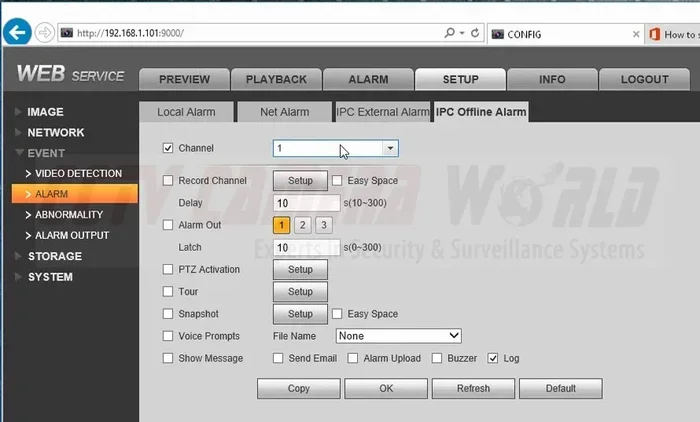
Access your camera or NVR through a web browser or dedicated app. Set the recording mode to continuous or motion-triggered. Choose your storage destination — SD card, NVR hard drive, or local computer storage.
Set up motion detection zones if your camera supports it. This saves storage space and makes reviewing footage much easier later.
Step 4: Monitor Your Feed
You can monitor your camera on a connected monitor, a computer, or a phone on the same local network. Many NVR systems come with their own monitoring app that works over the local network. No internet needed.
For a quick setup, connect a monitor directly to your NVR using an HDMI cable. You will see live feeds from all your cameras right away.
Remote Viewing Without Internet
One common concern is how to check your camera feed when you are away from home. Without internet, remote viewing seems impossible. But there are clever workarounds.
Using a Mobile Hotspot
You can use your phone as a mobile hotspot when you are away from home. Connect your device to the hotspot, and if your camera system supports remote access over a local network, you may be able to view the feed. Some NVR systems allow this through their app.
Setting Up a VPN
A VPN (Virtual Private Network) can connect you to your home network from anywhere. Even without internet at home, you can set up a VPN on a device that has internet access and tunnel back to your local network. This method requires some technical setup but is very effective.
Periodic SD Card Retrieval
The simplest offline approach is to retrieve the SD card regularly. Remove the card from the camera, plug it into your computer, and review the footage. This works great for properties where you visit daily or weekly.
Common Mistakes to Avoid
Setting up an IP camera without internet comes with its own pitfalls. Here are the most common mistakes and how to avoid them.
Assuming All IP Cameras Work Offline
Not every IP camera supports offline use. Some cameras require cloud connectivity for basic functions. Always check the product manual or spec sheet. Look for terms like “local recording,” “ONVIF support,” or “standalone operation.”
Forgetting to Assign Static IP Addresses
Without internet, DHCP may not work reliably in all setups. If your camera keeps losing connection, try assigning it a static IP address. This ensures the camera always has the same address on your local network, making it easier to find and manage.
Using Low-Quality SD Cards
Cheap SD cards fail frequently, especially in surveillance setups that write data continuously. Use high-endurance microSD cards rated for 24/7 recording. Brands like SanDisk High Endurance or Samsung PRO Endurance are excellent choices.
Neglecting Firmware Updates
Even offline cameras need firmware updates. If you have internet access at a different location, download updates and transfer them to your camera system via USB or local network. Outdated firmware can cause security gaps and performance issues.
Overlooking Power Supply Needs
An IP camera without internet still needs power. Make sure you have a reliable power source for each camera. PoE simplifies this by delivering power through the Ethernet cable, but non-PoE cameras need separate power adapters. Keep spare power supplies on hand.
Expert Tips for Maximizing Your Offline Camera System
Want to get the most out of your offline IP camera setup? Here are some expert tips that make a real difference.
Use a UPS (Uninterruptible Power Supply). Power outages can leave your cameras blind. A small UPS keeps your NVR and cameras running during short outages. This is especially important for properties you do not visit every day.
Label your cables and devices. When you have multiple cameras and cables, it is easy to lose track. Label each camera and its corresponding cable at both ends. You will save yourself a lot of troubleshooting time later.
Test your system regularly. Just because it works once does not mean it will always work. Check your cameras weekly. Verify that recordings are saving properly. Confirm that motion detection is triggering alerts.
Keep a spare camera on hand. Hardware fails eventually. Having a backup camera ready means you can swap it out quickly without leaving your property unmonitored.
Use encryption on your local network. Even without internet, your local network can be accessed by nearby devices. Enable WPA3 encryption on your router and use strong passwords for your camera and NVR accounts.
Frequently Asked Questions
Can I use an IP camera without internet for baby monitoring?
Absolutely. Many parents use offline IP cameras for baby monitoring. You simply set the camera on your local network or use a direct connection. The camera streams video to a monitor or your phone on the same network. No internet is needed. This also adds a layer of privacy since the feed never leaves your home.
Do I need a special router to run an IP camera offline?
No, you do not need a special router. Any standard router will work. You just disconnect the WAN cable from the modem to prevent internet access. The router will still create a local network for your camera and other devices to communicate on.
Can I access my offline IP camera from my phone?
Yes, but only when your phone is on the same local network. If you are at home and connected to your local WiFi (without internet), your phone can find and display the camera feed. For remote access away from home, you would need a VPN or mobile hotspot workaround.
What happens to motion alerts if there is no internet?
Motion alerts still work on most offline IP cameras. The camera detects motion locally and triggers alerts through its built-in buzzer, LED, or local notification system. Some cameras can send alerts over the local network to an NVR or monitoring device. The alerts do not need the internet to function.
Is an NVR necessary for offline IP camera recording?
An NVR is not strictly necessary. You can record to an SD card in the camera itself, or use a computer with recording software. However, an NVR makes the process much easier and more reliable. It provides centralized storage, easy playback, and better management for multiple cameras.
Can I upgrade my offline setup to include internet later?
Yes, most offline IP cameras can be upgraded to support internet access later. You simply reconnect your router to the internet, configure port forwarding or DDNS settings, and your camera becomes accessible remotely. The transition is smooth and does not require replacing any hardware.
Conclusion
The answer to “Can I use an IP camera without internet” is a clear and definitive yes. You have multiple paths to choose from. Whether you prefer a direct Ethernet connection, a local network with a router, standalone SD card recording, or a full PoE system with an NVR, there is a setup that fits your needs.
Offline IP camera systems offer real advantages. They are more private, more reliable during outages, and often more affordable than cloud-dependent alternatives. With the right setup, your surveillance system keeps working no matter what happens with your internet connection.
Start with one camera and test the setup. Once you see how simple and effective it is, you can expand your system to cover more areas. The knowledge you gain from this guide puts you ahead of most people who assume cameras need the internet to function.
Take action today. Set up your IP camera without internet and enjoy peace of mind knowing your property is monitored — on your terms, with your data, and without any internet dependency.