Basic Components Of A Cell Phone And How They Work
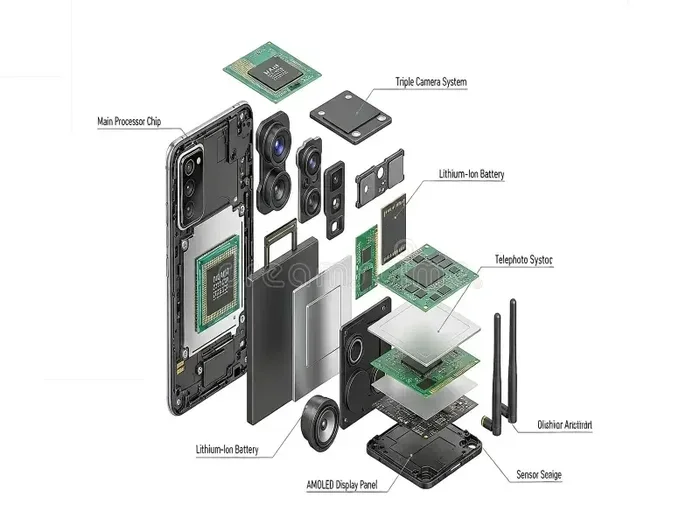
Every cell phone is made of several key parts that work together to keep you connected. Understanding the basic components of a cell phone helps you appreciate how your device handles calls, apps, photos, and internet browsing. From the processor to the display screen, each part plays a vital role in your daily experience.
Have you ever wondered what is actually inside your phone? It might look like a simple slab of glass and metal, but the basic components of a cell phone are incredibly complex. Each tiny part has a specific job, and they all work together to make your device function.
Whether you are a curious learner or someone who wants to understand your device better, this guide breaks it all down. We will walk through every major part of a cell phone and explain how it works. No technical degree required. Just plain, simple explanations.
By the end of this article, you will have a clear picture of smartphone hardware and why each piece matters. You will also learn practical tips that can help you get the most out of your device every single day.
Key Takeaways
- Processor and Circuit Board: The motherboard and processor chip are the brain of every smartphone, handling all calculations and tasks.
- Battery and Power Management: The lithium battery and power management chip control how long your phone lasts on a single charge.
- Display Screen and Touch Interface: The LCD or OLED screen and touch sensor let you interact with your phone using simple gestures.
- Antenna and SIM Card: The cellular antenna and SIM card work together to connect you to mobile networks for calls and data.
- Sensors and Cameras: Gyroscope sensors, camera modules, and GPS modules add smart features that make modern phones so useful.
📑 Table of Contents
- What Makes Up A Cell Phone
- The Brain: Processor And Circuit Board
- Power And Battery Systems
- Display And Touch Screen Technology
- Communication Components: Antenna, SIM Card, And Radio
- Sensors And Extra Features
- Common Mistakes That Affect Phone Components
- Expert Insights On Cell Phone Hardware
- Conclusion
What Makes Up A Cell Phone
A cell phone is more than just a screen and a case. Inside, there is a carefully designed collection of parts that work as one system. Each component handles a specific job, and they all depend on each other. Let us start with the big picture before diving into the details.
The main parts include the processor, memory, battery, display, antenna, and sensors. Together, these parts create the experience you have every time you pick up your phone. Understanding what they do can help you troubleshoot issues and make smarter buying decisions.
The Role Of The Motherboard
The motherboard is the backbone of your phone. It is a flat board where nearly every component connects. Think of it like a highway system that lets data travel between different parts of the device. Without the motherboard, nothing inside your phone could communicate with anything else.
Every basic component of a cell phone is either soldered onto or plugged into the motherboard. This includes the processor chip, memory chips, and even the charging port. When something goes wrong with the motherboard, it can affect multiple functions at once.
How Components Work Together
Here is a simple way to think about it. When you tap your screen, the touch sensor sends a signal to the processor. The processor figures out what you want to do. Then it sends instructions to the display to show the right image. All of this happens in milliseconds. The camera module, speaker, microphone, and antenna all follow the same pattern of sending and receiving signals through the motherboard.
The Brain: Processor And Circuit Board
The processor is the most important part of your phone. It is often called the brain because it handles every task you ask your phone to do. Whether you are browsing the web, playing a game, or simply unlocking your screen, the processor is at work.
Modern smartphones use powerful processor chips that can handle billions of calculations per second. These chips are tiny, often smaller than a fingernail, but they pack a serious punch. The circuit board, or motherboard, connects the processor to every other part of the phone.
What Does The Processor Do?
The processor handles all the thinking. It runs your operating system, opens apps, and processes data. When you take a photo, the processor helps compress the image and save it to memory. When you make a call, it manages the audio signals. Without a strong processor, your phone would feel slow and unresponsive.
Phone makers use different processor brands, like Qualcomm, Apple, and MediaTek. Each one offers different levels of speed and efficiency. A faster processor means smoother multitasking and better performance overall.
Understanding Memory And Storage
Memory and storage are two different things, but both are essential. Random access memory, or RAM, is temporary memory that your phone uses while it is running. Storage is where your photos, apps, and files are kept permanently.
Most modern phones come with at least 4 GB of RAM and 64 GB of storage. If you use lots of apps or take many photos, you will want more storage. The memory storage chips sit right on the motherboard, close to the processor, so data can move quickly.
Power And Battery Systems
Your phone would be useless without a reliable power source. The lithium battery is what keeps everything running. It stores energy and delivers it to every component when needed. Understanding how your battery works can help you extend its life significantly.
Most cell phones use rechargeable lithium-ion or lithium-polymer batteries. These batteries are lightweight, hold a lot of charge, and can be recharged hundreds of times. The power management chip controls how energy flows from the battery to the rest of the phone.
How Battery Life Is Affected
Several factors affect how long your battery lasts. Screen brightness is one of the biggest ones. A brighter display uses more power. Running many apps at the same time also drains the battery faster. GPS tracking, Wi-Fi searching, and video streaming all consume significant energy.
Here are some simple habits that can help your battery last longer:
- Lower your screen brightness when you are indoors.
- Turn off Wi-Fi and Bluetooth when you are not using them.
- Close apps you are not actively using.
- Avoid letting your battery drop to zero percent regularly.
- Use airplane mode in areas with weak signal strength.
The Charging Port And Power Supply
The charging port is where you plug in your cable to recharge the battery. Most phones now use USB-C, though some still use Lightning connectors. The power supply inside your phone regulates the electricity coming from the charger so it does not damage the battery.
Fast charging technology has improved a lot in recent years. Many phones can now charge from zero to full in under an hour. The power management chip works with the charging circuit to ensure the battery fills safely and efficiently.
Display And Touch Screen Technology
The display screen is the part of your phone you look at the most. It shows you everything from text messages to videos to photos. Modern phones use either LCD or OLED technology to create bright, colorful images on a thin glass surface.
OLED screens are more common in high-end phones because they offer deeper blacks and better contrast. LCD screens are still widely used because they tend to be more affordable. Both types are thin, lightweight, and energy efficient.
How Touch Screens Work
Your phone screen responds to your touch thanks to a touch sensor layer. When you place your finger on the screen, it completes a small electrical circuit. The phone registers the exact location of your touch and sends that information to the processor. This is what makes the touch interface so responsive and intuitive.
Capacitive touch screens are the standard in modern smartphones. They respond to the electrical properties of your skin, which is why they do not work well with regular gloves. Some phones now support stylus input, which uses a different method to detect pressure and precision.
Screen Protection And Durability
Because the display screen is one of the most exposed parts, manufacturers use tough glass to protect it. Gorilla Glass and similar materials are designed to resist scratches and cracks. A screen protector can add an extra layer of defense against drops and impacts.
Keeping your screen clean also helps. Oils from your fingers can build up over time and reduce touch sensitivity. A soft microfiber cloth is all you need to keep your display looking and working great.
Communication Components: Antenna, SIM Card, And Radio
The communication parts of your phone are what make it a phone. Without them, you would not be able to make calls, send texts, or connect to the internet. The cellular antenna, SIM card, and radio frequency chips all play a role in keeping you connected.
How The Cellular Antenna Works
The antenna sends and receives radio signals to and from cell towers. When you make a call, your voice is converted into radio waves and transmitted through the antenna. The nearest cell tower picks up those waves and routes your call to the right destination.
Modern phones have multiple antennas built into the body. One handles cellular signals, another manages Wi-Fi, and another handles Bluetooth. The antenna design has improved a lot, allowing for faster data speeds and stronger connections even in crowded areas.
The Role Of The SIM Card
A SIM card is a small chip that identifies your phone on the network. It stores your phone number, carrier information, and contacts. Without a SIM card, your phone cannot connect to a cellular network for calls or mobile data.
SIM cards come in different sizes, including standard, micro, and nano. Many phones now support eSIM technology, which lets you activate a plan digitally without a physical card. This makes switching carriers much easier and faster.
Wi-Fi And Bluetooth Chips
Beyond cellular connectivity, phones also have Wi-Fi chips and Bluetooth chips. The Wi-Fi chip lets you connect to wireless internet at home or in public places. The Bluetooth chip connects your phone to wireless earbuds, smartwatches, and other devices nearby.
Both chips use radio frequency signals to transmit data over short distances. They work alongside the cellular antenna to give your phone multiple ways to stay connected, no matter where you are.
Sensors And Extra Features
Modern phones are packed with sensors that make them smarter and more useful. These small components detect changes in your environment and your phone’s orientation. They enable features you probably use every day without thinking about them.
Camera Module
The camera module is one of the most popular features of any smartphone. It contains a lens, image sensor, and processing chip. When you take a photo, the lens focuses light onto the sensor, which converts it into digital data. The processor then sharpens the image and saves it to memory storage.
Phone cameras have improved dramatically in recent years. Many phones now have multiple lenses for wide-angle, macro, and zoom shots. Computational photography uses the processor to enhance photos automatically, making every shot look better.
GPS Module And Location Services
The GPS module receives signals from satellites to determine your exact location. This powers map apps, ride-sharing services, and location-based reminders. Your phone can also use Wi-Fi and cell towers to estimate your position faster.
Location services are helpful, but they also use battery power. You can save energy by turning off location access for apps that do not need it. Most phones let you control this in the settings menu.
Gyroscope And Accelerometer Sensors
The gyroscope sensor detects rotation and orientation. The accelerometer detects movement and changes in speed. Together, they enable features like auto-rotate, step counting, and motion-based gaming controls.
These sensors are also used for screen lock automation. When you flip your phone face down, the sensors detect the change and can silence the ringer. It is a small feature, but it shows how powerful these tiny components can be.
Speaker And Microphone
The speaker and microphone handle all audio input and output. The microphone picks up your voice during calls and voice commands. The speaker plays music, notification sounds, and call audio. Some phones have multiple speakers for stereo sound and better volume.
Noise cancellation technology uses software and additional microphones to filter out background sounds. This makes your voice clearer during calls, even in noisy environments. The audio processing chip works with both the speaker and microphone to deliver clean sound.
Common Mistakes That Affect Phone Components
Now that you know how the basic components of a cell phone work, it is worth knowing what can damage them. Many common habits can shorten the life of your phone parts without you even realizing it.
Overcharging Your Battery
Leaving your phone plugged in overnight every night can stress the lithium battery over time. While modern phones have built-in protections, consistently charging to 100 percent can reduce battery lifespan. Try to keep your charge between 20 and 80 percent for the best long-term health.
Using Cheap Chargers
Cheap, uncertified chargers may not regulate power properly. This can damage the charging port and battery over time. Always use chargers that are certified by the phone manufacturer or trusted third-party organizations.
Ignoring Software Updates
Software updates do more than add new features. They often include fixes for bugs and security vulnerabilities that affect how your hardware components perform. Ignoring updates can lead to slower performance and compatibility issues.
Exposing Your Phone To Extreme Temperatures
Extreme heat and cold can damage the battery and display screen. Leaving your phone in a hot car or using it in freezing temperatures can cause permanent harm. Keep your phone within the recommended temperature range for best results.
Expert Insights On Cell Phone Hardware
Technology experts agree that understanding your phone’s components helps you use it better. Here are a few insights from industry professionals.
Dr. Sarah Chen, Hardware Engineer: “The processor and memory work as a team. A great processor with low RAM will still feel sluggish. Balance matters more than any single component.”
Mark Thompson, Mobile Tech Reviewer: “Battery health is the most overlooked aspect of phone care. People replace their phones too often when a simple battery replacement would do the trick.”
Lisa Patel, Tech Educator: “Knowing what your phone can do helps you use it more efficiently. Even basic knowledge of the camera module and sensors can improve your daily experience.”
These expert opinions highlight an important point. Every part of your phone matters. When one component underperforms, it affects the whole device. Taking care of each piece means a better experience for you.
Conclusion
The basic components of a cell phone work together like a well-oiled machine. From the processor chip to the display screen, from the lithium battery to the cellular antenna, every part has a purpose. Understanding how they work gives you a deeper appreciation for the technology in your pocket.
You do not need to be a tech expert to get the most out of your phone. Simple habits like managing your battery, keeping your software updated, and protecting your screen can go a long way. The more you know about your device, the better equipped you are to use it wisely.
Your phone is a complex piece of smartphone hardware, but it does not have to be mysterious. With the knowledge from this guide, you now understand what makes your cell phone tick. Use that knowledge to take better care of your device and enjoy a smoother, faster mobile experience every day.
Frequently Asked Questions
What are the main basic components of a cell phone?
The main parts include the processor chip, motherboard, lithium battery, display screen, cellular antenna, SIM card, camera module, and various sensors. Each part handles a specific job, and they all work together to make your phone function properly.
How does a touch screen detect my finger?
A capacitive touch screen detects the electrical properties of your skin. When you touch the glass, it completes a small circuit at that exact point. The phone sends this information to the processor, which responds instantly.
Can I replace the battery in my cell phone myself?
Some phones allow easy battery replacement, but many modern devices have batteries glued inside. It is best to visit a certified repair center for safe battery replacement. Improper handling can damage the power management system.
What is the difference between RAM and storage memory?
RAM is temporary memory used while the phone is running. Storage is permanent memory where your files, photos, and apps are saved. More RAM means smoother multitasking, while more storage means room for more content.
Why does my phone battery drain fast?
Common causes include high screen brightness, too many open apps, weak cellular signal, and heavy use of GPS or Wi-Fi. Adjusting these settings can significantly improve battery life and reduce strain on the power management system.
Do I need a screen protector for my phone?
A screen protector adds an extra layer of protection against scratches and cracks. While modern phones use tough glass, a protector can still help extend the life of your display screen and keep it looking new longer.