Are There Wifi Projectors And Why You Need One Today
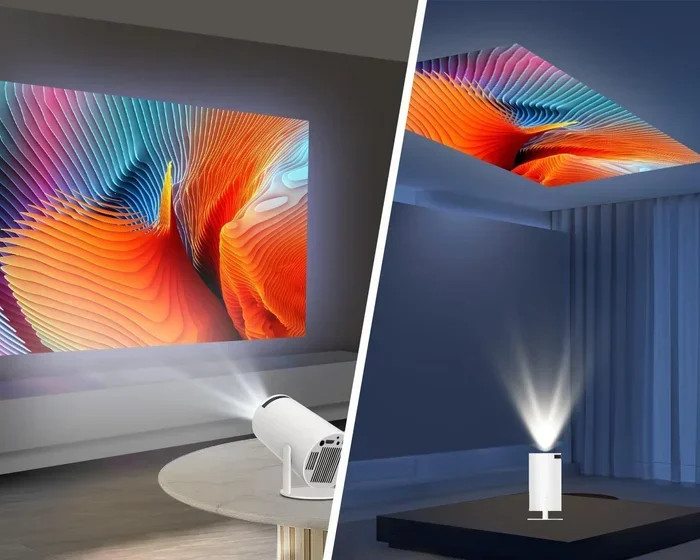
Yes, there are wifi projectors, and they are changing the way we watch, work, and play. These wireless projectors let you stream content, mirror your screen, and cast files without any cables. Whether you want a home theater projector or a portable projector for meetings, a wifi-enabled projector gives you freedom and flexibility like never before.
Have you ever wanted to watch a movie on a big screen without running cables across your living room? Or maybe you need to give a presentation at work but hate dealing with HDMI cords and adapters. The good news is that wifi projectors solve all of these problems. They let you stream, cast, and share content wirelessly from any device. In this guide, we will explore everything you need to know about wifi projectors. We will look at how they work, why they are a great choice, and what to look for when buying one. By the end, you will know exactly why a wireless projector deserves a spot in your home or office.
The world of home entertainment and office tech has changed a lot in recent years. People want simpler setups. They want to cast a movie from their phone to a big screen with just a few taps. They want to share a presentation without fumbling with cables. Wifi projectors make all of this possible. They are not just a fancy gadget. They are a practical tool that makes your daily life easier and more fun. Whether you are a movie lover, a gamer, a student, or a professional, a smart projector with wifi can truly transform your experience.
Key Takeaways
- Wifi projectors exist and are widely available: Many brands now offer wireless projectors with built-in wifi for easy streaming and screen mirroring.
- They eliminate cable clutter: With a wifi-enabled projector, you can cast content from your phone, laptop, or tablet without any wires.
- They are great for home and office use: From movie nights to business presentations, wifi projectors handle both with ease.
- Look for key features like 4K support, built-in speakers, and battery power: These make your setup simple and versatile.
- Setup is simple and fast: Most wireless projectors connect to your home network in minutes with step-by-step guidance.
- Avoid common mistakes like poor placement and weak signals: A little planning goes a long way for the best experience.
📑 Table of Contents
What Are Wifi Projectors?
A wifi projector is a device that projects images and videos onto a wall or screen and connects to your home or office network wirelessly. Unlike traditional projectors that need a physical cable to receive a signal, a wifi-enabled projector uses your existing wifi network to receive content. This means you can stream from Netflix, YouTube, or any app directly to your projector. You can also mirror your phone or laptop screen without any extra hardware.
The term wireless projector covers a wide range of devices. Some wifi projectors are small and portable. You can carry them in a backpack and set them up anywhere. Others are bigger and designed for a permanent home theater setup. Some wifi projectors come with built-in smart features, like an operating system built right in. Others rely on you casting from a separate device. No matter the type, the main idea is the same: you get a big screen without the mess of cables.
How Are They Different From Regular Projectors?
A regular projector usually needs a direct cable connection. You plug in an HDMI cable from your laptop or streaming device to the projector. This works fine, but it limits where you can place the projector. You also need to keep track of cables, adapters, and extra devices. A wifi projectors removes all of that. You connect it to your wireless network, and then you can send content from any device on the same network. It is a much cleaner and more flexible setup.
Another big difference is smart features. Many modern wifi projectors have built-in apps. You can open Netflix or Hulu right on the projector, just like you would on a smart TV. Some models even have voice control built in. You can ask a smart assistant to find a movie or adjust the volume. This level of convenience is something traditional projectors simply cannot match.
How Do Wifi Projectors Work?
Understanding how wifi projectors work is simpler than you might think. At their core, they use the same basic technology as any projector. A light source shines through a chip or lens to create an image on a screen. The difference is in how they receive that image. Instead of waiting for a cable signal, a wifi-enabled projector connects to your home network through a built-in wifi module.
Once connected, the projector can communicate with other devices on the same network. Your phone, tablet, or laptop sends a signal to the projector over the air. The projector then displays that signal on the big screen. This process is called screen mirroring or wireless display. Different brands use different technologies to make this happen. Some use Miracast, which is a standard for wireless connections. Others use their own app or built-in system. But the end result is the same: you see your content on the big screen without any wires.
What Technologies Do They Use?
Most wifi projectors use one of a few common technologies. The first is WiFi Direct. This lets the projector connect directly to your device without needing a router. It is fast and works well in most situations. The second is Bluetooth pairing. Some Bluetooth projectors can connect to speakers or other audio devices wirelessly. This is great if you want better sound without extra cables. The third technology is DLNA or Chromecast built-in. These let you cast content from supported apps directly to the projector.
Some wifi projectors also support AirPlay for Apple users. This means you can cast from your iPhone or iPad easily. Others work with Google Cast for Android users. The best wireless projectors support multiple methods. This gives you flexibility no matter what device you use. Always check which technologies a projector supports before you buy it.
Benefits Of Using A Wifi Projector
There are many reasons to choose a wifi projector over a traditional setup. Let us look at the biggest benefits that make these devices so popular.
1. Freedom From Cables
The most obvious benefit of a wireless projector is no cables. You do not need to run an HDMI cord across the room or hide wires behind furniture. You just set up the projector, connect it to your wifi, and start casting. This is a game-changer for people who rent homes or apartments. You cannot make permanent changes to the space, so a cable-free setup is perfect.
It is also great for people who like to move their projector around. Want to watch a movie in the living room tonight and the bedroom tomorrow? With a portable projector that has wifi, you can just pick it up and go. No need to unplug and replug cables every time.
2. Easy Screen Mirroring
Screen mirroring is one of the best features of a wifi projectors. You can mirror your phone or laptop screen to the big screen in seconds. This is incredibly useful for sharing photos with family, showing off vacation videos, or presenting slides at a meeting. It is much faster and easier than connecting a cable and adjusting settings.
Many wifi projectors also support casting from apps. You can open a streaming app on your phone and send the video directly to the projector. Your phone becomes a remote control. You can pause, play, and adjust the volume from your pocket. This level of convenience makes watching and sharing content a breeze.
3. Portability And Flexibility
Many wifi projectors are designed to be portable. They are lightweight and compact. Some even come with a built-in battery, making them a battery-powered projector that works anywhere. You can take them to a backyard party, a camping trip, or a business meeting in another room. The wifi connection means you do not need a cable to the source device, so you have total freedom.
This portability also makes wifi projectors great for classrooms and training rooms. A teacher can move the projector around the school and connect it to different devices without any hassle. A trainer can set up in a new conference room and be ready to present in minutes. The flexibility is hard to beat with a traditional wired setup.
4. Better Home Entertainment Setup
Turning your living room into a home theater is easier than ever with a wifi projector. You can stream directly from Netflix, Disney Plus, or Amazon Prime right on the big screen. No need for a separate streaming stick or cable box. Many smart projectors come with built-in apps and even voice assistants. You just say a command and your favorite show starts playing.
The experience of watching a movie on a big wall is simply unmatched. A home theater projector with wifi gives you a cinematic feel in your own home. It is perfect for movie nights with family or friends. You can also play games on a big screen, which adds a whole new level of fun to your gaming setup.
Key Features To Look For In A Wifi Projector
Not all wifi projectors are created equal. There are several features you should look for to make sure you get the best one for your needs. Here are the most important ones.
Resolution And Image Quality
The resolution of a wifi projectors determines how sharp and clear the image looks. Many budget models offer 720p or 1080p resolution, which is perfectly fine for most uses. If you want the best picture quality, look for a 4K projector that supports ultra-high definition. A higher resolution means more detail, especially on big screens. If you plan to watch movies or play games, investing in a higher resolution is worth it.
Another thing to consider is projector brightness. This is measured in lumens. A projector with higher lumens will produce a brighter image. If you plan to use your projector in a bright room, you will need more lumens. For a dark room or a home theater, a lower lumen count can still work well. A good rule of thumb is to aim for at least 2,000 lumens for general use.
Built-In Smart Features
Some wifi projectors come with built-in smart features. This means they have an operating system and app store right on the device. You can download apps like Netflix, YouTube, or Spotify directly onto the projector. This makes the projector a standalone device. You do not need to connect any other device to watch content.
Look for projectors with a user-friendly interface. The menus should be easy to navigate. Some smart projectors also come with voice control. You can use Alexa or Google Assistant to find content, adjust settings, or control the volume. These features make the whole experience smoother and more enjoyable.
Connectivity Options
While wifi is the main feature, it is still good to have other connection options on your wifi projectors. Look for models that have at least one HDMI port. This lets you connect a laptop, gaming console, or cable box if you need to. USB ports are also handy for playing media directly from a flash drive. Some projectors even have an audio output so you can connect external speakers.
Bluetooth connectivity is another nice feature. It lets you pair the projector with wireless speakers or headphones. This is great if the built-in speakers are not loud enough for your room. A Bluetooth projector gives you more options for audio without any extra wires. Always check the connectivity options before you buy to make sure the projector fits your setup.
Portability And Battery Life
If you want a projector you can take anywhere, look for a portable projector with a built-in battery. These battery-powered projectors let you set up in any room or even outdoors without needing a power outlet. Battery life varies by model. Some last for 2 to 3 hours, which is enough for a movie. Others can last longer, making them great for all-day events.
Size and weight also matter for portability. A lightweight wifi projectors that fits in a bag is much easier to carry around. Look for models that weigh under 5 pounds if portability is important to you. Many modern portable projectors are small enough to fit in a backpack, so you can take them anywhere you go.
Setting Up Your Wifi Projector
Setting up a wifi projectors is easier than you might think. Most brands design their projectors to be user-friendly. You do not need to be a tech expert to get one up and running. Here is a simple guide to help you through the process.
Step By Step Setup Guide
First, unbox your projector and place it on a flat surface. You can set it on a table, a shelf, or even mount it on the ceiling if you have a compatible mount. Make sure the projector is pointed at the screen or wall you will be using. The distance between the projector and the screen depends on the throw ratio of the model. Check the manual or the product page for the recommended distance.
Next, plug in the power cord and turn on the projector. Use the remote control or the buttons on the device to navigate to the wifi settings. Select your home network from the list and enter the password. Once connected, the projector will show a confirmation on the screen. This usually takes less than a minute.
Now it is time to connect your device. On your phone or laptop, go to the wifi settings and make sure you are on the same network. Open the screen mirroring or casting feature. On Android, this is called “Cast” or “Smart View.” On iPhone, it is “Screen Mirroring” via AirPlay. On Windows, you can use the “Connect” option in the display settings. Select your projector from the list of available devices, and your screen will appear on the big display.
Tips For A Smooth Setup
Here are some quick tips to make your projector setup go smoothly. First, place your router close to the projector. A strong wifi signal ensures a stable connection and prevents lag or buffering. If your router is far away, consider using a wifi extender to boost the signal in the projector room.
Second, update the projector firmware before you start using it. Most wifi projectors will prompt you to install updates on first use. These updates often include bug fixes and performance improvements. Keeping your projector updated ensures the best experience.
Third, use a dedicated streaming device if your projector does not have built-in apps. A device like a Chromecast or Roku stick can plug into the HDMI port and give you access to all major streaming services. This is a great workaround for projectors that do not have smart features built in.
Common Mistakes To Avoid With Wifi Projectors
Even though setting up a wifi projectors is simple, there are some common mistakes that can ruin your experience. Here are a few to watch out for.
Placing The Projector In The Wrong Spot
One of the biggest mistakes is placing the projector too close or too far from the screen. Every wifi projectors has a specific throw ratio that determines the image size based on distance. If you place it too close, the image will be small and blurry. If you place it too far, the image may be out of focus or too dim. Always check the throw ratio before you set up your projector setup.
Another placement issue is ambient light. A wifi projectors works best in a dim or dark room. If there is too much light, the image will look washed out and dull. Consider using blackout curtains or setting up in a room where you can control the lighting. This simple change can make a huge difference in picture quality.
Ignoring The Wifi Signal Strength
A weak wifi signal can cause buffering, lag, and poor image quality. Do not place your projector in a room far from the router without checking the signal strength first. If the signal is weak, you will experience stuttering when streaming. Use a wifi analyzer app on your phone to check the signal in the projector room. If it is weak, move the router closer or use a mesh wifi system to extend coverage.
Skipping Keystone Correction
When a projector is not perfectly aligned with the screen, the image can look like a trapezoid instead of a rectangle. This is where keystone correction comes in. Most wifi projectors have automatic keystone correction that adjusts the image to make it rectangular again. Do not skip this step. Without it, the image will look distorted and unprofessional.
Some projectors also offer lens shift, which is a more precise way to adjust the image position. This is a nice feature in higher-end models. If you plan to mount your projector permanently, look for one with lens shift for the best results.
Conclusion
Wifi projectors are a fantastic choice for anyone who wants a big screen experience without the hassle of cables. They offer freedom, flexibility, and convenience that traditional projectors simply cannot match. Whether you want to stream movies, share presentations, or play games on a big wall, a wireless projector makes it all easy and enjoyable.
The market for wifi projectors has grown a lot in recent years. There are now options for every budget and every need. From compact portable models to powerful home theater setups, there is a wifi-enabled projector out there for you. The key is to know what features matter most to you and to choose a model that fits your lifestyle.
If you have been thinking about upgrading your entertainment or presentation setup, now is the perfect time to explore wifi projectors. They are affordable, easy to use, and genuinely transform the way you watch, share, and connect. Give one a try, and you will wonder how you ever lived without it.
Frequently Asked Questions
Can I Use A Wifi Projector Without An Internet Connection?
Yes, you can use a wifi projectors without an internet connection for screen mirroring. Most wireless projectors support WiFi Direct, which lets you connect your device directly to the projector without needing a router. However, you will not be able to stream online content like Netflix or YouTube without an internet connection. Offline content from your device will still work fine.
Are Wifi Projectors Hard To Set Up?
Not at all. Most wifi projectors are designed to be plug-and-play. You simply connect the projector to your wifi network and then cast from your device. The setup usually takes less than five minutes. Many brands also include a step-by-step guide in the manual to walk you through the process.
What Is The Difference Between A Wifi Projector And A Smart Projector?
A smart projector is a type of wifi projectors that has built-in apps and an operating system. It can stream content directly without needing another device. A regular wifi-enabled projector may not have smart features and relies on you casting from a phone or laptop. Both use wifi, but smart projectors offer more standalone convenience.
Can I Connect Multiple Devices To A Wifi Projector?
Yes, most wifi projectors allow multiple devices to connect to the same network. However, only one device can cast to the projector at a time. Some models support multi-user casting, which lets you switch between devices easily. Check the specifications of your wireless projector to see what it supports.
Do Wifi Projectors Have Good Picture Quality?
Yes, modern wifi projectors offer excellent picture quality. Many models support full HD or even 4K resolution. The image quality depends on factors like brightness, resolution, and the quality of the projector’s internal chip. Higher-end models deliver stunning visuals that rival a television, especially in a dark room.
How Far Can I Be From The Projector When Casting?
You can be in any room within wifi range of the wifi projectors. As long as your device and the projector are on the same network, you can cast from anywhere in your home. For best results, make sure the wifi signal is strong in the room where the projector is located. A portable projector with Bluetooth can also extend your audio range if you pair it with wireless speakers.