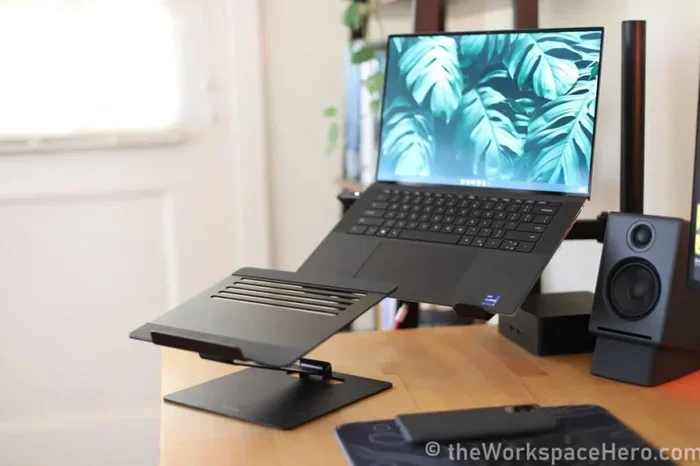
Are Laptop Stands Effective for Posture and Comfort
Are laptop stands effective? Yes, they can significantly improve your posture, reduce neck and back pain, and boost comfort during long work sessions. A laptop stand elevates your screen to eye level, which helps align your spine naturally. Combined with an external keyboard and mouse, a laptop riser transforms your desk setup into an ergonomic workspace that supports long-term health and productivity.
Do you spend hours a day working on a laptop? If so, you have probably felt the ache in your neck or the tightness in your shoulders by the end of the day. Many people wonder if a simple tool like a laptop stand can really make a difference. The short answer is yes, but let us dig deeper into why that is and what you should look for.
A laptop stand is more than just a fancy accessory. It is a practical tool that changes how your body interacts with your screen and keyboard. When you use a laptop on a flat desk, your screen sits below eye level. This forces you to hunch forward, which puts strain on your neck and upper back. Over weeks and months, this poor sitting posture can lead to real pain and long-term discomfort.
Ergonomic laptop stands fix this problem by lifting your screen to a better height. They also create space underneath for better airflow, which keeps your laptop from overheating. Whether you work from home, a coffee shop, or a shared office, a well-chosen stand can transform how you feel at the end of the day.
Key Takeaways
- Better Posture: A laptop stand raises your screen to eye level, which keeps your neck and spine in a neutral position.
- Less Pain: Using a laptop elevation device can reduce neck pain, shoulder tension, and back discomfort over time.
- Cooler Laptop: Most stands improve airflow under your laptop, helping it stay cooler during heavy use.
- More Desk Space: A laptop riser frees up valuable desk real estate for other essentials.
- Not Standalone: For best results, pair your stand with an external keyboard and mouse to get full ergonomic benefits.
- Many Types: From simple wooden blocks to adjustable metal frames, there is a laptop stand for every budget and need.
- Worth the Investment: Even a basic stand can make a noticeable difference in your daily comfort and focus.
📑 Table of Contents
- Why Posture Matters When You Use a Laptop
- How Laptop Stands Improve Comfort and Ergonomics
- Types of Laptop Stands and What Works Best
- Do You Really Need a Laptop Stand? The Evidence
- How to Choose the Right Laptop Stand for Your Needs
- Common Mistakes People Make with Laptop Stands
- Final Thoughts: Are Laptop Stands Worth It?
Why Posture Matters When You Use a Laptop
Most people do not think about their posture until something hurts. But the way you sit while working has a huge impact on your health, energy, and focus. Let us look at why posture improvement matters so much when you are on a laptop all day.
The Problem with Looking Down at Your Laptop
When you place a laptop directly on a desk or table, the screen is typically 15 to 20 inches below your natural eye level. To see the screen clearly, you tilt your head forward and down. This position is called “tech neck,” and it is more common than you might think.
Studies show that for every inch your head moves forward, the effective weight on your neck increases by about 10 pounds. So when you lean forward to look at a low laptop screen, your neck muscles are supporting the equivalent of 40 to 50 pounds of force. No wonder you feel sore after a long day!
Using a laptop elevation device lifts the screen closer to your natural gaze line. This simple change reduces the forward head tilt and takes a lot of pressure off your neck and shoulders. Over time, this can lead to real neck pain relief and less overall tension.
How Poor Posture Affects Your Whole Body
Bad posture from laptop use does not just affect your neck. It can cause a chain reaction of problems throughout your body:
- Shoulder tension: Hunching forward rounds your shoulders, which tightens the muscles around your shoulder blades.
- Upper back pain: The rounded posture puts extra stress on the thoracic spine, leading to stiffness and soreness.
- Lower back issues: Poor upper posture often causes you to slouch in the lower back as well.
- Headaches: Tension in the neck and shoulders frequently triggers tension headaches.
- Fatigue: When your body is fighting poor alignment, you feel more tired, even after a full night of sleep.
This is exactly why workspace ergonomics matter so much. A small change like adding a laptop stand can break this painful cycle and help you feel better throughout the day.
How Laptop Stands Improve Comfort and Ergonomics
Now that we understand the posture problem, let us look at how a laptop stand actually helps. The benefits go beyond just lifting the screen higher.
Screen Height and Eye-Level Alignment
The main job of a laptop riser is to bring your screen up to eye level. When the top of your screen is at or just slightly below your natural eye line, you can look straight ahead without tilting your head. This keeps your cervical spine in a neutral, healthy position.
Think of it this way: you would never hold a book below your waist and read it for hours. You would hold it up at eye level. The same logic applies to your laptop screen. A laptop stand simply does this for you automatically.
Better Airflow and Laptop Cooling
Most laptops have vents on the bottom or sides. When a laptop sits flat on a desk, those vents can get blocked by the surface. This traps heat and makes your laptop run hotter.
A laptop stand raises the device off the desk, which allows air to flow underneath more freely. Many stands are designed with open grids or angled surfaces that act as a built-in cooling system. This can help with:
- Laptop cooling: Lower temperatures mean your fan does not work as hard.
- Better performance: A cooler laptop maintains its speed and does not throttle as easily.
- Longer lifespan: Less heat over time means less wear on internal components.
Even a simple adjustable stand with a mesh design can make a big difference in how cool your laptop stays during heavy work sessions.
More Desk Space and Organization
When your laptop sits flat on the desk, it takes up a lot of room. A laptop stand lifts the device up and frees the surface underneath. This gives you more space for a keyboard, mouse, notebooks, or a coffee mug.
For people working in small spaces, this extra room can be a game-changer. A clean, organized desk setup also helps you focus and feel less overwhelmed during your workday.
Types of Laptop Stands and What Works Best
Not all laptop stands are the same. They come in different shapes, materials, and designs. Let us look at the most common types and who they work best for.
Adjustable Laptop Stands
Adjustable stands let you change the height and angle of your laptop. They usually have metal arms or joints that you can move to find the perfect position. These are great for people who share their workspace or who want flexibility.
Key features to look for include:
- Multiple height settings: So you can find your perfect screen height.
- Angle adjustment: To tilt the screen toward your eyes at the right degree.
- Sturdy construction: Metal or heavy-duty plastic holds your laptop securely.
- Portability: Some fold up for easy travel.
Fixed-Rise Laptop Stands
Fixed-riser stands are simple blocks or platforms that hold your laptop at one set height. They are usually lightweight and affordable. Wooden, plastic, or silicone versions are common.
These work well if you know your ideal screen height and do not need to change it often. They are also great for a permanent home office setup where you always use the same external keyboard and mouse.
Portable and Foldable Stands
If you work from different places, a portable laptop stand might be your best bet. These are lightweight, fold flat, and fit easily in a bag. They are perfect for coffee shops, co-working spaces, or travel.
The trade-off is that they usually offer fewer height options and may not be as stable as heavier stands. But for people who need ergonomic support on the go, they are a solid choice.
Ventilated and Mesh-Design Stands
These stands feature open grids or mesh surfaces that maximize airflow under your laptop. They are ideal for people who run demanding software, play games, or do video editing on their laptops.
The extra cooling helps maintain performance and keeps your device quieter since the internal fan does not need to work as hard.
Do You Really Need a Laptop Stand? The Evidence
You might be wondering if all the hype around laptop stand benefits is backed by real evidence. Let us look at what experts say and what studies have found.
What Ergonomic Experts Say
Most occupational therapists and ergonomics specialists agree that screen height is one of the most important factors in ergonomic comfort. The Occupational Safety and Health Administration (OSHA) recommends that the top of your screen be at or slightly below eye level. A laptop stand is one of the simplest and most affordable ways to achieve this.
Experts also emphasize that a stand works best when paired with an external keyboard and mouse. This allows you to keep the screen at eye level while maintaining a relaxed arm and wrist position while typing.
Real-World Benefits People Report
Here are some of the most commonly reported benefits from people who use a laptop riser daily:
- Less neck and shoulder pain: Many users notice a significant reduction in discomfort within the first few weeks.
- Fewer headaches: Better screen angle reduces eye strain and tension that leads to headaches.
- More energy and focus: When your body is comfortable, you can concentrate better on your work.
- Improved typing comfort: With the laptop elevated and a separate keyboard, your wrists stay in a more natural position.
- Cooler laptop: Better ventilation keeps the device from overheating during long sessions.
When a Laptop Stand Might Not Help
It is fair to be honest here. A laptop stand is not a magic fix for every problem. If you do not pair it with proper typing ergonomics, you might still experience discomfort. Also, if your chair or desk height is way off, a stand alone will not solve everything.
The key is to think of a laptop stand as one part of a complete ergonomic setup. It works best when combined with a good chair, a proper desk height, and an external keyboard and mouse.
How to Choose the Right Laptop Stand for Your Needs
With so many options out there, picking the right laptop stand can feel overwhelming. Here is a simple guide to help you choose.
Consider Your Workspace
Think about where you work most often. If you have a dedicated home office, a sturdy metal or wooden stand with multiple adjustments is a great investment. If you work in a shared space or move around a lot, a lightweight foldable stand makes more sense.
Match the Stand to Your Laptop Size
Make sure the stand you choose can safely hold your laptop. Most stands support laptops from 10 to 17 inches. Check the weight capacity, especially if you have a larger or heavier device.
Think About Portability
If you travel for work, prioritize a stand that is light, folds flat, and fits in your laptop bag. If you never leave your desk, you can focus on sturdiness and adjustability instead.
Budget vs. Quality
You can find basic stands for under $20, while premium adjustable models can cost $80 or more. The good news is that even an affordable stand provides real benefits. You do not need to spend a lot to see improvement in your sitting posture and comfort.
Quick Tips for Getting the Most Out of Your Laptop Stand
Here are some practical tips to make sure you get the best results from your new laptop stand:
- Pair it with an external keyboard and mouse. This is the single most important tip. Without these, you will still crane your neck to type on the laptop keyboard.
- Set the top of the screen at eye level. Your natural gaze should hit the top third of the screen.
- Take breaks. Even the best setup will not save you if you sit for hours without moving. Stand up, stretch, and move every 30 to 60 minutes.
- Adjust your chair height. Your feet should be flat on the floor, and your knees should be at about a 90-degree angle.
- Keep the screen at arm’s length. The laptop screen should be about an arm’s length away from your face for comfortable viewing.
Common Mistakes People Make with Laptop Stands
Even with the best laptop stand, some common mistakes can reduce its effectiveness. Watch out for these pitfalls:
Forgetting the External Keyboard
This is the number one mistake. If you raise your laptop screen but still type on the laptop keyboard, your hands and wrists will be in an awkward position. You will end up hunching your shoulders up to reach the keys. Always use an external keyboard when your screen is elevated.
Choosing the Wrong Height
Too high or too low defeats the purpose. If the stand is too tall, you will look up, which strains your neck in the opposite direction. If it is too low, you are back to the original problem. Take a minute to find your ideal screen height before you settle in.
Ignoring Stability
A wobbly stand is annoying and potentially dangerous for your laptop. Make sure your stand is stable on your desk surface. If you have a smooth desk, look for stands with rubber or silicone pads on the bottom.
Not Considering Your Full Setup
A laptop stand is just one piece of the puzzle. Your monitor should be at the right height, your chair should support your lower back, and your desk should allow your arms to rest comfortably. Think of your workspace as a system, not a collection of individual items.
Final Thoughts: Are Laptop Stands Worth It?
So, are laptop stands effective? Based on ergonomic principles, expert recommendations, and real-world user experiences, the answer is a clear yes. A well-chosen laptop stand can improve your posture, reduce pain, increase your comfort, and even help your laptop run cooler.
The key is to use it correctly. Pair your stand with an external keyboard and mouse, set the screen at the right height, and take regular breaks. When you do all of this together, you create a workspace that truly supports your body and your productivity.
Whether you invest in a premium adjustable model or grab a simple fixed riser, the benefits are real and noticeable. Your neck, shoulders, and back will thank you. And you might just find that you can work longer and feel better doing it.
Do not wait until pain sets in. Make the small change today, and your future self will appreciate it. A laptop stand is one of the easiest and most affordable upgrades you can make to your daily routine.
Frequently Asked Questions
Can a laptop stand really fix my neck pain?
A laptop stand can significantly reduce neck pain caused by looking down at a low screen. By bringing your screen to eye level, it removes the forward head tilt that strains your neck muscles. However, for best results, pair the stand with an external keyboard and mouse, and make sure your overall desk setup is ergonomic.
What is the best height for a laptop stand?
The ideal height puts the top of your screen at or just below your natural eye level. This allows you to look straight ahead without tilting your head up or down. Most adjustable laptop stands offer height settings between 4 and 8 inches, which works for most people.
Do laptop stands help with overheating?
Yes, most laptop stands improve airflow under your device by lifting it off the desk surface. This allows hot air to escape more freely and cool air to circulate underneath. Mesh or ventilated designs are especially effective for laptop cooling.
Can I use a laptop stand with a standing desk?
Absolutely. A laptop stand works great with a standing desk. It helps you maintain the correct screen height whether you are sitting or standing. Some people even use two stands at different heights to switch between sitting and standing throughout the day.
Are expensive laptop stands worth the money?
You do not need to spend a lot to get benefits. Even a basic stand under $20 can improve your posture and comfort. More expensive models offer better adjustability, sturdiness, and portability. Choose one that fits your needs and budget rather than chasing the most expensive option.
Should I use a laptop stand every day?
Yes, for the best results, use your laptop stand every time you work at your desk. Consistency is key when it comes to posture improvement and long-term comfort. Making it a daily habit ensures your body stays in a healthier alignment throughout the workday.
=== CONCLUSION ===
Are laptop stands effective for posture and comfort? The evidence and real-world experience both point to a clear yes. A laptop stand is a simple, affordable tool that can transform your desk setup and protect your body from the strain of hours of laptop use. From better screen height and ergonomic laptop stand positioning to improved airflow and more desk space, the benefits are real and lasting.
Remember that a stand works best as part of a complete ergonomic approach. Combine it with an external keyboard and mouse, a supportive chair, and regular movement breaks. Small changes add up to big improvements in how you feel every day.
Take action today. Try adding a laptop riser to your workspace and notice the difference in your neck, shoulders, and overall comfort. Your body will thank you for it.