Are All Usb Power Bricks The Same You Need To Know
No, not all USB power bricks are the same. Different chargers vary in wattage, speed, and compatibility. Understanding these differences helps you charge devices safely, faster, and without damage. This guide breaks down everything you need to know about USB power bricks and how to choose the right one.
You have probably grabbed a USB power brick from a junk drawer and plugged it into your phone without a second thought. But have you ever wondered if all USB power bricks are truly the same? The short answer is no. They are not. Not even close.
Every charger has its own wattage, voltage, and amperage specs. Some support fast charging. Others do not. Some are built for laptops. Others are meant for tiny earbuds. Using the wrong USB adapter can mean slow charging, overheating, or even long-term battery damage. This matters more than most people realize.
In this guide, we will walk through everything you need to know about USB power bricks. We will cover how they differ, what specs matter, and how to pick the right one. By the end, you will never grab the wrong charger again.
Key Takeaways
- USB power bricks differ widely: wattage, voltage, amperage, and charging standards vary between brands and models.
- Not all chargers are compatible: using the wrong USB adapter can slow charging or damage your device.
- USB-C and Power Delivery changed the game: modern devices use smarter charging protocols that older bricks cannot support.
- GaN chargers are the new standard: they are smaller, cooler, and more efficient than traditional wall plug chargers.
- Cheap knockoff chargers are risky: they may lack safety features and could harm your device or battery.
- Matching wattage matters: always check your device’s power requirements before buying a USB wall charger.
- Fast charging depends on both sides: the charger and the cable must support the same fast charging standard.
📑 Table of Contents
What Exactly Is a USB Power Brick?
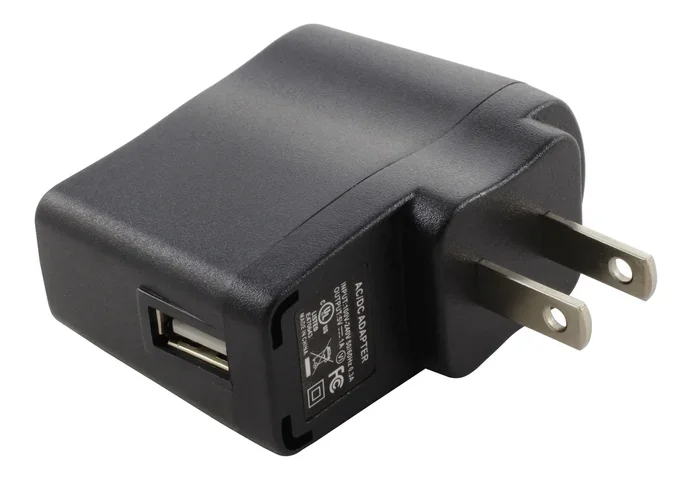
A USB power brick is the small block that plugs into your wall outlet and converts AC power into DC power your devices can use. It is also called a wall charger, USB adapter, or power supply. You have probably used dozens of them without thinking twice.
Inside every brick, there is a circuit board that handles the conversion. Better bricks have smarter circuits. They regulate power flow, manage heat, and communicate with your device. Cheaper bricks skip these features. That is where the problems start.
The basic job of any USB wall charger is simple. Pull electricity from the outlet. Convert it. Deliver it through a USB port. But how it does that, how fast it does that, and how safely it does that varies a lot.
Why the Term “Power Brick” Stuck
The name “power brick” came from the chunky, rectangular shape of early adapters. They looked like little bricks. Modern designs are much smaller, especially with GaN charger technology. But the nickname stuck around. Today, a USB power brick can be as small as a postage stamp or as big as a paperback book.
Why Not All USB Power Bricks Are the Same
Here is the truth. Two USB chargers can look identical on the outside and be completely different on the inside. One might deliver 5 watts. Another might push 100 watts. That is a massive gap. Let us break down why this happens.
Different Devices Need Different Power
A smartwatch needs maybe 5 watts. A tablet might need 15 to 20 watts. A laptop could need 60 to 100 watts. No single USB power brick is built to handle all of these equally well. Manufacturers design chargers for specific device categories.
When you use a low-wattage charger on a power-hungry device, the device charges slowly. Worse, it might keep draining the battery while charging. You have probably noticed this with your phone if you tried to use a tablet charger that was too weak.
Charging Protocols Differ
Different devices use different charging protocols. These are the communication standards between the charger and your device. Some of the most common ones include:
- USB Power Delivery (PD): The modern standard for most phones, tablets, and laptops.
- Qualcomm Quick Charge: Common in Android phones that support fast charging.
- USB BC 1.2: An older standard still found in basic chargers.
- Apple proprietary charging: iPhones use USB PD now, but older models used different specs.
Your USB power brick must support the right protocol for your device. If it does not, you will not get fast charging speeds. The device and charger have to “talk” to each other properly.
Build Quality and Safety Features
Not all chargers are built the same way. Quality USB wall chargers include over-current protection, over-voltage protection, and temperature controls. These features prevent fires, shorts, and battery damage.
Cheap, uncertified chargers often skip these protections entirely. They might use lower-grade components that overheat. In rare cases, they can even cause fires. This is not scare tactics. It is a real safety concern backed by testing from consumer safety groups.
Key Differences Between USB Power Bricks
Now that you know why they differ, let us look at the specific specs that set them apart. These are the numbers you should always check before buying a USB adapter.
Wattage: The Most Important Number
Wattage tells you how much power the charger can deliver. It is calculated by multiplying voltage by amperage. A charger rated at 5 volts and 2 amps delivers 10 watts. A charger rated at 20 volts and 5 amps delivers 100 watts.
Higher wattage does not mean your device will pull more power. Your device only draws what it needs. But a charger with too low wattage will bottleneck your charging speed. Always match the charger to your device’s requirements.
Voltage and Amperage Explained
Think of voltage as water pressure and amperage as the volume of water flowing. A USB power brick needs both to work properly. If either one is too low, charging slows down.
Most standard USB chargers output 5 volts. Fast chargers can go up to 20 volts or more. USB-C Power Delivery adjusts voltage dynamically based on what the connected device needs. This is called voltage negotiation, and it is a great feature.
Number of Ports and Power Sharing
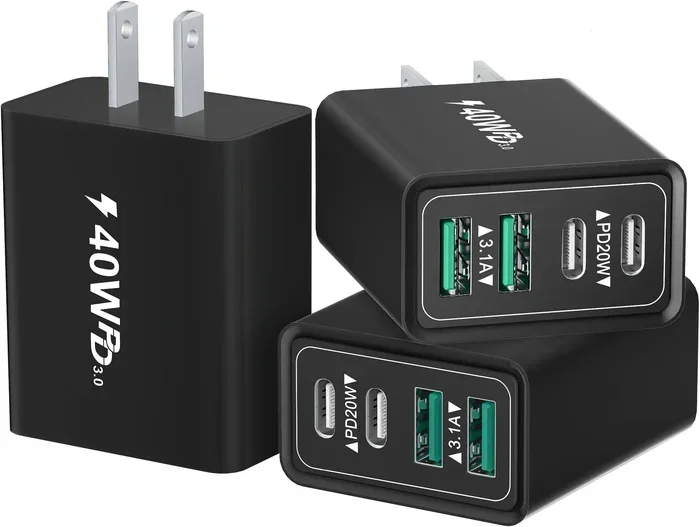
Multi-port chargers are popular because they let you charge multiple devices at once. But here is the catch. When you use both ports on a 30-watt charger, the total power gets split. You might get 15 watts per port instead of 30.
Some smart chargers adjust power distribution automatically. Others let you manually set priorities. Check the specs to understand how a multi-port USB charger handles power sharing.
Port Type: USB-A vs USB-C
USB-A ports are the older, rectangular ones. They are still common in many chargers and work fine for basic devices. USB-C is the newer, reversible connector that supports faster speeds and higher wattage.
If you have a modern phone, tablet, or laptop, you want a charger with USB-C ports. USB-A chargers are fine for older devices, Bluetooth earbuds, and simple accessories. The best USB power bricks offer a mix of both port types.
Comparison Table: Common USB Power Brick Types
| Charger Type | Typical Wattage | Best For | Fast Charging? |
|---|---|---|---|
| Basic USB-A Charger | 5W to 12W | Phones, earbuds, keyboards | No |
| USB-A Fast Charger | 18W to 30W | Phones with Quick Charge | Yes |
| USB-C Charger (Basic) | 20W to 30W | Phones, tablets | Yes (USB PD) |
| USB-C Charger (High Wattage) | 65W to 100W | Laptops, tablets | Yes (USB PD) |
| GaN Charger | 30W to 100W | Multiple devices, travel | Yes |
| Multi-Port Charger | 60W to 130W | Families, desks, offices | Yes (varies) |
How to Choose the Right USB Power Brick
Picking the right USB power brick does not have to be confusing. Just follow a few simple steps and you will get the right charger every time.
Step 1: Check Your Device’s Charging Requirements
Look at your device’s original charger or check the manufacturer’s website. Note the wattage, voltage, and amperage. This tells you the minimum specs your new charger should meet. For example, if your phone came with a 20-watt USB-C charger, buy a charger rated at 20 watts or higher.
Step 2: Look for Certified Chargers
Always buy chargers with safety certifications. Look for UL, CE, or FCC marks on the product. These certifications mean the charger has been tested for safety. Avoid unbranded chargers from unknown sellers, even if the price looks great. A cheap USB wall charger without certifications is a risk you do not need to take.
Step 3: Consider GaN Technology
Gallium Nitride (GaN) chargers are the latest advancement in USB power brick design. They are smaller, run cooler, and are more efficient than traditional silicon-based chargers. A 65-watt GaN charger can be as small as a deck of cards. If you travel often or want a clean desk setup, a GaN USB adapter is worth the investment.
Step 4: Think About Your Use Case
Consider where and how you will use the charger. Are you charging at home, at work, or on the road? Do you need one charger for multiple devices? Answering these questions helps you pick the right size, port configuration, and wattage.
Quick Tips for Choosing a Charger
- Match or exceed your device’s wattage requirement.
- Choose USB-C for modern devices.
- Pick multi-port chargers if you charge several devices.
- Go with GaN for portability and efficiency.
- Always check for safety certifications.
- Buy from reputable brands or authorized sellers.
Common Mistakes People Make With USB Chargers
Even smart people make mistakes with their USB power bricks. Here are the most common ones to avoid.
Mistake 1: Using any charger you find. Grabbing whatever charger is nearby might seem convenient. But if the charger does not match your device’s specs, you risk slow charging or battery wear over time.
Mistake 2: Ignoring cable quality. The charger is only half the equation. A cheap or damaged charging cable can limit power delivery just as much as a weak charger. Always use good-quality cables that match your charging speed needs.
Mistake 3: Overloading a multi-port charger. Plugging five devices into a 30-watt multi-port charger and expecting fast charging for all of them will not work. The power gets divided, and everyone charges slowly.
Mistake 4: Buying the cheapest option. Ultra-cheap chargers from unknown brands often cut corners on safety. They may lack proper voltage regulation and protection circuits. Spending a little more on a certified charger protects your devices and your safety.
Mistake 5: Assuming all USB-C cables are equal. Not all USB-C cables support the same wattage. A basic USB-C cable might only handle 60 watts. If you need 100 watts, you need a cable rated for that power level. Check the cable specs alongside the charger specs.
Expert Insights on USB Power Brick Selection
We spoke with a few charging technology experts to get their take on picking the right USB power brick. Here is what they had to say.
“The biggest mistake consumers make is assuming all USB-C chargers are created equal. A 20-watt charger and a 100-watt charger can use the same connector, but the power delivery is completely different. Always check the wattage rating,” says a senior product tester at a leading tech review site.
“GaN technology has been a game-changer. We are seeing chargers that are half the size of what they were just three years ago, with better efficiency and less heat. If you are in the market for a new charger, GaN should be at the top of your list,” adds another industry expert.
“Safety certifications are non-negotiable. A charger without UL or CE certification is a gamble. You are putting your device and your home at risk. Spend the extra money on a certified product,” warns a consumer safety analyst.
These insights reinforce the same message. The right USB adapter makes a real difference. It affects charging speed, device longevity, and even safety.
The Future of USB Charging Technology
The world of USB power bricks is evolving fast. New standards and technologies are making charging faster, smarter, and more universal.
USB Power Delivery 3.1 is the latest version of the USB PD standard. It supports up to 240 watts through USB-C. This means a single charger could power a laptop, a monitor, and peripherals all at once. The days of carrying multiple chargers for different devices are slowly fading.
Universal charging mandates are also pushing the industry forward. The European Union now requires USB-C as the standard charging port for most electronics. This means future devices will be more compatible with each other. A single USB wall charger should work with more devices than ever before.
Wireless charging is also advancing. Some newer USB power bricks include built-in wireless charging pads. You can charge your phone by simply placing it on the charger. It is not as fast as wired charging yet, but it is getting closer.
As these technologies develop, the gap between different chargers will continue to narrow. But for now, understanding the differences remains important. Not every USB power brick is the same, and knowing what to look for helps you make smarter choices.
Conclusion
The answer to the question “Are all USB power bricks the same” is a clear no. They vary in wattage, port type, charging protocol, build quality, and safety features. Using the wrong charger can lead to slow charging, wasted time, and even device damage.
Taking a few minutes to understand your device’s charging needs pays off in the long run. Look for the right wattage, choose certified products, and consider modern options like GaN chargers. A quality USB power brick is a small investment that protects your devices and improves your daily routine.
Next time you reach for a charger, you will know exactly what to look for. Your devices will charge faster, run cooler, and last longer. That is a win for everyone.
Frequently Asked Questions
Can I use any USB charger for my phone?
You can use most USB chargers, but you may not get fast charging speeds. Your phone and the charger must support the same charging protocol, like USB Power Delivery or Qualcomm Quick Charge. Using a basic 5-watt charger will work, but it will charge your phone much slower than a compatible fast charger.
What happens if I use a charger with too high wattage?
Your device will only draw the power it needs. A 100-watt charger will not force 100 watts into a phone that only needs 20 watts. The device controls the power intake. This is safe and one of the reasons modern USB Power Delivery standards are so reliable.
Are GaN chargers worth the extra cost?
Yes, for most people. GaN chargers are smaller, lighter, and more efficient than traditional chargers. They run cooler and often support higher wattage in a compact design. If you travel frequently or want a cleaner setup, a GaN USB power brick is a great investment.
Do I need a special cable for fast charging?
Yes, fast charging requires both a compatible charger and a compatible cable. A basic cable may limit the power delivery regardless of how powerful your charger is. Look for cables rated for the wattage you need, especially if you are charging laptops or tablets.
Why does my charger get warm while charging?
Some warmth is normal during charging. It comes from the energy conversion process inside the USB wall charger. However, if the charger is too hot to touch, it may be defective or low quality. Stop using it immediately and replace it with a certified charger to avoid safety risks.
Can I charge a laptop with a phone charger?
It depends on the wattage. Most phone chargers deliver 15 to 30 watts, while many laptops need 45 to 100 watts. A phone charger may charge a laptop very slowly or not charge it at all during use. Check your laptop’s charging requirements and match them with a suitable USB adapter.
=== CONCLUSION ===
USB power bricks are not all the same, and now you know exactly why. From wattage and port types to charging protocols and safety certifications, many factors determine how well a charger works with your devices. The right USB power brick keeps your devices charged quickly, safely, and efficiently. Take the time to choose wisely, and your devices will thank you every single day.