Can I Use A Universal Charger For My Laptop Safely
Yes, you can use a universal charger for your laptop in many cases, but safety depends on matching the right voltage, amperage, and connector type. A universal charger for laptop devices offers convenience and flexibility, especially for travelers and multi-device users. However, using the wrong power adapter wattage or ignoring laptop charger compatibility can lead to laptop battery damage or even hardware failure. This guide covers everything you need to know to charge safely and confidently.
Have you ever been in a situation where your universal charger for laptop went missing right when you needed it most? Maybe you left it at the office or it got lost during a trip. The frustration is real, and it makes you wonder if you can just grab any charger and get back to work.
The good news is that a universal charger for laptop can work in many cases. But “can” does not always mean “should.” There are important things you need to know about laptop charger compatibility, power adapter wattage, and voltage requirements before you plug in just any charger. Using the wrong one can lead to laptop battery damage or even safety hazards.
In this guide, we will walk you through everything you need to know about using a universal charger for your laptop. We will cover how these chargers work, when they are safe, what risks to watch out for, and how to pick the right one. By the end, you will feel confident about your charging choices.
Key Takeaways
- Universal chargers work for most laptops: As long as you match voltage and wattage requirements, a universal charger for laptop can be a safe and convenient option.
- Check compatibility first: Always verify your laptop’s voltage requirements and charger amperage before plugging in any third-party charger.
- USB-C has changed the game: Many modern laptops support USB Power Delivery, making USB-C charging a true universal solution.
- Wrong wattage can cause damage: Using a charger with too low or too high power adapter wattage risks overheating, slow charging, or laptop battery damage.
- GaN chargers are a great option: GaN charger technology is compact, efficient, and ideal for universal power adapter setups.
- Match the connector type: A barrel connector or USB-C port must fit your laptop’s charging port types for safe use.
- When in doubt, use the OEM charger: The original OEM charger is always the safest choice for laptop battery safety.
📑 Table of Contents
What Is a Universal Charger?
A universal charger is a single charging device designed to work with multiple laptop brands and models. Unlike a brand-specific AC adapter that only fits one laptop, a universal power adapter comes with interchangeable tips and adjustable settings. This makes it a popular choice for people who own more than one laptop or travel frequently.
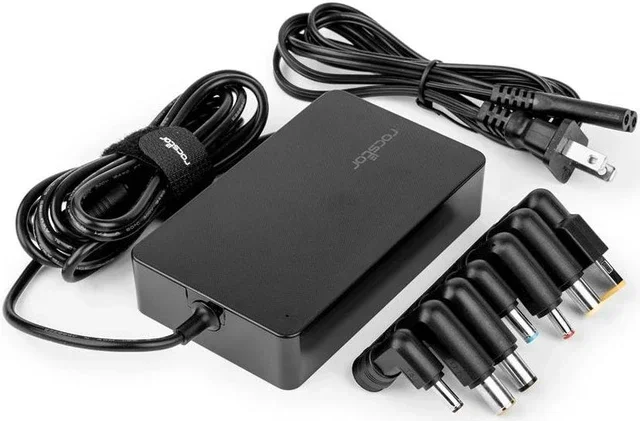
Most universal chargers include a set of interchangeable barrel connector tips. These tips fit different charging port types found across various laptop brands. Some models also support USB-C charging, which is becoming the new standard for many modern laptops.
How Does It Differ From a Standard Charger?
A standard charger, often called an OEM charger, is made specifically for one laptop model. It comes in a fixed power adapter wattage and has a connector that only fits one brand. For example, a Dell charger will not work with an HP laptop without an adapter.
A universal charger for laptop devices, on the other hand, is designed to be flexible. It can adjust its output to match different voltage requirements. This flexibility is what makes it appealing to many users. However, that flexibility also comes with responsibility. You must choose the right settings to keep your laptop safe.
How Do Universal Laptop Chargers Work?
Understanding how a universal charger for laptop works starts with the basics of power delivery. Every laptop needs a specific amount of electricity to charge properly. This electricity is measured in three key ways: voltage, amperage, and wattage.
A universal power adapter takes the power from your wall outlet and converts it to the right levels for your laptop. It does this through an internal circuit that regulates the output. When you set the correct voltage and amperage, the charger delivers a steady and safe flow of power to your device.
Understanding Voltage and Amperage
Voltage is the pressure that pushes electricity through your laptop power supply. It is measured in volts (V). Most laptops run on 19V, 20V, or sometimes 12V, depending on the brand and model.
Amperage is the amount of electrical current flowing through the charger. It is measured in amps (A). A typical laptop charger delivers between 3.25A and 4.62A. The product of voltage and amperage gives you wattage, which is the total power output.
Here is a simple way to think about it:
- Voltage is like water pressure in a pipe.
- Amperage is like the volume of water flowing through.
- Wattage is the total power being delivered.
If any of these numbers do not match your laptop’s needs, problems can occur. This is why checking your laptop’s label before using a universal charger for laptop is so important.
The Role of USB-C in Universal Charging
USB-C charging has changed the laptop charging landscape completely. Many newer laptops now use a single USB-C port for both data and power. This means a USB Power Delivery (USB-PD) charger can charge your laptop without needing a special tip.
USB Power Delivery is a smart charging standard. It allows devices and chargers to communicate and negotiate the right amount of power. A USB-C PD charger can deliver up to 100W or more, which is more than enough for most laptops. This is why many people now use a single GaN charger to charge their laptop, phone, and tablet.
However, not all USB-C ports support USB Power Delivery. Some laptops only use USB-C for data transfer and still need a proprietary AC adapter for charging. Always check your laptop’s specs before relying on USB-C charging as your primary method.
Can You Safely Use a Universal Charger for Your Laptop?
The short answer is yes, in most cases. A universal charger for laptop devices can be used safely as long as you follow a few key rules. The most important rule is to match the voltage and wattage requirements of your laptop.
When the power adapter wattage and voltage requirements align with your laptop’s specifications, a universal charger works just as well as the original OEM charger. Many quality universal power adapter brands now include smart chips that communicate with your laptop to deliver the correct power levels.
When It Works Perfectly
A universal charger for laptop works perfectly when:
- The voltage matches your laptop’s listed voltage exactly.
- The wattage is equal to or higher than what your laptop requires.
- The connector tip or USB-C cable fits your laptop’s charging port types securely.
- The charger is from a reputable brand with safety certifications.
For example, if your laptop needs 20V and 3.25A (65W), a universal charger rated at 20V and 4.62A (100W) will work safely. The laptop will only draw the power it needs. This is how wattage matching keeps your device protected.
When It Can Cause Problems
Using a universal charger for laptop becomes risky when the specifications do not match. Here are situations that can cause problems:
- The voltage is too high or too low for your laptop.
- The wattage is significantly lower than what your laptop needs.
- The connector tip is loose or does not make proper contact.
- The third-party charger lacks safety certifications like UL or CE.
In these cases, you may experience slow charging speed, overheating, or in worst-case scenarios, laptop battery damage. A charger with too low power adapter wattage may also cause your laptop to drain battery while using it, rather than charging it.
Benefits of Using a Universal Charger for Your Laptop
There are many good reasons to consider a universal charger for laptop devices. Let us look at the main benefits that make these chargers so popular.
Less Clutter, More Convenience
One of the biggest advantages of a universal power adapter is that it reduces clutter. Instead of carrying three or four different AC adapters for different laptops, you carry just one device with interchangeable tips. This is a game-changer for families, small offices, and anyone who manages multiple devices.
You also do not need to hunt for a specific brand charger when you are traveling. A single universal charger can handle laptops from Dell, HP, Lenovo, ASUS, and many other brands. This kind of laptop charger compatibility saves space and reduces stress.
Travel-Friendly Power Solutions
Traveling with a universal charger for laptop is much easier than packing multiple chargers. A compact GaN charger with USB Power Delivery can charge your laptop, phone, tablet, and earbuds all at once. Many travelers love how a single USB-C PD charger replaces a bag full of AC adapters.
Additionally, many universal chargers come with international plug adapters. This means you can use the same charger worldwide without buying a new one for each country. For frequent travelers, this is a huge convenience and cost saver.
Cost Savings Over Time
Buying a high-quality universal charger can save you money compared to buying multiple brand-specific chargers. A good universal power adapter costs between $30 and $80 and can last for years. Replacements for lost OEM chargers often cost more and are harder to find.
Risks and Common Mistakes to Avoid
While a universal charger for laptop offers many benefits, there are real risks if you are not careful. Understanding these risks helps you avoid common mistakes that can damage your laptop or shorten its battery life.
Mismatched Wattage
The most common mistake is ignoring wattage matching. Using a charger with too low wattage means your laptop may not charge properly or may charge very slowly. Using a charger with too high wattage is generally safer because your laptop will only draw what it needs, but it is still best to stay close to your laptop’s rated power adapter wattage.
Always check the label on your laptop’s original AC adapter or look in your laptop’s manual for the exact voltage requirements and charger amperage. Write these numbers down before shopping for a universal charger.
Ignoring Connector Types
Not all charging port types are the same. Some laptops use a round barrel connector, while others use a flat USB-C port. Using the wrong tip or cable can mean no charging at all, or worse, a poor connection that causes sparking or heat buildup.
Make sure the universal charger you buy includes the right tips for your laptop. If your laptop uses USB-C charging, make sure the charger and cable both support USB Power Delivery.
Buying Cheap, Uncertified Chargers
Cheap third-party chargers from unknown brands are a major risk. These chargers often lack proper safety circuits and may deliver inconsistent power. Over time, this can lead to laptop battery damage or even pose a fire hazard.
Always buy from reputable brands that carry safety certifications like UL, CE, or FCC. A slightly higher price for a certified universal charger is worth the peace of mind.
How to Choose the Right Universal Charger for Your Laptop
Choosing the right universal charger for laptop does not have to be complicated. Follow these steps to find the perfect match for your needs.
Check Your Laptop’s Power Requirements
Start by finding your laptop’s power specifications. Look for a label on the bottom of your laptop or on the original AC adapter. You need to know three things:
- Voltage (measured in volts, V)
- Amperage (measured in amps, A)
- Wattage (measured in watts, W)
Write these numbers down. When shopping for a universal charger, make sure it can deliver at least the same voltage and wattage. A slightly higher amperage rating is fine and will not harm your laptop.
Look for Smart Charging Features
Many modern universal power adapter models come with smart features that make charging safer and more efficient. Look for chargers that offer:
- Auto-detection of the right voltage and amperage.
- Multiple interchangeable tips for different laptop brands.
- USB-C Power Delivery support for modern laptops.
- Overcharge protection to prevent battery damage.
- Short-circuit protection for safety.
Chargers with these features give you an extra layer of protection. They ensure your laptop battery safety is maintained every time you plug in.
Compare Universal Chargers Side by Side
| Feature | Basic Universal Charger | GaN Universal Charger | USB-C PD Charger |
|---|---|---|---|
| Connector Types | Barrel tips only | Barrel tips + USB-C | USB-C only |
| Max Wattage | Up to 90W | Up to 100W | Up to 100W |
| Portability | Bulky | Compact | Very compact |
| Price Range | $20 – $50 | $40 – $80 | $30 – $70 |
| Best For | Older laptops | Multi-device users | Modern USB-C laptops |
As you can see, each type of universal charger has its strengths. Your choice depends on your laptop model, your budget, and how you plan to use it.
Quick Tips for Using a Universal Charger Safely
Here are some quick tips to keep in mind every time you use a universal charger for laptop:
- Always match the voltage requirements exactly.
- Choose a charger with wattage equal to or higher than your laptop needs.
- Make sure the connector fits snugly and does not wobble.
- Do not use a damaged charger or cable.
- Unplug the charger when it is not in use to save energy.
- Store your universal charger in a cool, dry place.
Final Thoughts
Using a universal charger for laptop is a practical and smart choice for many people. Whether you are a frequent traveler, a student with multiple devices, or someone who simply wants to reduce cable clutter, a quality universal charger can serve you well. The key is to take a few minutes to check your laptop’s power adapter wattage, voltage requirements, and charging port types before you buy.
When you match the right specifications and use a certified universal power adapter, you can charge your laptop safely and efficiently. Avoid cheap, uncertified third-party chargers, and always prioritize laptop battery safety. With the right universal charger for laptop setup, you will enjoy the freedom of flexible charging without any worries.
Take the time to research your options, follow the tips in this guide, and you will find a universal charger that works perfectly for your needs. Your laptop and your wallet will thank you.
Frequently Asked Questions
Will a universal charger damage my laptop?
A universal charger for laptop will not damage your laptop as long as you match the correct voltage and wattage. Always check your laptop’s power requirements before plugging in any third-party charger. Using a charger with the wrong voltage requirements is what causes damage.
What happens if the wattage is too low?
If the power adapter wattage is too low, your laptop may charge very slowly or not charge at all. In some cases, your laptop may drain battery while you use it. Always choose a universal charger with wattage equal to or higher than your laptop’s original OEM charger.
Can I use a universal charger for any laptop brand?
Most universal chargers work with multiple brands because they come with interchangeable tips. However, you must ensure the charger amperage and voltage requirements match your specific laptop. Always check compatibility before purchasing a universal power adapter.
Is USB-C charging the same as a universal charger?
USB-C charging is a type of universal charging, but not all USB-C ports support USB Power Delivery. A USB-C PD charger can act as a universal charger for laptop devices that support the standard. Check your laptop specs to confirm USB-C PD support.
How do I know if my laptop supports universal charging?
Check your laptop’s power label or manual for voltage requirements and charger amperage. If your laptop uses a standard USB-C port for charging and supports USB Power Delivery, it is compatible with most universal chargers. Look for the charging icon on your laptop’s battery indicator to confirm.
Are GaN chargers good universal options for laptops?
Yes, GaN charger technology is one of the best options for universal charging. GaN chargers are compact, efficient, and deliver high power adapter wattage in a small size. They are ideal for travelers and anyone who wants a single charger for their laptop and other devices.