Does 6ghz Wi Fi Penetrate Through Walls Effectively
6GHz Wi-Fi has a hard time penetrating walls compared to lower frequency bands. The high-frequency 6GHz signal loses strength quickly when it hits solid objects like concrete, brick, and metal. While 6GHz offers blazing speeds and less congestion, its range and wall penetration are limited. Understanding how this frequency behaves helps you place your router and devices for the best wireless coverage in your home.
Does 6GHz Wi-Fi Go Through Walls Effectively? Here’s What You Need To Know
So you just got a new router that supports the 6GHz band. Maybe you bought a Wi-Fi 6E device or upgraded your whole network. Either way, you are probably wondering one thing: does 6GHz Wi-Fi actually go through walls? It is a great question, and the short answer is not really. Not very well, at least. The 6GHz frequency is fast and powerful, but it has a big weakness. Walls, floors, and other solid objects block it more than you might expect. In this article, we will break down exactly how 6GHz Wi-Fi behaves when it hits obstacles. You will learn what materials stop the signal, how it compares to older bands, and what you can do to get better coverage in your home.
The 6GHz band is the newest addition to the Wi-Fi world. It offers incredible speeds and way less interference from other devices. But speed means nothing if the signal cannot reach your favorite spot on the couch. Let us dive deep into how this frequency works and what you can do about it.
Key Takeaways
- Limited Wall Penetration: 6GHz signals struggle to pass through thick walls, floors, and obstacles due to their high frequency.
- Short Range: The 6GHz band has a shorter effective range than 2.4GHz and 5GHz Wi-Fi.
- Speed vs. Range Trade-Off: You get faster speeds on 6GHz but sacrifice coverage distance and wall penetration.
- Building Materials Matter: Concrete, brick, and metal block 6GHz signals much more than drywall or wood.
- Placement Is Key: Central router placement and Wi-Fi extenders help improve 6GHz coverage throughout your home.
- Wi-Fi 6E Devices Help: Newer Wi-Fi 6E routers and devices handle the 6GHz band more efficiently.
- Consider Your Needs: Use 6GHz for close-range high-speed tasks and lower bands for devices farther away.
📑 Table of Contents
- What Is 6GHz Wi-Fi And Why Does It Matter?
- How 6GHz Signals Interact With Walls
- Building Materials That Block 6GHz Wi-Fi Signals
- Comparing 6GHz Vs 5GHz Vs 2.4GHz Wall Penetration
- Tips To Improve 6GHz Signal Through Walls
- When Should You Use 6GHz Wi-Fi?
- Common Mistakes People Make With 6GHz Wi-Fi
- Expert Insights On 6GHz Wall Penetration
- Conclusion
What Is 6GHz Wi-Fi And Why Does It Matter?
The 6GHz band is a part of the wireless spectrum that Wi-Fi 6E and Wi-Fi 7 devices can use. It offers a huge chunk of new channels that are not crowded at all. Think of it like a new highway with no traffic. Your data zips along at incredible speeds with almost no delays. This is why many people are excited about 6GHz wireless technology.
But here is the catch. Higher frequency signals have shorter wavelengths. Shorter wavelengths mean the signal carries more data, but it also means the signal does not travel as far. It also means the signal has a harder time getting through solid objects. This is the basic physics of how wireless signals work. Lower frequencies like 2.4GHz can bend around objects and pass through walls more easily. Higher frequencies like 6GHz carry more data but struggle with obstacles.
So when you ask does 6GHz Wi-Fi go through walls, you are really asking about the trade-off between speed and range. The 6GHz band gives you amazing wireless performance up close. But put a few walls in the way, and the signal drops fast. This is the biggest limitation of the 6GHz frequency band.
How the 6GHz Band Compares to Other Frequencies
To understand 6GHz wall penetration, you need to compare it to the other Wi-Fi bands you already know. Here is a simple breakdown of how the three main frequency bands stack up.
- 2.4GHz: Slowest speeds but the best range. It easily passes through walls and floors. This is why your smart home devices often use 2.4GHz.
- 5GHz: Faster than 2.4GHz but shorter range. It can get through walls to a degree, but thick walls slow it down a lot.
- 6GHz: The fastest of the three but the shortest range. It struggles the most with wall penetration and obstacles.
Each band has its place in a home network. The key is knowing when to use which band. Most modern routers let you switch between bands automatically. But understanding their strengths helps you make smarter decisions about where to place your devices.
How 6GHz Signals Interact With Walls
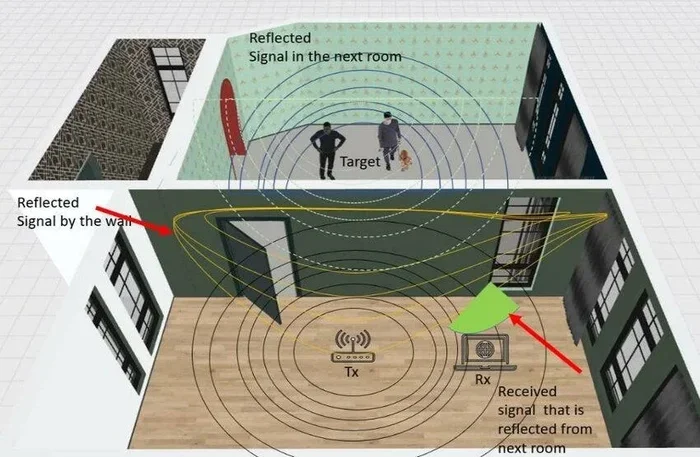
When a 6GHz wireless signal hits a wall, several things happen. Some of the signal bounces off. Some gets absorbed by the material. A tiny bit might pass through. But the amount that makes it to the other side is much smaller than what you would see with a 2.4GHz signal.
The reason comes down to frequency and wavelength. A 6GHz signal has a very short wavelength, about 5 centimeters. That short wavelength makes it easy for the signal to carry lots of data. But it also makes it easy for solid objects to block or weaken the signal. Think of it like a breeze pushing through a screen door. The breeze gets through, but not as strongly as it was before. Now imagine trying to push that same breeze through a solid brick wall. That is what happens with 6GHz signals and thick obstacles.
The Role of Signal Attenuation
Signal attenuation is the fancy term for signal loss. Every wall, floor, and piece of furniture causes some level of attenuation. But the amount of loss depends on the frequency. Higher frequencies like 6GHz experience much more attenuation than lower frequencies. This means every wall your 6GHz signal passes through weakens it significantly.
In a typical home with drywall, you might lose about 3 to 5 dB of signal strength per wall on the 6GHz band. That does not sound like much, but it adds up fast. Two or three walls and your 6GHz signal might be too weak for reliable connectivity. This is why 6GHz wireless coverage works best in open spaces or rooms that are close to the router.
Building Materials That Block 6GHz Wi-Fi Signals
Not all walls are created equal. Some materials barely affect your Wi-Fi signal, while others can kill it completely. Here is a look at common building materials and how they impact 6GHz signals.
Drywall and Thin Partitions
Drywall is the most common interior wall material. It is thin and relatively easy for wireless signals to pass through. A 6GHz signal can get through one or two drywall partitions with only minor loss. So if you are in one room and your router is in the next with a drywall wall between them, you should still get a decent 6GHz connection.
Brick and Concrete
Brick and concrete are the enemies of 6GHz signals. These dense materials absorb and reflect high-frequency waves very effectively. A single brick wall can reduce your 6GHz signal strength by a lot. Concrete walls with rebar inside are even worse. If your home has brick or concrete interior walls, do not expect 6GHz to reach far into your house.
Metal and Mirrors
Metal is the worst material for any Wi-Fi signal, and 6GHz is no exception. Metal studs in walls, metal roofing, and large mirrors can completely block the signal. The signal bounces off metal instead of passing through. If your router is on one side of a metal wall, the 6GHz band might not reach the other side at all.
Glass and Windows
Glass is much more friendly to 6GHz signals than brick or metal. Standard window glass allows most of the signal to pass through. However, energy-efficient windows with special coatings can reflect some of the signal. Still, glass walls and large windows are some of the best pathways for 6GHz signals in a home.
| Building Material | Signal Impact on 6GHz | Passability |
|---|---|---|
| Drywall | Minor loss | Good |
| Wood | Moderate loss | Fair |
| Brick | Heavy loss | Poor |
| Concrete | Very heavy loss | Very Poor |
| Metal | Near complete block | Almost None |
| Glass | Slight loss | Good |
Understanding what your walls are made of helps you predict where 6GHz will work and where it will not. This knowledge is incredibly valuable when you are setting up your home network.
Comparing 6GHz Vs 5GHz Vs 2.4GHz Wall Penetration
Let us put the numbers together so you can see the full picture. Here is a side-by-side comparison of how the three main Wi-Fi bands handle wall penetration.
- 2.4GHz Wall Penetration: Excellent. This band can pass through 3 to 4 walls and still maintain a usable connection. It is the go-to band for whole-home coverage.
- 5GHz Wall Penetration: Moderate. It can handle 1 to 2 walls reasonably well. Beyond that, signal strength drops quickly.
- 6GHz Wall Penetration: Poor. It works best with a clear line of sight or only one thin wall between the router and device.
This comparison shows why many homes use a mesh network setup. A single router might not cover every room with 6GHz speeds. But a mesh system with multiple nodes can extend the 6GHz coverage to more areas. If you are considering a mesh setup, you might want to check out Can I Connect Wi-Fi 6 Mesh To Wi-Fi 5 Router for helpful guidance on mixing different Wi-Fi generations.
The bottom line is that each band has a role. Use 6GHz for speed-critical tasks in the same room or nearby rooms. Use 5GHz for devices in adjacent rooms. Use 2.4GHz for devices that are far away or separated by many walls.
Tips To Improve 6GHz Signal Through Walls
Just because 6GHz struggles with walls does not mean you are stuck with poor coverage. There are several practical steps you can take to improve your 6GHz wireless performance throughout your home.
1. Place Your Router in a Central Location
The single most important thing you can do is put your router in the center of your home. If your router sits in one corner, the 6GHz signal has to pass through multiple walls to reach the other side. A central placement reduces the number of obstacles the signal must travel through. This is true for every Wi-Fi band, but it matters even more for 6GHz because of its limited range.
2. Keep the Router Elevated and Unobstructed
Do not hide your router behind a TV or inside a closed cabinet. Signals spread outward and downward from the antenna. Placing the router on a high shelf or mounting it on a wall helps the signal travel more freely. The fewer objects in the way, the better your 6GHz performance will be.
3. Use a Mesh Wi-Fi System
If your home is large or has many walls, a mesh Wi-Fi system can make a huge difference. Mesh nodes act as additional access points that rebroadcast your signal. This helps extend 6GHz coverage to rooms that are far from the main router. You can also boost your Wi-Fi signal outside with the right placement of mesh nodes near windows or exterior walls.
4. Reduce Interference From Other Devices
The 6GHz band is less crowded than 2.4GHz and 5GHz, which is one of its biggest advantages. But some devices can still cause interference. Microwave ovens, certain cordless phones, and even neighboring Wi-Fi networks can affect your signal quality. Keeping your router away from these sources helps maintain a strong 6GHz connection.
5. Update Your Router Firmware
Router manufacturers regularly release firmware updates that improve signal handling and performance. Make sure your router is running the latest firmware. This is an easy step that many people overlook. You might also want to explore whether changing your Wi-Fi router to a newer model could help if your current router does not support the latest 6GHz optimizations.
6. Consider Wi-Fi 6E or Wi-Fi 7 Devices
Newer devices that support Wi-Fi 6E or Wi-Fi 7 are designed to work better with the 6GHz band. They use advanced technologies like OFDMA and multi-link operation to maintain strong connections even when the signal is weaker. Upgrading your devices can help you get the most out of the 6GHz band.
Quick Tips Summary
- Put your router in the center of your home for balanced coverage.
- Keep the router elevated and away from large metal objects.
- Use a mesh system to extend 6GHz coverage to distant rooms.
- Stay away from interference sources like microwaves and cordless phones.
- Update your router firmware regularly for the best performance.
- Upgrade to Wi-Fi 6E or Wi-Fi 7 devices for better 6GHz handling.
When Should You Use 6GHz Wi-Fi?
Now that you know the limitations of 6GHz wall penetration, let us talk about when this band really shines. The 6GHz band is perfect for situations where you have a clear path between the router and the device. Here are the best use cases for 6GHz Wi-Fi.
Gaming and Streaming in the Same Room
If you are gaming on a console or streaming 4K video on a TV in the same room as your router, 6GHz is incredible. You will get the fastest speeds possible with almost no lag. The high bandwidth handles multiple heavy data streams with ease. This is where the 6GHz band truly shows its value.
Video Calls and Remote Work
Working from home means you need a reliable and fast connection for video calls. If your home office is in the same room or just one room away from the router, 6GHz provides a crystal-clear connection with no buffering or dropped calls.
Smart Home Devices That Need Speed
Some smart home devices benefit from the 6GHz band, especially those that stream video or handle large amounts of data. Smart security cameras, for example, can use 6GHz to upload high-quality footage without slowing down your network. However, many simple smart home devices like smart bulbs and plugs do not even support the 6GHz band. You can learn more about this in our article on Can Feit Smart Bulbs Be Used Without Wi-Fi.
When to Stick With Lower Bands
For devices that are far from the router or separated by multiple walls, stick with 5GHz or 2.4GHz. Your smart thermostat, smart locks, and other IoT devices usually work fine on 2.4GHz. Let the 6GHz band handle the heavy lifting for devices that are close and need maximum speed.
Common Mistakes People Make With 6GHz Wi-Fi
There are a few mistakes that many people make when setting up their 6GHz network. Avoiding these pitfalls can save you a lot of frustration.
- Assuming 6GHz covers the whole house: It does not. 6GHz is a short-range band. Expect it to work best in the same room or one adjacent room.
- Placing the router in a corner or closet: This wastes the 6GHz signal by blocking it with walls and furniture right from the start.
- Ignoring device compatibility: Not all devices support 6GHz. Older phones, laptops, and smart home gadgets may only connect to 2.4GHz or 5GHz.
- Not using both bands: Your router can run 2.4GHz, 5GHz, and 6GHz all at the same time. Let each band serve the devices that work best with it.
- Overlooking the need for a wired backhaul: If you use a mesh system, a wired backhaul connection between nodes dramatically improves 6GHz performance.
By avoiding these common mistakes, you can set up a network that makes the most of every band, including the powerful 6GHz frequency.
Expert Insights On 6GHz Wall Penetration
Wireless networking experts agree on one thing. The 6GHz band is a game-changer for speed and capacity, but it is not a replacement for lower frequency bands. It is a complement. The best home networks use all available bands together to provide seamless coverage and top performance.
Experts also recommend using a wired connection for your mesh nodes whenever possible. A wired backhaul carries the 6GHz signal from one node to another without any wall penetration loss. This means every mesh node can broadcast a strong 6GHz signal to the devices in its area.
Another expert tip is to use your router’s band steering feature. Band steering automatically assigns devices to the best band based on their location and needs. This takes the guesswork out of managing your home network. If you are exploring options for your home setup, check out Can I Buy A Wi-Fi Router And Not Pay Monthly for insights on choosing the right router without ongoing costs.
Finally, keep in mind that building construction varies widely. A home with mostly drywall and wood frames will have much better 6GHz coverage than a home with concrete block walls. Always test your 6GHz signal in different rooms before committing to a setup.
Conclusion
So does 6GHz Wi-Fi go through walls effectively? The honest answer is not really. The 6GHz band offers incredible speeds and plenty of bandwidth, but it has a tough time penetrating walls, especially thick ones made of brick, concrete, or metal. It works best in open spaces or rooms that are close to the router with only one or two drywall partitions in the way.
That does not mean 6GHz is not worth using. On the contrary, it is one of the best Wi-Fi technologies available today for the right situations. Use it for speed-critical tasks in the same room or nearby rooms. Pair it with a mesh system to extend coverage. And make sure your router is placed strategically to get the best results.
The key to a great home network is understanding the strengths and limitations of each frequency band. Use 6GHz for what it does best, and let the lower bands handle the rest. With the right setup, you can enjoy blazing-fast wireless speeds throughout your home without any headaches.
Frequently Asked Questions
Can 6GHz Wi-Fi pass through one interior wall?
Yes, 6GHz Wi-Fi can usually pass through one interior drywall wall with minimal signal loss. The connection should remain strong and stable. However, thicker walls made of brick or concrete will weaken the signal much more, even with just one wall.
Why does 6GHz have worse wall penetration than 2.4GHz?
Higher frequency signals have shorter wavelengths, which carry more data but are easier to block. The 6GHz signal has a much shorter wavelength than 2.4GHz, so solid objects absorb and reflect it more effectively. This is a basic principle of wireless physics that affects all high-frequency signals.
Does a Wi-Fi 6E router help with 6GHz wall penetration?
A Wi-Fi 6E router does not change the physics of how 6GHz signals interact with walls. However, it uses advanced technologies like OFDMA and better antenna designs that can maintain a usable connection even with some signal loss. The improvement is modest, not a game-changer for wall penetration.
Can I use 6GHz Wi-Fi in a multi-story home?
Using 6GHz on different floors is challenging because floors are usually made of concrete or thick wood. The signal struggles to pass between floors. A mesh system with nodes on each floor is the best solution for multi-story 6GHz coverage.
What is the maximum distance 6GHz Wi-Fi can travel indoors?
In an open indoor space with no walls, 6GHz can travel about 30 to 50 feet. Once you add walls and obstacles, that distance drops significantly. In a typical home with several interior walls, usable 6GHz coverage might be limited to one or two rooms from the router.
Should I disable 6GHz if it does not reach all my rooms?
No, do not disable 6GHz. Even if it does not reach every room, it is incredibly useful for devices that are nearby. Keep it enabled and let your router’s band steering feature assign devices to the best band automatically. The devices that can connect to 6GHz will enjoy much faster speeds.
=== CONCLUSION ===
6GHz Wi-Fi does not penetrate walls effectively, but it does not have to be a problem. Understanding how this frequency behaves helps you use it smarter. Place your router centrally, use a mesh system for larger homes, and reserve 6GHz for devices that are close and need maximum speed. Combine this with the right lower-band coverage, and you will have a home network that delivers the best of both worlds. The 6GHz band is a powerful tool. Use it wisely, and your wireless experience will be faster and more reliable than ever before.