Can I Cover My Work Laptop Camera Yes And Here Is Why
Yes, you absolutely can cover your work laptop camera, and it is one of the smartest privacy moves you can make. With cyber threats rising and employer monitoring becoming more common, a simple camera cover protects your personal and professional life. This guide shows you why, how, and what to watch out for.
Key Takeaways
- Covering your work laptop camera is safe and recommended: It adds a physical layer of protection against unauthorized access.
- Employers generally allow camera covers: Most IT departments support basic privacy measures as long as they do not damage the device.
- You have multiple cover options: From sliding clips to tape, there is a solution for every budget and preference.
- Covering the camera does not affect laptop performance: It is a passive tool that uses zero system resources.
- Common mistakes to avoid: Do not use thick tape that leaves residue, and never pry open built-in privacy flaps.
- Pair camera covers with other security habits: Use strong passwords, VPNs, and software updates for full protection.
📑 Table of Contents
- Can I Cover My Work Laptop Camera Yes And Here Is Why
- Why You Should Cover Your Work Laptop Camera
- Is It Safe to Cover Your Work Laptop Camera?
- Best Ways to Cover Your Work Laptop Camera
- Comparison Table: Camera Cover Options
- Quick Tips for Using Camera Covers
- Common Mistakes People Make With Laptop Camera Covers
- Expert Insights on Laptop Camera Privacy
- How Camera Covers Fit Into Broader Laptop Security
- Key Takeaways
- Conclusion
Can I Cover My Work Laptop Camera Yes And Here Is Why
Let us get straight to the point. Can I cover my work laptop camera? The answer is a firm and resounding yes. You can, you should, and here is exactly why it matters.
Your work laptop camera is a potential window into your private life. Hackers, malware, and even unauthorized employer surveillance can turn that tiny lens into a serious privacy risk. A simple camera cover blocks that threat completely. It costs almost nothing and takes just seconds to apply.
In this article, we will walk you through every reason to cover your work laptop camera. We will also cover the best methods, what your employer thinks, and common mistakes to avoid. By the end, you will have everything you need to protect your laptop privacy like a pro.
Why You Should Cover Your Work Laptop Camera
You might wonder why anyone would want to spy through a laptop camera. The truth is, it happens more often than you think. Let us break down the real reasons covering your camera matters.
The Rise of Laptop Spyware
Malware designed to activate webcams without your knowledge is a real threat. Hackers use this software to secretly watch through your laptop camera. They can see you in your home, at your desk, or even in private moments. This type of spyware has been around for years and continues to evolve.
One famous example is the Regin malware, which targeted government systems. But everyday workers are also at risk. A simple webcam hack can give criminals access to your face, your surroundings, and sensitive documents on your screen.
Employer Monitoring and Your Privacy
Many companies monitor work devices. Some use employer monitoring software that tracks keystrokes, screen activity, and even webcam usage. While this may be legal in some cases, it raises serious digital privacy concerns.
When you cover your camera, you take back a small but important measure of control. You decide when your lens is active and when it is not. This is especially important if you work from home and your laptop is in shared spaces.
Protecting Sensitive Work Data
Your laptop camera can reveal more than just your face. Background details might include whiteboards with meeting notes, documents on your desk, or even family photos. All of this information could be useful to someone with bad intentions.
Covering your webcam is a basic but effective step in cyber security. It stops visual leaks before they happen.
Is It Safe to Cover Your Work Laptop Camera?
Absolutely. Covering your camera is one of the safest things you can do. It does not harm your laptop in any way. Let us look at why it is safe and what you need to keep in mind.
No Impact on Laptop Performance
A camera cover is a physical barrier. It does not interact with your software or hardware electronically. It uses zero system resources. Your laptop will run exactly the same with or without a cover on the lens.
Some people worry that blocking the camera sensor might cause errors. This is not true. Your laptop will simply detect that the camera is blocked and move on. You will not lose any functionality.
Will Your Employer Mind?
This is one of the most common questions people ask. The good news is that most employers do not mind if you cover your work laptop camera. In fact, many IT departments encourage basic laptop security practices like this.
That said, you should check your company policy. Some strict environments may have specific rules about modifying devices. If you are unsure, ask your IT team. They will almost certainly say it is fine.
Does Not Void Your Warranty
Using an external camera cover or a small piece of tape will not void your warranty. You are not opening the laptop or changing any internal parts. You are simply placing a cover over the exterior lens.
Just make sure you do not attach anything with strong adhesive directly to the laptop body. Residue can cause issues and might lead to warranty claims.
Best Ways to Cover Your Work Laptop Camera
There are several easy ways to cover your laptop camera. Each method has its pros and cons. Let us explore the most popular options.
Sliding Webcam Covers
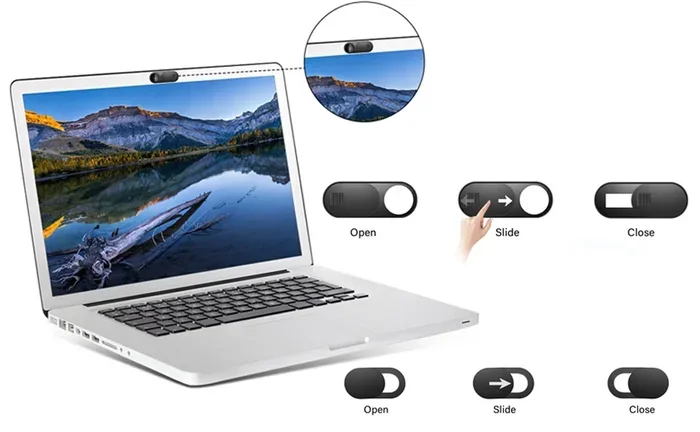
A sliding webcam cover is the most popular choice. It clips onto the top of your laptop and slides open or closed with your finger. These are sleek, reusable, and very convenient.
You can find them online for just a few dollars. They come in different sizes to fit various laptop models. A good sliding webcam cover is thin enough to not affect your laptop lid when closed.
Removable Privacy Stickers
Privacy stickers are small adhesive covers that you place over the camera lens. They are easy to remove and reapply. Many come in fun designs, so you can personalize your laptop privacy setup.
The downside is that adhesive can collect dust over time. You will need to clean the sticker and the lens occasionally to keep things clear.
Simple Tape
Do not underestimate a small piece of tape. Masking tape or painter’s tape works great. It is cheap, easy to find, and does the job perfectly.
Just avoid using duct tape or anything with a strong adhesive. These can leave residue on your laptop and damage the surface over time. Keep it simple and gentle.
Built-In Privacy Flaps
Some newer laptops come with a built-in privacy flap over the camera. You can slide it open or closed as needed. This is the most convenient option because it is already part of your device.
If your laptop has one, you are already ahead of the game. Just make sure the flap moves smoothly and does not get stuck.
Comparison Table: Camera Cover Options
| Cover Type | Cost | Reusable | Ease of Use | Best For |
|---|---|---|---|---|
| Sliding Webcam Cover | $3-$10 | Yes | Very Easy | Daily use, sleek look |
| Privacy Sticker | $2-$5 | Yes | Easy | Budget option, customization |
| Tape | $1-$3 | No | Very Easy | Quick fix, temporary use |
| Built-In Privacy Flap | Included | Yes | Very Easy | New laptop owners |
Quick Tips for Using Camera Covers
Here are some practical tips to get the most out of your camera cover:
- Clean the lens before applying: Use a microfiber cloth to wipe the camera lens. This prevents dust from getting trapped under your cover.
- Check the fit: Make sure your cover sits flush against the lens. A loose cover can slide off and fall into your laptop.
- Remove residue gently: If you use adhesive stickers, use rubbing alcohol to clean any leftover residue.
- Keep a spare cover handy: Covers can get lost or damaged. Having a backup ensures you are never caught without protection.
- Use it consistently: The best habit is to keep your cover closed when you are not actively using your camera for a call.
Common Mistakes People Make With Laptop Camera Covers
Even though covering your camera is simple, some mistakes can cause problems. Let us avoid them.
Using Thick or Heavy Tape
Thick tape can leave a sticky mess on your laptop. It can also trap heat near the camera area. Stick with thin, gentle materials like masking tape or a proper cover clip.
Forgetting About the Microphone
Your laptop has a microphone next to or near the camera. Some people cover the camera but forget the mic. If you are serious about audio privacy, consider covering the mic too. A small sticker works well for this.
Prying Open Built-In Flaps
If your laptop has a built-in privacy flap, do not force it open with tools. You could break the mechanism. Just use your finger to slide it gently.
Ignoring Software Security
A camera cover is a physical tool. It does not replace good software security. You still need antivirus programs, firewalls, and regular updates. Think of the cover as one layer in a multi-layered defense strategy.
Expert Insights on Laptop Camera Privacy
Cyber security experts agree that covering your webcam is one of the simplest and most effective privacy steps. The FBI has even recommended using a camera cover for both personal and work devices. This advice comes from real-world experience with webcam hijacking cases.
Mark Gibbs, a technology analyst, once said that a physical cover is the only 100% reliable way to block a camera. Software toggles can fail. Malware can bypass settings. But a physical barrier? That always works.
For work from home professionals, this is especially relevant. Your home environment is more exposed than a corporate office. Visitors, family members, and even pets can appear in your camera view. A cover gives you peace of mind every time you open your laptop.
How Camera Covers Fit Into Broader Laptop Security
Covering your camera is just one piece of the puzzle. True laptop security involves multiple habits and tools working together. Here is how a camera cover fits into a broader strategy.
Pair With a Privacy Screen
A privacy screen protects what others can see on your display. It narrows the viewing angle so only someone directly in front of the screen can read it. This is perfect for open offices, coffee shops, and shared workspaces.
Together, a camera cover and a privacy screen create a strong physical security setup. You protect both what you see and what others can see of you.
Keep Software Updated
Regular updates patch security vulnerabilities that could allow hackers to access your camera remotely. Enable automatic updates on your operating system and antivirus software.
Use Strong Passwords and Two-Factor Authentication
Your laptop safety depends on strong login credentials. Use unique passwords for your device and accounts. Add two-factor authentication wherever possible. This makes it much harder for unauthorized users to access your system.
Be Careful With Links and Downloads
Most webcam hack incidents start with a phishing email or a malicious download. Be cautious about clicking links from unknown senders. Only download software from trusted sources.
Key Takeaways
- Covering your work laptop camera is safe and recommended: It adds a physical layer of protection against unauthorized access.
- Employers generally allow camera covers: Most IT departments support basic privacy measures as long as they do not damage the device.
- You have multiple cover options: From sliding clips to tape, there is a solution for every budget and preference.
- Covering the camera does not affect laptop performance: It is a passive tool that uses zero system resources.
- Common mistakes to avoid: Do not use thick tape that leaves residue, and never pry open built-in privacy flaps.
- Pair camera covers with other security habits: Use strong passwords, VPNs, and software updates for full protection.
Conclusion
So, can you cover your work laptop camera? Yes, without any doubt. It is safe, effective, and one of the easiest ways to boost your laptop privacy and cyber security.
A simple camera cover blocks potential threats from spyware, hackers, and unauthorized monitoring. It costs almost nothing and takes seconds to apply. Whether you choose a sliding cover, a sticker, or a piece of tape, the protection is the same.
Combine this habit with other security practices like software updates, strong passwords, and privacy screens. Together, these steps create a strong defense for your work device and your personal information.
Take a few minutes today to cover your camera. Your future self will thank you. Protecting your work laptop camera is not paranoid. It is smart.
Frequently Asked Questions
Will covering my work laptop camera affect video calls?
No, it will not. You simply slide the cover open when you need to be on camera. During calls, the cover is open and everything works normally. When you are done, close it again for privacy.
Do employers provide camera covers for work laptops?
Some companies do, but many do not. It is a good idea to bring your own. Sliding webcam covers are inexpensive and easy to order online. Check with your IT department if you are unsure about company policy.
Can a camera cover damage my laptop?
Not if you use it correctly. Avoid strong adhesives and do not pry at built-in flaps. A gentle sliding cover or a small piece of masking tape will not cause any damage to your device.
Is a camera cover better than software solutions?
Yes, in many ways. Software can be disabled by malware or misconfigured settings. A physical cover is always on and cannot be bypassed by hackers. It is the most reliable form of camera protection.
How often should I clean my camera cover?
Wipe your cover and the camera lens once a week with a microfiber cloth. This prevents dust buildup and keeps your video quality clear during calls.
Can I cover both my camera and microphone?
Absolutely. Covering both adds an extra layer of digital privacy. Small stickers work well for the microphone. Just make sure they do not muffle your audio too much during calls.