Can A Portable Monitor Be Used As A Regular Monitor
Yes, a portable monitor can absolutely be used as a regular monitor. You just need the right cables, a power source, and a few simple steps. This guide covers everything from connectivity and setup to pros, cons, and practical tips for using a portable monitor as your primary display.
So, can a portable monitor be used as a regular monitor? The short answer is yes. A portable monitor works just like a standard display when you set it up correctly. Whether you want a second screen for your laptop or a full-time external display at your desk, a travel monitor can do the job.
More people are switching to a portable display for home office setups, digital nomad workstations, and even gaming rigs. These slim screens are lightweight, easy to carry, and surprisingly powerful. In this guide, we will walk you through everything you need to know. You will learn how to connect a portable screen, what to watch out for, and how to get the best experience.
Let us dive in and explore how a portable monitor can replace or complement your regular setup.
Key Takeaways
- Portable monitors work as regular monitors: You can use them as a primary or secondary display with the right setup.
- Connectivity is simple: Most portable monitors connect via USB-C, HDMI, or Mini DisplayPort to laptops, desktops, and even gaming consoles.
- Power options vary: Some models run on battery, while others need a wall outlet or USB power delivery.
- Resolution and screen size matter: Choose a portable display that matches your needs for work, gaming, or media.
- Setup is quick and portable: A travel monitor setup takes minutes and can boost productivity anywhere.
- Watch for limitations: Built-in speakers, stand options, and refresh rates may differ from a full-size monitor.
📑 Table of Contents
- What Is a Portable Monitor and How Does It Work?
- Can You Really Use a Portable Monitor as a Regular Monitor?
- What You Need to Know Before Using One
- Best Ways to Set Up a Portable Monitor at Home or Office
- Portable Monitor vs Regular Monitor: Key Differences
- Common Mistakes to Avoid When Using a Portable Monitor
- Expert Insights: Who Benefits Most From a Portable Monitor?
- Key Takeaways
- Final Thoughts
What Is a Portable Monitor and How Does It Work?
A portable monitor is a lightweight, slim display designed for on-the-go use. Think of it as a secondary screen you can toss in your backpack. Most models are between 13 and 17 inches and weigh under 2 pounds. They are built for people who need an external display without the bulk of a traditional desk monitor.
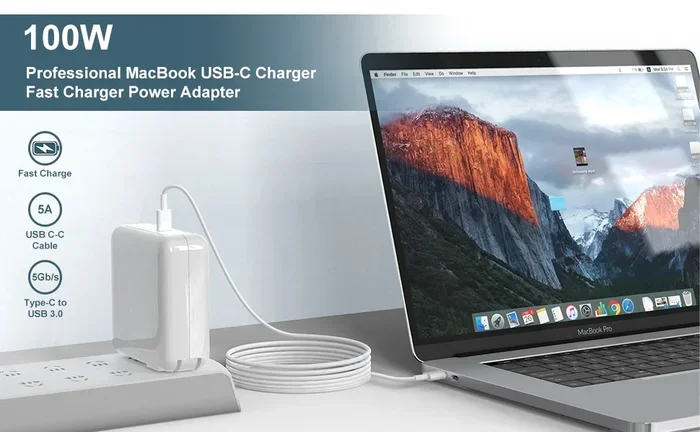
These screens connect to laptops, tablets, and even smartphones. The most common connection types are USB-C, HDMI, and Mini DisplayPort. Many modern portable displays also support USB power delivery, which means a single cable handles both video and charging. Some models even offer a touchscreen display for extra versatility.
How Does a Portable Display Connect to Devices?
Connecting a portable screen is straightforward. Here is how it typically works:
- USB-C connection: Plug one end into your laptop and the other into the monitor. This handles video and power in one cable.
- HDMI cable: Use an HDMI cord to link your device to the monitor. This works with desktops, gaming consoles, and older laptops.
- Wireless options: Some newer models support wireless screen mirroring or Bluetooth connectivity for added flexibility.
The beauty of a portable monitor is that you can set it up in seconds. No tools, no complicated software, no fuss.
Can You Really Use a Portable Monitor as a Regular Monitor?
The answer to can a portable monitor be used as a regular monitor is a confident yes. A travel monitor functions the same way as a standard desktop display once it is connected and powered on. You can run your desktop, open apps, watch videos, and even game on it.
Here is what makes a portable display work just like a regular monitor:
- Full HD or 4K resolution: Many portable screens offer sharp, clear images just like a traditional desktop monitor.
- Adjustable refresh rate: Some models support 60Hz or higher, which is great for smooth visuals.
- Wide viewing angles: IPS panels in portable displays deliver consistent colors from different angles.
- Multiple input options: You can switch between HDMI, USB-C, and other ports just like a full-size screen.
The key difference is size and portability. A portable monitor is designed to be compact and light. But in terms of performance and display quality, it holds its own against many regular monitors.
Using a Portable Monitor as a Primary Display
You can absolutely use a portable display as your main screen. Many remote workers and digital nomads do this every day. You just need to make sure your laptop or device supports external display output. Once connected, you can extend or mirror your screen in your operating system settings.
To set it up as a primary display:
- Connect the portable monitor to your laptop using USB-C or HDMI.
- Go to your display settings (Windows: Settings > Display; Mac: System Preferences > Displays).
- Choose “Extend these displays” for a dual-screen setup.
- Drag the monitor icon to match its physical position on your desk.
- Select the portable display as your main screen if you want it to show your taskbar and desktop.
This setup works beautifully for a home office or a workstation on the go.
What You Need to Know Before Using One
Before you start using a portable monitor as your regular display, there are a few things to consider. These factors will help you get the best experience and avoid common frustrations.
Power Requirements
Some portable screens run on built-in batteries, while others need to stay plugged in. If you want to use a travel monitor as a full-time desktop display, you will likely need a constant power source. Battery-powered models are great for travel but may not last all day at your desk.
Look for a portable monitor that supports USB-C power delivery. This lets you charge your laptop and power the display with one cable. It keeps your workspace clean and clutter-free.
Screen Size and Resolution
Most portable displays range from 13 to 17 inches. For a regular monitor replacement, 15 to 17 inches is ideal. Smaller screens work fine for reading and browsing, but you may want more screen real estate for multitasking.
As for display resolution, aim for at least Full HD (1920 x 1080). If you do design work or watch a lot of video, a 4K portable monitor will give you sharper, more detailed images.
Stand and Ergonomics
One thing to keep in mind is that many portable monitors do not come with a sturdy stand. Some include a basic fold-out kickstand, while others require a separate monitor stand or mount. If you plan to use the screen for long hours, invest in a good stand to keep your screen size at eye level.
Proper ergonomics matter. A poorly positioned screen can cause neck strain and eye fatigue. Keep the top of the display at or slightly below eye level. This is true whether you are using a portable display or a traditional monitor.
Best Ways to Set Up a Portable Monitor at Home or Office
Setting up a portable monitor as a regular display is easy. Here are some practical setups that work well in different environments.
Home Office Dual-Screen Setup
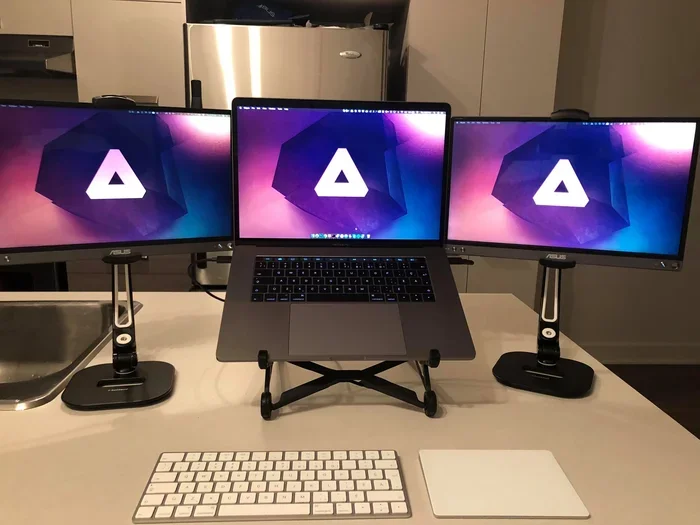
A dual screen setup is one of the most popular reasons people buy a portable display. You keep your laptop open on the left and place the portable monitor on the right. This gives you more space for emails, documents, and browser tabs.
To make this work smoothly:
- Use a USB-C hub or docking station for easy connectivity.
- Position the portable screen at the same height as your laptop display.
- Use a monitor arm or stand to save desk space.
- Adjust the brightness and color settings to match both screens.
This setup is a huge productivity boost. You will wonder how you ever worked with just one screen.
Travel and Remote Work Setup
For digital nomads and frequent travelers, a travel monitor is a game-changer. It turns any hotel room, coffee shop, or co-working space into a proper workstation. Just plug in your laptop, and you have a dual-screen setup wherever you go.
Quick tips for travel setups:
- Choose a lightweight model under 1.5 pounds.
- Carry a compact USB-C cable and a power bank for battery-powered models.
- Use a portable monitor stand that clips to your laptop or folds flat.
- Pick a screen with good brightness (300 nits or higher) for use in bright environments.
Gaming and Media Setup
You can also use a portable monitor for gaming and media consumption. Connect it to a PlayStation, Xbox, or Nintendo Switch using an HDMI cable. Some portable displays offer a high refresh rate, which makes games look smooth and responsive.
For the best gaming experience, look for these features:
- A refresh rate of 120Hz or higher.
- Low input lag for responsive gameplay.
- Good color accuracy for vibrant visuals.
- Built-in speakers or a headphone jack for audio.
Keep in mind that a portable gaming monitor may not match the performance of a large desktop gaming monitor. But for casual gaming on the go, it works great.
Portable Monitor vs Regular Monitor: Key Differences
A portable monitor and a regular desktop monitor serve the same basic purpose: displaying visual content. But there are important differences to understand before you make a choice.
| Feature | Portable Monitor | Regular Monitor |
|---|---|---|
| Weight | 1 to 3 pounds | 5 to 20+ pounds |
| Screen Size | 13 to 17 inches | 24 to 34 inches |
| Power Source | Battery or USB-C | Wall outlet only |
| Portability | Highly portable | Not portable |
| Resolution | Full HD to 4K | Full HD to 4K |
| Refresh Rate | 60Hz to 144Hz | 60Hz to 240Hz |
| Built-in Speakers | Small or none | Larger, better speakers |
| Price Range | $100 to $500 | $150 to $1000+ |
As you can see, a portable display trades size and built-in features for portability and convenience. If you need a screen size larger than 17 inches or premium speakers, a regular monitor is the better choice. But if you value mobility and flexibility, a portable monitor wins hands down.
When to Choose a Portable Monitor
Choose a portable monitor if you:
- Travel frequently for work or pleasure.
- Need a second screen for your laptop on the go.
- Have limited desk space at home or in the office.
- Want a lightweight external display for a digital nomad lifestyle.
- Need a backup screen for presentations or meetings.
When to Choose a Regular Monitor
Stick with a traditional desktop monitor if you:
- Work long hours at a fixed desk and need maximum screen real estate.
- Do professional video editing, graphic design, or 3D rendering.
- Want built-in speakers, USB hubs, and adjustable stands.
- Need a large screen size of 27 inches or more.
- Prioritize the highest refresh rate and color accuracy.
Common Mistakes to Avoid When Using a Portable Monitor
Using a portable monitor as a regular display is simple, but a few common mistakes can hurt your experience. Here is what to watch out for.
Skipping the Power Source
Many people assume a portable screen will run on battery forever. In reality, most models need to be plugged in during extended use. Always check the power requirements before you start working. Forgetting to plug in the monitor mid-task can be frustrating and disruptive.
Using the Wrong Cable
Not all cables are created equal. A cheap or incompatible HDMI cable or USB-C cable can cause flickering, low resolution, or no signal at all. Always use high-quality cables that support the bandwidth your portable monitor needs. For USB-C connections, make sure the cable supports display port over USB-C (also known as DP Alt Mode).
Ignoring Display Settings
After connecting a portable display, many people forget to adjust their display settings. This can result in a mirrored screen instead of an extended one, or text that appears too small. Take a few minutes to configure your display resolution, scaling, and orientation. This small step makes a big difference in daily comfort.
Overlooking the Stand
A portable monitor without a proper stand can strain your neck and eyes. The basic kickstand that comes with most models only offers one or two angle options. If you use the screen for hours at a time, invest in a adjustable monitor stand or a clamp mount. Your posture will thank you.
Expert Insights: Who Benefits Most From a Portable Monitor?
Not everyone needs a portable display, but certain groups benefit greatly from one. Here is a look at who gets the most value from using a portable monitor as a regular screen.
Remote workers love the flexibility of a travel monitor. It turns any space into a productive workstation. Whether you are working from a kitchen table, a hotel room, or a co-working space, a second screen helps you stay organized and efficient.
Students also benefit a lot. A lightweight portable monitor gives them a second screen for research while taking notes on their laptop. It is much easier to carry than a full-size desktop monitor to the library or a study group.
Gamers on the go appreciate a portable screen for console gaming during travel. Connecting a portable display to a Nintendo Switch or PlayStation makes long trips far more entertaining. The refresh rate and screen size on modern portable models are impressive for their size.
Creative professionals who work with photo or video editing on the road find a 4K portable monitor invaluable. It gives them a color-accurate external display to review their work anywhere.
Key Takeaways
- A portable monitor works as a regular monitor: With the right cables and power source, it performs just like a standard display.
- USB-C is the easiest connection: It handles both video and power, making setup simple and clean.
- Consider your needs carefully: Screen size, resolution, refresh rate, and portability should all factor into your choice.
- Avoid common setup mistakes: Use the right cable, adjust display settings, and invest in a good stand.
- A portable display boosts productivity: Whether at home, in the office, or on the road, a second screen helps you work smarter.
- It is not a replacement for everything: Large desktop monitors still offer advantages in size, speakers, and ergonomics for fixed setups.
Final Thoughts
So, can a portable monitor be used as a regular monitor? Absolutely. A portable display is a versatile, convenient, and powerful tool for work, play, and everything in between. It may not replace a large 34-inch ultrawide desktop monitor for everyone, but for many people, it is the perfect solution.
The key is choosing the right model for your needs. Consider your screen size, resolution, connectivity options, and power requirements. Set it up properly, adjust your display settings, and invest in a good stand. With these steps, your portable monitor will feel just like a regular monitor and maybe even better.
Whether you are a remote worker, a student, a gamer, or a creative professional, a portable monitor can transform the way you work and play. Give it a try, and you will wonder how you ever managed without one.
Frequently Asked Questions
Can I use a portable monitor as my only display?
Yes, you can use a portable monitor as your only display. Just connect it to your laptop or desktop via USB-C or HDMI, and set it as your primary screen in your display settings. Make sure the screen size and resolution are comfortable for your daily tasks.
Do portable monitors need to be plugged in all the time?
Most portable monitors need a constant power source for extended use. Some models have built-in batteries that last a few hours, but for full-time use as a regular monitor, you will want to keep it plugged in. Look for models that support USB-C power delivery for the simplest setup.
Can I connect a portable monitor to a gaming console?
Yes, you can connect a portable monitor to a PlayStation, Xbox, or Nintendo Switch using an HDMI cable. This makes it a great external display for gaming on the go. Just check that the monitor supports the refresh rate and input lag requirements for smooth gameplay.
Is a portable monitor good for professional work?
A portable monitor is excellent for professional work, especially for remote workers, designers, and writers. A dual screen setup with a portable display and a laptop can significantly boost productivity. Choose a model with at least Full HD resolution and good color accuracy for the best results.
What is the best screen size for a portable monitor used as a regular monitor?
A 15 to 17-inch portable display is ideal for use as a regular monitor. It provides enough screen size for comfortable multitasking while remaining portable. If you prioritize portability over screen real estate, a 13 to 14-inch model also works well for basic tasks.
Can I use a portable monitor with a tablet or smartphone?
Yes, many portable monitors work with tablets and smartphones that support HDMI output or USB-C video output. This turns your mobile device into a mini workstation with a larger display resolution and more screen space for apps and content.
=== CONCLUSION ===
Using a portable monitor as a regular monitor is not only possible, it is a smart choice for many people. A portable display offers flexibility, portability, and solid performance that rivals traditional desktop monitors. Whether you are setting up a home office, traveling for work, or building a compact workstation, a travel monitor delivers real value.
Remember to choose the right screen size, resolution, and connection type for your needs. Avoid common setup mistakes, invest in a good stand, and configure your display settings properly. With the right approach, your portable monitor will work just as well as any regular monitor, and you will enjoy the freedom of a lightweight, portable display wherever you go.