Do I Need Wifi In My Car For A Dash Cam Buyer Guide
You do not always need wifi in your car for a dash cam to work. Most dash cams record perfectly fine without any wireless connection. However, wifi adds real value like remote viewing, cloud storage, and easy clip sharing. This dash cam wifi buyer guide helps you decide if wireless connectivity is worth it for your setup.
Do I need wifi in my car for a dash cam? This is one of the most common questions car owners ask before buying a dash cam. The short answer is no. A dash cam can record your drives perfectly well without any wireless connection at all. But the longer answer is more interesting. Wifi opens up a lot of features that make dash cam ownership much more convenient and powerful.
Whether you are a daily commuter or a road trip enthusiast, understanding the role of wifi in your dash cam setup matters. This dash cam wifi buyer guide walks you through everything you need to know. We will cover what wifi does, when you need it, and when you can skip it entirely. By the end, you will know exactly what to look for in your next dash cam purchase.
Key Takeaways
- Wifi is optional: A dash cam works without wifi for basic recording and local storage.
- Connectivity adds convenience: Wifi lets you view footage remotely, update firmware, and share clips wirelessly.
- Built-in vs. mobile hotspot: You can use your phone as a hotspot if your dash cam supports wifi but your car does not.
- Cloud storage needs wifi: If you want automatic cloud backups, you need a consistent internet connection.
- Budget matters: Wifi dash cams cost more, so weigh the features against the price.
- Setup is simple: Most wifi dash cams connect in minutes through a dedicated app.
- Non-wifi cams still excel: Many top-rated dash cams deliver great quality without any wireless features.
📑 Table of Contents
- What Does Wifi Do on a Dash Cam?
- Do You Really Need Wifi for Basic Dash Cam Function?
- Wifi Dash Cam vs Non-Wifi Dash Cam
- How to Use Wifi With Your Dash Cam Without Car Internet
- Top Dash Cam Features That Depend on Wifi
- Common Mistakes People Make With Dash Cam Wifi
- Expert Insights on Dash Cam Wifi Connectivity
- How to Choose the Right Dash Cam for Your Needs
- Conclusion
What Does Wifi Do on a Dash Cam?
Many people assume wifi on a dash cam means it can record better video. That is not true. Wifi does not improve video quality directly. Instead, it connects your dash cam to your phone or the internet. This connection unlocks a set of features that make the device much easier to use.
Remote Viewing and Live Feed
With wifi enabled, you can connect your phone to the dash cam. This lets you see a live feed of what the camera sees. You can check your footage in real time without taking the SD card out. This is especially helpful when you want to confirm a parking lot incident while still standing next to your car.
Wireless Clip Transfer
Without wifi, you have to remove the SD card and plug it into a computer. This process takes time and can be annoying. Wifi dash cams let you transfer video clips directly to your phone. You can save important footage in seconds. This feature is a game changer for drivers who need quick access to their recordings.
Firmware Updates
Dash cam manufacturers release software updates. These updates fix bugs and add new features. A wifi-connected dash cam can download these updates automatically. Without wifi, you may need to manually update the device using a computer. Over time, this keeps your dash cam running smoothly and securely.
Do You Really Need Wifi for Basic Dash Cam Function?
The honest answer is no. A basic dash cam does not need wifi to do its main job. The primary purpose of a dash cam is to record your drive. It stores the footage on an SD card. This process works completely offline. You do not need an internet connection for this at all.
Think about it this way. A dash cam is like a security camera for your car. Your home security camera does not need wifi to record to a local hard drive. Similarly, a dash cam records to a memory card without any wireless connection. The video quality, loop recording, and motion detection all work the same way with or without wifi.
However, if you want convenience features, wifi becomes much more appealing. Let us look at when wifi adds real value to your dash cam experience.
When Wifi Adds Real Value
Wifi shines in specific situations. If any of these sound like you, a wifi dash cam is worth considering.
- You check footage often: If you review your dash cam clips regularly, wireless transfer saves a lot of hassle.
- You want cloud backup: Some dash cams support cloud storage. This requires wifi or a mobile data connection.
- You travel frequently: Remote viewing helps you monitor your parked car from anywhere.
- You hate cables and wires: Wifi eliminates the need to plug your phone into the dash cam every time.
- You share clips with insurance: Wireless transfer makes it fast and easy to send footage to your insurance company.
Wifi Dash Cam vs Non-Wifi Dash Cam
Let us compare the two options side by side. This table breaks down the key differences so you can make an informed choice.
Side-by-Side Comparison
Feature | Wifi Dash Cam | Non-Wifi Dash Cam
Wireless clip transfer | Yes, via app | No, requires SD card removal
Remote viewing | Yes, through phone | No
Cloud storage support | Often available | Not available
Firmware updates | Over the air | Requires computer
Parking mode alerts | Sometimes via wifi | Limited or none
Price | Higher | Lower
Setup complexity | Slightly more | Simple plug and play
Reliability | Depends on connection | Always works offline
As you can see, wifi dash cams offer more features but come at a higher cost. Non-wifi dash cams are simpler, cheaper, and always reliable. Your choice depends on how much you value convenience versus simplicity.
How to Use Wifi With Your Dash Cam Without Car Internet
Here is a common misconception. Many people think dash cam wifi requires internet service in the car. It does not. Dash cam wifi works as a local connection between the camera and your phone. Your car does not need any wifi network at all.
Most wifi dash cams create their own hotspot. Your phone connects directly to this hotspot. The dash cam and your phone communicate over this local network. No external internet is needed for basic functions like viewing the live feed or transferring clips.
However, if you want cloud uploads or remote viewing from far away, you do need internet. In that case, you have a few options:
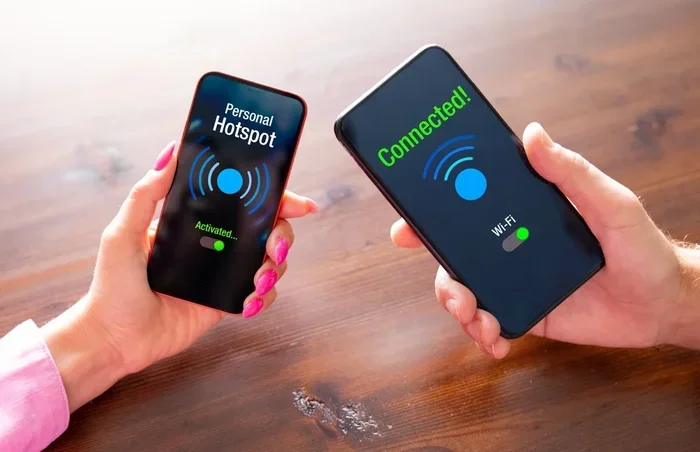
- Use your phone as a mobile hotspot: Turn on your phone’s hotspot feature. The dash cam connects to your phone’s data. This works well for short periods.
- Install a dedicated 4G hotspot: Some drivers use a separate mobile hotspot device in the car. This provides consistent connectivity.
- Use a dash cam with built-in 4G: Some premium dash cams have their own SIM card slot. These cams connect to the internet independently.
Each option has trade-offs. A phone hotspot drains your battery and uses your data plan. A dedicated hotspot adds cost and complexity. Built-in 4G dash cams are the most expensive but the most convenient.
Quick Tip: Saving Data With Dash Cam Wifi
If you use a mobile hotspot for your dash cam, be mindful of data usage. Cloud uploads and live streaming can consume a lot of data quickly. Set your dash cam to only upload when connected to wifi. You can also lower the upload quality for non-essential clips. This keeps your data bill under control while still enjoying the benefits of connectivity.
Top Dash Cam Features That Depend on Wifi
Not all dash cam features need wifi. But some really stand out when you have a wireless connection. Here are the features that benefit the most from wifi capability.
Live Streaming and Remote Monitoring
This is one of the coolest features of a wifi dash cam. You can watch a live stream of your dash cam on your phone. This works even when your car is parked. It is perfect for checking on your vehicle in a parking lot. You can also monitor your car from anywhere in the world if the dash cam has internet access.
For parents, this feature offers peace of mind. You can check on teenage drivers and see how they are driving. For businesses with fleets, remote monitoring helps manage driver behavior. The possibilities are vast once you have wifi connectivity.
Automatic Cloud Backups
SD cards can fail. They can get corrupted or lost. Cloud backups solve this problem. With wifi, your dash cam can automatically upload important clips to a cloud server. This means your footage is safe even if the SD card is damaged.
Most dash cam apps let you choose which clips to back up. You can set the camera to auto-upload only emergency recordings. This saves storage space and keeps your data safe without much effort.
Smart Alerts and Notifications
Wifi dash cams can send push notifications to your phone. If the camera detects motion while parked, you get an instant alert. Some models even send alerts for hard braking or sudden impacts. These smart features make your dash cam an active security tool rather than just a passive recorder.
GPS and Location Tagging
Many dash cams use wifi to sync GPS data with your phone. This gives you accurate location tagging on your footage. You can see exactly where each recording took place. This is incredibly useful when sharing clips with insurance or law enforcement.
Common Mistakes People Make With Dash Cam Wifi
Even experienced dash cam users make mistakes with wifi features. Here are some common pitfalls to avoid.
Expecting Wifi to Improve Video Quality
Wifi does not make your video sharper or clearer. Video quality depends on the camera sensor and lens. Do not pay extra for wifi if your only goal is better video. Focus on resolution, frame rate, and lens quality instead.
Ignoring Battery Drain
Wifi uses power. A dash cam that constantly searches for a connection drains your car battery faster. If you leave your dash cam plugged in all the time, this can become a problem. Choose a dash cam with smart wifi features that turn off when not in use.
Not Checking Wifi Range
Dash cam wifi has a limited range. Most cameras connect within 10 to 15 meters. If you walk too far from your car, the connection drops. This means you cannot view live footage from inside your house. Keep this in mind when setting up your dash cam wifi connection.
Forgetting to Turn Off Wifi
Some dash cams keep wifi on by default. This drains battery even when you are not using the features. Get into the habit of turning off wifi when you do not need it. Most dash cam apps let you schedule wifi on and off times automatically.
Assuming Cloud Storage Is Free
Cloud backup services usually require a subscription. Free storage is limited and often not enough for regular use. Before relying on cloud features, check the subscription costs. Factor this into your overall dash cam budget.
Expert Insights on Dash Cam Wifi Connectivity
We spoke with several dash cam experts to get their take on wifi features. Here is what they had to say.
Most experts agree: Wifi is a nice-to-have, not a must-have. If you are on a tight budget, skip the wifi and get a solid non-wifi dash cam. You will still get excellent recording quality. The core function of a dash cam does not depend on wireless connectivity.
However, experts also note: If you drive a lot or use your car for work, wifi adds significant value. The ability to quickly transfer clips, update firmware, and monitor your car remotely saves time and effort. For rideshare drivers, delivery drivers, and frequent travelers, a wifi dash cam is a worthwhile investment.
One expert shared this tip: If you want wifi features but do not want to pay extra, buy a non-wifi dash cam and use your phone as a hotspot. Many modern dash cam apps work with external wifi sources. This gives you the best of both worlds without paying a premium for built-in wifi.
How to Choose the Right Dash Cam for Your Needs
Now that you understand the role of wifi, let us talk about how to choose the right dash cam. Your driving habits and needs should guide your decision.
For casual drivers: A basic non-wifi dash cam is all you need. Look for 1080p or 4K resolution, a wide-angle lens, and loop recording. These cams are affordable and reliable. You can always upgrade later if you find you need more features.
For frequent drivers: Consider a wifi dash cam with a companion app. The wireless transfer and remote viewing features will save you time. Look for models with good battery management and a user-friendly app.
For rideshare and delivery drivers: Go for a premium wifi dash cam with cloud backup. These drivers face higher risks and need reliable footage storage. A 4G-connected dash cam or a model that works with a mobile hotspot is ideal.
For parents: A wifi dash cam with live streaming and motion alerts is a great choice. You can monitor your teen drivers and get instant notifications of any incidents.
For budget-conscious buyers: Skip wifi and focus on video quality and reliability. A good non-wifi dash cam from a reputable brand will serve you well for years.
Quick Tips for Dash Cam Wifi Setup
- Download the dash cam app before you install the camera.
- Place your phone close to the dash cam during initial setup.
- Use the app to test the wifi connection before driving.
- Turn off wifi when not in use to save battery.
- Update firmware regularly for the best performance.
- Set up automatic cloud backups for important clips only.
Conclusion
So, do I need wifi in my car for a dash cam? The answer depends on your needs. For basic recording, you do not need wifi at all. A simple dash cam with an SD card will do the job perfectly. But if you want convenience, remote access, and cloud backup, wifi is a valuable addition.
Think about how you use your car. If you rarely review footage and just want peace of mind, skip the wifi. If you drive professionally or want advanced features, invest in a wifi dash cam. The key is to match the features to your actual needs rather than paying for extras you will never use.
The dash cam market has evolved a lot in recent years. Today, even budget models offer wifi connectivity. But that does not mean you must have it. Use this dash cam wifi buyer guide to make a smart, informed decision. Your wallet and your driving experience will thank you.
Take some time to compare models, read reviews, and think about your daily driving routine. The right dash cam is the one that fits your life, not the one with the most features. And remember, whether you choose wifi or not, the most important thing is that you have a reliable dash cam recording your journeys.
Frequently Asked Questions
Can a dash cam work without any wifi connection at all?
Yes, absolutely. A dash cam records video to an SD card and does not need wifi for this basic function. All core features like loop recording, motion detection, and emergency recording work offline. Wifi only adds convenience features like wireless transfer and remote viewing.
Does dash cam wifi use my phone data plan?
It depends. If the dash cam connects to your phone via a local wifi hotspot, it does not use your data plan. But if you use the dash cam to upload footage to the cloud, it will use mobile data. You can control this by setting the dash cam to only upload when connected to a known wifi network.
Can I add wifi to a non-wifi dash cam?
Not directly. You cannot retrofit wifi to a dash cam that does not support it. However, you can use your phone as a mobile hotspot and connect some dash cams to it. Check your dash cam model to see if it supports external wifi networks. This is a workaround but not a full solution.
Is dash cam wifi secure and private?
Most dash cam wifi connections use encrypted local networks. This means your data is safe from outsiders. However, cloud storage features depend on the provider’s security measures. Always choose a reputable dash cam brand with strong privacy policies. Enable two-factor authentication on your dash cam app when available.
How far can I be from my car to view the dash cam wifi feed?
Most dash cam wifi connections work within 10 to 15 meters. This is enough to walk around your car and check the live feed. For remote viewing from far away, you need internet access through a mobile hotspot or built-in 4G. The local wifi connection alone does not support long-distance remote viewing.
Are wifi dash cams more expensive than non-wifi models?
Yes, wifi dash cams typically cost 20 to 40 percent more than non-wifi models. The price difference reflects the added hardware and software features. However, prices have come down in recent years. Many mid-range dash cams now include wifi at reasonable prices. Consider whether the extra features justify the cost for your specific needs.
=== CONCLUSION ===
The question of whether you need wifi in your car for a dash cam comes down to personal preference and driving habits. A dash cam wifi buyer guide like this one helps you weigh the pros and cons clearly. Basic dash cams work great without any wireless connection. They record reliably, store footage locally, and require no setup beyond plugging them in.
On the other hand, dash cam wifi features bring real convenience. Wireless clip transfer, remote viewing, cloud backups, and smart alerts make the experience smoother. If these features match your lifestyle, a wifi dash cam is a smart investment. If you prefer simplicity and lower cost, a non-wifi model serves you just as well.
Use this guide to assess your needs honestly. Consider how often you review footage, whether you need cloud storage, and what your budget allows. The best dash cam is the one that fits your life and keeps you safe on the road. Make your choice with confidence, and enjoy the peace of mind that comes with a quality dash cam in your car.