Do I Need Internet Or Wifi For Home Security Cameras
Not all home security cameras need internet or WiFi to work. Many systems can record footage locally, send alerts via cellular, or operate entirely offline. Whether you live in a rural area with weak WiFi or simply want a more secure setup, there are options that fit every home and budget.
Key Takeaways
- WiFi is not always required: Many security cameras can record and store footage locally without any internet connection.
- Internet adds powerful features: Remote viewing, cloud storage, and real-time alerts depend on a stable internet connection.
- Cellular cameras work anywhere: These use a SIM card and mobile data, making them ideal for areas without WiFi.
- Wired cameras offer reliability: Ethernet-connected systems provide steady feeds without relying on WiFi signals.
- Local storage is a great alternative: SD cards and NVR/DVR systems keep your footage safe without cloud subscriptions.
- Your choice depends on your needs: Consider location, budget, and features before picking a camera system.
📑 Table of Contents
- Do I Need Internet or WiFi for Home Security Cameras?
- How WiFi Security Cameras Work
- Can Security Cameras Work Without Internet?
- Wired vs Wireless Security Cameras
- How Internet Affects Your Camera’s Performance
- Cellular Security Cameras: An Alternative Worth Considering
- Common Mistakes People Make With Security Camera Setup
- Expert Insights on Camera Connectivity
- How to Choose the Right Setup for Your Home
- Key Takeaways
- Conclusion
Do I Need Internet or WiFi for Home Security Cameras?
Here is a question many homeowners ask before buying a security camera system: do you actually need internet or WiFi? The short answer is no. You do not always need WiFi or internet for your cameras to work. But the longer answer depends on what features you want.
Some people want live streaming on their phone. Others just need a camera that records when motion is detected. Understanding the difference between WiFi cameras and cameras that work without internet helps you make the right choice. This guide covers everything you need to know about home security cameras and their connection requirements.
Let us break it down in simple terms. By the end, you will know exactly what kind of setup works best for your home.
Why the Confusion Exists
Most modern cameras are marketed as “smart cameras.” They connect to your home WiFi network. They send alerts to your phone. They stream video through an app. Because of this, many people assume all security cameras need internet. That is not true.
Even basic surveillance systems can function without a single byte of internet data. The technology has come a long way. Cameras can store footage on SD cards, hard drives, or local servers. They can still detect motion and record without ever touching the internet.
How WiFi Security Cameras Work
WiFi security cameras are the most popular type today. They connect to your home wireless network. From there, they can send video to a cloud server or a local device like a network video recorder (NVR).
Here is how a typical WiFi camera setup works:
- The camera connects to your home WiFi router.
- Video footage is either stored locally or uploaded to the cloud.
- You view the feed through a mobile app or web browser.
- Motion alerts are pushed to your phone in real time.
WiFi cameras are convenient. You do not need to run cables through your walls. You can place them almost anywhere within WiFi range. But they do depend on a stable wireless connection. If your WiFi goes down, the camera loses its ability to stream or send alerts.
What You Need for WiFi Cameras
A working WiFi router is the first requirement. Most cameras need at least 2 Mbps upload speed for smooth streaming. For multiple cameras, you will need higher internet speed and more bandwidth.
Here is a quick look at what WiFi cameras need:
- A 2.4 GHz or 5 GHz WiFi network
- Stable internet connection with decent upload speed
- A compatible app or platform (like Google Home, Alexa, or a brand-specific app)
- Power source (battery, wired, or solar)
Without these basics, your WiFi camera will not perform well. Weak WiFi signals lead to laggy video and dropped connections. This is why Wi-Fi range matters so much when placing your cameras.
Can Security Cameras Work Without Internet?
Yes, absolutely. Many offline cameras work perfectly fine without any internet connection. They record footage to a local storage device. They do not send alerts to your phone. But they still capture everything that happens in front of them.
This is great news for people who live in areas with poor internet service. Rural homes, cabins, and remote properties often lack reliable WiFi. A camera system that works offline solves this problem completely.
Types of Cameras That Work Without Internet
Not all non-internet cameras are the same. Here are the main types that can operate without a web connection:
- Local storage cameras: These save footage to an SD card or a hard drive on-site. You retrieve the footage by removing the card or accessing the recorder directly.
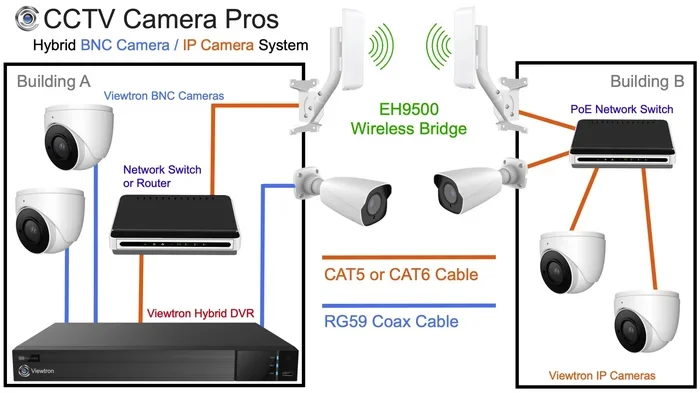
- DVR-based systems: A digital video recorder connects to analog cameras via coaxial cables. All footage stays on the DVR.
- NVR-based systems: A network video recorder connects to IP cameras via Ethernet cables. The NVR stores everything locally.
- Battery-powered standalone cameras: Some cameras record to internal memory and do not need any network at all.
Each option has its strengths. DVR and NVR systems are popular for full-home surveillance setups. Standalone cameras work well for single-room coverage or rental properties.
What You Lose Without Internet
Going without internet means giving up some convenient features. You cannot view your cameras remotely from your phone. You lose real-time push notifications. Cloud backup and two-way audio may not work either.
But you still get core security. The camera records motion events. You can review footage after an incident. For many homeowners, that is enough.
Wired vs Wireless Security Cameras
When choosing a home security camera, one of the biggest decisions is wired versus wireless. This choice affects how your cameras connect and how reliable they are.
Wired Cameras (Ethernet Connection)
Wired cameras use an Ethernet cable to connect directly to your router or NVR. They do not rely on WiFi signals. This makes them very stable and reliable.
Benefits of wired cameras include:
- No signal interference from walls or appliances
- Consistent video quality
- Lower latency for live viewing
- No need for a strong WiFi network
The downside is installation. You need to run cables through walls or along baseboards. This can be tedious. But the payoff is a rock-solid IP camera setup that rarely drops connection.
Wireless Cameras (WiFi Connection)
Wireless cameras connect to your WiFi network. They are easy to install. You just mount them and connect through an app. No cables needed for data transfer.
Benefits of wireless cameras include:
- Easy and fast installation
- Flexible placement options
- Portable and repositionable
- Smart features like app alerts and voice control
The downside is dependence on WiFi. If your router is far away, the signal may be weak. Thick walls and metal objects can interfere with the wireless connection. For best results, place wireless cameras within good range of your router.
Comparison Table: Wired vs Wireless
| Feature | Wired Cameras | Wireless Cameras |
|---|---|---|
| Connection Type | Ethernet cable | WiFi network |
| Installation | More complex | Easy and quick |
| Reliability | Very high | Depends on WiFi strength |
| Video Quality | Consistent and stable | Can fluctuate with signal |
| Internet Required | No (for local recording) | No (for local recording) |
| Remote Viewing | Yes (with internet) | Yes (with internet) |
| Power Source | PoE or power adapter | Battery or power adapter |
Both types can work without internet for local recording. The difference is in how they connect to your network when internet is available.
How Internet Affects Your Camera’s Performance
If you do have internet, it affects how your cameras perform in several ways. Understanding this helps you choose the right plan and equipment.
Bandwidth and Upload Speed
Every camera uses bandwidth. Streaming video takes up data. A single 1080p camera uses about 1 to 2 Mbps of upload speed. A 4K camera can use 4 Mbps or more.
If you have multiple cameras, the bandwidth usage adds up quickly. A 4-camera system streaming at 1080p could use 8 Mbps of upload. If your internet plan has slow upload speeds, this can cause lag and poor video quality.
Here are some tips to manage bandwidth:
- Lower the resolution for cameras you do not need in 4K
- Set cameras to record only on motion detection
- Use a separate network or VLAN for your camera system
- Check your upload speed with an online speed test
Cloud Storage vs Local Storage
Cloud storage requires internet. Your footage uploads to a server managed by the camera company. You access it through an app. This is convenient but often comes with monthly fees.
Local storage does not need internet. Footage saves to an SD card, NVR, or DVR. You access it directly from the device. There are no monthly fees. But you must be on-site to review the footage.
Many homeowners choose a hybrid approach. They use local storage for everyday recording. They use cloud backup for critical events. This balances cost and convenience.
Remote Viewing and Smart Features
Internet unlocks the smart features people love about modern cameras. You can check your home from work. You get instant alerts when motion is detected. You talk through two-way audio. You share access with family members.
Without internet, none of these features work. The camera still records locally. But you cannot control it from your phone. You cannot receive alerts. You cannot stream live video remotely.
Think of it this way. Internet turns a basic camera into a smart camera. It is the difference between a security system and a smart security system.
Cellular Security Cameras: An Alternative Worth Considering
Cellular security cameras are a great option for homes without WiFi. They use a SIM card and mobile data to connect. Think of them like a phone that happens to be a camera.
These cameras are perfect for:
- Rural properties with no WiFi or internet
- Garages, sheds, and detached buildings
- Rental homes where you cannot install a WiFi router
- Backup cameras during internet outages
You need a data plan for cellular cameras. Most brands offer their own SIM plans or work with major carriers. Costs range from a few dollars to around $15 per month per camera.
Cellular cameras record locally or to the cloud. They send motion alerts to your phone. They work independently of your home WiFi. This makes them incredibly versatile for home security in areas with limited connectivity.
Quick Tips for Choosing Cellular Cameras
- Check cellular coverage in your area before buying
- Choose a camera with a good battery life (or solar panel option)
- Compare data plans from different carriers
- Look for cameras that support local storage to avoid monthly fees
Common Mistakes People Make With Security Camera Setup
Many homeowners make avoidable mistakes when setting up their surveillance system. Here are the most common ones and how to prevent them.
Assuming All Cameras Need Internet
This is the biggest mistake. People buy WiFi cameras and then get frustrated when their internet is down. They think the cameras stopped working. In reality, the cameras may still be recording locally. They just cannot send alerts or stream remotely.
Before buying, decide what features you actually need. If you just want recording, a non-WiFi camera may be all you need.
Ignoring WiFi Range
Placing a wireless camera too far from the router causes weak signals. The video may lag, drop, or fail to connect. Always check your WiFi signal strength at the camera location before mounting it.
Use a WiFi extender or mesh network if needed. A wired Ethernet connection solves this problem entirely.
Overlooking Storage Needs
Cameras record a lot of data. A 1080p camera can fill a 64GB SD card in just a few days. Plan your storage carefully. Use larger SD cards, set motion-only recording, or use a loop recording feature.
Skipping the NVR or DVR
Some people rely only on individual cameras with SD cards. This works for one or two cameras. But for a full home system, an NVR or DVR centralizes everything. It makes management easier and storage more reliable.
Expert Insights on Camera Connectivity
We asked a few security professionals about the internet vs. no-internet debate. Here is what they had to say.
Mark, a home security installer with 12 years of experience: “I always tell clients that WiFi is a convenience, not a necessity. A wired system with local storage will never fail just because the internet goes down. That is the peace of mind people need.”
Sarah, a smart home consultant: “For most urban homes, WiFi cameras are the way to go. They are easy to set up and offer great features. But for vacation homes or remote properties, I recommend cellular or fully offline systems.”
David, a cybersecurity specialist: “Internet-connected cameras are more vulnerable to hacking. Offline cameras are inherently more secure. If privacy is a top concern, local-only recording is the safer choice.”
These experts agree on one thing. The best setup depends on your specific situation. There is no one-size-fits-all answer.
How to Choose the Right Setup for Your Home
Now that you understand the options, here is how to decide what works best for you.
Choose a WiFi camera system if:
- You have reliable WiFi throughout your home
- You want remote viewing and smart features
- You prefer easy installation without running cables
- You are comfortable with cloud storage subscriptions
Choose a wired camera system if:
- You want maximum reliability and stability
- You have multiple cameras to cover a large area
- You do not want to depend on WiFi signals
- You prefer local storage with no monthly fees
Choose a cellular camera if:
- You have no WiFi or internet at the camera location
- You need coverage for a detached building or remote area
- You want a portable or temporary setup
Choose an offline camera if:
- You only need local recording
- You want the lowest possible cost
- You value privacy and do not want cloud storage
- You live in an area with unreliable internet
Think about your priorities. Then pick the system that matches. You can always start simple and expand later.
Key Takeaways
- Internet is not required for basic security camera function. Many cameras record locally without any connection.
- WiFi makes cameras smarter. It enables remote viewing, alerts, and cloud features.
- Wired cameras offer the most reliable connection. Ethernet beats WiFi for stability and video quality.
- Cellular cameras fill the gap for areas without WiFi. They use mobile data to connect and send alerts.
- Local storage saves money. SD cards and NVR/DVR systems avoid monthly cloud fees.
- Your needs should drive your choice. Consider location, budget, and features before buying.
- Offline cameras still protect your home. They record motion events even without internet access.
Conclusion
So do you need internet or WiFi for home security cameras? The answer is it depends on what you want. If you want basic recording and local storage, you do not need either. If you want remote access, smart alerts, and cloud backup, then yes, you need internet.
The good news is there are options for every situation. WiFi cameras work great for urban homes with strong internet. Wired cameras offer reliability for full-home coverage. Cellular cameras serve remote properties perfectly. Offline cameras keep things simple and affordable.
Take your time. Assess your home. Think about what features matter most to you. Then choose the system that fits. A well-planned security camera setup gives you peace of mind whether you have internet or not.
Start with what you need. You can always upgrade later. The most important thing is that your home is protected.
Frequently Asked Questions
Can I use security cameras without WiFi at home?
Yes, you can. Many security cameras record footage locally to an SD card or a DVR/NVR system. These cameras do not need WiFi to capture and store video. You just need to access the storage device on-site to review the footage.
Do wireless security cameras need internet to record?
No, wireless cameras do not need internet to record. They can save footage to a local SD card or a connected recorder. Internet is only needed if you want to stream live, receive remote alerts, or upload to the cloud.
What happens to my security camera when the internet goes down?
If your camera records locally, it keeps working. It will continue to capture motion events and save them to its storage. You just will not be able to view the feed remotely or receive phone alerts until the internet returns.
Are cellular security cameras a good option without WiFi?
Yes, cellular cameras are an excellent option. They use a SIM card and mobile data to connect. This makes them ideal for homes without WiFi or for detached buildings like garages and sheds. You will need a data plan, but they work anywhere with cellular coverage.
How much internet do security cameras use?
A single 1080p camera uses about 1 to 2 Mbps of upload speed. A 4K camera can use 4 Mbps or more. If you have multiple cameras, the data usage adds up. Check your internet plan to make sure your upload speed can handle all your cameras.
Is it safer to use cameras without internet?
Offline cameras are generally more secure. They cannot be hacked through the internet because they are not connected. If privacy is a major concern for you, a local-only camera system with no internet access is the safest choice.