Do I Need A New Modem If I Get A Wi Fi 6 Router Today
You might not need a new modem if you are getting a WiFi 6 router. The answer depends on your current modem’s age, your ISP’s requirements, and whether your existing gear supports the speeds you want. In many cases, an older modem can still work with a shiny new WiFi 6 router, but there are important exceptions to watch for.
This is a comprehensive guide about Do I Need A New Modem If I Get A Wi Fi 6 Router.
Key Takeaways
- Your old modem may still work: Many existing modems are compatible with new WiFi 6 routers through Ethernet or coaxial connections.
- Check your internet speed plan: If your ISP plan exceeds your modem’s capabilities, you will need an upgrade.
- WiFi 6 routers need WiFi 6 devices to shine: Older devices will still connect but won’t unlock the full speed benefits.
- Modem-router combos add complexity: Replacing one unit can be trickier than buying separate devices.
- ISP approval matters: Always verify your modem is on your provider’s approved list before making any purchase.
- Separate modem and router setups offer more flexibility: You can upgrade one without replacing the other.
- DOCSIS 3.0 or higher is usually sufficient: Most current modems meet the minimum requirements for WiFi 6 routers.
[FEATURED_IMAGE_PLACEHOLDER]
What Is WiFi 6 and Why Should You Care
WiFi 6 is the latest wireless standard, also known as 802.11ax. It brings faster speeds, better efficiency, and improved performance in crowded spaces. If you have ever struggled with slow internet in a busy household, WiFi 6 can be a game changer.
But here is the big question people ask all the time. Do you need to buy a new modem when you upgrade your router to WiFi 6? The short answer is maybe. The longer answer is what this guide covers in full detail.
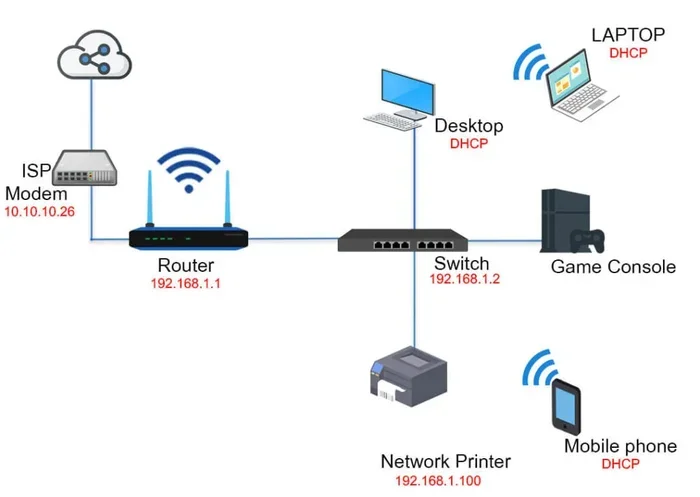
Think of your modem as the bridge between your home and the internet. Your router takes that connection and spreads it wirelessly around your house. These two devices work together but serve different jobs. Understanding this difference is the first step to making a smart upgrade decision.
Many people confuse modems and routers because internet providers often sell them as a single unit. That combo device handles both jobs at once. But you can also run separate devices, which gives you more control over what you upgrade and when.
Let us walk through exactly when you need a new modem and when you can keep what you already have. By the end, you will feel confident about your next move.
How Your Current Modem Works with a New WiFi 6 Router
The Basic Connection
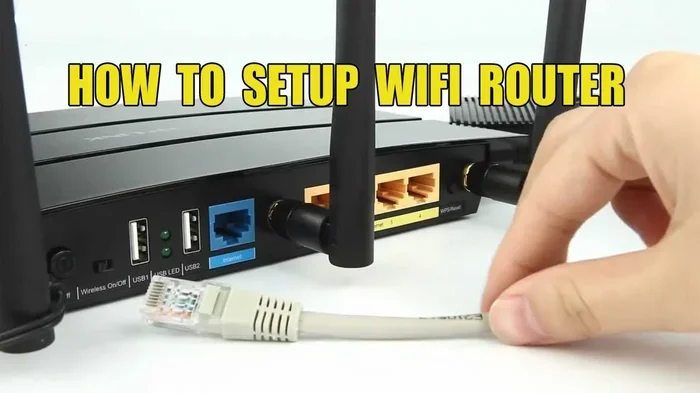
A modem connects to your internet service provider through a coaxial cable or a fiber line. It translates the signal from your ISP into something your home network can use. Then it passes that signal to your router, either through an Ethernet cable or wirelessly.
When you add a new WiFi 6 router to the mix, the modem does not need to understand WiFi 6 itself. It just needs to deliver the internet signal reliably. Your new router handles all the WiFi 6 magic on the wireless side.
This means most modems manufactured in the last five to seven years can work fine with a WiFi 6 router. The modem talks to the ISP, and the router talks to your devices. They do not need to be the same generation.
Where Compatibility Can Break Down
There are a few situations where your old modem will cause problems. If your modem is very old, it might not support the speeds your ISP offers. For example, if you pay for gigabit internet but your modem only handles 100 megabits, you will never get the full speed no matter how good your new router is.
Another issue is the connection type between the modem and router. If you are using an older Ethernet cable, it might bottleneck your speeds. A WiFi 6 router can deliver speeds up to 9.6 gigabits per second under ideal conditions. But an old Cat5 cable will limit you to 100 megabits. That is a huge difference.
Also, some older modems struggle with modern DOCSIS standards. DOCSIS stands for Data Over Cable Service Interface Specification. It is the protocol most cable internet providers use. If your modem only supports DOCSIS 3.0, it might still work fine for most users. But if you are pushing the upper limits of your internet plan, a DOCSIS 3.1 modem will handle the load better.
When You DO Need a New Modem
Your ISP Requires It
Some internet providers lock you into specific modem models. They maintain a list of approved modems on their website. If your current modem is not on that list, they might not provide support. Worse, they might not let you connect at full speed.
Before buying anything, check your ISP’s approved equipment list. Call their support line or visit their website. This one step can save you from buying the wrong modem entirely.
Your Modem Is Too Old
As a general rule, modems older than five years may not support the speeds modern internet plans deliver. If your modem was purchased before 2018, it is worth checking its specifications. Look for the DOCSIS version and the maximum throughput it supports.
Here is a quick way to check if your modem is holding you back. Run a speed test on a device connected directly to your modem with an Ethernet cable. Compare that result to the speed tier you pay for. If you are consistently getting much less than what you pay for, your modem is likely the bottleneck.
You Want to Maximize Your WiFi 6 Investment
A WiFi 6 router is a big investment. You want it to perform at its best. If your modem cannot feed it enough data, you are essentially putting a powerful engine in a slow car. The router cannot deliver speeds the modem does not provide.
For most users on plans up to 500 megabits, a DOCSIS 3.0 modem will work well with a WiFi 6 router. For gigabit plans or faster, a DOCSIS 3.1 modem is strongly recommended. This ensures your modem can keep up with what the router can dish out.
You Are Switching Internet Providers
If you are changing ISPs, you almost certainly need a new modem. Different providers use different technologies. Cable, fiber, and DSL all require different types of modems. Your old cable modem will not work with a fiber connection, and vice versa.
When you switch providers, ask them what modem they recommend or require. They often rent modems to customers, but buying your own can save money in the long run.
When You Can Keep Your Old Modem
Your Modem Is Less Than Five Years Old
If your modem was purchased in the last few years, it probably supports DOCSIS 3.0 or higher. This is more than enough for most WiFi 6 routers. You can connect the two with an Ethernet cable and enjoy the benefits of WiFi 6 without spending extra on a modem.
Check the label on your modem for the model number. Then look up that model online to see what standards it supports. You will usually find the DOCSIS version and maximum speed right on the manufacturer’s page.
Your Internet Speed Plan Is Modest
If your internet plan is under 500 megabits, your current modem likely has no problem keeping up. WiFi 6 routers shine when they have fast data to send. But if your internet plan is slower, the router will still improve your wireless experience through better range and device handling.
WiFi 6 offers benefits beyond raw speed. It handles multiple devices more efficiently. If you have a smart home with dozens of connected gadgets, a WiFi 6 router can reduce lag and interference even on a basic internet plan.
You Have a Good Ethernet Connection
If your modem and router are connected with a modern Ethernet cable, the wired link between them will not slow things down. A Cat5e or Cat6 cable supports gigabit speeds easily. This means your old modem can deliver full-speed internet to your new WiFi 6 router without any issues.
Modem vs Router: Understanding the Difference
People often mix up modems and routers because they look similar and both sit in the corner of a room blinking lights. But they do very different jobs.
A modem brings the internet into your home from your provider. It is the translator between your ISP’s network and your local network. Without a modem, your router would have no internet to share.
A router takes that internet connection and distributes it to your devices. It assigns local IP addresses, manages traffic, and broadcasts the WiFi signal. A router also provides security features like a firewall and controls which devices can access the network.
When you buy a modem-router combo, you get both in one box. These are convenient but can be limiting. If one part breaks or becomes outdated, you have to replace the whole unit. Buying separate devices lets you upgrade just the router when WiFi standards improve.
| Feature | Modem | Router |
|---|---|---|
| Primary Job | Connects to ISP | Distributes connection to devices |
| WiFi Signal | No WiFi (usually) | Broadcasts WiFi |
| Upgrade Frequency | Every 5-7 years | Every 3-5 years |
| Replaces ISP Equipment? | Yes, if approved | Yes, always |
| Affects WiFi Speed? | Indirectly | Directly |
How to Choose the Right Equipment for WiFi 6
Check Your ISP’s Requirements First
Before spending a dime, find out what your ISP requires. Some providers use specific authentication systems that only work with certain modems. Others are more flexible and let you use any compatible device.
Call your ISP or check their website. Ask these three questions. First, what modem models do you approve for my service? Second, do I need a separate router or is a combo sufficient? Third, are there any settings I need to configure on my end?
Match Your Modem to Your Speed Tier
Your modem should support at least the speed tier you pay for. If you have a 1 gigabit plan, your modem needs to handle at least 1 gigabit. Most DOCSIS 3.1 modems support gigabit speeds or higher.
Here are some popular modem options that work well with WiFi 6 routers. The Motorola MB8600 is a reliable DOCSIS 3.1 modem that handles gigabit speeds. The Netgear CM1000 is another solid choice. The Arris Surfboard SB8200 is also widely recommended by users and tech reviewers alike.
Pick a WiFi 6 Router That Fits Your Home
WiFi 6 routers come in different shapes and sizes. For small apartments, a single router might be enough. For larger homes with multiple floors, consider a WiFi 6 mesh system. Mesh systems use multiple units to cover your entire home with strong, consistent signals.
Popular WiFi 6 routers include the TP-Link AX6000, the ASUS RT-AX86U, and the Netgear Nighthawk AX8. Each offers strong performance and good value. Choose based on your home size, the number of devices you have, and your budget.
Do Not Forget the Cables
A quick upgrade people often overlook is the Ethernet cable connecting the modem and router. An old Cat5 cable will limit your speeds. A Cat6 or Cat6a cable supports gigabit and multi-gigabit speeds without breaking a sweat.
These cables are inexpensive and easy to find. Spending ten dollars on a better cable can make a noticeable difference in performance. It is one of the simplest upgrades you can make.
Common Mistakes People Make When Upgrading to WiFi 6
Assuming the Router Alone Will Fix Everything
A WiFi 6 router will not fix slow internet if your modem is the bottleneck. Always test your modem’s speed first before buying a new router. Otherwise, you might spend money on equipment that does not solve your actual problem.
Ignoring Device Compatibility
WiFi 6 works best when your devices also support WiFi 6. Older phones, laptops, and tablets will still connect to a WiFi 6 router, but they will not unlock the faster speeds or efficiency features. You will still see improvements in range and congestion handling, but the full speed benefits require WiFi 6 capable devices.
Skipping the Firmware Update
When you set up a new router, always check for firmware updates. Manufacturers release these updates to fix bugs, improve security, and sometimes even boost performance. Skipping this step means you might miss out on important improvements right out of the box.
Placing the Router in a Bad Spot
Even the best WiFi 6 router will struggle if it is tucked behind a TV or inside a closet. Place your router in a central, open location for the best coverage. Walls, metal objects, and large appliances can all weaken the wireless signal.
Expert Tips for Getting the Most Out of Your Upgrade
Network professionals recommend a few best practices when upgrading your setup. First, restart both your modem and router after making any changes. This clears the cache and forces both devices to establish fresh connections with your ISP.
Second, use your router’s admin panel to optimize settings. Enable QoS, which stands for Quality of Service. This feature prioritizes bandwidth for important tasks like video calls or gaming over background downloads.
Third, consider your network security. WiFi 6 routers support WPA3 encryption, which is more secure than older standards. Make sure it is enabled in your router settings to protect your network from unauthorized access.
Fourth, label your cables and devices. When you have multiple pieces of networking equipment, it is easy to get confused. A simple label on each cable can save you a lot of troubleshooting time later.
Key Takeaways
- You may not need a new modem: Most modern modems work fine with WiFi 6 routers through a simple Ethernet connection.
- Check your modem’s age and DOCSIS version: DOCSIS 3.0 or higher is usually sufficient for most internet plans.
- Your ISP approval matters: Always verify your modem is on your provider’s approved list before purchasing.
- A WiFi 6 router improves wireless performance: Even with an older modem, you can enjoy better range, speed, and device handling.
- Upgrade cables when upgrading gear: A modern Ethernet cable ensures your modem and router can communicate at full speed.
- Separate modem and router setups offer flexibility: You can upgrade one device without replacing the other, saving money over time.
- Test before you buy: Run a speed test connected directly to your modem to identify whether your modem or router is the real problem.
Final Thoughts
Getting a WiFi 6 router is one of the best upgrades you can make for your home network. Faster speeds, better device handling, and improved range make a real difference in daily use. But you do not always need to buy a new modem at the same time.
The key is understanding what your current setup can handle. Check your modem’s specifications, verify your ISP’s requirements, and test your actual internet speeds. If your modem is modern and supports your speed tier, you can simply add a WiFi 6 router and enjoy the benefits immediately.
If your modem is outdated or your ISP requires a specific model, then yes, a new modem is part of the equation. But that is a decision you can make with confidence once you have the right information in hand.
Take your time, do a little research, and you will end up with a network setup that serves you well for years to come. A smart upgrade today means fewer headaches tomorrow.
Do I Need a New Modem If My ISP Rented Me One?
Not necessarily. If your ISP rented you a modem-router combo, you can still add a separate WiFi 6 router. You just need to put the rented device into bridge mode. This turns off its WiFi broadcasting and lets your new router handle all the wireless duties. Check with your ISP for instructions on enabling bridge mode on their equipment.
Will a WiFi 6 Router Work with an Older Modem?
Yes, in most cases. A WiFi 6 router will work with an older modem as long as the modem can deliver internet at the speeds you need. The router handles the WiFi 6 wireless standards, while the modem handles the connection to your ISP. They do not need to be the same generation.
How Do I Know If My Modem Supports DOCSIS 3.1?
Check the label on your modem or look up the model number online. The DOCSIS version is usually listed in the specifications. If it says DOCSIS 3.1, you are good to go for gigabit internet speeds. If it only says DOCSIS 3.0, it may still work but could be a bottleneck for faster plans.
Can I Use a WiFi 6 Router with a Fiber Internet Connection?
Yes, absolutely. Fiber internet uses an optical network terminal, or ONT, instead of a traditional cable modem. You can connect a WiFi 6 router directly to your ONT or to a separate router connected to the ONT. Fiber connections are often fast enough to fully take advantage of WiFi 6 speeds.
Does Buying My Own Modem Save Money?
It usually does over time. Most ISPs charge a monthly rental fee for their modems, typically around ten to fifteen dollars per month. That adds up to over one hundred dollars a year. Buying your own modem costs around one hundred to two hundred dollars upfront but pays for itself within a year or two.
What Else Do I Need to Know Before Upgrading?
Make sure your new WiFi 6 router supports the bands you need. Most WiFi 6 routers are dual-band, meaning they broadcast on both 2.4 GHz and 5 GHz frequencies. Some also support WiFi 6E, which adds a 6 GHz band for even less congestion. Also, ensure your devices are WiFi 6 capable to get the full benefit of the upgrade.
Frequently Asked Questions
What is Do I Need A New Modem If I Get A Wi Fi 6 Router?
Do I Need A New Modem If I Get A Wi Fi 6 Router is an important topic with many practical applications.