Do 1tb USB Drives Exist Here Is What You Need To Know
Yes, 1TB USB drives do exist, and they are more affordable than ever. These high capacity USB devices let you carry a terabyte of files in your pocket. In this guide, we break down how 1TB USB drives work, what to look for, and which options are worth your money.
Have you ever wondered, do 1TB USB drives exist? It sounds like something from the future. You know those tiny flash drives you toss on your keychain? Now imagine one that holds a whole terabyte of data. That is a million megabytes. It sounds too good to be true. But here is the deal. 1TB USB drives are real, they are available right now, and they are changing how we store and carry data. In this article, we will walk you through everything you need to know about 1TB USB drives. We will cover how they work, what to look for, which ones to buy, and common mistakes to avoid.
If you have been searching for a portable storage solution that packs a huge punch, you are in the right place. We will keep things simple and practical. No jargon. No fluff. Just the real scoop on 1TB USB drives. Let us dive in.
Key Takeaways
- 1TB USB drives are real and widely available: Multiple brands offer 1TB USB flash drives today.
- They use advanced flash memory: Modern NAND technology makes 1TB storage in a tiny form factor possible.
- USB 3.0 and USB 3.2 speeds vary: Always check the data transfer speed before buying.
- USB-A and USB-C options exist: Choose the connector type that matches your devices.
- Price varies widely: Expect to pay more for a reliable 1TB USB drive from a trusted brand.
- Security features matter: Look for encrypted USB drives if you store sensitive data.
- Read reviews before purchasing: Not all 1TB drives deliver on their promises.
📑 Table of Contents
- Do 1TB USB Drives Actually Exist?
- How 1TB USB Drives Work
- Types of 1TB USB Drives Available
- Best Uses for a 1TB USB Drive
- Things to Consider Before Buying a 1TB USB Drive
- Common Mistakes to Avoid When Buying a 1TB USB Drive
- How to Get the Most Out of Your 1TB USB Drive
- Are 1TB USB Drives Worth the Price?
- Final Thoughts
Do 1TB USB Drives Actually Exist?
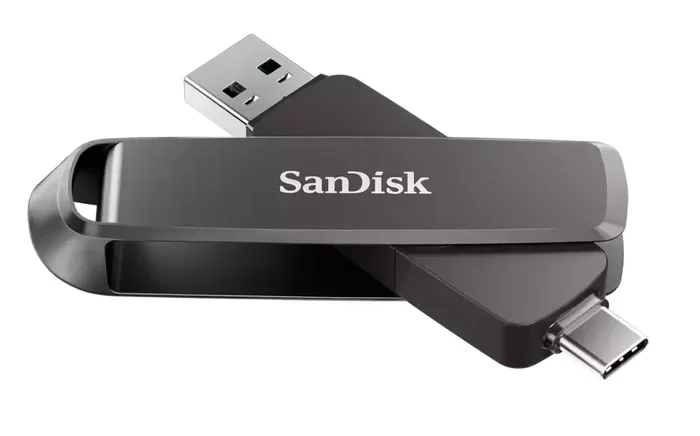
The short answer is yes. 1TB USB drives absolutely exist. You can buy them online and in stores today. Brands like SanDisk, Kingston, Samsung, and Corsair all offer 1TB USB flash drives. These are not prototype concepts or marketing hype. They are real products you can order and use right away.
But here is the thing that surprises many people. A 1TB USB drive looks almost identical to a regular 64GB or 128GB thumb drive. The size difference is barely noticeable. That is the magic of modern flash memory technology. Engineers have figured out how to squeeze a terabyte of storage into a device that fits on your keychain.
So why did it take so long for this to happen? The answer lies in how storage technology has evolved. Early USB drives held just a few megabytes. Over the years, manufacturers improved flash memory density. Each new generation of NAND flash chips could store more data in the same physical space. Today, 1TB has become the sweet spot for high capacity USB drives.
Do not fall for fake listings that claim to offer 1TB for just a few dollars. Those are almost always scams. A genuine 1TB USB drive costs more because the flash memory chips inside are expensive. If a deal looks too good to be true, it probably is.
What Makes a 1TB USB Drive Possible?
The secret is in the flash memory chips. Each chip contains billions of tiny transistors that store data as electrical charges. Modern 3D NAND technology stacks these layers vertically. This means more storage in a smaller space. A 1TB USB drive uses advanced NAND chips that pack a huge amount of data into a compact module.
The controller chip also plays a big role. It manages how data is read and written to the flash memory. Better controllers mean faster speeds and more reliable performance. When you buy a 1TB USB drive, both the flash chips and the controller work together to deliver a smooth experience.
How 1TB USB Drives Work
Understanding how a 1TB USB drive works does not require a computer science degree. Let us break it down in simple terms. At the heart of every USB drive is flash memory. This is a type of solid state storage. There are no moving parts. Everything is stored electronically. That is why USB drives are so durable and fast compared to older storage options.
When you plug a USB drive into your computer, the operating system recognizes it as an external storage device. You can drag and drop files just like you would with a folder on your hard drive. The data gets written to the flash memory chips inside the drive. When you need the files back, the controller reads them and sends them to your computer through the USB connection.
Flash Memory Technology Explained
Flash memory comes in different types. The most common ones in USB drives are TLC and QLC NAND. TLC stands for triple level cell. Each cell stores three bits of data. QLC stands for quad level cell. Each cell stores four bits. QLC drives can offer more storage for less money. But they tend to be slower and less durable over time.
For a 1TB USB drive, most brands use TLC NAND. It offers a good balance of speed, durability, and cost. If you plan to use your drive every day, TLC is the way to go. It will last longer and perform better than QLC options.
USB Connectors and Speeds
Not all USB connections are the same. The connector type and USB version both matter for speed and compatibility. Here is a quick look at what you will encounter.
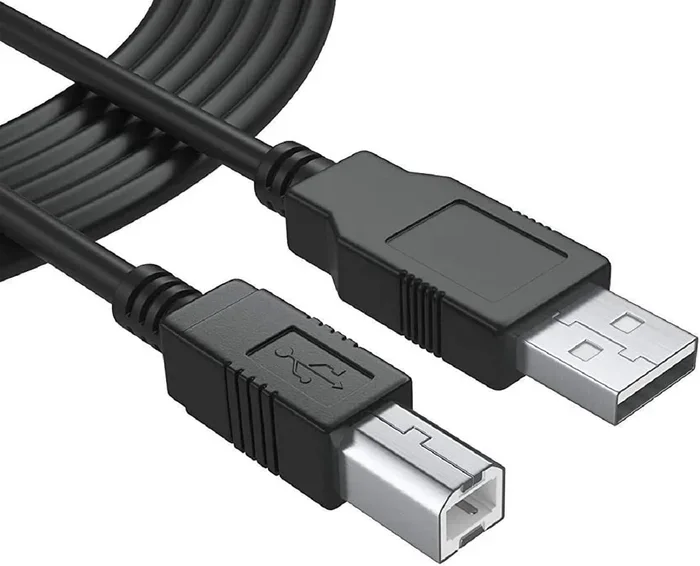
USB-A: This is the classic rectangular connector. It is found on most computers and laptops. USB-A 3.0 offers speeds up to 5 Gbps. USB-A 3.1 and 3.2 push that even higher.
USB-C: This is the smaller, oval-shaped connector. It is reversible, which means you cannot plug it in wrong. USB-C is becoming the standard on newer laptops, tablets, and phones. Many 1TB USB drives now come with USB-C connectors.
USB 3.0 vs USB 3.1 vs USB 3.2: These numbers refer to different generations of USB technology. Each new version offers faster data transfer speeds. A USB 3.2 Gen 2 drive can hit speeds of 10 Gbps. That is blazing fast for a portable device.
When shopping for a 1TB USB drive, check the USB version. A USB 3.0 or higher drive will give you much better performance than an older USB 2.0 drive. The difference is huge when you are moving large files.
Types of 1TB USB Drives Available
The market for 1TB USB drives has grown a lot in recent years. You will find several different types to choose from. Each type has its own strengths. Let us look at the main categories.
USB-A vs USB-C 1TB Drives
Most 1TB USB drives use a USB-A connector. These are the most common and work with almost any computer or laptop. They are reliable and widely compatible.
USB-C 1TB drives are newer and offer a more modern design. They are especially useful if you own a newer laptop, a tablet, or a phone with a USB-C port. Some drives even come with both USB-A and USB-C connectors. These dual connector drives give you the best of both worlds.
Here is a quick comparison of the two types.
- USB-A 1TB drives: Wider compatibility, classic design, slightly bulkier.
- USB-C 1TB drives: Modern design, reversible plug, faster potential speeds, great for newer devices.
- Dual connector drives: Include both USB-A and USB-C, flexible but may cost more.
Metal vs Plastic Build
1TB USB drives come in different builds. Metal-bodied drives feel premium and sturdy. They resist drops and scratches better than plastic ones. Plastic drives are lighter and often cheaper. But they can crack or break more easily if you drop them.
If you carry your drive around every day, a metal build is a smart choice. It will hold up better to wear and tear. For occasional use, a plastic drive works just fine. The internal flash memory is the same in both cases.
Best Uses for a 1TB USB Drive
A 1TB USB drive is incredibly versatile. Once you have one, you will find all sorts of ways to use it. Here are the most popular and practical uses.
Backup and File Transfer
This is the number one reason people buy a 1TB USB drive. You can back up your entire photo library, video collection, and important documents. A 1TB drive holds roughly 250,000 photos or 250 hours of HD video. That is a lot of memories in one small device.
File transfer is another big use case. Need to move a 50GB video project from one computer to another? A 1TB USB drive handles that easily. No need for cloud uploads or slow email attachments. Just plug it in and copy the files over.
Gaming and Media Storage
Gamers love 1TB USB drives. You can store dozens of PC games on one drive and carry them with you. Some games are huge files, often 50GB or more. A 1TB drive gives you plenty of room for a solid game library on the go.
Movie lovers benefit too. A 1TB drive can hold hundreds of movies in HD or 4K quality. Perfect for long flights or road trips. Just plug it into a compatible TV or media player and enjoy your entertainment.
Professional and Creative Work
Photographers, videographers, and designers deal with massive files every day. A 1TB USB drive is a lifesaver for storing raw photo files, video footage, and project archives. It is much faster and more reliable than burning files to a disc.
Many professionals keep a 1TB drive as a secondary backup. It sits in a bag or drawer as a safety net. If the primary storage fails, the files are still safe on the USB drive.
Things to Consider Before Buying a 1TB USB Drive
Before you rush out and buy a 1TB USB drive, there are a few things you should know. Not all drives are created equal. Here are the key factors to keep in mind.
Speed and Performance
Speed matters a lot with a 1TB USB drive. A slow drive can make transferring large files painfully slow. Look for drives that advertise USB 3.0 or higher speeds. A good 1TB USB 3.0 drive should offer read speeds of at least 100 MB per second.
Some premium 1TB drives push speeds of 200 MB per second or more. These are great for professionals who work with huge files daily. For everyday use, anything above 100 MB per second is solid.
Keep in mind that write speeds are often slower than read speeds. This is normal for most USB drives. If you need fast write speeds for video editing or large file transfers, look for drives that specifically advertise high write speeds.
Security Features
If you plan to store sensitive or personal files on your 1TB USB drive, security should be on your radar. Some drives come with built in encryption. This means your data is protected by a password before it even leaves the drive.
Encrypted USB drives add an extra layer of protection. Even if someone finds your drive, they cannot access your files without the password. Brands like SanDisk and Kingston offer models with hardware encryption. This is especially useful for business users or anyone handling confidential data.
You can also use third party encryption software on any USB drive. Programs like VeraCrypt let you create an encrypted partition on your drive. This works with any 1TB USB drive regardless of the brand.
Brand Reputation and Warranty
When it comes to 1TB USB drives, brand reputation matters. Stick with well known brands like SanDisk, Kingston, Samsung, and Corsair. These companies have a track record of quality and reliability.
Check the warranty before you buy. A good 1TB USB drive should come with at least a 3 to 5 year warranty. Some brands offer limited lifetime warranties. This shows confidence in their product and gives you peace of mind.
Read customer reviews too. Look for feedback on real world performance, durability, and speed. A drive that looks great on paper may have issues in practice. Reviews help you avoid bad purchases.
Common Mistakes to Avoid When Buying a 1TB USB Drive
Buying a 1TB USB drive sounds simple enough. But many people make mistakes that cost them time and money. Here are the most common ones to watch out for.
Mistake 1: Buying from unknown sellers. Fake 1TB USB drives are everywhere on online marketplaces. They use fake flash memory that reports 1TB but actually holds much less. Stick to reputable retailers and official brand stores.
Mistake 2: Ignoring the USB version. A USB 2.0 1TB drive will be painfully slow. Always check that the drive supports USB 3.0 or higher for decent performance.
Mistake 3: Not testing the drive. Once you get your 1TB USB drive, test it right away. Use a free tool like H2testw or FakeFlashTest to verify the actual storage capacity. This catches fake drives early.
Mistake 4: Skipping backups. A USB drive is a great backup tool, but it is not infallible. Flash memory can fail over time. Always keep a second copy of your most important files somewhere else, like a cloud service or an external hard drive.
Mistake 5: Expecting SSD speeds. A 1TB USB drive is not the same as a 1TB solid state drive. USB drives are slower than internal SSDs or even external SSDs connected via USB-C. Manage your expectations and you will be happy with the performance.
How to Get the Most Out of Your 1TB USB Drive
Once you have your 1TB USB drive, a few simple tips will help you get the best performance and longest lifespan.
Always use the safely remove feature. On Windows, right click the drive icon and select eject. On Mac, drag the drive to the trash or use the eject button. This ensures all data is fully written before you unplug the drive. Pulling it out without ejecting can corrupt files.
Keep your drive clean and dry. USB drives are small and portable. They go everywhere with you. But moisture and dust can damage the connector and internal components. Store your drive in a protective case when not in use.
Avoid extreme temperatures. Flash memory does not like heat or cold. Do not leave your 1TB USB drive in a hot car or in direct sunlight for long periods. Room temperature storage is best.
Organize your files. A 1TB drive gives you plenty of space. Use folders to keep things organized. Create separate folders for photos, videos, documents, and backups. This makes it much easier to find what you need quickly.
Update the drive firmware if available. Some brands release firmware updates that improve performance and fix bugs. Check the manufacturer website for any updates for your specific model.
Are 1TB USB Drives Worth the Price?
The price of a 1TB USB drive has dropped significantly over the past few years. A few years ago, a 1TB drive would cost a small fortune. Today, you can find solid 1TB USB drives for around 60 to 100 dollars. Premium models with metal builds and faster speeds may cost 120 to 150 dollars.
Is that worth it? It depends on your needs. If you regularly carry large files, back up important data, or need portable storage for creative projects, a 1TB USB drive is absolutely worth it. The convenience of having a terabyte of storage in your pocket is hard to beat.
For casual users who only need to store a few documents or a handful of photos, a 1TB drive might be overkill. In that case, a 128GB or 256GB USB drive would be more than enough and much cheaper. But if you need the space, do not hesitate. 1TB USB drives offer incredible value for the price.
The bottom line is this. 1TB USB drives are real, they are reliable, and they are more accessible than ever. Whether you are a student, a professional, a gamer, or just someone who wants to keep their files organized, a 1TB USB drive is a smart investment.
Final Thoughts
So do 1TB USB drives exist? Yes, they absolutely do. And now you know everything you need to make an informed decision. We covered how they work, the different types available, the best use cases, and common mistakes to avoid. A 1TB USB drive gives you massive portable storage in a tiny package. It is perfect for backups, file transfers, gaming, and creative work.
When shopping, focus on trusted brands, check the USB version for speed, and always test your drive after purchase. Avoid suspiciously cheap deals and always keep backups of your most important files. With the right 1TB USB drive, you will never worry about running out of portable storage again.
The technology behind 1TB USB drives is impressive. It shows how far portable storage has come in just a few years. As flash memory continues to improve, we can expect even higher capacities at lower prices. But for now, a 1TB USB drive hits the sweet spot of capacity, size, and affordability. Grab one that fits your needs, and you will wonder how you ever managed without it.
Frequently Asked Questions
Can you really buy a 1TB USB flash drive?
Yes, you can buy a 1TB USB flash drive from major retailers and online stores. Brands like SanDisk, Kingston, Samsung, and Corsair all manufacture 1TB USB drives. Just make sure to buy from reputable sellers to avoid counterfeit products.
How fast is a 1TB USB drive?
Speed depends on the USB version and the drive model. Most 1TB USB 3.0 drives offer read speeds between 100 and 200 MB per second. USB 3.2 drives can be even faster. Always check the product specifications for the exact read and write speeds before buying.
Are 1TB USB drives compatible with all devices?
Most 1TB USB drives use a USB-A connector, which works with nearly all computers and laptops. USB-C 1TB drives are compatible with newer devices that support USB-C. Some drives offer both connectors for maximum compatibility.
How long does a 1TB USB drive last?
A quality 1TB USB drive can last several years with normal use. Flash memory has a limited number of write cycles, but for everyday file storage and transfers, the lifespan is more than sufficient. Avoid exposing the drive to extreme heat or moisture to maximize its longevity.
Is a 1TB USB drive good for gaming?
A 1TB USB drive is great for storing and carrying PC games. However, games will load slower from a USB drive than from an internal SSD. It works well for games you want to transport or play on different computers, but it is not a replacement for a fast internal drive.
Can a 1TB USB drive be used for video editing?
Yes, but with some limitations. A 1TB USB drive works well for storing and transferring video files. For active editing, an internal SSD or an external SSD connected via USB-C will be much faster. Use the USB drive for storage and backup, not for live editing of large video projects.
=== CONCLUSION ===
1TB USB drives are real, they are practical, and they are here to stay. Whether you need portable storage for backups, gaming, creative projects, or everyday file transfers, a 1TB USB drive delivers serious value. The key is to buy from trusted brands, check the USB version and speed specs, and avoid scams by sticking to reputable sellers. With the right 1TB USB drive in your bag, you will always have a terabyte of storage ready whenever you need it. Make the smart choice today and experience the freedom of true portable storage.