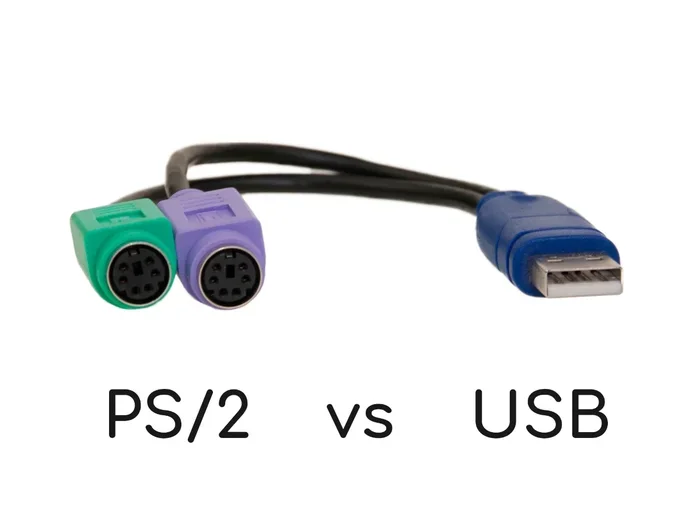
Difference Between Usb Ps2 Mouse And Which One Wins
The USB PS2 mouse debate comes down to connection type, compatibility, and performance. USB mice offer plug-and-play convenience and faster data transfer, while PS2 mice provide a reliable legacy connection for older systems. Understanding the differences helps you choose the right mouse for your setup.
This is a comprehensive guide about Difference Between Usb Ps2 Mouse.
Key Takeaways
- USB mice are universal: They work with almost any modern computer and support hot-swapping.
- PS2 mice are reliable: They use a dedicated port and offer consistent performance without driver setup.
- USB wins for modern users: Faster polling rates and broader compatibility make USB the go-to choice today.
- PS2 still has a niche: Legacy systems, industrial setups, and certain gaming scenarios still favor PS2 connections.
- Consider your needs: Your choice depends on your computer, use case, and whether you need advanced features.
[FEATURED_IMAGE_PLACEHOLDER]
Difference Between USB PS2 Mouse And Which One Wins
Choosing between a USB mouse and a PS2 mouse might seem simple, but there is more to it than just the plug shape. If you have ever wondered which connector type is better for your computer, you are in the right place. This guide breaks down everything you need to know about USB PS2 mouse differences. We will cover speed, compatibility, setup, and real-world performance so you can make a smart choice.
The difference between USB PS2 mouse options comes down to how each mouse connects to your computer. USB mice use a universal serial bus port that most computers have today. PS2 mice plug into a dedicated purple port designed specifically for input devices. Each has its strengths and weaknesses, and understanding them helps you pick the right one for your needs.
Whether you are a gamer, a office worker, or someone fixing up an old computer, this article has you covered. We will walk through every major difference in plain language. By the end, you will know exactly which mouse connector type suits your setup best.
What Is a USB Mouse?
A USB mouse connects to your computer through a USB port. USB stands for Universal Serial Bus, and it has become the standard way to connect almost all computer peripherals. The first USB mice appeared in the mid-1990s and quickly replaced older connection types.
USB mice are plug and play in most cases. You plug them in, and your operating system recognizes them almost instantly. No extra software or driver installation is usually needed. This makes USB mice incredibly convenient for everyday users.
Types of USB Mice
Not all USB mice are the same. Here are the main types you will encounter:
- Wired USB mice: These connect directly with a cable. They offer a stable connection and never need charging.
- Wireless USB mice: These use a USB receiver or Bluetooth to connect. They give you freedom of movement without a cable.
- Gaming USB mice: These feature high polling rates, customizable buttons, and advanced sensors for precision.
Each type has its own benefits. Wired USB mice tend to have lower latency, which matters for fast-paced gaming. Wireless USB mice offer more desk flexibility and a cleaner setup.
What Is a PS2 Mouse?
A PS2 mouse connects through a round, purple-colored port on the back of your computer. PS2 stands for Personal System/2, an older standard introduced by IBM in 1987. For many years, PS2 was the primary way to connect mice and keyboards to desktop computers.
PS2 mice use a serial connection that sends data at a fixed rate. Unlike USB, PS2 ports are dedicated only to input devices like mice and keyboards. You cannot plug a USB device into a PS2 port or vice versa without an adapter.
How PS2 Mice Work
PS2 mice communicate through a synchronous serial interface. This means the mouse and computer exchange data in a timed, steady rhythm. The connection is very stable and does not depend on software drivers in most cases.
One big advantage of PS2 mice is that they work at the BIOS level. This means you can use a PS2 mouse even before your operating system loads. That is why many servers and industrial computers still use PS2 connections today.
Key Differences Between USB and PS2 Mice
The difference between USB PS2 mouse options goes beyond just the physical plug. Let us look at the main areas where these two types differ.
Connection and Compatibility
USB mice work with almost every modern computer, laptop, and tablet that has a USB port. They are truly universal. PS2 mice need a specific purple port, which is rare on newer computers and laptops.
If you are using a modern computer, a USB mouse is almost always the better choice. However, if you are working with older hardware or building a retro setup, a PS2 mouse might be exactly what you need. The differences between analog and digital computers also play a role here, as older systems often relied on PS2-style connections while modern systems use USB.
Speed and Performance
USB mice generally offer faster data transfer than PS2 mice. A standard USB mouse sends data at rates between 125 and 1000 Hz. This means it reports its position to the computer 125 to 1000 times per second. PS2 mice typically operate at a fixed 100 Hz polling rate.
For most everyday tasks, this difference is barely noticeable. But for competitive gaming or precise design work, the higher polling rate of a USB mouse gives it a clear edge.
Hot-Swapping
USB mice support hot-swapping, which means you can plug them in or pull them out while the computer is running. PS2 mice do not support hot-swapping. You must turn off the computer before plugging in or removing a PS2 mouse.
This is a major convenience factor. With USB, you can switch mice anytime without restarting. With PS2, you need a full shutdown first.
Driver Support
USB mice often come with advanced driver support. This allows for custom buttons, DPI settings, and RGB lighting. PS2 mice usually work with basic drivers built into the operating system. They do not offer the same level of customization.
If you want a mouse with extra features, USB is the way to go. If you just need a simple, reliable pointing device, PS2 works perfectly fine.
Durability and Longevity
PS2 ports are known for their durability. The round connector fits snugly and does not wear out easily. USB ports are also durable, but the smaller connector can sometimes become loose over time.
In industrial or heavy-use environments, PS2 connections tend to last longer. This is one reason why many businesses and servers still keep PS2 ports on their motherboards.
Comparison Table: USB vs PS2 Mouse
| Feature | USB Mouse | PS2 Mouse |
|---|---|---|
| Connection Type | Universal Serial Bus | Dedicated Serial Port |
| Polling Rate | 125 Hz to 1000 Hz | 100 Hz |
| Hot-Swappable | Yes | No |
| Driver Support | Advanced | Basic |
| Customization | High | Low |
| Compatibility | Almost all modern PCs | Older PCs and legacy systems |
| BIOS-Level Support | Limited | Full |
| Cable Type | USB Type-A or USB-C | Round PS2 Connector |
| Best For | Modern computing, gaming | Legacy systems, servers |
As you can see, each type has its own strengths. The right choice depends on what you value most in a computer mouse.
Which One Should You Choose?
Now that you know the key differences, let us talk about which USB PS2 mouse option is right for you.
Choose USB If…
- You use a modern computer or laptop with USB ports.
- You want plug-and-play convenience without any setup.
- You need hot-swapping so you can change mice on the fly.
- You are a gamer who needs high polling rates and low latency.
- You want advanced features like customizable buttons and DPI settings.
- You prefer a clean, cable-free desk with a wireless option.
Choose PS2 If…
- You are working with an older computer that only has PS2 ports.
- You need BIOS-level mouse support for server or industrial use.
- You want a simple, no-frills mouse that just works.
- You are building a retro computing setup or vintage PC.
- You need a durable connection for heavy-use environments.
- You do not want to deal with driver installations or software.
For most people today, a USB mouse is the clear winner. The USB PS2 mouse comparison really only matters if you are dealing with older hardware or specific use cases. The evolution from analog and digital technology in computing has made USB the dominant standard, but PS2 still holds value in niche scenarios.
Common Mistakes When Choosing Between USB and PS2 Mice
Many people make avoidable mistakes when picking between these two mouse types. Here are the most common ones:
Mistake 1: Assuming PS2 mice work on modern PCs. Most new computers do not have PS2 ports. You will need an adapter, which can add latency and reduce performance.
Mistake 2: Ignoring polling rate for gaming. If you are a competitive gamer, a PS2 mouse’s 100 Hz polling rate may feel sluggish compared to a USB gaming mouse at 1000 Hz.
Mistake 3: Plugging PS2 devices while the PC is on. This can damage the motherboard port. Always shut down before connecting or disconnecting a PS2 device.
Mistake 4: Overlooking wireless USB options. Some people assume USB means wired. Modern wireless USB mice offer excellent performance and convenience without any cable.
Mistake 5: Forgetting about driver support. If you want advanced customization, a basic PS2 mouse will not give you that. Make sure your choice matches your feature needs.
Expert Insights on USB and PS2 Mouse Connections
From a technical standpoint, the shift from PS2 to USB was one of the biggest changes in computer peripheral design. USB brought universal compatibility, faster speeds, and the ability to daisy-chain multiple devices through hubs. PS2 offered a dedicated, stable connection that many professionals still trust.
For those interested in the broader picture of how computer interfaces evolved, the differences between analog and digital computers provide important context. The transition from analog signals to digital data transfer is exactly what USB represents over the older PS2 standard.
Experts also point out that PS2 keyboards and mice use a dedicated interrupt system. This means the computer prioritizes input from PS2 devices, which is why they work at the BIOS level. USB devices share a common bus, which can sometimes lead to slight delays during high-traffic periods.
However, modern USB technology has largely closed this gap. USB 3.0 and newer standards offer speeds that far exceed what PS2 ever could. For practical purposes, USB is the better choice in almost every scenario today.
Quick Tips for Getting the Most Out of Your Mouse
No matter which type you choose, follow these tips to get the best performance:
- Keep your mouse clean. Dust and dirt can affect sensor accuracy, especially on optical sensors.
- Update your drivers. For USB mice with advanced features, always check for the latest driver updates from the manufacturer.
- Use a quality mouse pad. A good pad improves sensor tracking and extends the life of your mouse feet.
- Adjust DPI settings. Higher DPI is not always better. Find a setting that matches your screen resolution and usage style.
- Replace batteries on time. If you use a wireless USB mouse, fresh batteries ensure consistent performance.
- Check your port. Make sure your USB port is working properly. Try a different port if your mouse is not responding.
Final Verdict: Which One Wins?
The difference between USB PS2 mouse types comes down to your specific needs and setup. For the vast majority of users, a USB mouse is the better choice. It offers faster speeds, wider compatibility, hot-swapping, and advanced features that PS2 mice simply cannot match.
PS2 mice still have a place in the world, though. They shine in legacy systems, server environments, and situations where simplicity and reliability matter most. If you are working with older hardware or building a retro setup, a PS2 mouse is a solid option.
The computing world has clearly moved toward USB as the standard input interface. The differences between analog and digital technology that shaped early computing gave way to the universal USB standard we rely on today. PS2 remains as a reliable backup and niche option, but USB is the future.
So which one wins? For modern computing, USB takes the crown. For legacy and specialized use, PS2 holds its ground. Choose based on your computer, your needs, and what matters most to you.
Whichever you pick, make sure it feels comfortable in your hand and suits your daily workflow. The best mouse is the one that helps you get your work done efficiently and without frustration.
Frequently Asked Questions
Can I use a PS2 mouse on a modern computer?
Most modern computers do not have PS2 ports. You can use a PS2-to-USB adapter to connect a PS2 mouse to a modern PC. However, this may reduce performance and you might lose some features like hot-swapping. It works in a pinch, but a USB mouse is a better long-term solution.
Is a USB mouse faster than a PS2 mouse?
Yes, a USB mouse is generally faster. USB mice can have polling rates up to 1000 Hz, while PS2 mice are limited to 100 Hz. For everyday tasks, you will not notice much difference. But for gaming or precise work, the higher polling rate of a USB mouse gives it a clear advantage.
Do USB mice need drivers?
Basic USB mice work without any drivers. They are plug and play on most operating systems. However, gaming USB mice or mice with extra features may need drivers to access all their customization options. Always check the manufacturer’s website for the latest drivers.
Can I plug a PS2 mouse into a USB port?
Not directly. PS2 and USB use different connectors and protocols. You need a PS2-to-USB adapter or a USB-to-PS2 adapter to make them work with the wrong port. Keep in mind that adapters can sometimes cause compatibility or performance issues.
Are PS2 mice still made today?
Yes, PS2 mice are still manufactured, though they are much less common than USB mice. They are mostly used in industrial, server, and legacy computing environments. You can find new PS2 mice online or from specialty retailers.
Which mouse is better for gaming, USB or PS2?
USB is the better choice for gaming. USB gaming mice offer higher polling rates, customizable buttons, and advanced sensors. PS2 mice lack these features and have a lower polling rate. If you are serious about gaming, a USB mouse will give you the performance edge you need.
Conclusion
The difference between USB PS2 mouse options is clear when you look at the key factors. USB mice offer speed, flexibility, and modern features. PS2 mice offer simplicity, durability, and legacy compatibility. Both have their place, but for most users, USB is the better option in 2024 and beyond.
Take a moment to evaluate your setup and your needs. If you are upgrading or replacing a mouse, go with USB for the best experience. If you are maintaining an older system, a PS2 mouse will serve you well. Either way, you now have the knowledge to make a confident choice. Pick the mouse that fits your life, and enjoy a smoother, more productive computing experience.
Frequently Asked Questions
What is Difference Between Usb Ps2 Mouse?
Difference Between Usb Ps2 Mouse is an important topic with many practical applications.