Can You Convert A Lamp To Usb And Why You Should Try
Yes, you can convert a lamp to USB power with a few simple tools and affordable parts. This guide walks you through the entire process, from choosing the right USB adapter to wiring your lamp safely. You will learn the benefits, step-by-step instructions, and expert tips to make your lamp USB-powered in under an hour.
Have you ever looked at an old lamp sitting in a drawer and thought it would be perfect if it just worked with USB power? The good news is that converting a lamp to USB is easier than most people think. Whether you want to power your lamp from a laptop, a wall charger, or a portable battery bank, a simple USB conversion can breathe new life into an old favorite.
In this guide, we will walk you through everything you need to know about USB lamp conversion. You will learn the benefits, the tools you need, step-by-step instructions, and common mistakes to avoid. By the end, you will feel confident enough to tackle the project yourself.
Key Takeaways
- Easy Conversion: Converting a lamp to USB is simple and requires basic tools like a soldering iron, wire cutters, and a USB adapter.
- Cost Effective: Most USB conversion kits cost under $15, saving you money compared to buying a new USB lamp.
- Greater Flexibility: USB-powered lamps can run on power banks, laptops, wall chargers, and portable battery packs.
- Safety First: Always match voltage requirements and use proper insulation to avoid electrical hazards.
- Wide Compatibility: Desk lamps, floor lamps, and table lamps can all be converted to USB power with the right adapter.
- Eco Friendly: USB lamps use less energy and can be powered by solar chargers or reusable battery packs.
📑 Table of Contents
- What Does It Mean To Convert A Lamp To Usb?
- Benefits Of Converting Your Lamp To Usb
- How To Convert A Lamp To Usb Step By Step
- Types Of Lamps That Work Best For Usb Conversion
- Common Mistakes To Avoid When Converting A Lamp To Usb
- Expert Tips For The Best Usb Lamp Setup
- Frequently Asked Questions
- Conclusion
What Does It Mean To Convert A Lamp To Usb?
Converting a lamp to USB means rewiring or adapting the lamp so it runs on USB power instead of a traditional wall outlet plug. Most lamps are designed to work with AC power from your home’s electrical system. A USB lamp conversion changes that so the lamp runs on the 5-volt DC power that a USB port delivers.
This is different from simply plugging a USB adapter into a wall outlet. A true USB conversion modifies the lamp’s internal wiring so it draws power directly from a USB source. The result is a lamp that is more portable and versatile.
Understanding USB Power Basics
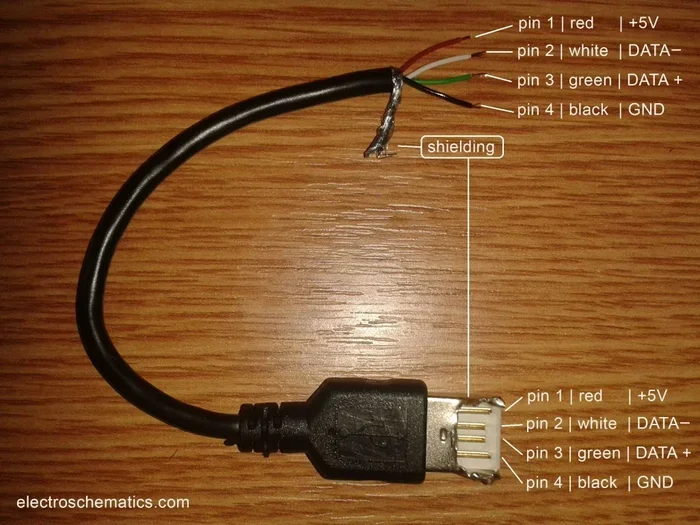
USB ports deliver 5 volts of direct current (DC) power. Standard USB 2.0 ports can supply up to 500 milliamps, while USB 3.0 ports can provide up to 900 milliamps. USB-C ports can deliver even more power depending on the charger. For most small to medium lamps, 5 volts is more than enough to produce bright light.
Here are some key facts about USB power:
- Voltage: USB ports provide 5 volts DC.
- Current: Standard USB provides 0.5 to 2.0 amps depending on the port version.
- Wattage: Most USB lamps draw between 2 and 10 watts.
- Compatibility: USB power works with wall chargers, power banks, computers, and car chargers.
When you convert a lamp to USB, you need to make sure the lamp’s LED bulbs or other light source can run on this low voltage. Most modern LED lamps are already designed to work on low voltage, which makes them ideal candidates for USB conversion.
Benefits Of Converting Your Lamp To Usb
There are many reasons why people choose to convert their lamps to USB power. Let us look at the biggest advantages.
Portability And Convenience
A USB-powered lamp is not tied to a wall outlet. You can take it anywhere. Use it on a camping trip, at a desk, in a dorm room, or in a tent. As long as you have a USB power bank or a charged battery pack, your lamp keeps working.
Cost Savings
Buying a new USB desk lamp can cost anywhere from $20 to $80 or more. Converting an existing lamp costs just a few dollars for a USB adapter or cable. This makes it a very budget-friendly option.
Reduced Clutter
Traditional lamps need bulky power adapters and outlets. A USB lamp can plug directly into a USB port on your computer or a wall USB charger. This means fewer cables and a cleaner workspace.
Energy Efficiency
USB lamps use very little power compared to traditional lamps. A typical USB LED lamp uses about 5 watts, while an incandescent desk lamp can use 40 watts or more. Over time, this adds up to real energy savings.
Versatile Power Options
With USB power, you are not limited to one outlet. You can power your lamp from a laptop, a car charger, a solar panel, or a rechargeable battery pack. This gives you options that a standard lamp simply cannot offer.
How To Convert A Lamp To Usb Step By Step
Now let us get into the hands-on part. Converting a lamp to USB is a straightforward DIY project. You do not need to be an electrician. Follow these steps carefully and you will have a working USB lamp in no time.
What You Need For The Conversion
Before you start, gather these tools and materials:
- A lamp you want to convert (desk lamp or table lamp works best)
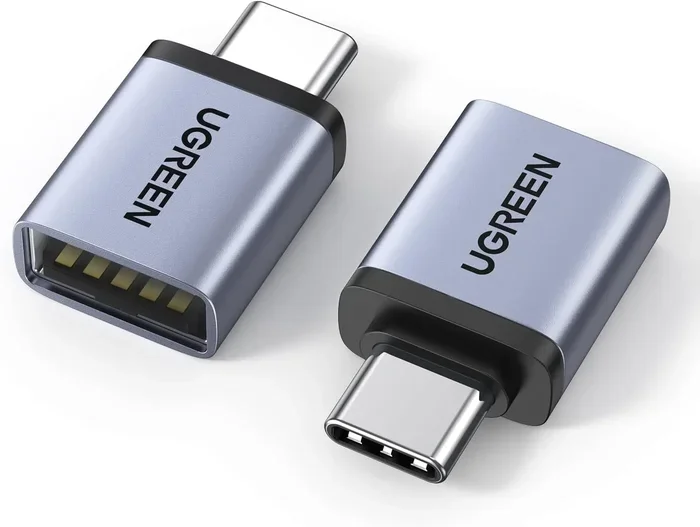
- A USB cable (USB-A to USB-C or micro USB, depending on your lamp)
- A USB voltage regulator or step-down converter
- Wire cutters and strippers
- A soldering iron and solder
- Electrical tape or heat shrink tubing
- A multimeter for testing voltage
- A small screwdriver set
You can find most of these items at a local hardware store or online. A basic USB conversion kit costs between $5 and $15.
Step 1: Disconnect And Disassemble The Lamp
Unplug the lamp from the wall. Remove the bulb and the lamp shade. Carefully take apart the lamp base. Most lamps have a screw-on base or a few screws holding the housing together. Keep all the small parts in a safe place so you do not lose them.
Step 2: Identify The Existing Wiring
Look at the wiring inside the lamp base. You will see two wires connected to the lamp socket. One wire carries the positive current and the other carries the negative current. Use your multimeter to identify which wire is positive and which is negative if you are unsure.
Step 3: Cut The Existing Power Cord
Using wire cutters, cut the existing power cord about 3 inches from the lamp base. Leave enough wire to work with safely. Strip about half an inch of insulation from each wire end.
Step 4: Connect The USB Voltage Regulator
This is the most important step. The USB voltage regulator steps down the 5-volt USB power to match what your lamp needs. Connect the positive wire from the lamp to the positive output of the voltage regulator. Connect the negative wire to the negative output. Use a soldering iron to make secure connections.
Then connect the USB input side of the regulator to your USB cable. Match the positive and negative wires carefully. A wrong connection can damage the lamp or the power source.
Step 5: Insulate And Secure The Connections
Wrap each soldered connection with electrical tape or slide heat shrink tubing over them. This prevents short circuits and keeps everything safe. Tuck the wires neatly inside the lamp base so nothing is exposed.
Step 6: Test The Lamp
Before you reassemble the lamp, plug the USB cable into a power source and turn the lamp on. Use your multimeter to check that the voltage is correct. If the lamp lights up and the voltage reads properly, you are good to go.
Step 7: Reassemble The Lamp
Put the lamp base back together. Screw in a new LED bulb if needed. Attach the lamp shade. Your converted USB lamp is ready to use.
Types Of Lamps That Work Best For Usb Conversion
Not all lamps are equally good candidates for USB conversion. Here is a look at the types of lamps that work best.
Desk Lamps
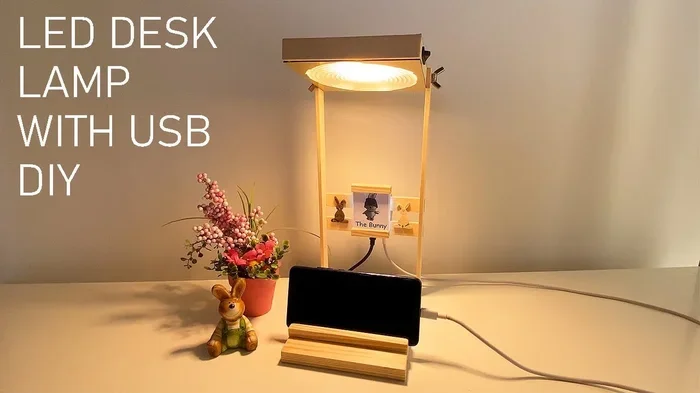
USB desk lamps are the most popular choice for conversion. They are small, use low-wattage bulbs, and are easy to modify. Most desk lamps use LED bulbs that run perfectly on 5 volts of USB power.
Table Lamps
A convert table lamp to USB project works well for smaller table lamps. These lamps typically have a simple wiring setup that makes conversion straightforward. Just make sure the lamp shade and base are easy to open.
Floor Lamps
Converting a floor lamp to USB is possible but a bit more involved. Floor lamps often have higher wattage bulbs, so you may need a more robust voltage regulator. The wiring is also more complex because of the longer cable run.
Clip-On Lamps
Clip-on USB lamps are great for desks and bedsides. These small lamps are already designed to be low-power, making them ideal for USB conversion. They are lightweight and easy to modify.
Reading Lamps
A USB reading lamp is one of the most practical conversions you can make. Reading lamps use LED bulbs that work perfectly with USB power. The result is a portable reading light that you can take anywhere.
Common Mistakes To Avoid When Converting A Lamp To Usb
Even though this is a simple project, mistakes can happen. Here are the most common errors and how to avoid them.
Skipping The Voltage Regulator
Some people try to connect a USB cable directly to the lamp without a voltage regulator. This can work for some LED bulbs, but it is risky. Without proper voltage regulation, you can burn out the bulb or damage the lamp. Always use a USB voltage regulator to protect your lamp.
Using The Wrong USB Cable
Not all USB cables are the same. Some cables only carry data, not power. Make sure you use a USB cable that is rated for power delivery. Look for cables labeled as “charging cables” or “power cables.”
Ignoring Polarity
Connecting the positive and negative wires incorrectly can ruin your lamp. Always check the polarity before soldering. Use a multimeter to verify the correct connections.
Overloading The USB Port
USB ports have a maximum power output. If your lamp draws more power than the port can supply, the lamp will be dim or will not work at all. Check the lamp’s wattage and compare it to the USB port’s output rating.
Poor Insulation
Leaving exposed wires inside the lamp base is a fire hazard. Always use electrical tape or heat shrink tubing to cover all connections. Make sure no bare wires touch each other.
Expert Tips For The Best Usb Lamp Setup
Here are some professional tips to get the most out of your converted USB lamp.
- Use LED bulbs: LED bulbs draw very little power and produce minimal heat. They are the safest and most efficient choice for USB lamps.
- Choose a quality voltage regulator: A good regulator ensures stable power delivery and protects your lamp from voltage spikes.
- Label your wires: Use colored tape or markers to label positive and negative wires before you start soldering.
- Test before reassembling: Always test the lamp with the multimeter before putting it back together. This saves you from having to open it up again.
- Consider a USB hub: If you plan to power multiple USB devices from one port, use a USB hub with its own power supply.
- Keep it portable: Pair your USB lamp with a high-capacity power bank for true portability. This is great for outdoor events or travel.
If you are looking for more ways to modernize your home setup, you might also want to explore alternatives to traditional home entertainment systems that embrace modern connectivity like USB power solutions.
Frequently Asked Questions
Can Any Lamp Be Converted To USB Power?
Most lamps with LED bulbs can be converted to USB power. Lamps that use incandescent or halogen bulbs may require a more powerful USB source, which is not always practical. The best candidates are desk lamps, table lamps, and reading lamps with LED bulbs.
Do I Need Special Tools To Convert A Lamp To Usb?
You need basic tools like wire cutters, a soldering iron, electrical tape, and a multimeter. These tools are inexpensive and widely available. You do not need any advanced electrical knowledge to complete the project.
Is Converting A Lamp To Usb Safe?
Yes, as long as you follow the steps carefully and use a voltage regulator. Always disconnect the lamp from power before working on it. Make sure all connections are properly insulated. If you are unsure about any step, consult a professional electrician.
How Much Does It Cost To Convert A Lamp To Usb?
The total cost is usually between $5 and $20. A USB cable costs around $3 to $5. A voltage regulator adds another $5 to $10. If you already own basic tools, the project costs very little.
Can I Use A Power Bank To Run My Converted USB Lamp?
Absolutely. A USB power bank is one of the best ways to power your converted lamp. Look for a power bank with at least 10,000 mAh capacity for several hours of continuous light. This makes your lamp perfect for camping, travel, or power outages.
Will My Converted USB Lamp Be As Bright As Before?
For most LED lamps, the brightness will be the same or very similar. USB ports deliver 5 volts, which is enough to power standard LED bulbs effectively. If you notice dimming, check that your voltage regulator is working properly and that your USB source can deliver enough current.
Conclusion
Converting a lamp to USB is a simple, affordable, and rewarding DIY project that anyone can do. Whether you want more portability, less clutter, or just a fresh take on an old lamp, a USB conversion delivers real results. You do not need expensive tools or advanced skills. With a few basic parts and this guide, you can transform almost any lamp into a versatile USB-powered light.
The benefits are clear. A USB lamp is portable, energy efficient, and compatible with many power sources. It is perfect for desks, bedrooms, camping trips, and anywhere else you need reliable light. Plus, you get to repurpose a lamp you already own instead of buying something new.
So grab your tools, pick a lamp, and give it a try. Once you see how easy and satisfying the process is, you may want to convert more. The world of USB lamp conversion is open to you, and the results are well worth the effort.