Can You Connect To Wi Fi Through Bluetooth With These Tips
Can you connect to Wi-Fi through Bluetooth? The short answer is no — Bluetooth and Wi-Fi are two separate wireless technologies. However, you can share internet access between devices using Bluetooth tethering, Wi-Fi Direct, or mobile hotspot features. This guide covers everything you need to know about wireless connection, device connectivity, and internet sharing with simple, actionable tips.
Have you ever been in a situation where you needed internet access but had no Wi-Fi signal in sight? Maybe your laptop lost connection, or your tablet needs a quick browse while you are on the go. The first thought that crosses many minds is: can you connect to Wi-Fi through Bluetooth? It sounds logical. Both are wireless technologies. Both help devices talk to each other. But the reality is a bit more complicated.
The truth is that Bluetooth and Wi-Fi are two completely different technologies. They operate on different frequencies, serve different purposes, and work in different ways. Bluetooth is designed for short-range data transfer between nearby devices. Wi-Fi is built for high-speed internet access over longer distances. You cannot simply use one to replace the other. But here is the good news — you can still share your internet connection using a combination of these technologies and some clever workarounds.
In this article, we will break down everything you need to know about wireless connection and device connectivity. We will explain why Bluetooth cannot directly access Wi-Fi. We will show you how to share internet through Bluetooth tethering, mobile hotspot features, and Wi-Fi Direct. We will also share practical tips, common mistakes to avoid, and expert insights that will save you time and frustration. Whether you are at home, in the office, or traveling, this guide has you covered.
Key Takeaways
- Bluetooth cannot directly connect to Wi-Fi: These are two different wireless protocols with distinct purposes and frequencies.
- You can share internet via Bluetooth tethering: This lets other devices access the web through your phone’s data connection.
- Wi-Fi Direct offers faster speeds: It creates a direct wireless connection between devices without a router.
- Mobile hotspots are the most common solution: They turn your phone into a Wi-Fi router for other devices.
- Bluetooth has a limited range: Typically 30 feet, which affects how you set up internet sharing.
- Not all devices support tethering: Check your Bluetooth enabled device specs before trying these methods.
📑 Table of Contents
- Understanding Bluetooth and Wi-Fi: The Basics
- How to Share Internet Using Bluetooth Tethering
- Wi-Fi Direct: A Faster Alternative to Bluetooth Sharing
- Mobile Hotspot: The Most Popular Solution
- Common Mistakes and How to Avoid Them
- When to Use Each Method
- The Future of Wireless Connectivity
- Conclusion
Understanding Bluetooth and Wi-Fi: The Basics
Before we dive into solutions, let us understand the fundamentals. Many people confuse Bluetooth and Wi-Fi because both are wireless. But they are built for very different jobs.
What Is Bluetooth?
Bluetooth is a short-range wireless technology. It connects devices over very short distances, usually about 30 feet or less. It uses low power and is perfect for accessories like headphones, keyboards, and speakers. Bluetooth pairing is simple and fast. You tap a button, enter a code if needed, and your devices are connected.
Here are some key facts about Bluetooth:
- Range: About 30 feet for most devices
- Speed: Slower than Wi-Fi, typically up to 3 Mbps on older versions
- Power Use: Very low, which is why it is ideal for small accessories
- Purpose: Connecting peripheral devices like earbuds, mice, and fitness trackers
- Frequency: Uses the 2.4 GHz band
What Is Wi-Fi?
Wi-Fi is a wireless networking technology. It connects devices to the internet through a router or access point. Wi-Fi offers much faster speeds and longer range than Bluetooth. It is what you use at home, at cafes, and at airports to get internet access.
Here are some key facts about Wi-Fi:
- Range: Up to 150 feet indoors, much farther outdoors
- Speed: Can reach hundreds of Mbps or even Gbps on modern standards
- Power Use: Higher than Bluetooth, which is why routers need power outlets
- Purpose: Providing high-speed wireless connection to the internet
- Frequency: Uses 2.4 GHz and 5 GHz bands
Why Bluetooth Cannot Directly Connect to Wi-Fi
Now that you understand the basics, let us answer the big question. Can you connect to Wi-Fi through Bluetooth? The direct answer is no. These two technologies operate on different protocols and serve different functions. Bluetooth is not designed to carry internet data from a router to your device. It is designed to connect two devices locally.
Think of it this way. Wi-Fi is like a highway that connects you to the internet. Bluetooth is like a footpath that connects two nearby devices. You cannot drive a car on a footpath, and you cannot use a highway to connect your wireless headphones to your phone. Each tool has its own purpose.
However, this does not mean you are stuck. There are several ways to share internet access using Bluetooth and related technologies. Let us explore those options now.
How to Share Internet Using Bluetooth Tethering
While you cannot connect directly to Wi-Fi through Bluetooth, you can share your phone’s internet connection with other devices using Bluetooth tethering. This is also known as Bluetooth sharing or Bluetooth internet sharing. It is a handy trick when you have no Wi-Fi available but need another device online.
What Is Bluetooth Tethering?
Bluetooth tethering uses your phone’s mobile data connection and shares it with another device through Bluetooth. Your phone acts as a bridge. It receives data from the cellular network and sends it to your laptop, tablet, or another phone via Bluetooth.
This method is slower than using a mobile hotspot or Wi-Fi Direct, but it uses very little battery. It works well for basic tasks like checking email, browsing light websites, or sending messages.
How to Set Up Bluetooth Tethering
Setting up Bluetooth tethering is straightforward. Here is a step-by-step guide:
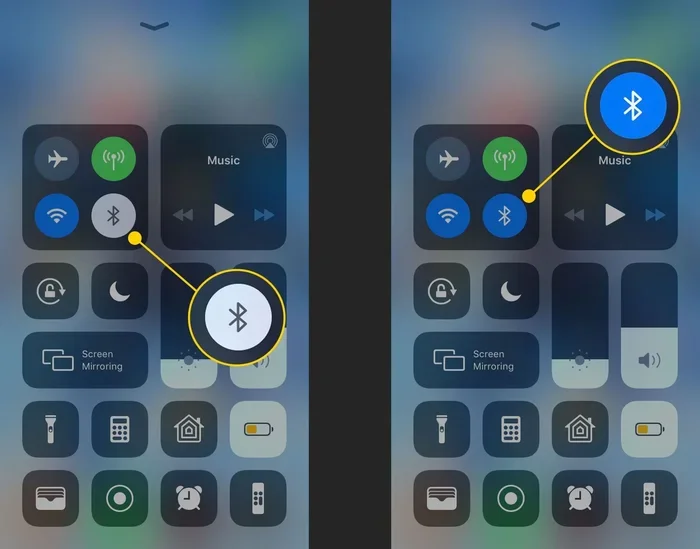
- Turn on Bluetooth on both devices. Make sure they are Bluetooth enabled and visible to each other.
- Pair the devices. Go to your phone’s Bluetooth settings, find the other device, and tap to pair. Enter a PIN if prompted.
- Enable tethering. On your phone, go to Settings > Network & Internet > Hotspot & Tethering. Turn on Bluetooth tethering.
- Connect on the other device. On your laptop or tablet, go to Bluetooth settings and connect to the paired phone.
- Test the connection. Open a browser and try loading a webpage.
When to Use Bluetooth Tethering
Bluetooth tethering is great in certain situations. It uses less power than a mobile hotspot. It works when Wi-Fi is not available. It is useful for quick tasks when you do not need high speeds. However, it is not ideal for streaming videos or downloading large files because of the slow data transfer speeds.
Quick Tips for Bluetooth Tethering
- Keep both devices within 30 feet of each other for the best Bluetooth range.
- Turn off tethering when you are not using it to save battery.
- Use this method for light browsing and messaging only.
- Make sure your phone plan includes mobile data before tethering.
Wi-Fi Direct: A Faster Alternative to Bluetooth Sharing
If you need faster speeds and more reliable wireless connection, Wi-Fi Direct is the way to go. This technology allows devices to connect directly to each other without needing a router or Wi-Fi hotspot. It is often confused with Bluetooth, but it works differently and much faster.
What Is Wi-Fi Direct?
Wi-Fi Direct creates a wireless connection between two devices using Wi-Fi technology. One device acts as a group owner (like a soft router), and the other connects to it. This happens without you needing an actual Wi-Fi network or internet router.
Wi-Fi Direct is commonly used for:
- Wireless printing — connecting your phone directly to a printer
- File sharing — sending photos and documents between devices
- Screen mirroring — casting your phone screen to a TV
- Internet sharing — sharing a device’s connection with another device
Wi-Fi Direct vs Bluetooth: Key Differences
People often wonder which technology is better for internet sharing and device connectivity. Here is a quick comparison:
| Feature | Bluetooth | Wi-Fi Direct |
|---|---|---|
| Speed | Slower (up to 3 Mbps) | Faster (up to 250 Mbps) |
| Range | About 30 feet | Up to 650 feet |
| Power Use | Very low | Moderate |
| Setup | Simple pairing | Slightly more complex |
| Best For | Accessories, light sharing | File transfer, internet sharing |
How to Use Wi-Fi Direct for Internet Sharing
Using Wi-Fi Direct to share internet is similar to setting up a mobile hotspot. On Android devices, you can enable Wi-Fi Direct in your settings. Then, connect your other device to the Wi-Fi Direct network. The connected device will have access to the internet through the host device’s connection.
Keep in mind that Wi-Fi Direct is not available on all devices. Some older phones and laptops may not support it. Always check your device specifications before relying on this method.
Mobile Hotspot: The Most Popular Solution
When people ask, “can you connect to Wi-Fi through Bluetooth,” they are usually trying to solve a real problem. They need internet on a device that does not have its own data connection. The most popular and effective solution is using a mobile hotspot.
What Is a Mobile Hotspot?
A mobile hotspot turns your phone into a Wi-Fi router. It broadcasts a Wi-Fi hotspot signal that other devices can connect to. Your phone uses its cellular data to provide internet access to connected devices. This is probably the most common way people share internet on the go.
How to Set Up a Mobile Hotspot
Setting up a mobile hotspot is easy. Here is how:
- Go to Settings on your phone.
- Find Network & Internet or Connections.
- Tap on Hotspot & Tethering.
- Turn on Wi-Fi Hotspot.
- Set a network name and password.
- Connect your other device to the new Wi-Fi hotspot.
Pros and Cons of Mobile Hotspot
Like any technology, mobile hotspot has its advantages and disadvantages.
Pros:
- Fast speeds compared to Bluetooth tethering
- Works with any Wi-Fi enabled device
- Reliable connection over longer distances
- Supports multiple devices at once
Cons:
- Uses more battery than Bluetooth sharing
- Consumes more mobile data
- May require a specific plan from your carrier
- Can be slow in areas with weak cellular signal
Expert Insight
According to networking experts, mobile hotspot is the most reliable method for sharing internet with other devices. While Bluetooth tethering uses less power, the speed difference is significant. For any task that requires a stable connection — video calls, streaming, or large downloads — a mobile hotspot is the clear winner. Always monitor your data usage when using a hotspot to avoid unexpected charges.
Common Mistakes and How to Avoid Them
Many people run into problems when trying to share internet or connect devices wirelessly. Here are the most common mistakes and how you can avoid them.
Mistake 1: Confusing Bluetooth with Wi-Fi
The biggest mistake is assuming Bluetooth can do everything Wi-Fi can. It cannot. Bluetooth is for short-range device-to-device connections. Wi-Fi is for internet access and high-speed data. Understanding this difference will save you a lot of frustration.
Mistake 2: Ignoring Device Compatibility
Not all devices support Bluetooth tethering or Wi-Fi Direct. Some older laptops, tablets, and phones may lack the necessary hardware or software support. Before you try any sharing method, check if your devices are Bluetooth enabled and compatible with tethering features.
Mistake 3: Overlooking Data Limits
When you share your phone’s internet connection, you use your mobile data. Many phone plans have data limits. Sharing a Wi-Fi hotspot or using Bluetooth tethering can eat through your data quickly, especially if someone is streaming videos or downloading files. Always keep an eye on your data usage.
Mistake 4: Poor Device Placement
Bluetooth range is limited. If your devices are too far apart, the connection will drop. Walls, furniture, and other obstacles can weaken the signal. Keep devices within 30 feet of each other for the best results with Bluetooth sharing.
When to Use Each Method
With so many options available, how do you choose the right one? Here is a simple guide to help you decide.
| Situation | Best Method | Why |
|---|---|---|
| Quick email check on a laptop | Bluetooth tethering | Uses less battery, good enough for light tasks |
| Streaming video on a tablet | Mobile hotspot | Faster speeds, more stable connection |
| Sharing files between two phones | Wi-Fi Direct | Fast data transfer without internet needed |
| Connecting wireless headphones | Bluetooth | Built for audio accessories, low power |
| Printing a document from your phone | Wi-Fi Direct | Direct connection to printer without router |
| Multiple devices need internet | Mobile hotspot | Supports several devices at once |
The Future of Wireless Connectivity
The world of wireless technology is always evolving. New standards and protocols are being developed all the time. Bluetooth is getting faster with each new version. Bluetooth 5.0 and later versions offer improved range and speed. Wi-Fi Direct is also becoming more common in everyday devices.
In the future, we may see even more seamless ways to share internet access between devices. Technologies like Wi-Fi 6 and upcoming IoT devices will make device connectivity faster and more reliable. Smart home gadgets, IoT devices, and wearable technology will all benefit from these advances.
For now, understanding the difference between Bluetooth and Wi-Fi is your best tool. You cannot connect to Wi-Fi through Bluetooth directly, but you have plenty of options for sharing internet and staying connected. The key is choosing the right method for your specific situation.
Conclusion
So, can you connect to Wi-Fi through Bluetooth? Not directly. Bluetooth and Wi-Fi are two separate wireless technologies designed for different purposes. Bluetooth connects devices over short distances for accessories and light data sharing. Wi-Fi provides high-speed internet access over longer distances.
But that does not mean you are out of options. You can share internet using Bluetooth tethering, mobile hotspot, or Wi-Fi Direct. Each method has its strengths and weaknesses. Bluetooth tethering is great for saving battery and quick tasks. Mobile hotspot offers the fastest and most reliable connection. Wi-Fi Direct is perfect for fast file transfers and direct device connections.
The best approach depends on your needs. For light browsing, try Bluetooth sharing. For streaming or downloads, use a mobile hotspot. For file transfers, go with Wi-Fi Direct. Always check your device compatibility and keep an eye on your data usage.
Now that you understand how these technologies work, you can stay connected no matter where you are. The next time someone asks you, “can you connect to Wi-Fi through Bluetooth,” you will know exactly what to tell them. Share this guide with friends who need help with wireless connection and internet sharing. Stay connected, stay informed, and make the most of your devices.
Frequently Asked Questions
Can you use Bluetooth to get Wi-Fi internet?
No, you cannot use Bluetooth to directly access Wi-Fi internet. Bluetooth is a separate wireless technology designed for short-range device connections. However, you can share your phone’s internet through Bluetooth tethering, which lets another device access the web using your phone’s cellular data via Bluetooth.
Is Bluetooth tethering faster than Wi-Fi hotspot?
No, Bluetooth tethering is significantly slower than a Wi-Fi hotspot. Bluetooth has limited data transfer speeds, usually up to 3 Mbps. A mobile hotspot can provide much faster speeds because it uses Wi-Fi technology. For anything beyond light browsing, a hotspot is the better choice.
What is the difference between Bluetooth and Wi-Fi Direct?
Bluetooth is designed for short-range, low-power connections between accessories and devices. Wi-Fi Direct creates a direct wireless connection between devices using Wi-Fi technology, offering much faster speeds and longer range. Wi-Fi Direct is better for file sharing and internet sharing, while Bluetooth is better for peripherals like headphones and keyboards.
Does Bluetooth tethering use a lot of battery?
No, Bluetooth tethering uses very little battery compared to a mobile hotspot. Because Bluetooth operates at low power, it is an energy-efficient way to share internet when you are away from a Wi-Fi hotspot. Still, it is a good idea to turn off tethering when you are not using it to conserve battery life.
Can I connect my laptop to the internet through my phone using Bluetooth?
Yes, you can connect your laptop to the internet through your phone using Bluetooth tethering. First, pair your phone and laptop via Bluetooth pairing. Then, enable Bluetooth tethering in your phone’s settings. Your laptop will be able to access the internet through your phone’s cellular data connection. This works well for basic tasks like email and light browsing.
What devices support Bluetooth internet sharing?
Most modern smartphones support Bluetooth tethering, including both Android and iPhone devices. Laptops and tablets with Bluetooth enabled can connect as the receiving device. However, some older or budget devices may not support Bluetooth sharing for internet access. Always check your device specifications to confirm compatibility before attempting to set up internet sharing via Bluetooth.