Can I Use D Sub Instead Of Hdmi And What You Need To Know
Using a D Sub connector instead of HDMI is possible with the right adapter, but there are important differences you should understand. D Sub (also known as VGA) carries an analog signal, while HDMI delivers digital audio and video in one cable. This guide covers everything you need to know about compatibility, image quality, and setup so you can make the right choice for your display needs.
Have you ever looked at the back of your computer or monitor and wondered if you could swap one cable for another? Maybe you have a D Sub cable lying around and an HDMI port on your new display. The question is simple: can I use D Sub instead of HDMI? The answer is more nuanced than you might think.
D Sub connectors, often called VGA connectors, have been around for decades. They were the standard way to connect computers to monitors for many years. HDMI, on the other hand, is the modern standard that carries both high-definition video and audio through a single cable. Understanding the differences between these two connection types can save you time, money, and frustration.
In this article, we will walk through everything you need to know. We will cover what each connector does, how they compare, and whether you can use one in place of the other. Whether you are setting up a home office, connecting a projector, or troubleshooting an older display, this guide has you covered. Let us dive right in.
Key Takeaways
- D Sub and HDMI are not the same: D Sub uses an analog signal while HDMI uses a digital signal, which affects image quality and compatibility.
- You can connect D Sub to HDMI with an adapter: A VGA to HDMI converter or adapter cable makes this possible in most setups.
- Image quality differs significantly: HDMI supports higher resolutions and better color depth compared to D Sub connections.
- Audio is a key difference: HDMI carries both audio and video, but D Sub only handles video signals.
- Older devices often use D Sub: Many legacy monitors, projectors, and computers still rely on D Sub ports.
- Signal degradation can occur: Converting analog to digital may result in some quality loss during the process.
- Choose based on your needs: Consider your devices, resolution requirements, and whether you need audio support.
📑 Table of Contents
What Is a D Sub Connector?
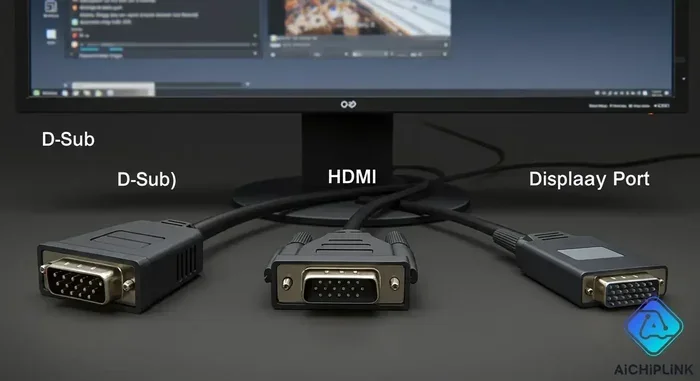
A D Sub connector is an older type of video connector that has been used since the 1980s. The full name is D Subminiature, and the most common version used for video is the HD-15 connector. This is the blue, 15-pin connector you have probably seen on older monitors and computers.
D Sub connectors carry an analog signal. This means they transmit a continuous electrical wave that represents the video image. The signal is not as precise as digital signals because it can be affected by interference and distance.
How D Sub Connectors Work
The D Sub connector uses 15 pins arranged in three rows to transmit video signals. These pins carry red, green, and blue color channels along with horizontal and vertical sync signals. This setup allows the connector to display a wide range of resolutions, though it has its limits.
Here are some key facts about D Sub connectors:
- Connector type: HD-15 (15-pin D-shaped connector)
- Signal type: Analog
- Common name: VGA connector
- Max resolution: Typically 2048 x 1536 at 85 Hz
- Audio support: None
- Common use: Older monitors, projectors, and laptops
Many people still use D Sub connections today, especially in office environments and educational settings. Projectors in classrooms and conference rooms often have D Sub ports. If you are working with older equipment, understanding how D Sub works is essential.
It is also worth noting that the visual quality of a D Sub connection depends heavily on cable quality and length. Longer cables can lead to signal loss and ghosting, where you see a faint duplicate image. This is one of the main drawbacks of analog connections.
What Is HDMI?
HDMI stands for High-Definition Multimedia Interface. It was introduced in the early 2000s and quickly became the standard for connecting audio and video devices. HDMI cables carry both digital video and digital audio through a single cable, which makes them incredibly convenient.
HDMI cables transmit data in a digital format. This means the signal is made up of ones and zeros, which is much more resistant to interference than an analog signal. The result is a cleaner, sharper image with better color accuracy.
HDMI Versions and Capabilities
There are several versions of HDMI, and each one supports different features and resolutions. Here is a quick look at the main versions:
- HDMI 1.4: Supports 4K at 30 Hz and 3D content
- HDMI 2.0: Supports 4K at 60 Hz and higher bandwidth
- HDMI 2.1: Supports 8K at 60 Hz and 4K at 120 Hz
HDMI also supports features like Consumer Electronics Control (CEC), which lets you control multiple devices with one remote. It also supports Ethernet data transfer in some versions. These extra features make HDMI a very versatile choice for modern setups.
Just as the 7 basic elements of photography help you understand how to create great visual content, understanding your display connections helps you get the best visual output from your devices. The quality of your connection directly impacts what you see on screen.
D Sub vs HDMI: Key Differences
Now that you know what each connector does, let us compare them side by side. Understanding these differences is the key to answering whether you can use D Sub instead of HDMI.
Signal Type
The biggest difference between D Sub and HDMI is the signal type. D Sub uses an analog signal, while HDMI uses a digital signal. Analog signals are more prone to interference and degradation over distance. Digital signals maintain their quality much better, even over longer cable runs.
Resolution Support
HDMI supports much higher resolutions than D Sub. While D Sub can handle up to 2048 x 1536 in ideal conditions, HDMI can support 4K and even 8K resolutions depending on the version. If you want sharp, detailed images, HDMI is the clear winner.
Audio Transmission
HDMI carries both audio and video signals through one cable. D Sub only carries video. If you are using a D Sub connection, you will need a separate audio cable to get sound. This is a major inconvenience for many users, especially in home theater setups.
Cable Quality and Distance
HDMI cables maintain signal quality over longer distances compared to D Sub cables. D Sub cables are more susceptible to electromagnetic interference, especially in environments with lots of electronic devices. This can cause image quality issues like flickering or color distortion.
Compatibility
HDMI is the modern standard and is found on most new devices. D Sub is found mainly on older equipment. If you have a newer monitor or TV, it may not even have a D Sub port. This limits the situations where you can use D Sub as a replacement for HDMI.
Comparison Table
| Feature | D Sub (VGA) | HDMI |
|---|---|---|
| Signal Type | Analog | Digital |
| Max Resolution | 2048 x 1536 | Up to 8K (HDMI 2.1) |
| Audio Support | No | Yes |
| Interference Resistance | Low | High |
| Common Use | Older monitors, projectors | Modern TVs, monitors, devices |
| Cable Length Limit | Up to 15 feet (quality loss) | Up to 50 feet (minimal loss) |
| Ease of Use | Separate audio cable needed | Single cable for audio and video |
These differences make it clear why HDMI has largely replaced D Sub in modern setups. However, D Sub still has its place, especially with older equipment that many people still rely on every day.
Can You Use D Sub Instead of HDMI?
The short answer is yes, but with some important caveats. You can use a D Sub connector in place of HDMI, but you will need an adapter or converter. Simply plugging a D Sub cable into an HDMI port will not work because the connectors are physically different and the signal types are incompatible.
Using a VGA to HDMI Adapter
The most common way to use D Sub instead of HDMI is with a VGA to HDMI adapter. This device takes the analog signal from the D Sub connector and converts it to a digital signal that HDMI can understand. These adapters are widely available and relatively affordable.
Here is what you need to know about VGA to HDMI adapters:
- They convert analog to digital: The adapter handles the signal conversion for you.
- They may need external power: Some adapters require a USB power source to work properly.
- Image quality may suffer: Converting analog to digital can result in some quality loss.
- They do not carry audio: Most VGA to HDMI adapters only convert video, not audio.
Using a VGA to HDMI Cable
Another option is a VGA to HDMI cable, which has the D Sub connector on one end and the HDMI connector on the other. These all-in-one cables are convenient because you do not need a separate adapter box. However, they work on the same principle as adapters and have the same limitations.
Signal Quality Considerations
When you convert an analog signal to a digital signal, some quality loss is inevitable. The analog signal from a D Sub connector is not as precise as a digital HDMI signal. During conversion, the adapter must interpret the analog signal and recreate it digitally. This process can introduce noise, reduced sharpness, and color inaccuracies.
For basic tasks like reading text or browsing the web, this quality loss may not be noticeable. For tasks that require sharp image quality, such as photo editing or graphic design, the difference can be more apparent. If you care about display quality, HDMI is always the better choice.
Think of it this way. Just as the basic elements of photography determine the quality of a visual image, the quality of your connection determines the quality of your display output. A weak connection leads to weak results.
When D Sub Might Be the Right Choice
There are situations where using D Sub instead of HDMI makes sense. Here are a few common scenarios:
- You have an older monitor: If your monitor only has a D Sub port, you need to use it.
- You are connecting a projector: Many projectors still use D Sub inputs.
- You are in a corporate or educational setting: Many organizations still use older equipment with D Sub ports.
- You only need basic display output: For simple tasks where high resolution is not important.
In these cases, using D Sub with the right adapter is a perfectly valid solution. Just be aware of the limitations and set your expectations accordingly.
How to Connect D Sub to HDMI
If you have decided to use a D Sub connection instead of HDMI, here is how to set it up properly. The process is straightforward, but there are a few things to keep in mind.
What You Will Need
- A D Sub (VGA) cable
- A VGA to HDMI adapter or cable
- An HDMI cable (if the adapter does not include one)
- An audio cable (if you need sound)
Step-by-Step Setup
- Connect the D Sub cable: Plug the VGA end of the cable into your computer or source device.
- Connect the adapter: Attach the VGA to HDMI adapter to the other end of the D Sub cable.
- Connect the HDMI cable: Run an HDMI cable from the adapter to your display.
- Connect audio if needed: Use a separate 3.5mm audio cable from your source device to your display or speakers.
- Power on the adapter: If the adapter requires external power, plug it in using a USB cable.
- Switch the display input: On your monitor or TV, select the HDMI input source.
- Adjust display settings: On your computer, go to display settings and adjust the resolution to match your display.
Once you complete these steps, your D Sub connection should be working. You may need to tweak the resolution settings to get the best image quality. Most modern displays will auto-detect the incoming signal and adjust accordingly.
Quick Tips for Better Results
- Use a short cable: Shorter D Sub cables maintain better signal quality.
- Keep cables away from power cords: This reduces electromagnetic interference.
- Update your graphics drivers: Updated drivers can improve compatibility with adapters.
- Set the native resolution: Always set your display to its native resolution for the sharpest image.
- Check the adapter brand: Cheap adapters may produce poor results. Invest in a quality converter.
Which Connection Should You Choose?
Deciding between D Sub and HDMI depends on your specific situation. Here are some factors to consider when making your choice.
Choose HDMI If
- You want the best image quality and resolution
- You need audio and video through one cable
- Your devices support HDMI natively
- You are gaming or watching high-definition content
- You want future-proof connectivity
Choose D Sub If
- You are working with older equipment
- Your display only has a VGA input
- You only need basic display output
- You are on a tight budget and already have a D Sub cable
- You are setting up a projector or legacy system
The elements of photography teach us that the foundation of great visuals starts with understanding your tools. The same principle applies to display connections. Knowing your options helps you make better decisions.
For most modern setups, HDMI is the clear winner. It offers better quality, more features, and greater convenience. However, D Sub still has a place in the world, especially for users who work with older equipment or specialized displays like projectors.
If you find yourself needing to use D Sub instead of HDMI, just remember that an adapter can bridge the gap. The connection may not be perfect, but it will get the job done in most situations. Just be mindful of the limitations, especially around audio and image quality.
Common Mistakes to Avoid
When switching between D Sub and HDMI connections, there are some common mistakes that can cause problems. Here are a few to watch out for.
- Using a cheap adapter: Low-quality converters can produce poor image quality and may not work reliably.
- Ignoring audio needs: Remember that D Sub does not carry audio. You will need a separate audio solution.
- Using too long a cable: Long D Sub cables suffer from signal degradation, leading to fuzzy or ghosted images.
- Not updating drivers: Outdated graphics drivers can cause compatibility issues with adapters and converters.
- Forcing the connector: D Sub and HDMI connectors have different shapes. Never force a cable into a port.
Avoiding these simple mistakes can save you a lot of headaches and help you get the best possible experience from your display connection.
Expert Insights on Display Connections
Display technology has evolved significantly over the past two decades. D Sub was once the standard, but HDMI has taken over as the dominant connection type. Understanding this evolution helps you make better decisions about your setup.
Experts generally recommend using HDMI whenever possible. The digital signal is more reliable, supports higher resolutions, and carries audio. D Sub is best reserved for situations where you have no other choice or where you are working with legacy equipment.
If you are setting up a new system, invest in HDMI cables and devices. If you are maintaining an older system, keep your D Sub cables handy and have a quality adapter available for situations where you need to connect to modern displays. Both connectors have their place, and knowing when to use each one is the key to a great setup.
The visual quality you get from your display depends on many factors, from the cable type to the resolution settings. Much like how the elements of photography work together to create a compelling image, your display setup works best when all components are properly matched and configured.
Key Takeaways
- D Sub and HDMI serve different purposes: D Sub is analog and older, while HDMI is digital and modern.
- You can use D Sub with an adapter: A VGA to HDMI converter makes the connection possible in most cases.
- Image quality favors HDMI: Digital signals are cleaner and support much higher resolutions than analog D Sub signals.
- Audio is only available through HDMI: D Sub requires a separate audio cable for sound output.
- Older equipment often needs D Sub: Many projectors, legacy monitors, and older computers still use VGA ports.
- Adapters can introduce quality loss: Converting analog to digital always involves some compromise in signal fidelity.
- Choose based on your needs: Consider your devices, resolution requirements, and audio needs when deciding which connection to use.
Conclusion
So, can I use D Sub instead of HDMI? The answer is yes, you can, but it comes with trade-offs. D Sub connections work with the help of adapters, but they cannot match the quality, convenience, and versatility of HDMI. If you have the choice, HDMI is always the better option for modern displays and devices.
That said, D Sub is not obsolete. Many people still use it every day with older monitors, projectors, and computers. Understanding how D Sub works and how it compares to HDMI empowers you to make informed decisions about your display setup. Whether you are connecting an old projector in a classroom or setting up a legacy monitor in a home office, knowing your options is invaluable.
Use this guide as your reference the next time you face a D Sub versus HDMI decision. With the right adapter and a clear understanding of the differences, you can get your display working no matter what connectors your devices have. The most important thing is to match your connection to your needs and enjoy a great viewing experience.
Frequently Asked Questions
Can I plug a D Sub cable directly into an HDMI port?
No, you cannot plug a D Sub cable directly into an HDMI port. The connectors are physically different, and the signal types are incompatible. D Sub uses an analog signal with a 15-pin connector, while HDMI uses a digital signal with a different-shaped connector. You will need a VGA to HDMI adapter or converter to bridge the gap between these two connection types.
Does using a D Sub to HDMI adapter affect image quality?
Yes, using a D Sub to HDMI adapter can affect image quality to some degree. The adapter must convert an analog signal to a digital signal, and this conversion process can introduce noise, reduced sharpness, and color inaccuracies. The quality of the adapter matters a lot. A high-quality converter will produce better results than a cheap one, but some quality loss is inevitable when converting between analog and digital signals.
Can I get audio through a D Sub to HDMI connection?
No, you cannot get audio through a D Sub connection. D Sub (VGA) cables only carry video signals. If you need audio, you must use a separate audio cable, such as a 3.5mm aux cable, to connect your audio output to your display or speakers. HDMI is the better choice if you want both audio and video through a single cable.
What resolution can a D Sub connection support?
A D Sub connection can typically support resolutions up to 2048 x 1536 at 85 Hz under ideal conditions. However, the actual resolution you can achieve depends on your cable quality, cable length, and the capabilities of your devices. In practice, most users find that 1920 x 1080 (Full HD) works well with D Sub connections for everyday use.
Are there alternatives to D Sub and HDMI?
Yes, there are several alternatives to both D Sub and HDMI. DisplayPort and USB-C are modern alternatives that support high resolutions and carry audio. DVI is another older digital connector that is similar to HDMI but does not carry audio. The best choice depends on the ports available on your devices and your specific needs for resolution, audio, and convenience.
Is D Sub still used in any modern devices?
Yes, D Sub is still used in some modern devices, particularly projectors, certain monitors, and equipment in corporate or educational environments. Many projectors in conference rooms and classrooms still feature VGA inputs. Some budget monitors and older laptops also include D Sub ports. While it is not common in consumer electronics, D Sub has not completely disappeared from the market.