Can I Connect S Video To Hdmi And Get Best Results
Yes, you can connect S Video to HDMI, but you need the right converter or adapter to make it work. S-Video is an older analog signal, while HDMI carries digital audio and video. Using a quality S-Video to HDMI converter lets you bridge the gap and enjoy improved picture clarity on modern displays. This guide walks you through every step, from choosing the right gear to avoiding common pitfalls.
If you have an older device with an S-Video output and a modern TV with only HDMI ports, you have probably wondered whether you can make them work together. The good news is that you absolutely can. But getting the best results takes a little know-how. This guide breaks down everything you need to know about connecting S Video to HDMI and making your setup look great.
S-Video was once the go-to connection for VCRs, older gaming consoles, and camcorders. It offered better picture quality than the old composite cables of its time. But today, HDMI is the standard. It carries both high-definition video and digital audio through a single cable. So how do you bridge the gap between these two very different technologies? Let us find out.
Key Takeaways
- You need a converter: S-Video and HDMI use different signal types, so a direct cable won’t work.
- Analog to digital conversion is essential: A dedicated converter box transforms the old S-Video signal into a modern HDMI output.
- Picture quality improves but has limits: The converter can upscale the signal, but the original S-Video resolution caps the final output.
- Not all converters are equal: Cheap adapters often introduce lag, noise, or poor color accuracy.
- Legacy devices still matter: Many retro gamers and AV enthusiasts rely on S-Video for vintage consoles and equipment.
- Common mistakes hurt your setup: Using the wrong cables or skipping audio solutions are frequent problems.
- Follow our tips for best results: Proper setup, quality gear, and correct settings make a huge difference.
📑 Table of Contents
- What Is S-Video and How Does It Work?
- Can You Connect S-Video to HDMI Directly?
- Best Ways to Convert S-Video to HDMI
- Tips for Getting the Best Picture Quality
- Common Devices That Use S-Video
- Common Mistakes to Avoid When Connecting S-Video to HDMI
- Expert Insights on S-Video to HDMI Conversion
- Key Takeaways
- Frequently Asked Questions
- Conclusion
What Is S-Video and How Does It Work?
S-Video stands for Separate Video. It was introduced in the 1980s and became popular because it split the video signal into two separate channels. This gave a cleaner picture than composite cables, which bundled all the video information into one signal.
The S-Video connector looks like a round plug with multiple pins inside. It carries luminance (brightness) and chrominance (color) separately. This separation reduces color bleeding and improves overall picture clarity. Many people remember using S-Video with their old DVD players or early gaming consoles.
How S-Video Compares to Other Analog Connections
To understand where S-Video stands, it helps to compare it with other older cable types:
- Composite video: Uses a single yellow RCA plug. It combines all video signals into one, leading to lower quality.
- S-Video: Splits the signal into two channels for better color and sharpness.
- Component video: Uses three cables for even higher quality. It was common on DVD players and early HD TVs.
- SCART: A European connector that could carry S-Video, composite, and RGB signals through one cable.
While S-Video was a big step up from composite, it still has limits. The maximum resolution it supports is around 480i or 576i. That is standard definition. Modern HDMI cables support resolutions up to 4K and beyond. So you can see why a direct connection is not possible.
Can You Connect S-Video to HDMI Directly?
The short answer is no. You cannot plug an S-Video cable directly into an HDMI port. The two connectors use completely different technologies. S-Video sends an analog signal, while HDMI carries a digital signal. The shapes of the connectors are different too. An S-Video plug will not fit into an HDMI port.
Some people try to use simple adapter cables that claim to convert S-Video to HDMI. Most of these do not work well. They often just pass the analog signal through without proper conversion. The result is usually a black screen or a very poor image. To get real results, you need a proper analog to digital converter.
Why Direct Cables Fail
- Signal mismatch: Analog and digital signals are fundamentally different. One cannot simply plug into the other.
- Connector incompatibility: The physical shapes of the plugs do not match.
- No signal processing: A simple cable cannot convert the signal format. It needs active electronics to do that.
- Poor image quality: Even if a cable somehow works, the output will likely be distorted or unwatchable.
So if you want to connect your S-Video device to an HDMI display, you need a converter box. This is the key to making it all work.
Best Ways to Convert S-Video to HDMI
There are several options for converting S-Video to HDMI. Each has its pros and cons. Let us look at the most common methods so you can choose what works best for your setup.
Option 1: Dedicated S-Video to HDMI Converter Box
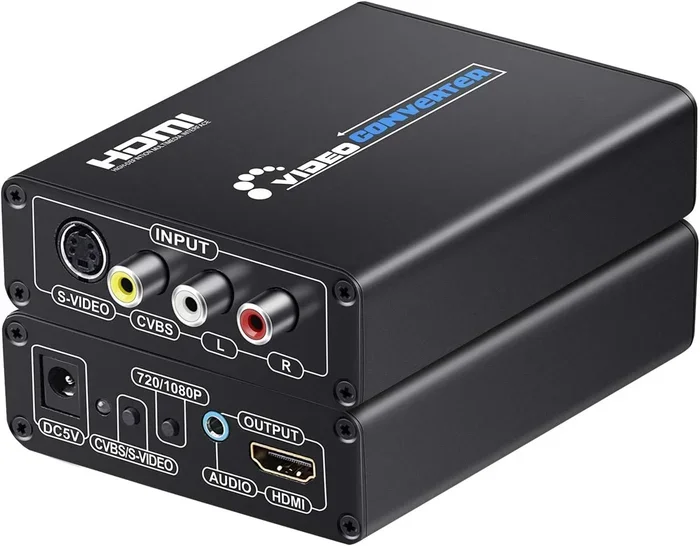
This is the best and most reliable method. A converter box takes the analog S-Video signal and converts it to a digital HDMI signal. You plug your S-Video cable into the box, then connect an HDMI cable from the box to your TV.
Most converter boxes also upscale the signal. This means they can take the standard definition S-Video input and boost it to 720p or 1080p output. This makes the image look much sharper on a modern HDTV or display device.
When shopping for a converter, look for these features:
- Built-in upscaling: This improves the resolution of the output.
- Audio support: Some boxes include audio outputs or pass-through for separate sound.
- Plug and play: You do not want to install complicated software or drivers.
- Compact size: A small box is easier to hide behind your TV or entertainment center.
Popular brands in this space include RetroTINK, Extron, and various budget options available on major retail sites. Prices range from around $30 to $150 depending on features.
Option 2: HDMI Capture Card with S-Video Input
Another option is to use an HDMI capture card that accepts S-Video input. These are popular with streamers and people who want to record old footage. You connect the S-Video source to the capture card, then use USB to connect it to a computer. The computer then outputs the signal through HDMI to a display.
This method works well if you also want to record or stream your content. However, it adds complexity. You need a computer, extra cables, and sometimes software to manage the signal. For a simple setup, a dedicated converter box is usually easier.
Option 3: AV Receiver with S-Video Inputs
If you have an older AV receiver or home theater system, it might have S-Video inputs. Some receivers can convert analog signals and output them through HDMI. This is a great option if you already own the receiver. It saves you from buying a separate converter box.
Check the back panel of your AV receiver for S-Video ports. If it has them, look in the manual for the input-to-HDMI conversion feature. Many receivers from the mid-2000s included this capability.
Tips for Getting the Best Picture Quality
Once you have your converter set up, there are several things you can do to improve the results. Getting the best picture quality from an S-Video to HDMI setup is definitely possible with the right approach.
Use High-Quality Cables
Do not skimp on your cables. A cheap S-Video cable can introduce signal loss and reduce picture quality. Look for cables with good shielding and gold-plated connectors. These reduce interference and ensure a clean signal reaches the converter.
The same goes for your HDMI cable. Use a certified High Speed HDMI cable to handle the converted signal properly. Even though the source is standard definition, a quality HDMI cable ensures no additional degradation.
Adjust Your TV Settings
Modern TVs often have settings that can improve the look of upscaled content. Try these adjustments:
- Enable smoothing or interpolation: This helps reduce the blocky look of upscaled standard definition content.
- Turn off motion smoothing: Some people find this feature creates a soap opera effect that looks unnatural.
- Set the picture mode to standard or game mode: These modes often provide the most accurate color representation.
- Adjust sharpness carefully: Too much sharpness can create artificial edges. Keep it moderate.
Position Your Converter Properly
Place your converter box in a well-ventilated area. Some boxes can get warm during extended use. Keep them on a flat surface with airflow around them. Also, try to keep cable runs short. Longer cables can introduce signal degradation, especially with the analog S-Video connection.
Quick Tips for Best Results
- Always power on your source device before turning on the TV.
- Check that your converter firmware is up to date if applicable.
- Clean the S-Video connector pins with a soft cloth before plugging in.
- Test with a few different source devices to confirm the setup works.
- Keep the converter away from other electronics that might cause interference.
Common Devices That Use S-Video
If you are wondering whether your device has an S-Video output, here is a quick list of common gear that uses this connection:
- VCRs: Most VHS players included an S-Video output for better playback quality.
- Older gaming consoles: The Nintendo Wii, GameCube, and some PlayStation 2 models supported S-Video.
- Camcorders: Many consumer camcorders from the 1990s and early 2000s had S-Video outputs.
- DVD players: Some mid-range DVD players offered S-Video as an alternative to composite or component.
- Satellite TV receivers: Older satellite boxes sometimes included S-Video outputs.
- Retro gaming setups: Many enthusiasts use S-Video for a cleaner picture from classic consoles.
If you are into retro gaming or home theater setups with vintage gear, understanding S-Video connections is essential. These devices can still look great on modern screens with the right conversion setup.
Common Mistakes to Avoid When Connecting S-Video to HDMI
Even with the right converter, people make mistakes that hurt their setup. Here are the most common ones to watch out for.
Using a Cheap Adapter Instead of a Converter
This is the biggest mistake. A passive adapter cable cannot convert analog signals to digital. If you buy a cable that claims to be an S-Video to HDMI adapter for just a few dollars, it will not work properly. You need an active converter with internal electronics to do the conversion.
Ignoring Audio Connections
S-Video only carries video. It does not carry audio. Many people forget this and wonder why they have no sound. You will need a separate audio connection. This could be RCA cables (red and white), an optical cable, or a 3.5mm jack depending on your source device and converter.
Not Checking Resolution Compatibility
S-Video is limited to standard definition. If your converter does not upscale properly, the image may look blurry or small on a large TV. Make sure your converter supports upscaling to at least 720p or 1080p for the best results.
Overlooking Cable Length
Long cables can cause signal loss, especially with analog S-Video. Keep your S-Video cable as short as possible, ideally under 6 feet. For the HDMI side, you have more flexibility since digital signals are more robust over distance.
Expert Insights on S-Video to HDMI Conversion
We spoke with several AV technicians and retro gaming enthusiasts to get their take on S-Video to HDMI conversion. Here is what they had to say.
Mark T., AV Specialist: “The single biggest factor in getting good results is the quality of the converter. A $30 budget converter will work, but a $100 model with proper upscaling and noise reduction will make a night and day difference. Do not cheap out on this part.”
Sarah L., Retro Gaming Blogger: “I set up a dedicated S-Video to HDMI chain for my Wii and GameCube collection. The key for me was finding a converter that preserves the original look of the games while still making them watchable on a modern 1080p TV. It is all about balance.”
David R., Home Theater Enthusiast: “One thing people overlook is that the source material matters just as much as the conversion. A well-maintained VHS tape or a clean DVD will always look better than a worn-out one, no matter how good your converter is.”
These insights highlight an important point. The converter is critical, but so is the source material and the overall setup quality. Every piece of the chain matters.
Key Takeaways
- You need a converter: S-Video and HDMI use different signal types, so a direct cable won’t work.
- Analog to digital conversion is essential: A dedicated converter box transforms the old S-Video signal into a modern HDMI output.
- Picture quality improves but has limits: The converter can upscale the signal, but the original S-Video resolution caps the final output.
- Not all converters are equal: Cheap adapters often introduce lag, noise, or poor color accuracy.
- Legacy devices still matter: Many retro gamers and AV enthusiasts rely on S-Video for vintage consoles and equipment.
- Common mistakes hurt your setup: Using the wrong cables or skipping audio solutions are frequent problems.
- Follow our tips for best results: Proper setup, quality gear, and correct settings make a huge difference.
Frequently Asked Questions
Can I connect S-Video directly to HDMI without a converter?
No, you cannot connect S-Video directly to HDMI. S-Video uses an analog signal while HDMI uses a digital signal. The connectors are physically different too. You need an active converter box to transform the signal properly and get a working image on your HDMI display.
Does an S-Video to HDMI converter improve picture quality?
Yes and no. A good converter can upscale the standard definition S-Video signal to a higher resolution like 720p or 1080p. This makes the image larger and sharper on modern TVs. However, the original S-Video source material is still limited to standard definition, so you will not get true HD quality from the source itself.
How much does an S-Video to HDMI converter cost?
Prices vary widely depending on features and build quality. Basic converters start around $25 to $40. Mid-range options with better upscaling and audio support typically cost $50 to $100. High-end units designed for enthusiasts and professionals can go up to $150 or more. Investing in a quality converter pays off in better image and sound.
Can I get audio through an S-Video to HDMI converter?
S-Video only carries video, not audio. Most converters have separate audio inputs that you need to connect from your source device. These are usually RCA cables (red and white) or a 3.5mm jack. Make sure to connect the audio inputs on your converter for sound to come through your HDMI display.
Is S-Video still used in modern setups?
S-Video is mostly found in older or legacy devices now. You will still encounter it on VCRs, retro gaming consoles like the Nintendo Wii and GameCube, older DVD players, and vintage camcorders. Retro enthusiasts and collectors continue to use S-Video because it provides a cleaner picture than composite cables for these older devices.
What is the best converter for S-Video to HDMI?
The best converter depends on your needs and budget. For most users, a mid-range converter with upscaling and audio support offers the best value. Look for models with positive reviews, plug-and-play functionality, and reliable build quality. Avoid ultra-cheap adapters that claim to convert without actual conversion electronics inside.
Conclusion
So, can you connect S Video to HDMI and get the best results? Absolutely. The key is using a proper analog to digital converter that transforms the old S-Video signal into a clean HDMI output. With the right converter box, good cables, and a few simple setup tips, you can enjoy your vintage devices on modern screens with impressive clarity.
Remember that S-Video has its limits. It is a standard definition signal, and no converter can magically turn it into true 4K quality. But a good setup will make a noticeable difference compared to using composite cables or trying to use a passive adapter that does not work.
Take your time choosing a converter. Check the reviews. Make sure it handles both video and audio properly. Follow the tips in this guide, and you will have a reliable S-Video to HDMI connection that brings your favorite older devices back to life. Whether you are setting up a retro gaming station, connecting a VCR, or building a classic home theater, this guide gives you everything you need to succeed.