Can Hdmi Handle 8k Everything You Need To Know Today
Yes, HDMI can handle 8K, but only with the right version and cable. HDMI 2.1 is the standard that fully supports 8K resolution at 60Hz and even 120Hz with the right bandwidth and features like HDR, VRR, and eARC. If you want to future-proof your home theater or gaming setup for 8K content, understanding HDMI specifications is essential.
If you are shopping for a new TV, monitor, or home theater setup, you have probably seen the term 8K thrown around a lot. It sounds impressive. It promises stunning picture quality. But here is the real question most people ask: can HDMI handle 8K? The short answer is yes. But the full answer involves a few important details you need to know before you spend your money.
Understanding how HDMI handles 8K resolution is more important than ever. With 8K TVs becoming more affordable and 8K content slowly growing, the right cable and port can make or break your viewing experience. Whether you are a gamer, a movie lover, or a content creator, this guide breaks down everything you need to know about HDMI and 8K in simple, practical terms.
We will cover HDMI versions, bandwidth requirements, cable types, and real-world performance. By the end, you will know exactly what to look for when setting up your 8K display. No fluff. No jargon. Just clear, helpful information you can use right away.
Key Takeaways
- HDMI 2.1 is required for 8K: Older versions like HDMI 2.0 cannot fully support 8K resolution at higher refresh rates.
- Bandwidth matters a lot: 8K needs at least 48 Gbps of bandwidth, which only HDMI 2.1 cables provide.
- Not all 8K TVs need 8K cables: Many 8K TVs use processing to upscale content, so HDMI 2.0 may work for basic use.
- Gaming benefits hugely from HDMI 2.1: Features like VRR, ALLM, and 120Hz refresh rates make HDMI 2.1 ideal for next-gen consoles.
- Cable length affects signal quality: Longer HDMI cables can lose signal, so active cables or fiber optics work better for 8K.
- Future-proofing is smart: Investing in HDMI 2.1 now prepares your setup for upcoming 8K content and devices.
📑 Table of Contents
- What Is 8K Resolution and Why Does It Matter?
- Can HDMI Handle 8K? The Short Answer
- Understanding HDMI Bandwidth and Why It Matters for 8K
- HDMI 2.1 Features That Enhance 8K Performance
- HDMI Cables for 8K: What Should You Buy?
- 8K TVs, Monitors, and Real-World 8K Content
- Expert Tips for Getting the Most Out of Your 8K HDMI Setup
- Common Mistakes People Make with 8K and HDMI
- Is HDMI 2.1 Worth It for 8K? Final Verdict
- Final Thoughts on HDMI and 8K
What Is 8K Resolution and Why Does It Matter?
Before we dive into HDMI specifics, let us quickly understand what 8K actually means. 8K resolution refers to a display with approximately 7680 x 4320 pixels. That is four times the pixel count of 4K and sixteen times the pixels of standard 1080p Full HD. The result is an incredibly sharp and detailed image that looks almost lifelike on large screens.
For most people watching on a standard-sized screen, the difference between 4K and 8K might not be obvious. But on screens 65 inches and larger, 8K ultra HD offers a noticeable improvement in clarity and detail. This matters for immersive home theater setups, professional content creation, and high-end gaming where every pixel counts.
The Pixel Count Explained
To put it simply, more pixels mean more detail. Here is a quick comparison of common resolutions:
- 1080p Full HD: 1920 x 1080 pixels — about 2 million pixels total
- 4K Ultra HD: 3840 x 2160 pixels — about 8.3 million pixels
- 8K Ultra HD: 7680 x 4320 pixels — about 33.2 million pixels
That massive pixel count demands a lot from your connection. This is where HDMI comes in. The cable must be able to carry all that data without lag, compression, or signal loss. And not every HDMI version can do that.
Can HDMI Handle 8K? The Short Answer
So, can HDMI handle 8K? Yes, but with an important caveat. The version of HDMI you use determines whether it can support 8K resolution. HDMI 2.1 is the first version that fully supports 8K at 60Hz and even 8K at 120Hz. Older versions like HDMI 2.0 and HDMI 1.4 have significant limitations when it comes to 8K video quality.
If you try to push 8K resolution through an HDMI 2.0 port, you will run into problems. The bandwidth is simply not enough. HDMI 2.0 maxes out at 18 Gbps, which is fine for 4K at 60Hz but falls short for 8K. HDMI 2.1, on the other hand, offers up to 48 Gbps of bandwidth. That is more than enough to handle 8K video with high dynamic range and high refresh rates.
HDMI Version Comparison for 8K Support
| HDMI Version | Max Bandwidth | 8K Support | Best For |
|---|---|---|---|
| HDMI 1.4 | 10.2 Gbps | No | Basic 1080p and 4K at 30Hz |
| HDMI 2.0 | 18 Gbps | Limited (8K at 30Hz only) | 4K at 60Hz, basic 8K |
| HDMI 2.1 | 48 Gbps | Yes (8K at 60Hz and 120Hz) | 8K gaming, 8K video, home theater |
As you can see from the table above, HDMI 2.1 is the only version that truly unlocks the full potential of 8K. If you are serious about 8K video quality and future-proofing your setup, HDMI 2.1 is the way to go.
Understanding HDMI Bandwidth and Why It Matters for 8K
Bandwidth is the amount of data a cable can transfer per second. Think of it like a highway. The wider the highway, the more cars (data) can travel at once. For 8K resolution, you need a very wide highway. That is what high bandwidth provides.
8K video at 60Hz with HDR requires a lot of data. We are talking about roughly 48 gigabits per second. HDMI 2.1 cables are built to handle this. They use advanced signaling technology and better shielding to prevent signal interference. This ensures that the video signal stays clean and strong from your source device to your display.
What Happens When Bandwidth Is Not Enough?
If your HDMI cable or port cannot handle the required bandwidth, several issues can occur:
- Reduced refresh rate: Your 8K display might drop to 30Hz or lower, causing choppy motion
- No HDR support: High dynamic range features may not work properly
- Signal dropouts: The screen might flicker or go black intermittently
- Compression artifacts: The image may look pixelated or blurry despite being 8K
These problems are frustrating, but they are easy to avoid. Simply using an HDMI 2.1 certified cable and connecting it to an HDMI 2.1 port on both your source device and your TV or monitor solves most of these issues.
HDMI 2.1 Features That Enhance 8K Performance
HDMI 2.1 is not just about higher resolution. It brings a suite of features that significantly improve the 8K viewing and gaming experience. Let us look at the most important ones.
Variable Refresh Rate (VRR)
VRR syncs your display refresh rate with your source device in real time. This eliminates screen tearing and reduces input lag. For 8K gaming, VRR is a game-changer. It makes fast-paced games look smooth and responsive, even at demanding resolutions.
Auto Low Latency Mode (ALLM)
ALLM automatically switches your TV to its lowest latency mode when you start gaming. This means faster response times and a more immersive experience. You do not have to dig through settings menus to find the right mode. It happens automatically.
Enhanced Audio Return Channel (eARC)
eARC allows for higher quality audio to be sent back through your HDMI cable. This is important for 8K home theater setups. It supports advanced audio formats like Dolby Atmos and DTS:X without compression. The result is richer, more detailed sound that matches the stunning visual quality of 8K.
Quick Frame Transport (QFT)
QFT reduces the time it takes for frames to travel from your device to your display. This is especially beneficial for VR applications and competitive gaming. Lower latency means a more responsive and comfortable experience.
HDMI Cables for 8K: What Should You Buy?
Not all HDMI cables are created equal. When it comes to 8K, you need a cable that is specifically designed for the job. Here is what to look for when shopping for an 8K HDMI cable.
Ultra High Speed HDMI Cable
The official HDMI certification for 8K support is the Ultra High Speed HDMI cable. These cables are rated for 48 Gbps bandwidth, which is the maximum bandwidth HDMI 2.1 supports. They are backward compatible with older HDMI versions, so they work with your existing devices too.
Cable Length and Signal Quality
Cable length matters more than many people realize. A longer HDMI cable can weaken the signal, especially at 8K resolutions. Here are some practical tips:
- Under 3 meters (10 feet): Standard Ultra High Speed cables work great
- 3 to 5 meters (10 to 16 feet): Look for cables with better shielding and thicker gauge
- Over 5 meters (16 feet): Consider active HDMI cables or fiber optic cables for reliable 8K signal transmission
Investing in a quality cable is one of the easiest ways to ensure your 8K setup performs at its best. Do not cheap out on cables. A good HDMI 2.1 cable costs around $15 to $30 and makes a real difference.
Common HDMI Cable Mistakes to Avoid
- Buying cables without proper certification: Always look for the Ultra High Speed HDMI certification logo
- Using old cables with new devices: An HDMI 2.0 cable will bottleneck your 8K performance
- Ignoring cable build quality: Flimsy cables with poor connectors can cause intermittent signal issues
- Assuming all ports are the same: Check that both your source device and display have HDMI 2.1 ports
8K TVs, Monitors, and Real-World 8K Content
Now that we have covered cables and bandwidth, let us talk about the actual devices and content. Can HDMI handle 8K in real-world scenarios? The answer depends on your specific setup and what you are watching or playing.
8K TVs and How They Use HDMI
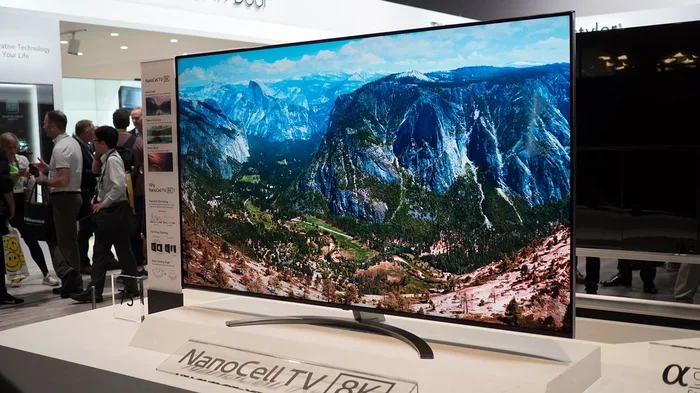
Most 8K TVs on the market today come with multiple HDMI 2.1 ports. These TVs are designed to take full advantage of 8K HDMI input. Brands like Samsung, LG, Sony, and Toshiba all offer 8K models with at least one or two HDMI 2.1 ports. These ports support 8K at 60Hz, HDR10, Dolby Vision, and all the HDMI 2.1 gaming features we discussed earlier.
However, there is an important note. Many 8K TVs do not actually have native 8K content available. Instead, they use advanced upscaling technology to convert lower resolution content to 8K. This means your HDMI connection might be carrying a 4K or even 1080p signal that the TV then upscales. In these cases, HDMI 2.0 might be sufficient for the input signal, but HDMI 2.1 ensures you are ready for when true 8K content becomes more widely available.
8K Gaming and Next-Gen Consoles
Gaming is one of the biggest drivers of 8K adoption. The PlayStation 5 and Xbox Series X both support 8K output, although true 8K gaming at 60fps is still rare. Most games on these consoles run at 4K or even 1080p with upscaling. But as game developers continue to push the boundaries of display technology, having HDMI 2.1 ready is essential.
PC gamers also benefit from HDMI 2.1. High-end graphics cards from NVIDIA and AMD now support 8K output through HDMI 2.1. Combined with features like VRR and HDR, HDMI 2.1 delivers a premium gaming experience that older HDMI versions simply cannot match.
The State of 8K Content Today
True 8K content is still limited. Streaming services like YouTube support 8K uploads, but 8K streaming requires very high internet speeds and a lot of data. Blu-ray discs do not yet support 8K. Professional content creators are starting to work in 8K, but consumer-facing 8K movies and shows remain rare.
Despite the limited content availability, investing in HDMI 2.1 now is a smart move. It is a form of future-proofing. As 8K content becomes more common over the next few years, your setup will already be ready. You will not need to replace cables or upgrade ports.
Expert Tips for Getting the Most Out of Your 8K HDMI Setup
Setting up an 8K display is exciting, but getting the best results requires a few extra steps. Here are some expert tips to help you maximize your 8K HDMI experience.
1. Check Both Ends of the Connection
It is not enough to have an HDMI 2.1 cable. Both your source device and your display need HDMI 2.1 ports. Plugging an HDMI 2.1 cable into an HDMI 2.0 port will limit your performance to HDMI 2.0 capabilities. Always verify the specifications of every device in your chain.
2. Enable ALLM and VRR in Your TV Settings
Many TVs have these features disabled by default. Go into your TV settings and turn on Auto Low Latency Mode and Variable Refresh Rate if your device supports them. This alone can dramatically improve your gaming and video experience.
3. Use High-Quality Ports on Your AV Receiver
If you use an AV receiver or soundbar with HDMI passthrough, make sure it supports HDMI 2.1. Some receivers only pass through HDMI 2.0 signals, which can bottleneck your 8K setup. Check the receiver specifications before purchasing.
4. Keep Cables Short and Well-Placed
Signal degradation over long cable runs is a real issue for 8K. Keep your HDMI cables as short as possible. If you need a longer run, invest in an active HDMI cable or a fiber optic HDMI cable. These options maintain signal integrity over much greater distances.
5. Update Your Device Firmware
Device manufacturers regularly release firmware updates that improve HDMI compatibility and performance. Keep your TV, console, and source devices updated to ensure the best 8K experience possible.
Common Mistakes People Make with 8K and HDMI
Even with the best intentions, many people make avoidable mistakes when setting up their 8K displays. Here are the most common ones and how to prevent them.
- Assuming any HDMI cable works for 8K: This is the most common mistake. Only Ultra High Speed HDMI cables reliably support 8K at full bandwidth
- Ignoring port versions on devices: A device might have multiple HDMI ports, but only one or two may support HDMI 2.1
- Overlooking signal interference: Running HDMI cables alongside power cables can cause electromagnetic interference that degrades the signal
- Expecting 8K content everywhere: True 8K content is still rare. Your 8K TV will mostly display upscaled content, which is perfectly fine but worth understanding
- Skipping the handshake test: After connecting everything, power on all devices and verify that 8K resolution is actually being output. Check your TV display settings to confirm
Avoiding these mistakes will save you time, frustration, and money. A little bit of knowledge goes a long way when setting up a high-end 8K display system.
Is HDMI 2.1 Worth It for 8K? Final Verdict
The bottom line is clear. If you are buying or upgrading to an 8K TV, monitor, or projector, HDMI 2.1 is absolutely worth it. It provides the bandwidth, features, and future-proofing that 8K demands. From VRR and ALLM to eARC and QFT, HDMI 2.1 enhances every aspect of your viewing and gaming experience.
For gamers, HDMI 2.1 is practically essential. The combination of 8K resolution, high refresh rates, and low latency creates an incredibly immersive and responsive experience. For movie lovers, HDMI 2.1 ensures that your 8K content looks and sounds its absolute best with full HDR support and uncompressed audio.
For content creators and professionals, HDMI 2.1 opens the door to working with 8K video in real time. The high bandwidth and color depth support make it possible to view and edit 8K footage without compression or quality loss.
Can HDMI handle 8K? With HDMI 2.1, it handles it beautifully. The technology is ready. The cables are available. The devices are on the market. All that is left is for you to make the right choices for your setup.
Final Thoughts on HDMI and 8K
Understanding how HDMI handles 8K resolution does not have to be complicated. The key takeaway is simple: HDMI 2.1 is the standard you need for true 8K performance. It provides the bandwidth, features, and reliability that 8K ultra HD demands. Whether you are a gamer chasing the ultimate visual experience, a movie enthusiast building a dream home theater, or a professional working with high-resolution content, HDMI 2.1 delivers.
Invest in certified Ultra High Speed HDMI cables. Check that your devices have HDMI 2.1 ports. Take advantage of features like VRR, ALLM, and eARC. And remember that 8K technology is still evolving. By setting up your system with HDMI 2.1 today, you are preparing yourself for the future of display technology.
The world of 8K is exciting and full of potential. With the right HDMI setup, you will be ready to enjoy every pixel, every frame, and every detail that 8K has to offer. Make the smart choice now, and your setup will thank you for years to come.
Frequently Asked Questions
Can I use an HDMI 2.0 cable for 8K?
You can use an HDMI 2.0 cable for basic 8K at 30Hz, but it will not support 8K at 60Hz or higher refresh rates. For the full 8K experience with smooth motion and HDR, you need an HDMI 2.1 Ultra High Speed cable. HDMI 2.0 cables max out at 18 Gbps, which is not enough for true 8K performance.
How do I know if my TV has HDMI 2.1 ports?
Check your TV’s specifications on the manufacturer website or in the user manual. Look for mentions of HDMI 2.1, 48 Gbps bandwidth, or 8K support. Most 8K TVs and many 4K TVs released after 2020 include at least one HDMI 2.1 port. Some TVs label their HDMI 2.1 ports with a specific icon or color for easy identification.
Do I need 8K content to benefit from HDMI 2.1?
Not necessarily. HDMI 2.1 offers benefits even if you are watching 4K content. Features like VRR, ALLM, and higher refresh rates improve gaming and video quality at any resolution. However, to experience true 8K resolution, you need both an HDMI 2.1 connection and 8K source content.
What is the difference between HDMI 2.1 and Ultra High Speed HDMI cables?
HDMI 2.1 is the specification standard that defines the features and bandwidth capabilities. Ultra High Speed HDMI is the official certification for cables that meet the HDMI 2.1 requirements. When you buy an Ultra High Speed certified cable, you are guaranteed it can handle 48 Gbps bandwidth and support 8K at 60Hz or 4K at 120Hz.
Can HDMI 2.1 support 8K at 120Hz?
Yes, HDMI 2.1 fully supports 8K at 120Hz. This requires the full 48 Gbps bandwidth that HDMI 2.1 provides. This capability is especially important for PC gaming and next-gen consoles that target high frame rates at high resolutions. Make sure both your source device and display support this feature.
Are fiber optic HDMI cables better for 8K?
Fiber optic HDMI cables are excellent for long cable runs with 8K signals. They use light to transmit data, which eliminates signal degradation over distance. If you need to run an HDMI cable longer than 5 meters for your 8K setup, a fiber optic cable is a great investment. They maintain full 48 Gbps bandwidth and deliver reliable 8K performance even over 30 meters or more.
=== CONCLUSION ===
Can HDMI handle 8K? The answer is a definitive yes, provided you have the right equipment. HDMI 2.1 is the key. It brings the bandwidth, features, and performance needed to unlock the full potential of 8K resolution. From gaming and movies to professional content creation, HDMI 2.1 makes 8K practical and accessible today.
Invest in certified cables, verify your device ports, and take advantage of the advanced features that HDMI 2.1 offers. Your 8K setup will deliver an incredible visual experience that is ready for today and built for tomorrow. The future of display technology is bright, and HDMI 2.1 puts it right at your fingertips.