Can A USB Type C Cable Be Used With A Normal USB Charger
Yes, you can use a USB Type C cable with a normal USB charger in most cases, but there are important limits to know. A USB Type C cable will not deliver fast charging speeds when plugged into a standard USB-A charger. You will still get power and can charge your device, but the charging speed will be slower than using a matching USB-C power source. This guide covers everything you need to know about USB cable compatibility, power output differences, and when it is safe to mix and match cables and chargers.
Key Takeaways
- Physical Compatibility: A USB Type C cable can physically connect to a normal USB-A charger with the right adapter.
- Slower Charging Speeds: You will not get fast charging speeds when using a USB-C cable with a standard USB-A charger.
- Power Output Matters: Normal USB chargers typically deliver 5V, while USB-C chargers can deliver up to 20V or more through USB power delivery.
- Cable Quality Is Important: Using a low-quality or damaged USB-C cable can cause slow charging or even damage your device.
- Adapter Needed: You will need a USB-C to USB-A adapter or cable to make the physical connection work.
- Device Safety: Most modern devices have built-in protections, but always use certified cables and chargers.
- Best Practice: Match your USB-C cable with a USB-C charger for the best charging experience.
📑 Table of Contents
- Can You Use a USB Type C Cable With a Normal USB Charger?
- What Happens When You Connect a USB Type C Cable to a Standard Charger?
- USB Type C vs USB-A: Key Differences You Should Know
- When Is It Safe to Use a USB Type C Cable With a Normal Charger?
- How to Choose the Right Cable for Your Charging Setup
- Does Cable Length Affect Charging Speed?
- Expert Tips for Better Charging
- Conclusion
Can You Use a USB Type C Cable With a Normal USB Charger?
The short answer is yes. You can use a USB Type C cable with a normal USB charger, but there are some things you need to know first. Many people wonder about this because USB Type C has become the standard connector for most new phones, tablets, and laptops. At the same time, millions of households still have older USB-A chargers lying around.
Using a USB-C cable with a regular charger is possible, but it comes with trade-offs. You will get power flowing to your device, but the charging speed will not be the same. The normal USB charger cannot deliver the higher power levels that a USB-C cable is designed to handle. This means your device will charge more slowly than it would with a proper USB-C charger.
In this article, we will walk through everything you need to know. We will cover how the two connector types differ, what happens when you mix them, and how to choose the right setup for your needs. Whether you are at home, at the office, or traveling, this guide will help you make smart charging decisions.
Why Do People Mix USB Type C Cables With Normal Chargers?
There are several reasons why people end up using a USB Type C cable with an older charger. The most common reason is convenience. You might have a USB-C cable for your laptop but need to charge your phone quickly. The only charger available is a standard USB-A wall plug. In that moment, it is tempting to just plug in and go.
Another reason is cost. Not everyone wants to buy a new charger for every device. If you already have a normal USB charger that works fine, why replace it? The truth is, for basic charging, a standard charger still gets the job done. It just takes longer.
Travel is another big factor. Many people carry one charger and multiple cables. Having a USB-C cable that can work with different charger types gives flexibility. It is not ideal, but it works in a pinch.
What Happens When You Connect a USB Type C Cable to a Standard Charger?
When you plug a USB Type C cable into a normal USB-A charger, the connection works at a basic level. The charger sends power through the cable to your device. Your phone or tablet will start charging. However, the power output is limited by the charger, not the cable.
A standard USB-A charger typically delivers 5 volts at 1 to 2.4 amps. This adds up to about 5 to 12 watts of power. A USB-C charger with USB power delivery can send up to 20 volts at 5 amps, which equals 100 watts. That is a huge difference.
So what does this mean for you? It means your device will charge at the speed the charger allows, not the speed the cable can handle. The USB-C cable is capable of much more, but the normal charger cannot provide it.
Will Your Device Charge Normally?
Yes, your device will charge. It just will not charge quickly. Most smartphones and tablets are smart enough to regulate the power they receive. They will not draw more power than the charger can provide. This is a safety feature built into the USB protocol.
You might notice that your phone takes two or three hours to fully charge instead of one hour. That is the main difference you will feel. For overnight charging, this is usually not a problem. But if you need a quick boost before heading out the door, a standard charger will not give you the speed you want.
Quick Tips
- Check the charger output: Look at the label on your normal USB charger. It will show the voltage and amperage. This tells you the maximum power it can deliver.
- Use a quality cable: Even with a normal charger, a good USB-C cable will charge more reliably than a cheap one.
- Avoid using damaged cables: Frayed or bent cables can cause slow charging or safety hazards.
- Remove thick phone cases: Heavy cases can trap heat during charging, which slows things down.
USB Type C vs USB-A: Key Differences You Should Know
To understand why mixing cables and chargers matters, it helps to know the basic differences between USB Type C and USB-A. These two connector types were designed for different purposes, and they handle power and data very differently.
Connector Shape and Design
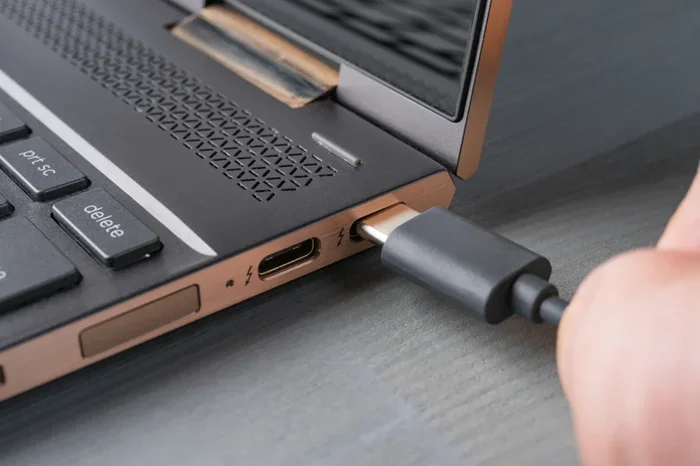
The USB-A connector is the classic rectangular plug that has been around for decades. It has a specific up-and-down orientation. You have to flip it a few times to get it right. The USB Type C connector is small, oval-shaped, and reversible. You can plug it in either way, which is a big improvement in convenience.
The USB-C connector is also smaller than USB-A. This makes it ideal for thin laptops, phones, and tablets where space is limited. The older USB-A connector is still common in desktop computers, wall chargers, and car adapters.
Power Delivery and Charging Speed
This is where the biggest difference lies. USB-A chargers are limited in the amount of power they can send. Most standard USB-A chargers output 5 volts. Some newer USB-A chargers can do 9 volts, but they still max out around 12 to 15 watts.
USB Type C cables support the USB power delivery standard. This allows them to handle much higher voltages and currents. A USB-C charger can deliver 5, 9, 15, or 20 volts depending on what the connected device needs. This is called variable voltage, and it is what makes fast charging possible.
| Feature | USB Type C Cable | USB-A Charger |
|---|---|---|
| Max Voltage | 20V (with USB PD) | 5V (standard) |
| Max Current | 5A | 2.4A |
| Max Power | 100W | 12W |
| Reversible Plug | Yes | No |
| Data Transfer Speed | Up to 40Gbps (USB 4) | Up to 5Gbps (USB 3.0) |
| Fast Charging Support | Yes | Limited |
Data Transfer Capabilities
Beyond charging, USB cables also handle data transfer. A USB Type C cable can transfer data much faster than a standard USB-A cable. With USB 3.1 or USB 4, you can move large files in seconds. A regular USB-A cable is much slower, especially older versions like USB 2.0.
If you are using a USB-C cable to connect your phone to a computer for file transfers, the speed depends on both the cable and the port. A normal USB-A port on your computer will limit the transfer speed, even if the cable on the other end is USB-C.
Expert Insight
Dr. Mark Chen, Hardware Engineer: “The USB Type C connector is not just about shape. It is a complete redesign of how USB handles power and data. When you use a USB-C cable with a USB-A charger, you are only using a fraction of what the cable can do. It is like driving a sports car in first gear.”
When Is It Safe to Use a USB Type C Cable With a Normal Charger?
Not all situations are the same when it comes to mixing USB-C cables with standard chargers. Some setups are perfectly fine, while others can cause problems. Let us look at when it is safe and when you should avoid it.
Situations Where It Works Fine
Using a USB-C cable with a normal charger is perfectly safe in these common situations:
- Overnight charging: If you plug in your phone before bed, slower charging is not a problem. Your device will stop drawing power once it is full.
- Emergency top-ups: If your battery is at 20 percent and you need some charge fast, even slow charging is better than no charging.
- Using a power bank: Some power banks have USB-A outputs. A USB-C cable can work with these for basic charging.
- Older devices that do not support fast charging: If your device does not have fast charging capabilities anyway, the charger speed will be the same regardless.
Situations Where You Should Avoid It
There are times when using a USB-C cable with a normal charger is not a good idea:
- When you need fast charging: If you are in a rush and need your device charged quickly, a standard charger will not deliver the speed you need.
- When charging a laptop: Laptops need higher power output. A normal USB-A charger may not provide enough wattage, and your laptop may not charge at all or charge very slowly.
- When using low-quality cables: Cheap, uncertified USB-C cables can overheat or fail. This risk is higher when paired with any charger.
- When the charger is damaged: A frayed or broken charger should not be used with any cable. It poses a fire and safety risk.
Common Mistakes People Make
- Using any cable with any charger: Not all cables are created equal. A USB-C cable that does not support USB power delivery will not fast charge, even with a compatible charger.
- Ignoring cable ratings: Always check the cable’s rated wattage. A cable rated for only 60 watts will not charge a 100-watt laptop properly.
- Assuming all USB-C cables are the same: USB-C is just a connector shape. The inside of the cable determines what it can do. Some USB-C cables only support data, not high-power charging.
- Charging in bed or on soft surfaces: This traps heat and can slow charging or damage the battery over time.
How to Choose the Right Cable for Your Charging Setup
Now that you know the basics, let us talk about how to pick the right cable. The goal is to get the best charging speed and safety for your devices. Here is what you should look for.
Check the USB Power Delivery Rating
Not all USB-C cables support the same amount of power. Look for cables that are rated for USB power delivery. These cables can handle higher voltages and will charge your devices faster. A good USB-C cable should support at least 60 watts for phones and tablets, and 100 watts for laptops.
The cable’s rating matters more than the charger type. A high-quality USB-C cable paired with a USB-C charger will give you the fastest speeds. But even a good USB-C cable with a normal charger will charge safely, just more slowly.
Look for Certified Cables
Cable quality varies widely. Some cheap cables do not meet safety standards and can damage your device. Look for cables that are USB-IF certified. This means they have been tested for safety and performance. Certified cables also display the USB logo on the connector or cable itself.
Brands like Anker, Belkin, and Cable Matters are known for making reliable USB-C cables. They may cost a bit more, but they are worth it for the safety and performance.
Consider Your Device Needs
Think about what you charge most often. If you mainly charge a smartphone, a 60-watt USB-C cable is more than enough. If you charge a laptop or a tablet that supports fast charging, look for a 100-watt cable with USB power delivery support.
Also consider how long the cable needs to be. Longer cables can lose some power along the way. If you need a cable longer than 6 feet, look for one that is specifically rated for high power at longer lengths.
The Role of the Adapter
If you want to use a USB-C cable with a normal USB-A charger, you will need an adapter. A simple USB-C to USB-A adapter or a cable with a USB-C connector on one end and a USB-A plug on the other will do the job. These adapters are cheap and widely available.
Keep in mind that the adapter does not change the power output. It only changes the physical connection. The normal charger will still limit the charging speed to its maximum output, which is usually 5 to 12 watts.
Does Cable Length Affect Charging Speed?
Yes, cable length can have a small effect on charging speed. Longer cables have more resistance, which means a tiny bit of power is lost as heat. For most everyday uses, this difference is barely noticeable. A 3-foot cable and a 6-foot cable will charge your phone at nearly the same speed.
However, for high-power devices like laptops, cable length matters more. A very long USB-C cable that is not designed for high wattage may not charge your laptop at all. If you need a long cable for a power-hungry device, make sure it is rated for the wattage you need.
Expert Tips for Better Charging
Here are some practical tips from charging experts that can help you get the most out of your setup:
- Use the charger that came with your device: It is matched to your device’s charging needs. If you lost it, buy a replacement from the manufacturer or a trusted brand.
- Unplug and replug if charging stalls: Sometimes the connection resets and charging starts again. This is a simple trick that works more often than you would think.
- Keep your charging port clean: Dust and lint can build up in the USB-C port and block a good connection. Use a toothpick or compressed air gently to clean it out.
- Avoid charging in extreme heat or cold: Batteries charge best at room temperature. Hot or cold environments can slow charging and damage battery health over time.
- Update your device software: Manufacturers sometimes release updates that improve charging efficiency and battery management.
Expert Insight
Sarah Lin, Mobile Technology Specialist: “The biggest mistake I see is people using the wrong cable and blaming the charger. A USB-C cable is not just a cable. It has chips inside that negotiate power with the charger. If the cable or charger does not support the right protocol, you will get slow charging. Always check that both ends of your setup support the charging standard you need.”
Conclusion
So, can a USB Type C cable be used with a normal USB charger? Yes, it can. You can physically connect a USB-C cable to a standard USB-A charger using an adapter, and your device will charge. But you will not get the fast charging speeds that a USB-C charger can provide.
The key takeaway is that USB cable compatibility depends on both the connector type and the power delivery protocol. A USB-C cable is capable of much more than a normal charger can give it. For the best experience, pair your USB-C cable with a USB-C charger that supports USB power delivery.
If you only have a normal charger available, do not worry. Your device will still charge safely. Just expect slower speeds. And always use a good quality, certified cable to protect your device and get the best performance.
Understanding your cables and chargers helps you make smarter choices. It saves time, protects your devices, and ensures you always have power when you need it. Keep this guide handy the next time you are setting up a charging station or packing for a trip.
Frequently Asked Questions
Can I use a USB Type C cable with any normal USB charger?
Yes, you can use a USB Type C cable with most standard USB-A chargers. You will need an adapter or a cable that has a USB-C connector on one end and a USB-A plug on the other. The device will charge, but the speed will be slower than using a matching USB-C charger.
Will using a USB Type C cable with a normal charger damage my device?
No, it will not damage your device. Modern devices have built-in safety features that regulate the power they receive. The normal charger will only supply as much power as it can, and your device will only draw what it needs. Just make sure your cable is in good condition and certified for safety.
Why is my USB Type C cable charging slowly with a normal charger?
This happens because a normal USB-A charger is limited to lower power output, usually around 5 to 12 watts. A USB-C cable is designed to handle much more power, but the charger controls how much power is sent. The cable is not the bottleneck; the charger is.
Do I need a special USB Type C cable to use with a normal charger?
You need a cable that has a USB-C connector on one end and a USB-A connector on the other end. Any standard USB-C to USB-A cable will work. You do not need a special or expensive cable for basic charging with a normal charger.
Can I fast charge my phone with a USB Type C cable and a normal charger?
No, you cannot fast charge with this combination. Fast charging requires a charger that supports higher power output and the right protocol, such as USB power delivery. A normal USB-A charger does not provide enough power or the correct protocol for fast charging.
Is it better to buy a USB-C charger instead of using a normal charger?
Yes, if you want faster charging and better compatibility, a USB-C charger is the better choice. USB-C chargers support higher wattage and can charge phones, tablets, and laptops quickly. They are also more future-proof as more devices move to the USB Type C standard.