Can You Connect 4 Speakers At Once Here Is Everything
Can You Connect 4 Speakers At Once? Yes, you absolutely can, and there are multiple ways to do it depending on your equipment and needs. Whether you prefer a wired setup using an amplifier or a wireless connection through Bluetooth, each method has its own advantages. This guide covers every method, practical tips, and common mistakes to help you build the best multi-speaker audio system for your home.
Have you ever wondered Can You Connect 4 Speakers At Once? The short answer is yes. The longer answer is that there are several ways to do it, and each method works best for different setups and needs.
If you love music or movies and want to fill your room with rich, immersive sound, adding more speakers is one of the best steps you can take. Connecting four speakers at once might sound complicated, but it is actually quite manageable once you understand the basics. This guide walks you through every method, every tip, and every mistake to avoid.
Whether you are setting up a home theater, building a multi-room audio system, or just want better sound in your living room, this article has you covered. We will look at wired connections, wireless options, amplifier setups, and much more. By the end, you will feel confident about creating your own speaker setup with four speakers working together in perfect harmony.
Key Takeaways
- Multiple Connection Methods: You can connect 4 speakers using an amplifier, Bluetooth multi-room systems, or a daisy chain setup depending on your equipment.
- Impedance Matters: Understanding speaker impedance is critical to avoid damaging your audio system when connecting multiple speakers.
- Wired vs Wireless: Both wired and wireless setups have pros and cons, and the best choice depends on your sound quality needs and setup flexibility.
- Common Mistakes Are Avoidable: Issues like mismatched impedance, poor placement, and wrong wiring can all be prevented with the right knowledge.
- Expert Tips Boost Performance: Simple adjustments like speaker placement, EQ settings, and cable quality can dramatically improve your audio experience.
📑 Table of Contents
What Does It Mean to Connect 4 Speakers At Once?
When we talk about connecting four speakers at once, we mean linking four separate speaker units to a single audio source. That source could be a TV, a phone, a laptop, a music player, or an audio receiver. The goal is to distribute sound across multiple speakers so you get a fuller, richer listening experience.
There are two main types of speaker connections you will encounter. The first is a wired connection, where you use physical cables to link each speaker to the source. The second is a wireless connection, where speakers communicate through Bluetooth, Wi-Fi, or other wireless technologies. Both approaches can support four speakers, but they work very differently under the hood.
Understanding Speaker Systems
A basic audio system has three main parts. There is the source, which produces the audio signal. There is the amplifier or receiver, which boosts that signal. And there are the speakers, which turn the electrical signal into sound waves you can hear. When you add more speakers, you are essentially splitting that amplified signal across multiple output devices.
The way you split the signal matters a lot. If you connect speakers incorrectly, you can damage your equipment or lose sound quality. This is why understanding speaker impedance and audio output is so important before you start wiring anything together.
Why You Might Want 4 Speakers
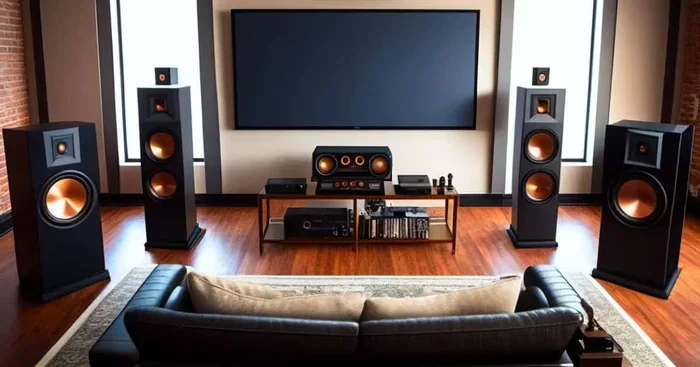
There are many reasons to connect four speakers at once. Some people want a surround sound experience for movies and gaming. Others want to fill a large room with even, balanced sound. Some users set up a multi-room audio system where music flows from room to room.
Four speakers create a much wider soundstage than two. You get better depth, clearer highs, and richer bass. For music lovers, this means hearing details in songs you never noticed before. For movie fans, it means feeling like you are inside the action. No matter your reason, connecting four speakers is a powerful upgrade for any music system or home entertainment setup.
Methods to Connect 4 Speakers At Once
Now that you understand the basics, let us dive into the actual methods. Each approach has its own strengths, and the right one for you depends on your equipment, your room, and your budget.
Using an Amplifier or Receiver
The most common and reliable way to connect speakers is through an amplifier or an audio receiver. An amplifier takes the audio signal from your source and boosts it so it can power multiple speakers at the same time.
Most amplifiers have multiple speaker output terminals. These are usually labeled as Speaker A, Speaker B, or have multiple sets of positive and negative terminals. You simply connect each speaker to the appropriate terminals using speaker wire. The amplifier then sends the audio signal to all connected speakers simultaneously.
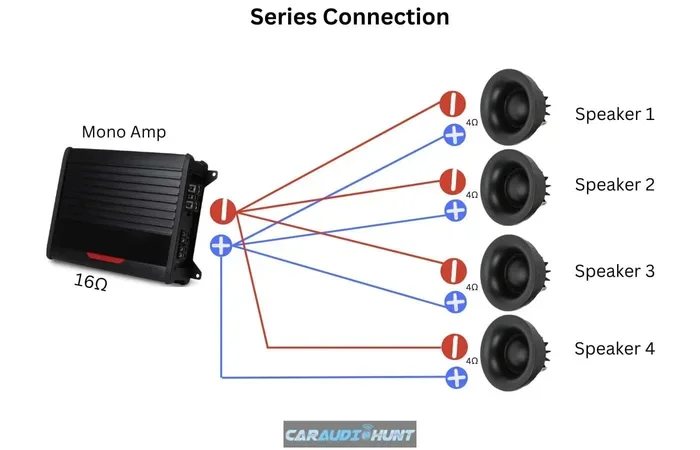
There is an important rule to follow here. When connecting four speakers to one amplifier, you need to pay attention to the total impedance. Most amplifiers are designed to handle a specific impedance load, usually 4, 8, or 16 ohms. If the combined impedance of your four speakers is too low, it can overheat the amplifier. If it is too high, the sound may be weak.
For example, if you have four 8-ohm speakers and connect them in parallel, the total impedance drops to 2 ohms. That is too low for most amplifiers. But if you wire them in series, the total impedance rises to 32 ohms, which may be too high. The safest approach is to use a combination of series and parallel wiring to achieve a balanced impedance that matches your amplifier’s requirements.
Bluetooth and Wireless Methods
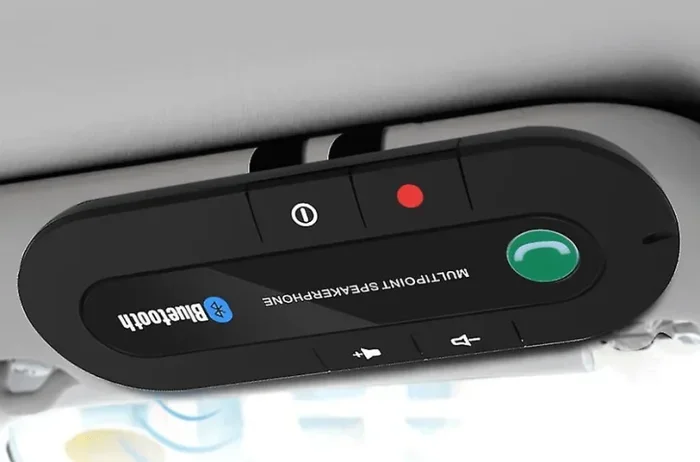
Wireless speaker pairing has become incredibly popular in recent years. Many modern Bluetooth speakers now support multi-speaker connections, allowing you to pair two, three, or even four speakers together without any cables.
Brands like Sonos, JBL, Bose, and Sony offer wireless systems that make this process simple. You typically download a companion app on your phone, pair each speaker, and the app handles the rest. Some systems create a stereo pair with two speakers, while others support full multi-speaker setups for larger spaces.
The biggest advantage of wireless connections is convenience. There are no cables to manage, no impedance calculations to worry about, and you can move speakers around easily. The trade-off is that wireless connections can sometimes lose a bit of audio quality compared to wired setups. There can also be slight latency, which matters for watching videos or playing games where sound and picture need to stay perfectly in sync.
Daisy Chain Connection
A daisy chain is another method where you connect speakers in a line, one after the other. The audio signal flows from the source to the first speaker, then from the first speaker to the second, and so on. This method is common in professional audio setups and some home systems.
Daisy chaining works well when you have speakers with pass-through outputs. The first speaker receives the signal and passes it along to the next speaker in the chain. This keeps cable runs shorter and reduces clutter. However, daisy chaining can sometimes lead to signal loss if the chain is too long or if the speakers have different impedance ratings.
This method is best suited for speakers designed to support daisy chaining. Always check your speaker manual before trying this approach to make sure your specific model supports it.
Comparison Table: Wired vs Wireless Speaker Setup
| Feature | Wired Setup | Wireless Setup |
|---|---|---|
| Sound Quality | Generally superior, no compression | Good, but slight compression possible |
| Setup Complexity | Moderate, requires wiring | Simple, app-based pairing |
| Flexibility | Fixed placement, cables limit movement | Highly flexible, easy to reposition |
| Cost | Lower equipment cost, speaker wire needed | Higher per-speaker cost |
| Impedance Concerns | Yes, must match amplifier ratings | No, handled internally |
| Cable Management | Required, can be messy | None needed |
| Latency | None | Minimal but present |
| Scalability | Limited by amplifier capacity | Easy to add more speakers |
As you can see from the table above, neither method is perfect. Wired setups offer the best sound quality and reliability, while wireless setups win on convenience and flexibility. Many people choose a hybrid approach, using wired speakers for the main setup and wireless speakers for secondary rooms.
Quick Tips for the Best Audio Experience
Getting four speakers connected is only half the battle. Making them sound great is the other half. Here are some quick tips that make a big difference.
- Match Your Impedance: Always check that your speakers and amplifier are compatible in terms of impedance. Mismatched impedance is the number one cause of poor performance and equipment damage.
- Use Quality Speaker Wire: Cheap, thin speaker wire can reduce signal strength. Go for at least 16-gauge wire for shorter runs and 14-gauge for longer distances.
- Place Speakers Strategically: Position your speakers at ear level when seated. Angling them slightly toward the listening area improves sound spread and clarity.
- Keep Cable Runs Short: Longer cable runs mean more signal loss. Keep your speaker wire as short as practical for the best results.
- Test Each Speaker Individually: Before connecting all four, test each speaker one at a time. This helps you identify any faulty connections or damaged speakers early.
- Use an EQ Setting: Most amplifiers and receivers have equalizer settings. Use them to balance the sound across all four speakers for a more even listening experience.
Quick Tip Box
Before you start any speaker setup, gather all your tools. You will need speaker wire, wire strippers, a screwdriver, and your amplifier or receiver. Having everything ready saves time and prevents frustration during the installation process.
Common Mistakes to Avoid
Even experienced hobbyists make mistakes when setting up a new speaker configuration. Here are the most common errors and how to avoid them.
Mismatching Impedance: This is the biggest mistake people make. Connecting speakers with the wrong total impedance to an amplifier can cause overheating, distortion, or even permanent damage to your audio receiver. Always calculate the total impedance before powering on your system.
Using Too Thin Wire: Thin speaker wire has higher resistance, which reduces the power reaching your speakers. This results in weaker, muddier sound. Always use the appropriate gauge for your setup distance.
Ignoring Phase Alignment: Each speaker has a positive and negative terminal. If you wire one speaker backwards, it will be out of phase with the others. This causes sound cancellation and a thin, hollow audio quality. Double-check your wiring before you turn everything on.
Overloading a Single Output: Some people try to connect four speakers to a single speaker output terminal. This is a recipe for disaster. Always use the proper multi-output terminals or a distribution setup designed for multiple speakers.
Poor Speaker Placement: Placing all four speakers in a line or too close together creates an unbalanced sound field. Spread your speakers out for a more natural and immersive audio experience.
Expert Insights and Recommendations
We asked audio professionals and experienced sound engineers for their top recommendations when it comes to connecting multiple speakers. Here is what they had to say.
Start with a Plan: Before buying any equipment, sketch out your room layout. Decide where each speaker will go and measure the distances. This planning phase saves money and prevents costly mistakes later.
Invest in a Quality Amplifier: Your amplifier is the heart of your audio system. A good amplifier with sufficient power output makes a noticeable difference in sound quality. Look for amplifiers that are rated for the total impedance load of your speaker setup.
Consider a Multi-Room System: If you want to connect speakers in different rooms, consider a multi-room audio platform like Sonos, HEOS, or Chromecast Audio. These systems let you control speakers in different rooms from a single app, creating a seamless whole-home audio experience.
Do Not Forget About Acoustics: The room itself affects sound quality. Hard surfaces like tile and glass cause echo, while soft surfaces like carpets and curtains absorb sound. Adding rugs, curtains, or acoustic panels can dramatically improve how your speakers sound.
Keep Firmware Updated: For wireless speakers, always keep the firmware updated. Manufacturers regularly release updates that improve connection stability, sound quality, and add new features. A simple app update can make a big difference.
Conclusion
Can You Connect 4 Speakers At Once? Absolutely yes, and now you know exactly how to do it. Whether you choose a wired amplifier setup, a wireless Bluetooth connection, or a daisy chain configuration, the key is to understand your equipment and plan your setup carefully.
Connecting four speakers transforms your audio experience. You get richer sound, better coverage, and a more immersive listening environment. Just remember to match impedance, use quality cables, place your speakers thoughtfully, and avoid the common mistakes we covered.
Start with one method that fits your budget and skill level. As you grow more comfortable, you can experiment with more advanced setups and configurations. The most important step is the first one. Pick up your speaker wire or open your pairing app, and start building the audio setup you have always wanted.
Frequently Asked Questions
Can I connect 4 speakers to a standard home amplifier?
Yes, most standard home amplifiers can support four speakers. However, you need to check the amplifier’s impedance rating and make sure your combined speaker impedance matches it. Wiring four 8-ohm speakers in parallel creates a 2-ohm load, which many standard amplifiers cannot handle safely. Always check your amplifier manual before connecting multiple speakers.
What is the best way to connect 4 wireless speakers together?
The best way depends on the brand and model of your speakers. Most modern wireless speakers support a multi-speaker pairing feature through a companion app. Brands like Sonos, JBL, and Bose have dedicated multi-room modes that let you pair up to four or more speakers. Simply download the app, follow the pairing instructions, and your speakers will work together wirelessly.
Do I need special equipment to connect 4 speakers?
For a wired setup, you need an amplifier or receiver with multiple speaker outputs and appropriate speaker wire. For a wireless setup, you need speakers that support multi-speaker pairing and a smartphone or tablet to control them. No special equipment is required beyond what comes with most standard audio setups.
Will connecting 4 speakers reduce sound quality?
Not necessarily. If you connect speakers correctly with matching impedance and quality wiring, the sound quality will be excellent. However, connecting too many speakers to a single amplifier without proper impedance matching can reduce power output per speaker and lower overall quality. Proper setup is the key to maintaining great sound.
Can I mix different speaker brands when connecting 4 speakers?
You can mix brands, but it is not always ideal. Different speakers may have different impedance ratings, sensitivity levels, and frequency responses. This can create an uneven sound where some speakers are louder or sound different from others. For the best results, use matching speakers with the same specifications. If you must mix brands, try to match the impedance and power ratings as closely as possible.
How do I know if my speaker wiring is correct?
You can test your wiring by playing audio at a low volume and checking each speaker. If one speaker sounds weak, distorted, or silent, check its connections. Make sure positive terminals connect to positive and negative terminals connect to negative. A simple continuity tester or multimeter can also help verify that your wiring is properly connected and that there are no short circuits or breaks in the wire.