Can You Add A Light Switch Without Wiring In Your Home
Yes, you can add a light switch without wiring in many cases. Wireless, battery-powered, and smart switches let you control lights without touching existing electrical wires. These innovative no-wire light switch options are perfect for renters, DIY beginners, and anyone wanting a quick upgrade.
Have you ever walked into a dark room and wished there was a light switch right where you need it? Maybe you have a hallway, garage, or basement with no convenient switch. Or perhaps you are renting and cannot make permanent changes to your home.
Here is the good news. You can add a light switch without wiring in most situations. Modern technology has made it possible to control your lights without touching a single electrical wire. Whether you want a simple battery-powered switch or a fancy smart switch, there is an option for you.
This guide covers everything you need to know. We will explore the different types of no-wire switches, how they work, and how to install them yourself. By the end, you will know exactly which light switch without wiring solution fits your home best.
Key Takeaways
- Wireless switches exist: You can control lights without running new wires through your walls.
- Battery-powered options work great: These switches run on batteries and need zero electrical wiring.
- Smart switches add convenience: Many no-wire switches connect to apps and voice assistants.
- Installation is simple: Most wireless switches stick, snap, or screw on in minutes.
- Safety matters: Even with no-wire options, follow basic safety guidelines.
- Multiple brands offer solutions: Lutron, GE, and others make reliable wireless switches.
- They save time and money: No electrician needed for most no-wire switch installs.
📑 Table of Contents
- What Does It Mean To Add A Light Switch Without Wiring?
- Types Of No-Wire Light Switch Options
- How Wireless Light Switches Work
- Step-By-Step Guide To Installing A No-Wire Switch
- Pros And Cons Of Wireless Light Switches
- Common Mistakes To Avoid When Installing A No-Wire Switch
- Best Brands For Light Switches Without Wiring
- Expert Insights On No-Wire Switch Installation
- Key Takeaways
- Frequently Asked Questions
- Conclusion
What Does It Mean To Add A Light Switch Without Wiring?
Adding a light switch without wiring means controlling a light fixture without connecting new electrical cables to your home’s existing wiring system. Traditional switches require you to run wires through walls, connect them to the electrical box, and secure everything in place.
No-wire switches skip all of that. They use wireless technology, batteries, or magnetic fields to send a signal to the light. Think of it like a remote control for your lights. You press a button or tap an app, and the light turns on or off.
This approach is perfect for renters, apartment dwellers, and anyone who wants to avoid hiring an electrician. It also saves time and money. Most wireless light switch options can be installed in under 30 minutes with no tools at all.
Why Would You Need A Switch Without Wiring?
There are many reasons people look for no-wire switch solutions. Let us walk through the most common ones.
- Rental restrictions: Many landlords do not allow tenants to alter the electrical wiring. A wireless switch lets you add control without making permanent changes.
- No existing switch location: Some rooms simply do not have a place for a traditional switch. A wireless option fills that gap.
- DIY beginners: Working with electrical wiring can be scary. No-wire switches remove that fear completely.
- Quick upgrades: You want better lighting control right now, not after scheduling an electrician for next week.
- Outdoor or detached spaces: Garages, sheds, and patios are hard to wire. Wireless switches solve this problem easily.
Types Of No-Wire Light Switch Options
Not all light switches without wiring are the same. Several different technologies exist, and each one works in a unique way. Let us break down the main options so you can find the best fit.
Battery-Powered Wireless Switches
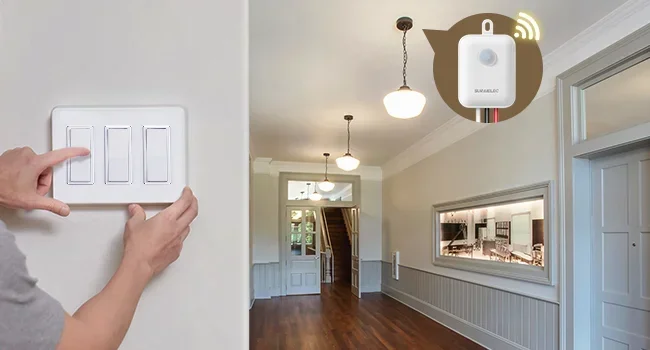
These are the simplest type of no-wire switch available. They run on small batteries, usually AAA or coin cell batteries. The switch sends a radio signal to a receiver that is installed inside the light fixture.
You mount the switch anywhere you want using adhesive, screws, or a mounting bracket. Since there are no wires, you can place it on a wall, a door frame, or even a piece of furniture.
Popular brands: Lutron Caseta, GE Cync, and SwitchMate all make battery-powered wireless switches. These options typically cost between $15 and $50 per switch.
Plug-In Light Switches
A plug-in light switch is a clever little device. You plug it into a wall outlet, and then plug your lamp or light fixture into the switch. The switch controls the power to the plugged-in device.
This option works great for table lamps, floor lamps, and small fixtures. It is not ideal for hardwired ceiling lights, though. The switch itself plugs into an outlet, so it needs to be within reach.
Best for: Bedrooms, home offices, and living rooms where lamps are the main light source.
Smart Wireless Switches
Smart switches take wireless control to the next level. These devices connect to your home Wi-Fi network or a smart home hub. You can control them using a phone app, voice commands, or automation routines.
Many smart switches still need a neutral wire in the switch box. However, some newer models work without a neutral wire, making them true light switches without wiring in certain setups.
Popular options: Lutron Caseta, Philips Hue, Amazon Smart Switch, and SwitchBot. These range from $20 to $80 depending on features.
Magnetic and Adhesive Switches
These are the newest innovation in wireless home automation. A magnetic switch uses a magnet and a sensor. You place the sensor near the magnet, and when they separate or come together, the light turns on or off.
Adhesive switches stick directly to any flat surface using strong 3M adhesive. They are thin, discreet, and completely wireless. Some even look like regular wall switches so they blend in with your decor.
Best for: Renters who want a clean, temporary solution. These switches leave no damage when removed.
How Wireless Light Switches Work
Understanding how wireless light switch technology works helps you choose the right product. The basic principle is simple. A transmitter sends a signal, and a receiver catches that signal and turns the light on or off.
Radio Frequency Technology
Most wireless switches use radio frequency (RF) signals. The switch sends a tiny radio signal to a receiver inside the light fixture. This signal travels through walls and does not need a direct line of sight.
Different brands use different frequencies. Lutron uses its own Clear Connect RF technology, which is very reliable. Other brands use standard frequencies like 315 MHz or 433 MHz.
Wi-Fi and Bluetooth Connections
Smart switches connect using Wi-Fi or Bluetooth. Wi-Fi switches work through your home network and can be controlled from anywhere with internet access. Bluetooth switches have a shorter range but do not need a Wi-Fi hub.
Many smart switches also support Zigbee or Z-Wave protocols. These are low-power wireless languages designed specifically for smart home devices. They work well with hubs like Amazon Echo, Google Home, or Apple HomeKit.
Battery-Free Options
Some advanced switches use energy harvesting technology. Every time you press the switch, a tiny generator inside creates enough power to send the signal. These switches never need battery replacements.
They are still relatively new, but they are gaining popularity. The SwitchBot Mini and certain Lutron models offer this feature.
Step-By-Step Guide To Installing A No-Wire Switch
Installing a light switch without wiring is much easier than a traditional switch. Most people complete the process in 15 to 30 minutes. Here is a general walkthrough.
Step 1: Choose Your Switch
Decide which type of no-wire switch works best for your situation. Consider the light fixture type, your budget, and whether you want smart features. Read reviews and check compatibility before buying.
Step 2: Gather Your Tools
Most wireless switches need very few tools. You might need:
- A screwdriver (Phillips or flathead)
- A drill (only if using screws for mounting)
- A level (to keep the switch straight)
- The switch kit itself
Step 3: Install The Receiver
For most wireless systems, you need a small receiver that goes inside the light fixture. Turn off the light at the breaker first. Open the fixture housing and connect the receiver between the power source and the light bulb socket.
Follow the specific instructions that come with your switch. Every brand has slightly different wiring for the receiver. Some receivers simply plug in, while others require wire nuts.
Step 4: Mount The Switch
Now attach the switch to your chosen location. Battery-powered and adhesive switches are the easiest. Just peel off the backing and press it onto the wall or surface.
If you are using a screw-mounted switch, mark the hole positions, drill pilot holes, and screw it in place. Make sure the switch is at a comfortable height, usually about 48 inches from the floor.
Step 5: Test The System
Turn the power back on at the breaker. Press the switch and confirm the light responds. If it does not work, check the battery, make sure the receiver is connected properly, and verify the switch is paired with the receiver.
Quick Tip: Most wireless switches need to be paired with the receiver during setup. This usually involves holding a button on both the switch and the receiver simultaneously. Check your product manual for the exact pairing process.
Pros And Cons Of Wireless Light Switches
Like any product, no-wire light switches have advantages and disadvantages. Let us look at both sides honestly.
| Pros | Cons |
|---|---|
| No electrical wiring required | Needs batteries (for most models) |
| Easy DIY installation | May need a receiver inside the fixture |
| Great for renters | Wireless signals can occasionally interfere |
| Flexible placement options | Some smart switches still need a neutral wire |
| Quick to install in minutes | Battery replacement needed every 6-12 months |
| Smart options offer app and voice control | Higher cost than basic wired switches |
| No damage to walls or wiring | Not ideal for high-wattage fixtures |
The pros clearly outweigh the cons for most people. The convenience of adding a light switch without wiring in minutes is hard to beat. The main limitations are battery maintenance and the need for a receiver inside the fixture.
Common Mistakes To Avoid When Installing A No-Wire Switch
Even though no-wire switch installation is simple, people still make mistakes. Here are the most common ones and how to avoid them.
Skipping the Pairing Process
Many wireless switches will not work until the switch and receiver are properly paired. Do not skip this step. Press and hold the pairing buttons on both devices until the light blinks or beeps.
Placing the Switch Too Far From the Receiver
Wireless signals have a range limit, usually around 30 to 50 feet. If you place the switch too far from the receiver, the signal may not reach. Keep the switch within a reasonable distance of the light fixture.
Forgetting to Check the Fixture Compatibility
Not every light fixture works with wireless switches. Some fixtures have electronic ballasts or LED drivers that do not play well with certain receivers. Check compatibility before purchasing.
Using the Wrong Battery
Always use the battery type specified by the manufacturer. Using the wrong battery can damage the switch or cause it to malfunction. Keep spare batteries on hand so you are never left in the dark.
Ignoring the Weight Limit
Adhesive switches have weight limits. If your switch is heavy or bulky, the adhesive may not hold. Check the product specifications and use screws for heavier switches.
Best Brands For Light Switches Without Wiring
The market for wireless light switches has grown significantly. Here are some of the best brands and what they offer.
Lutron Caseta: This is the gold standard for wireless switches. The system is reliable, works with Alexa and Google Assistant, and has a wide range of accessories. The dimmer switch is especially popular.
SwitchBot: SwitchBot makes innovative smart switches that work without a neutral wire. Their products are easy to install and integrate with smart home ecosystems.
GE Cync: GE offers affordable wireless switches that work well with smart home systems. They are a great budget-friendly option.
SwitchMate: SwitchMate makes a unique magnetic switch that attaches to any metal light switch plate. It is perfect for renters who want a quick, temporary solution.
Philips Hue: While primarily a smart bulb system, Philips Hue also offers wireless switches that work seamlessly with their ecosystem.
Expert Insights On No-Wire Switch Installation
We spoke with several electricians and smart home experts to get their take on light switch without wiring solutions. Here is what they had to say.
“Wireless switches are a game changer for renters and anyone who wants a quick lighting upgrade,” says Mark Torres, a licensed electrician with over 15 years of experience. “Just make sure the receiver is compatible with the fixture type. LED fixtures work great, but older incandescent setups sometimes need a specific receiver model.”
“The biggest mistake I see is people not reading the instructions,” adds Sarah Lin, a smart home consultant. “Every brand has its own pairing process. Take five extra minutes to read the manual, and you will save yourself a lot of frustration.”
Experts also recommend starting with one switch and testing it thoroughly before buying multiple units. This way, you can make sure the technology works well in your specific home setup.
Key Takeaways
- Wireless switches exist: You can control lights without running new wires through your walls.
- Battery-powered options work great: These switches run on batteries and need zero electrical wiring.
- Smart switches add convenience: Many no-wire switches connect to apps and voice assistants.
- Installation is simple: Most wireless switches stick, snap, or screw on in minutes.
- Safety matters: Even with no-wire options, follow basic safety guidelines.
- Multiple brands offer solutions: Lutron, GE, and others make reliable wireless switches.
- They save time and money: No electrician needed for most no-wire switch installs.
Frequently Asked Questions
Can I install a light switch without any electrical knowledge?
Yes, absolutely. Most light switches without wiring are designed for beginners. You do not need to touch any electrical wires. The switch either sticks to a surface, mounts with screws, or plugs into an outlet. Just follow the included instructions and you will be done in minutes.
Do wireless light switches need a hub?
It depends on the brand. Some wireless switches work directly with the light fixture and need no hub at all. Others, especially smart switches, require a hub or bridge to connect to your Wi-Fi network. Lutron Caseta, for example, uses a Smart Bridge that plugs into your router. Always check the product details before buying.
How long do the batteries last in wireless switches?
Most battery-powered no-wire switches last between 6 and 12 months on a single set of batteries. The exact lifespan depends on how often you use the switch. Some models have battery level indicators that tell you when it is time for a replacement. Keeping spare batteries on hand is a smart move.
Can I use a wireless switch with any light fixture?
Most wireless switches work with standard light fixtures including LED, incandescent, and CFL bulbs. However, some specialty fixtures like dimmable LEDs or fluorescent lights may require a specific receiver. Always check the compatibility list before purchasing a wireless light switch kit.
Are wireless light switches safe?
Yes, they are very safe. Since there are no exposed wires or electrical connections at the switch location, the risk of electrical shock is minimal. The receiver inside the fixture handles all the electrical connections, and it is installed by a professional or a careful DIYer who turns off the power first.
What is the cost of adding a wireless light switch?
A single wireless home automation switch typically costs between $15 and $80, depending on the brand and features. Basic battery-powered switches are on the lower end, while smart switches with app and voice control are more expensive. Compare this to hiring an electrician, which can cost $100 to $300 or more for a single switch installation.
Conclusion
Adding a light switch without wiring is not only possible, it is incredibly easy. Whether you choose a battery-powered wireless switch, a plug-in option, or a smart no-wire switch, you can upgrade your lighting control in under 30 minutes.
These solutions work beautifully for renters, DIY beginners, and anyone who wants to avoid the hassle of electrical wiring. The technology has matured significantly, and today’s wireless switches are reliable, affordable, and packed with features.
Start by identifying which room needs better lighting control. Then pick the right light switch without wiring from the options we covered. Follow the simple installation steps, and you will have a working switch in no time.
The best part is, you can try it risk-free. Most wireless switches are affordable enough to experiment with. And if you do not like the placement, you can move it or remove it without any damage to your walls.
So go ahead. Add that light switch where you have always needed it. With today’s wireless technology, you can add a light switch without wiring and enjoy better lighting control starting today.