Can I Use A 4k Hdmi Cable On A Non 4k Tv Yes Heres How
Yes, you can absolutely use a 4K HDMI cable on a non-4K TV. A 4K HDMI cable is fully backward compatible with older TVs, and it will work perfectly fine with your existing setup. The cable simply adjusts to the display resolution of your TV, so you get the best possible picture quality your screen can support.
Have you ever bought a 4K HDMI cable and then wondered if it would even work with your older TV? Maybe you picked up a new cable for your gaming console or streaming box and realized your TV is not 4K capable. Or perhaps you just want to future-proof your setup. Whatever the reason, this is a really common question. The good news is that the answer is simple and reassuring. You can use a 4K HDMI cable on a non-4K TV, and it will work just fine.
In this guide, we are going to walk through everything you need to know. We will cover how it works, whether there are any risks, and what benefits you might actually get. By the end, you will feel confident about your cable choices and your home entertainment setup. Let us get into it.
Key Takeaways
- A 4K HDMI cable works on non-4K TVs: It is fully backward compatible and adjusts to your TV’s resolution automatically.
- You will not damage your TV: Using a higher-spec cable on an older TV is completely safe.
- Better future-proofing: A 4K cable prepares your setup for upgrades without needing to replace cables.
- No noticeable difference on a 1080p TV: The cable delivers the best signal your TV can handle.
- Check your HDMI port version: The port on your TV matters more than the cable label.
- Cable quality still matters: Choose certified cables for reliable signal and performance.
📑 Table of Contents
- What Is a 4K HDMI Cable?
- Can You Use a 4K HDMI Cable on a Non-4K TV?
- How Does a 4K HDMI Cable Work with a 1080p TV?
- Benefits of Using a 4K HDMI Cable on a Non-4K TV
- Common Mistakes People Make
- Expert Tips for Choosing the Right HDMI Cable
- Does Cable Quality Really Matter?
- Quick Tips for Using a 4K HDMI Cable on a Non-4K TV
- Final Thoughts
What Is a 4K HDMI Cable?
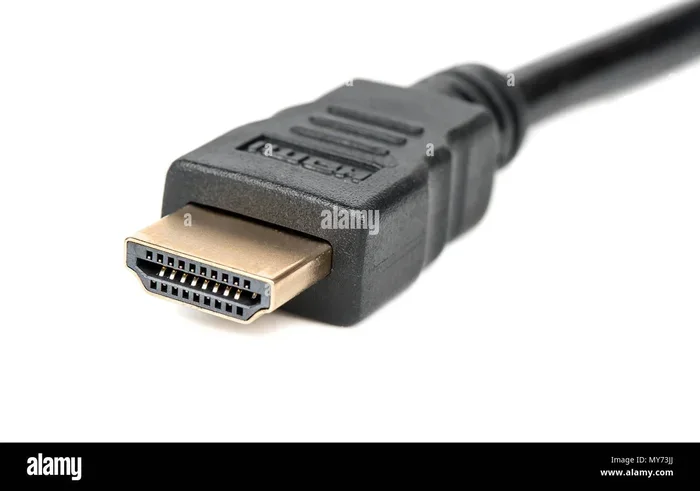
Before we dive into compatibility, let us talk about what a 4K HDMI cable actually is. A 4K HDMI cable is designed to handle high-bandwidth signals that support ultra high definition resolution. This means it can carry video at 3840 x 2160 pixels or higher. It also supports advanced features like HDR, which stands for High Dynamic Range, and wider color gamuts.
These cables are built to meet specific HDMI standards. The most common ones you will see are HDMI 2.0 and HDMI 2.1. HDMI 2.0 cables can handle 4K at 60 frames per second. HDMI 2.1 cables go even further, supporting 4K at 120 frames per second and even 8K resolution. But here is the thing that surprises many people. These cables also work perfectly with older devices and displays.
Understanding HDMI Versions
There are several HDMI versions out there. Each version brings new capabilities. HDMI 1.4 was a big step forward and introduced 4K support at 30 frames per second. HDMI 2.0 doubled that to 60 frames per second. HDMI 2.1 took things even further with support for higher refresh rates and resolutions.
When you buy a cable labeled as a 4K HDMI cable, it is typically rated for HDMI 2.0 or higher. This means it has the bandwidth and wiring needed to carry those high-resolution signals. But it also means the cable is designed to be flexible and work across different devices and resolutions.
Can You Use a 4K HDMI Cable on a Non-4K TV?
The short answer is yes. A 4K HDMI cable works on a non-4K TV without any problems. HDMI technology is designed to be backward compatible. This means newer cables and devices can communicate with older equipment just fine.
When you plug a 4K HDMI cable into a 1080p TV, the cable and the TV will negotiate the best possible connection. The TV will tell the cable what resolution it can display. The cable will then deliver that signal. You will get the best picture quality your TV is capable of showing. The cable simply adjusts to match your display.
There is no risk of damage to your TV or your devices. A 4K HDMI cable will not send a signal that is too powerful for your screen. It does not work like that. The TV controls what it displays. The cable just carries the signal. Think of it like a highway. A wider highway can handle more traffic, but it also works perfectly fine when there is only a little traffic on it.
How the Handshake Process Works
When you connect two devices with an HDMI cable, they go through what is called a handshake. This is an automatic process where the source device and the display talk to each other. They agree on the resolution, refresh rate, and other settings. This happens every time you turn on your TV or change inputs.
With a 4K HDMI cable connected to a non-4K TV, the handshake will simply agree on the resolution your TV supports. If your TV is 1080p, the connection will be set to 1080p. If your TV is 720p, it will settle on that. The cable does not force any resolution on your TV. It just provides the capability.
How Does a 4K HDMI Cable Work with a 1080p TV?
Now let us get a little more specific. What actually happens when you use a 4K HDMI cable with a 1080p TV? The experience will be smooth and straightforward. Your cable will deliver the signal, and your TV will display it at its native resolution.
You might wonder if the image quality will be any different. The answer is no. A 1080p TV can only display 1080p pixels. It does not matter if the cable is capable of carrying 4K signals. Your TV will still show 1080p content. The cable simply has more capacity than your TV can use. That is not a bad thing. It just means you are not wasting anything.
One thing to keep in mind is the source device. If you are connecting a streaming stick, a Blu-ray player, or a gaming console, the quality of the output depends on the device. A 4K HDMI cable will pass through whatever signal the device sends. If the device outputs 1080p, your TV will show 1080p.
Audio Quality Considerations
Another benefit of using a 4K HDMI cable is the audio quality. HDMI cables carry both video and audio signals through a single cable. A 4K HDMI cable supports advanced audio formats like Dolby Atmos and DTS:X. Even if your TV is not 4K, it can still pass these audio signals to your soundbar or receiver.
This is a nice bonus that many people overlook. You get better audio quality without needing a 4K TV. The cable handles everything seamlessly. You just plug it in and enjoy.
Benefits of Using a 4K HDMI Cable on a Non-4K TV
You might be thinking, if the cable works but my TV is not 4K, what is the point? There are actually several good reasons to use a 4K HDMI cable even on a non-4K TV.
Future-Proofing Your Setup
The biggest advantage is future-proofing. Technology changes fast. Today your TV might be 1080p. Tomorrow you might upgrade to a 4K TV. If you already have 4K HDMI cables, you do not need to buy new ones. You just plug them in and go. This saves you money and time.
Think about all the devices you own. You might have a gaming console, a streaming box, a Blu-ray player, and a soundbar. If you upgrade any of these devices in the future, your 4K cables will be ready. You will not have to rush out and buy new cables again.
Better Build Quality
4K HDMI cables are often built with higher quality materials. They tend to have better shielding and thicker wires. This means they are less likely to suffer from signal degradation over long cable runs. If you need a longer cable, a 4K-rated cable is usually a better choice.
Better shielding also means less interference from other electronic devices in your home. You are less likely to experience flickering, signal drops, or audio dropouts. This is a real benefit even on a non-4K setup.
Support for Advanced Features
Even on a non-4K TV, a 4K HDMI cable can support features like HDR and wider color ranges. Some non-4K TVs do support HDR. A 4K cable ensures your setup can handle these features if your TV supports them.
It also means your cable is ready for any new features that might be introduced through firmware updates. HDMI standards continue to evolve, and having a higher-spec cable gives you more headroom.
Common Mistakes People Make
There are a few common mistakes people make when it comes to HDMI cables and non-4K TVs. Avoiding these can save you frustration and money.
Buying Expensive Cables You Do Not Need
One mistake is spending too much money on a cable that is overkill for your setup. A 4K HDMI cable can cost more than a standard cable. If you are never going to use 4K, you might feel like you wasted your money. But remember, the benefits of future-proofing and build quality often outweigh the small price difference.
That said, you do not need the most expensive cable on the market. A mid-range certified 4K cable will do the job perfectly. You do not need a $100 cable for a 1080p TV. A $15 to $25 certified cable is more than enough.
Assuming All 4K Cables Are the Same
Not all 4K HDMI cables are created equal. Some are certified Ultra High Speed. Others are just labeled as 4K without meeting the official standards. Always look for cables that are certified by the HDMI Licensing Administrator. This ensures the cable actually meets the specifications it claims.
Certified cables have gone through testing. They are guaranteed to handle the bandwidth they advertise. Non-certified cables might work, but they might also cause issues like signal drops or flickering.
Ignoring Cable Length
Cable length matters more than people think. A longer cable can lead to signal loss, especially with high-bandwidth signals like 4K. If you need a cable longer than 6 feet, consider getting one with better shielding or an active signal booster.
For most living room setups, a 6-foot cable is plenty. If your TV is mounted far from your devices, invest in a higher-quality longer cable. This will ensure a stable and reliable connection.
Using the Wrong Port
Some TVs have multiple HDMI ports, and not all of them are the same. Some ports might be HDMI 2.0, while others are older HDMI 1.4. If you want to take advantage of advanced features, plug your 4K cable into the right port.
Check your TV manual or look for port labels on the back of the TV. Ports labeled HDMI 2.0 or ARC are usually the better ones for modern devices.
Expert Tips for Choosing the Right HDMI Cable
Choosing the right HDMI cable does not have to be confusing. Here are some expert tips to help you make the best choice for your setup.
Look for the HDMI Logo
The HDMI Licensing Administrator puts a certification logo on cables that meet their standards. Look for the Ultra High Speed HDMI logo on 4K cables. This logo guarantees the cable can handle 4K at 60Hz and supports HDR.
If you do not see the logo, be cautious. The cable might still work, but there is no guarantee it will perform reliably at high resolutions.
Match the Cable to Your Needs
Think about what you are connecting and what you want to get out of it. If you are connecting a gaming console and want 4K at 120Hz, you need an HDMI 2.1 Ultra High Speed cable. If you are just connecting a streaming stick to a 1080p TV, a standard high-speed cable will work fine.
There is no need to buy more cable than you need. But if you want flexibility for future upgrades, a 4K cable is a smart investment.
Buy from Reputable Brands
Stick with reputable brands when buying HDMI cables. Brands like Belkin, Cable Matters, and AmazonBasics offer reliable options at fair prices. Avoid buying the cheapest unbranded cables from unknown sellers. These often do not meet the specifications they claim.
Reading reviews can also help you find a good cable. Look for cables with consistent positive feedback and no reports of signal issues.
Test Your Setup
Once you have your cable, test your setup. Plug everything in, turn on your devices, and check the picture and sound quality. Make sure there are no flickering, artifacts, or audio sync issues. If everything looks and sounds good, you are all set.
If you do notice issues, try a different port on your TV or a different cable. Sometimes the problem is not the cable at all but the port or the device settings.
Does Cable Quality Really Matter?
This is a question many people ask. Does the brand or price of an HDMI cable really affect performance? The short answer is yes, but with some nuance.
For most casual viewers, a basic certified HDMI cable will work perfectly. The difference between a $10 cable and a $50 cable might not be noticeable on a 1080p TV. However, for longer cable runs or setups with lots of electronic interference, a higher-quality cable makes a real difference.
4K HDMI cables tend to have better construction. They use thicker conductors and better shielding. This translates to a more stable signal and fewer issues over time. Even if you are not using 4K right now, the build quality of a 4K cable gives you a better experience overall.
The key takeaway is this. Do not overspend, but do not go for the absolute cheapest option either. A mid-range certified cable from a trusted brand strikes the perfect balance between cost and quality.
Quick Tips for Using a 4K HDMI Cable on a Non-4K TV
- Always check your TV’s HDMI port version. HDMI 2.0 ports give you the most flexibility.
- Use certified cables. Look for the Ultra High Speed HDMI logo.
- Keep cable runs under 10 feet when possible. Longer runs can cause signal loss.
- Do not worry about damage. A 4K cable will not harm your non-4K TV.
- Enjoy the audio benefits. Even on a non-4K TV, the cable can carry advanced audio formats.
- Keep your cables organized. Use cable ties or clips to keep things neat and prevent wear.
Final Thoughts
Using a 4K HDMI cable on a non-4K TV is completely safe and fully supported. HDMI technology is designed to be backward compatible, so you do not need to worry about any issues. Your TV will display the best resolution it can handle, and the cable will deliver the signal without any problems.
The real value of a 4K HDMI cable lies in future-proofing. You are investing in a cable that will work with your current setup and any upgrades you make down the road. Plus, the better build quality and support for advanced audio features are nice bonuses you get for free.
So the next time you are shopping for cables and see a great deal on a 4K HDMI cable, do not hesitate. It will work on your non-4K TV and serve you well for years to come. Just make sure you buy a certified cable from a reputable brand, and you will be all set.
Take a moment to check your current cables and ports. If you are still using an old standard HDMI cable, upgrading to a 4K cable is an easy and affordable way to improve your home entertainment setup. You will thank yourself the next time you upgrade your TV or your devices.
Frequently Asked Questions
Will a 4K HDMI cable damage my non-4K TV?
No, it will not. HDMI cables are designed to be backward compatible. The TV controls the resolution it displays, and the cable simply carries the signal. There is no risk of damage to your display or any connected devices.
Will I notice any difference in picture quality on a 1080p TV?
Not really. Your 1080p TV can only display 1080p resolution. The 4K cable will deliver the best 1080p signal possible, but you will not see a visible difference compared to a standard high-speed HDMI cable. The benefit is more about future-proofing and build quality.
Do I need a special 4K HDMI cable for gaming consoles?
It depends on your console and TV. If you have a PlayStation 5 or Xbox Series X and a 4K TV, an Ultra High Speed HDMI 2.1 cable is recommended. But if your TV is not 4K, a standard certified high-speed HDMI cable will work perfectly for gaming.
Can I use a 4K HDMI cable for streaming devices like Roku or Fire Stick?
Absolutely. A 4K HDMI cable works with streaming devices regardless of your TV’s resolution. The cable will pass through the best signal your device and TV can support. If your streaming device outputs 1080p, your TV will display 1080p.
What is the difference between a standard HDMI cable and a 4K HDMI cable?
A standard HDMI cable is rated for lower bandwidth and may support 1080p or 4K at 30Hz. A 4K HDMI cable, especially one rated HDMI 2.0 or higher, supports 4K at 60Hz and can carry HDR and advanced audio formats. The 4K cable also tends to have better build quality and shielding.
How do I know if my HDMI cable is certified for 4K?
Look for the Ultra High Speed HDMI logo on the cable or its packaging. This logo is certified by the HDMI Licensing Administrator and guarantees the cable meets the official 4K specifications. You can also check the product description for the HDMI version number, such as HDMI 2.0 or HDMI 2.1.
=== CONCLUSION ===
The answer to whether you can use a 4K HDMI cable on a non-4K TV is a clear and definitive yes. A 4K HDMI cable is fully backward compatible and will work seamlessly with your existing TV. It delivers the best signal your TV can handle, supports advanced audio formats, and gives you peace of mind for future upgrades.
There are no risks, no compatibility issues, and no reason to hesitate. Whether you are setting up a new home theater or just replacing an old cable, a 4K HDMI cable is a smart choice. It is an affordable upgrade that pays for itself the moment you decide to upgrade your TV or any other device in your setup.
So go ahead, grab that 4K HDMI cable, plug it in, and enjoy your entertainment. You have nothing to lose and a better setup to gain.