Can I Unlock My August Smart Lock From Anywhere Today
Yes, you can unlock your August Smart Lock from anywhere as long as you have an internet connection and the August app installed on your phone. Remote access lets you control your door whether you are at home, at work, or traveling across the globe. The August Smart Lock Pro model works best for remote features because it includes built-in WiFi. You will need a stable WiFi connection, the August app, and an active August account to make it all work smoothly.
Have you ever been sitting in a coffee shop and suddenly wondered if you left your front door unlocked? Maybe you are on vacation and a friend needs to grab something from inside your house. Or perhaps you just want to let a delivery person in without being home. The idea of unlocking your door from anywhere sounds like pure convenience, and that is exactly what smart locks promise.
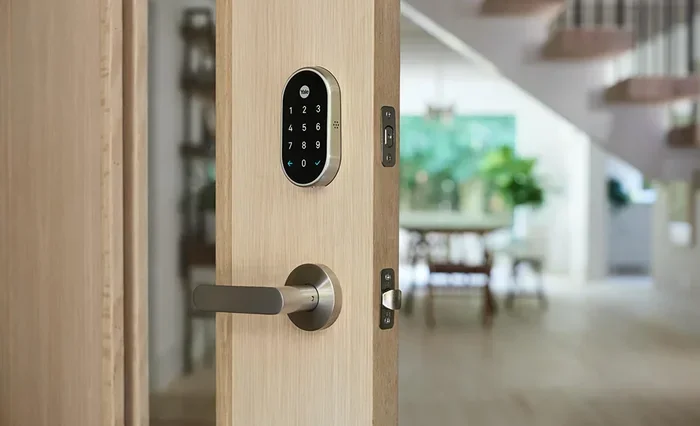
The August Smart Lock is one of the most popular smart door locks on the market. It works with most standard deadbolts, so you do not need to replace your entire lock. But the real question is this: can you actually unlock an August Smart Lock from anywhere? The short answer is yes. The longer answer involves WiFi, the August app, and a few setup steps that make all the difference.
In this guide, we will walk through everything you need to know about remote access with your August Smart Lock. We will cover how it works, what you need, how to set it up, and what to do when things do not go as planned. By the end, you will feel confident using your lock from any location in the world.
Key Takeaways
- Remote unlocking is possible: You can unlock your August Smart Lock from anywhere with an internet connection and the August app.
- The August Smart Lock Pro is ideal: It has built-in WiFi, which makes remote access much more reliable than Bluetooth-only models.
- You need the right setup: A working WiFi network, the August app, and a linked August account are all required.
- Security stays strong: Remote access uses encrypted connections and two-factor authentication to keep your door safe.
- Guest access works too: You can grant temporary remote access to friends, family, or service providers from your phone.
- Troubleshooting is straightforward: Most remote access issues come from WiFi problems, low battery, or app updates.
- Auto-lock keeps you safe: The lock can automatically secure your door after you unlock it remotely.
📑 Table of Contents
- How Does the August Smart Lock Work?
- Can You Unlock It From Anywhere?
- Setting Up Remote Access Step by Step
- Remote Access Features You Will Love
- Common Issues and How to Fix Them
- Security Considerations for Remote Access
- Comparing Remote Access: August Smart Lock Pro vs Standard Model
- Final Thoughts
How Does the August Smart Lock Work?
Before diving into remote access, it helps to understand the basics. The August Smart Lock replaces your existing deadbolt’s interior thumb turn. The exterior key still works just like before. But on the inside, the smart lock connects to your phone through Bluetooth and WiFi.
There are two main models worth knowing about:
- August Smart Lock (2nd Gen): This model connects primarily through Bluetooth. It works well for nearby control but needs extra hardware for remote access.
- August Smart Lock Pro: This model has built-in WiFi. It supports remote access right out of the box. It also works with Alexa, Google Home, and Apple HomeKit.
The Bluetooth connection lets you lock and unlock your door when you are within about 30 feet. But Bluetooth has a limited range. That is where remote access comes in. When you add WiFi to the mix, your lock connects to the internet. This means you can send commands from your phone no matter how far away you are.
The Role of the August App
The August app is the brain behind everything. It connects your phone to the lock through the cloud. When you tap “unlock” on your phone, the app sends a signal through the internet to your lock. The lock then receives the command and turns the deadbolt. This whole process takes just a few seconds.
The app also gives you useful features like:
- Activity log: See who locked or unlocked your door and when.
- Auto-lock: Set the lock to automatically secure after a certain time.
- Guest access: Grant temporary or permanent access to trusted people.
- DoorSense: Know if your door is open or closed, even when you are away.
Can You Unlock It From Anywhere?
Here is the part you have been waiting for. Yes, you can unlock your August Smart Lock from anywhere. But there is a catch. Your lock needs to be connected to the internet for remote commands to work. Without an active internet connection, the lock falls back to Bluetooth-only mode, which only works when you are nearby.
Remote access works through the cloud. The August Smart Lock Pro connects directly to your WiFi network. When you are away from home, your phone talks to the August cloud servers, which then relay your command to the lock. This is called cloud-based remote access, and it is how most smart locks handle long-distance control.
What You Need for Remote Access
Setting up remote access is straightforward, but you do need a few things in place first:
- A WiFi network: Your lock must be connected to a stable 2.4GHz WiFi network. Most home routers use this frequency by default.
- The August Smart Lock Pro: If you have the standard Bluetooth-only model, you will need a separate WiFi bridge or hub to enable remote access.
- The August app: Make sure you have the latest version installed on your phone. Both iOS and Android are supported.
- An active August account: Your lock must be linked to your August account. This is done during the initial setup process.
- A working internet connection: Your home WiFi needs an active internet connection. If your router loses power or internet, remote access will not work.
Once all of these pieces are in place, you can unlock your door from your office, from a different city, or even from another country. The lock responds to commands through the internet, so physical proximity does not matter.
Setting Up Remote Access Step by Step
Getting remote access working on your August Smart Lock takes about 15 to 20 minutes. Here is how to do it.
Step 1: Install the Lock
First, make sure your lock is properly installed. The August Smart Lock replaces the interior thumb turn of your existing deadbolt. You do not need any special tools. Just unscrew your current thumb turn, slide the August lock onto the deadbolt, and tighten the screws. The exterior key cylinder stays in place.
Step 2: Connect to WiFi
Open the August app on your phone. Follow the on-screen prompts to connect the lock to your WiFi network. Make sure you are using a 2.4GHz network. Some routers broadcast both 2.4GHz and 5GHz bands. If your router combines them, try separating them in your router settings for the best results.
Step 3: Link Your Account
The app will ask you to sign in or create an August account. This account is essential for remote access and cloud connectivity. Once your account is linked, your lock will register with the August cloud servers.
Step 4: Test Remote Access
Turn off your phone’s WiFi and move to a different location. Open the August app and try unlocking your door. If everything is set up correctly, the lock should respond within a few seconds. You can also test this by having a friend try unlocking the door while you are away from home.
Quick Tips for a Smooth Setup
- Keep your phone close during setup: Bluetooth and WiFi pairing work best when you are near the lock.
- Restart your router if needed: A quick router reboot can fix most connectivity issues during setup.
- Update the app regularly: New updates often improve remote access performance and fix bugs.
- Use a strong WiFi signal: If your lock is far from your router, consider adding a WiFi extender.
Remote Access Features You Will Love
Once your August Smart Lock is set up for remote access, a whole new world of convenience opens up. Here are some of the best features you get.
Unlock for Guests and Service Providers
Need a plumber to fix a leak while you are at work? You can grant temporary remote access through the August app. Just create a guest code or send a digital key. The person can unlock your door without ever having a physical key. When the job is done, you can revoke their access instantly from your phone.
Lock and Leave Peace of Mind
One of the best features of the August Smart Lock is the auto-lock function. When you unlock your door remotely for someone, the lock can automatically re-lock after a set time. This means you never have to worry about forgetting to lock up. Peace of mind is built right into the lock.
Check Your Door Status Anywhere
The DoorSense sensor tells you whether your door is open or closed. You can check this from the August app no matter where you are. Wondering if you closed the front door before heading to the airport? Just open the app and take a look. This feature works with the August Smart Lock Pro and the DoorSense add-on sensor.
Integrate With Other Smart Home Devices
The August Smart Lock Pro works with Alexa, Google Home, and Apple HomeKit. You can create routines that lock or unlock your door based on other smart home triggers. For example, you can set it up so your door unlocks automatically when your smart camera detects a recognized face at the door. Smart home automation makes remote access even more powerful.
Receive Activity Notifications
Every time someone locks or unlocks your door, the app sends you a notification. You can see a full activity log with timestamps and user details. This is especially useful if you share access with family members or guests. You always know who came and went and when.
Common Issues and How to Fix Them
Remote access with your August Smart Lock is generally reliable, but occasional issues can pop up. Here are the most common problems and how to solve them.
Lock Not Responding to Remote Commands
If your lock does not respond when you try to unlock it remotely, the first thing to check is your home WiFi connection. A weak or dropped WiFi signal will prevent remote commands from reaching the lock. Try restarting your router and checking that the lock is still connected to the network in the app.
Low Battery Warning
The August Smart Lock runs on batteries that typically last about 6 to 12 months. When the battery gets low, the lock may lose its WiFi connection. You will get a low battery alert in the app. Simply replace the batteries with fresh ones to restore full functionality. Keep spare batteries on hand so you are never caught off guard.
App Connectivity Problems
Sometimes the issue is not with the lock but with the app. Make sure you have the latest version of the August app installed. Try logging out and back in. If the problem persists, uninstall and reinstall the app. A quick app refresh often fixes remote access glitches.
WiFi Network Changes
If you changed your WiFi password or got a new router, the lock will lose its connection. You will need to reconnect the lock to the new network through the app. This is a simple process but easy to forget after a router change.
Security Considerations for Remote Access
Remote access adds convenience, but it also means your lock is connected to the internet. Security should always be a top priority when using any smart lock. Here is how to keep your August Smart Lock secure.
Use Strong Account Passwords
Your August account is the gateway to your lock. Use a strong, unique password that you do not use anywhere else. Enable two-factor authentication in the app settings for an extra layer of protection. This means even if someone guesses your password, they still cannot access your lock without a second verification step.
Be Careful With Guest Access
Granting guest access is incredibly useful, but be selective about who you share it with. Only give access to people you trust. Use temporary access codes whenever possible instead of permanent ones. You can set an expiration date on guest access so it automatically revokes after a certain time.
Keep Your App and Firmware Updated
August regularly releases updates that fix security vulnerabilities and improve performance. Keep your app updated and make sure your lock firmware is current. Outdated software is one of the easiest ways for hackers to gain access to smart home devices.
Use a Secure WiFi Network
Your home WiFi is the bridge between your lock and the internet. Make sure your WiFi network uses WPA3 or WPA2 encryption. Change your default router password and keep your firmware updated. A secure WiFi network protects not just your lock but all your smart home devices.
Comparing Remote Access: August Smart Lock Pro vs Standard Model
Not all August Smart Locks are created equal when it comes to remote access. Here is a quick comparison to help you understand the difference.
| Feature | August Smart Lock Pro | August Smart Lock (2nd Gen) |
|---|---|---|
| Built-in WiFi | Yes | No |
| Remote Access | Yes, out of the box | Requires WiFi bridge |
| Auto-Unlock | Yes | No |
| Alexa/Google Home/HomeKit | Yes | Limited |
| DoorSense Support | Yes | Yes (with add-on) |
| Battery Life | 6-12 months | 6-12 months |
| Price Range | Higher | Lower |
If remote access is important to you, the August Smart Lock Pro is the clear choice. It has everything built in and does not require any extra hardware. The standard model works well for nearby Bluetooth control, but you will need a bridge for full remote functionality.
Final Thoughts
The ability to unlock your August Smart Lock from anywhere is one of the biggest reasons people invest in smart locks. Whether you want to let in a guest, check on your door while traveling, or simply never worry about locking up again, remote access delivers real value. The August Smart Lock Pro makes this process seamless with built-in WiFi and a reliable cloud connection.
Setting up remote access is easy and takes less than half an hour. Once it is working, you will wonder how you ever managed without it. Just remember to keep your WiFi strong, your batteries fresh, and your app updated. With these simple habits, your August Smart Lock will serve you well from any location in the world.
Remote access turns your door into a smart, connected part of your home. It gives you control, convenience, and peace of mind. So go ahead, unlock your August Smart Lock from anywhere today, and enjoy the freedom that smart home technology brings.
Frequently Asked Questions
Can I unlock my August Smart Lock from another country?
Yes, you can unlock your August Smart Lock from another country as long as your home WiFi is active and you have an internet connection on your phone. The August app connects to the lock through the cloud, so physical distance does not matter. Just make sure your home router stays powered on and connected to the internet.
Do I need the August Smart Lock Pro for remote access?
The August Smart Lock Pro has built-in WiFi, which makes remote access straightforward. The standard August Smart Lock uses Bluetooth only, so you will need a separate WiFi bridge or hub to enable remote features. The Pro model saves you the hassle of extra hardware.
Is remote unlocking safe and secure?
Yes, remote unlocking is safe when you follow basic security practices. Use a strong password for your August account, enable two-factor authentication, and keep your app and lock firmware updated. The August app uses encrypted connections to communicate with your lock, protecting your data and access.
What happens if my WiFi goes down while I am away?
If your home WiFi goes down, you will not be able to send remote commands to your lock until the connection is restored. Your lock will continue to work normally with a physical key or Bluetooth when you are nearby. Consider using a WiFi extender or a smart plug with battery backup to keep your router running during outages.
Can I grant remote access to someone else?
Absolutely. The August app lets you create guest access for friends, family, or service providers. You can set temporary or permanent access and even add an expiration date. The guest receives access through the app and can unlock your door remotely, just like you would.
How long does it take to unlock the door remotely?
Remote unlocking typically takes just a few seconds. The command travels from your phone through the internet to the August cloud, and then to your lock. The actual speed depends on your internet connection and WiFi signal strength. A strong, stable connection ensures the fastest response time.
=== CONCLUSION ===
Unlocking your August Smart Lock from anywhere is not just possible, it is simple and reliable when you have the right setup. The August Smart Lock Pro stands out as the best choice for remote access thanks to its built-in WiFi and seamless app integration. Whether you are at home, at work, or halfway around the world, your door is just a few taps away.
Remember to keep your WiFi strong, your batteries fresh, and your app updated. Follow the security best practices we covered, and you will enjoy all the benefits of remote access without any worries. The smart home revolution starts at your front door, and the August Smart Lock puts that power right in your pocket.