How Do I Add Bluetooth to My Car Factory Stereo System
Adding Bluetooth to your car factory stereo system is simpler than you think. You can use a Bluetooth adapter, FM transmitter, or AUX input to get wireless audio streaming in your vehicle. This guide covers every method, from budget options to premium solutions, so you can choose the best fit for your car and budget.
Do you love your car but hate that your factory stereo does not support Bluetooth? You are not alone. Many drivers still rely on older stereos that only play CDs or radio stations. The good news is that you do not need to buy a whole new stereo system to get wireless music streaming.
Adding Bluetooth to your car factory stereo is one of the best car audio upgrades you can make. It lets you stream music, take hands-free calls, and use voice assistants without touching your phone. In this guide, we walk you through every method, from simple plug-and-play adapters to more permanent installations.
Whether you drive a sedan, truck, or SUV, these steps work for almost any vehicle. We will cover costs, pros and cons, and tips to get the best sound quality. Let us get started.
Key Takeaways
- Bluetooth adapters are the easiest way to add wireless streaming to your factory stereo without replacing it.
- FM transmitters offer a no-wire option that works with almost any car radio.
- AUX input Bluetooth adapters provide better sound quality than FM transmitters for most vehicles.
- Installation takes 10-30 minutes depending on the method you choose.
- Compatibility matters — check your stereo type before buying any adapter.
- Hands-free calling becomes possible once you add Bluetooth to your factory system.
📑 Table of Contents
- Why Add Bluetooth to Your Factory Stereo?
- Method 1: Bluetooth FM Transmitter (Easiest and Cheapest)
- Method 2: AUX Input Bluetooth Adapter (Best Sound Quality)
- Method 3: Bluetooth Car Adapter (For USB-Only Stereos)
- Method 4: Aftermarket Bluetooth Module (For Advanced Users)
- Comparison: Which Method Is Right for You?
- Tips for the Best Bluetooth Car Audio Experience
- Common Mistakes to Avoid
- Expert Insight: Is It Worth It?
- Final Thoughts on Adding Bluetooth to Your Car Factory Stereo
Why Add Bluetooth to Your Factory Stereo?
Factory stereos are built to last. They often sound great and last for years. But they were designed before wireless streaming became the norm. That means you are missing out on a lot of convenience.
Here is why adding Bluetooth makes sense:
- Wireless music streaming — Play Spotify, Apple Music, or any app without cables.
- Hands-free calling — Answer calls safely while driving.
- No stereo replacement needed — Keep your factory radio and just add wireless capability.
- Quick setup — Most adapters take less than 30 minutes to install.
- Cost-effective — Bluetooth adapters cost much less than a new head unit.
- Works with any phone — Android and iPhone both connect easily.
Think of it this way. You already have a great stereo. Bluetooth simply gives it a modern upgrade. It is like adding a smart feature to an otherwise solid device.
Method 1: Bluetooth FM Transmitter (Easiest and Cheapest)
An FM transmitter is the most popular way to add Bluetooth to a factory stereo. It works by sending your phone’s audio to an empty FM radio frequency. Your stereo then picks up that signal and plays it through your speakers.
How It Works
The FM transmitter plugs into your car’s cigarette lighter or USB port. It connects to your phone via Bluetooth. Then you tune your stereo to the same frequency the transmitter broadcasts on. Your music plays through the car speakers wirelessly.
What You Need
- A Bluetooth FM transmitter (prices range from $15 to $50)
- An empty FM radio frequency on your stereo
- Your car’s cigarette lighter or USB port
Step-by-Step Setup
- Plug the FM transmitter into your car’s power source.
- Turn on your car stereo and set it to an empty FM frequency (like 88.1 or 107.9).
- Set the transmitter to the same frequency.
- On your phone, go to Bluetooth settings and pair with the transmitter.
- Start playing music on your phone. It should now come through your car speakers.
Pros and Cons
FM transmitters are super easy to use. They work with almost any car. But the sound quality is not always perfect. You may hear some static or interference, especially in areas with a lot of radio signals. They also rely on your car’s power outlet, so they stop working when you turn off the engine.
One thing to keep in mind: if you have ever wondered whether you can add Bluetooth to other devices in your home, like your TV, the concept is very similar. For example, you can check how to make your TV have Bluetooth using a similar wireless adapter approach.
Method 2: AUX Input Bluetooth Adapter (Best Sound Quality)
If your factory stereo has an AUX input, this is the best method. An AUX Bluetooth adapter plugs directly into the AUX port on your stereo. It connects to your phone wirelessly and sends a clean digital audio signal. The sound quality is much better than an FM transmitter.
How It Works
The adapter sits right in the AUX port. It receives Bluetooth audio from your phone and sends it directly to the stereo. There is no FM signal involved, so there is no static or interference. The audio stays clean and clear.
What You Need
- An AUX input Bluetooth adapter (prices range from $10 to $40)
- A factory stereo with an AUX input port
- Your phone with Bluetooth capability
Step-by-Step Setup
- Find your AUX input port on the stereo or center console.
- Plug the AUX Bluetooth adapter into the port.
- Turn on your car stereo and set it to AUX mode.
- On your phone, go to Bluetooth settings and pair with the adapter.
- Play music and enjoy wireless streaming with clear audio.
Pros and Cons
The biggest advantage is sound quality. You get clean audio without any static. These adapters are also small and easy to hide. The downside is that you need an AUX port. Not all factory stereos have one, especially in older models.
Another option to consider is using a wired connection if your car supports it. You can plug an audio cable directly from your phone to the stereo. But that defeats the purpose of going wireless. If you want to explore wireless options for other devices, you might be interested in how to connect your PC to the internet without Ethernet using wireless methods.
Method 3: Bluetooth Car Adapter (For USB-Only Stereos)
Some factory stereos only have USB ports and no AUX input. In that case, a dedicated Bluetooth car adapter is your best bet. These adapters plug into the USB port and act as a Bluetooth receiver for your stereo.
How It Works
The adapter connects to your phone via Bluetooth. It then sends the audio signal through the USB connection to the stereo. Some adapters also charge your phone while you drive, which is a nice bonus.
What You Need
- A Bluetooth USB adapter compatible with your stereo
- A factory stereo with a USB port
- Your phone with Bluetooth
Step-by-Step Setup
- Plug the Bluetooth adapter into your stereo’s USB port.
- Switch your stereo to USB mode.
- Pair your phone with the adapter through Bluetooth settings.
- Start playing music. The audio should stream through your car speakers.
Pros and Cons
These adapters offer good sound quality and convenient charging. They work well with stereos that lack AUX inputs. The main downside is compatibility. Not all USB Bluetooth adapters work with every stereo. You need to check that the adapter is compatible with your car model before buying.
Just like adding Bluetooth to your car stereo, you can also upgrade other devices. For instance, adding Bluetooth to older audio equipment is a common upgrade. If you have an older Bose Wave radio at home, you can make it Bluetooth-enabled with a simple adapter.
Method 4: Aftermarket Bluetooth Module (For Advanced Users)
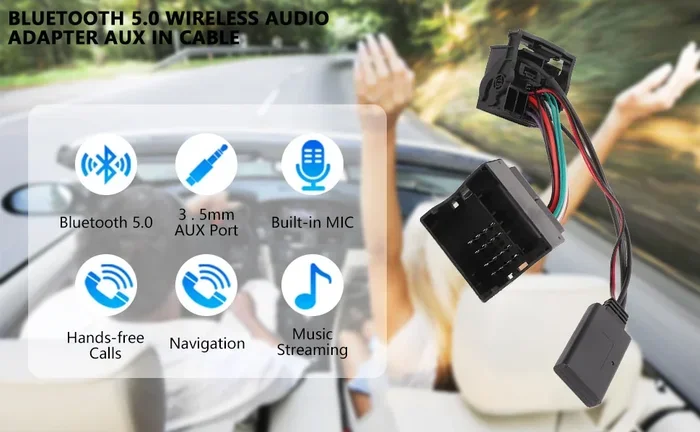
If you want a permanent, clean installation, a Bluetooth module is the way to go. This method involves wiring a small Bluetooth receiver directly into your factory stereo’s internal wiring. It is more advanced but gives the best results.
How It Works
A small Bluetooth module is connected behind your stereo. It receives Bluetooth audio and feeds it directly into the stereo’s audio input. The module stays hidden and does not block any ports. Everything works seamlessly.
What You Need
- A Bluetooth module or adapter kit designed for car stereos
- Basic tools (screwdriver, wire stripper)
- Some knowledge of car stereo wiring
- Electrical tape or wire connectors
Step-by-Step Setup
- Remove your factory stereo from the dashboard.
- Locate the stereo’s rear input connections.
- Connect the Bluetooth module to the stereo’s audio input or auxiliary input wires.
- Mount the module where it will not interfere with other components.
- Reinstall the stereo and test the Bluetooth connection.
- Pair your phone and enjoy wireless audio.
Pros and Cons
This method gives the cleanest look and best sound quality. The module is hidden behind the stereo, so nothing is visible. The downside is that it requires more technical skill. If you are not comfortable with car electronics, you may want to hire a professional. The cost is also higher, typically $50 to $150 for the module plus potential installation fees.
When you are working on car electronics, it is always good to double-check compatibility. Just like you would verify that a USB controller works with your Switch before buying, make sure your Bluetooth module is compatible with your specific stereo model.
Comparison: Which Method Is Right for You?
Choosing the right method depends on your stereo type, budget, and how much effort you want to put in. Here is a quick comparison:
| Method | Cost | Sound Quality | Difficulty | Best For |
|---|---|---|---|---|
| FM Transmitter | $15 – $50 | Fair | Very Easy | Quick, budget-friendly setup |
| AUX Bluetooth Adapter | $10 – $40 | Good | Easy | Stereos with AUX input |
| USB Bluetooth Adapter | $15 – $45 | Good | Easy | Stereos with USB only |
| Bluetooth Module (Wired) | $50 – $150 | Excellent | Moderate | Clean, permanent installation |
If you want the fastest solution, go with an FM transmitter. If sound quality matters most, choose the AUX adapter or wired module. Think about what your car needs and pick accordingly.
Tips for the Best Bluetooth Car Audio Experience
Once you have your Bluetooth setup running, a few tips will help you get the most out of it:
- Keep your adapter firmware updated. Some adapters receive updates that improve connectivity and sound quality. Check the manufacturer’s website for updates.
- Place your phone nearby. Bluetooth works best when your phone is within a few feet of the adapter. Keeping it in a cup holder or on the dash works best.
- Use a high-quality audio app. Apps like Spotify, Tidal, or Apple Music stream in higher quality than standard radio streams.
- Reduce interference. If you use an FM transmitter and hear static, try a different frequency. Empty frequencies with less radio traffic give cleaner sound.
- Charge your phone while streaming. Bluetooth streaming uses battery power fast. Use a USB adapter that charges your phone at the same time.
- Reset the connection if needed. Sometimes Bluetooth connections drop. Turn both devices off and back on to fix the issue quickly.
Common Mistakes to Avoid
Here are some mistakes people make when adding Bluetooth to their car stereo:
- Buying the wrong adapter. Not all Bluetooth adapters work with all stereos. Check compatibility before you buy.
- Ignoring sound quality. Cheap FM transmitters can produce a lot of static. Spending a little more gets you much better audio.
- Forgetting to update firmware. Updated firmware often fixes connection issues and improves performance.
- Overlooking power requirements. Some adapters need a constant power source. Make sure your car port provides enough power.
- Pairing too many devices. Some adapters only remember one or two devices. Keep your phone as the primary paired device for the best experience.
Expert Insight: Is It Worth It?
From a practical standpoint, adding Bluetooth to a factory stereo is absolutely worth it. The cost is low, the installation is simple, and the benefits are huge. You get wireless streaming, hands-free calling, and a modern driving experience without replacing your entire stereo system.
Even if you have a newer car, Bluetooth upgrades can still help. Some factory systems have outdated Bluetooth that disconnects often or does not support the latest audio codecs. A new adapter can fix these issues and give you a better connection.
Think of it as a small investment that pays off every time you get in the car. You will wonder how you ever drove without it.
Final Thoughts on Adding Bluetooth to Your Car Factory Stereo
Adding Bluetooth to your car factory stereo is one of the simplest and most rewarding car upgrades you can do. Whether you choose an FM transmitter, an AUX adapter, a USB Bluetooth device, or a wired module, the process is straightforward and affordable.
You do not need to be a tech expert. Most methods take less than 30 minutes and require no special tools. The result is a wireless audio experience that makes every drive more enjoyable. You can stream your favorite playlists, take calls safely, and enjoy hands-free convenience.
Start with the method that fits your stereo type and budget. Follow the steps carefully, and you will be streaming wirelessly in no time. Your factory stereo has more life in it than you think. Give it a Bluetooth boost and enjoy the ride.
Frequently Asked Questions
Can I add Bluetooth to any car factory stereo?
Yes, you can add Bluetooth to almost any factory stereo. The method depends on what inputs your stereo has. If it has an AUX port, use an AUX Bluetooth adapter. If it only has a USB port, use a USB Bluetooth adapter. If it has no inputs at all, an FM transmitter works universally.
How much does it cost to add Bluetooth to a car stereo?
The cost ranges from $10 to $150 depending on the method. FM transmitters and AUX adapters are the cheapest options at $10 to $50. Wired Bluetooth modules cost more, typically $50 to $150, including professional installation if needed.
Does adding Bluetooth to my factory stereo affect sound quality?
It depends on the method. FM transmitters may introduce some static or interference. AUX Bluetooth adapters and wired modules provide much better sound quality. For the best audio experience, choose an AUX adapter or a Bluetooth module over an FM transmitter.
Can I make hands-free calls with a Bluetooth car adapter?
Yes, most Bluetooth adapters support hands-free calling. When you receive a call, the audio switches to the adapter automatically. You can speak and listen through your car speakers just like a factory Bluetooth system would work.
Is it hard to install a Bluetooth adapter in my car?
No, it is very easy. Most adapters plug directly into an existing port or power source. AUX and USB adapters take about 5 minutes. FM transmitters also take just a few minutes. Wired module installation takes more time but is still manageable for most car owners.
Will a Bluetooth adapter work with both Android and iPhone?
Yes, all Bluetooth adapters work with both Android and iPhone. Bluetooth is a universal wireless standard. You can pair any Bluetooth-enabled phone with any Bluetooth adapter regardless of the operating system.