How Do Bluetooth Picture Frames Work and Share Photos
Bluetooth picture frames let you send photos directly to a digital display without cables or Wi-Fi. They use Bluetooth technology to pair with your phone or tablet, making photo sharing fast and easy. This guide covers how they work, what to look for, and how to set one up in minutes.
Have you ever wanted to share photos with family in a fun and modern way? Bluetooth picture frames make this possible without any messy cables or complicated setup. These smart frames connect to your phone using Bluetooth, letting you send new pictures whenever you want. You just pick a photo, tap send, and it shows up on the frame in seconds.
In this guide, we will walk you through everything you need to know. You will learn how these frames connect, how photo sharing works, and what features to look for. We will also cover setup steps, common problems, and how Bluetooth frames compare to Wi-Fi options. By the end, you will know exactly if a Bluetooth picture frame is right for you.
Whether you are a tech beginner or a seasoned gadget lover, this guide has you covered. We keep things simple and practical so you can start sharing photos right away. Let us dive in and explore the world of wireless photo frames.
Key Takeaways
- Bluetooth picture frames connect wirelessly: They pair with your phone or tablet using Bluetooth technology, so you don’t need cables or an internet connection to send photos.
- Photo sharing is simple and fast: Most frames come with a companion app that lets you select, edit, and send photos in seconds.
- Key features matter: Look for good resolution, enough storage, long battery life, and easy pairing when choosing a frame.
- Bluetooth vs. Wi-Fi frames differ: Bluetooth frames work offline, while Wi-Fi frames need a home network but offer cloud syncing.
- Setup takes minutes: You just charge the frame, download the app, pair the devices, and start sharing.
- Common issues are easy to fix: Most problems like connection drops or slow transfers have simple solutions.
📑 Table of Contents
- What Is a Bluetooth Picture Frame?
- How Bluetooth Picture Frames Connect to Your Devices
- How Photo Sharing Works with Bluetooth Frames
- Key Features to Look For in a Bluetooth Picture Frame
- Setting Up Your Bluetooth Picture Frame
- Bluetooth Picture Frames vs. Wi-Fi Picture Frames
- Common Issues with Bluetooth Picture Frames and How to Fix Them
- Final Thoughts on Bluetooth Picture Frames
What Is a Bluetooth Picture Frame?
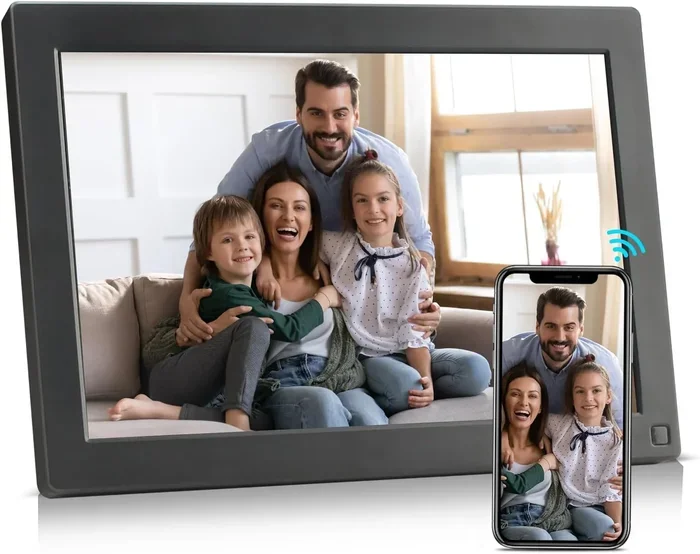
A Bluetooth picture frame is a digital display that receives photos through Bluetooth wireless technology. Unlike traditional frames that hold printed pictures, these smart frames show digital images on a screen. You do not need to print anything or plug in a memory card to update the photos.
Most Bluetooth frames look like regular picture frames on the outside. They have a slim design with a digital screen inside. Some frames come with a wood or metal finish that blends right into your home decor. The inside is where the magic happens with a high-resolution display and Bluetooth chip.
The Bluetooth chip is what makes everything work. It acts like a bridge between your phone and the frame. When you send a photo from your phone, the Bluetooth chip picks it up and displays it on the screen. This all happens without needing Wi-Fi or an internet connection.
How Bluetooth Technology Powers These Frames
Bluetooth is a short-range wireless technology that sends data between devices. It has been around for years and is in almost every phone and computer today. Bluetooth works by creating a small wireless network between two devices that are close to each other.
For picture frames, Bluetooth usually works within a range of about 30 feet. This means your phone and the frame need to be in the same room or nearby. Some newer frames have improved Bluetooth range, so check the specs before you buy. The Bluetooth connection is secure and uses very little battery power, which is great for a device that sits on a shelf all day.
How Bluetooth Picture Frames Connect to Your Devices
Connecting a Bluetooth picture frame to your phone is easier than you might think. The process is similar to pairing any Bluetooth device, like pairing Bluetooth headphones to an LG TV. You put the frame in pairing mode, find it on your phone, and tap to connect.
Once paired, the frame and your phone form a direct link. This means your phone can send photos straight to the frame without any middleman. There is no router needed, no cloud account required, and no internet connection necessary. It is just your phone talking directly to your frame.
The connection stays active while both devices are nearby. If you move too far away, the connection may drop. But when you come back within range, the frame usually reconnects automatically. This makes it very convenient for daily use in your home or office.
Step-by-Step Pairing Process
Here is how you typically pair a Bluetooth picture frame with your phone:
- Charge the frame fully. Most frames come with a USB charging cable. Plug it in and wait until the battery is full before you start.
- Turn on the frame and enter pairing mode. This is usually done by pressing and holding a button on the back or side of the frame. The frame will blink to show it is ready.
- Open Bluetooth on your phone. Go to your phone settings and make sure Bluetooth is turned on.
- Find the frame on your phone. Your phone will scan for nearby Bluetooth devices. The frame should appear in the list.
- Tap to connect. Select the frame name and wait for the connection to be confirmed. You may hear a beep or see a light change on the frame.
- Open the companion app. Many frames come with a free app. Download it from your app store and follow the on-screen prompts to link it to the frame.
Once paired, the frame should remember your phone. You will not need to repeat the pairing process every time. Just make sure Bluetooth is on and you are within range.
How Photo Sharing Works with Bluetooth Frames
The whole point of a Bluetooth picture frame is to share photos easily. Here is how the process works from start to finish. You open the companion app on your phone, choose a photo from your gallery, and tap send. The app uses Bluetooth to beam the photo to the frame. The frame then displays the photo on its screen.
Most apps let you send one photo at a time or a batch of several photos. Some apps even let you set a slideshow so the frame cycles through multiple pictures automatically. You can control the speed of the slideshow and decide which photos appear first.
One great thing about Bluetooth photo sharing is that it works without Wi-Fi. You do not need a home network or a data plan to send photos. This makes Bluetooth frames perfect for use in areas where Wi-Fi is weak or unavailable. The photo transfer happens directly between your phone and the frame.
Some frames also let you receive photos from other people. For example, your family members can download the same app and send you pictures too. This makes Bluetooth frames a fun way to stay connected with loved ones who live far away. Everyone can send their favorite moments to the same frame.
Can You Print Photos from a Bluetooth Frame?
Some Bluetooth picture frames have a built-in printer, but most do not. If you want to print photos from your frame, you can use a Bluetooth printer without Wi-Fi to print directly from the frame or your phone. This lets you turn your favorite digital photos into physical prints you can hold and share.
Without a printer, the frame simply displays photos on its screen. You can still enjoy them in high quality on the digital display. Many frames have excellent screen resolution that makes photos look sharp and vibrant. The lack of printing does not take away from the experience of sharing and viewing memories.
Key Features to Look For in a Bluetooth Picture Frame
Not all Bluetooth picture frames are created equal. When you shop for one, there are several features you should keep in mind. These features will affect how easy the frame is to use and how good your photos look on the screen.
Screen resolution is very important. A higher resolution means your photos will look sharper and more detailed. Look for frames with at least a 1080p display for the best results. Lower resolution frames may look blurry or pixelated, especially with larger photos.
Storage space matters too. Most Bluetooth frames have built-in memory that can hold anywhere from 50 to 500 photos. Some frames also support memory cards that expand the storage. If you plan to send lots of photos, choose a frame with more memory or one that supports expandable storage.
Battery life is another key factor. Most Bluetooth frames plug into a wall outlet, so battery life is less of a concern. But if you want a portable frame, look for one with a long-lasting battery. A frame that lasts 8 to 12 hours on a single charge gives you plenty of freedom to move it around.
Bluetooth range is worth checking. Standard Bluetooth works within about 30 feet. Some premium frames have a longer range, which gives you more flexibility in where you place the frame. Also check if the frame supports the latest Bluetooth version for faster transfers.
Other Features to Consider
- Companion app quality. A good app makes photo sending and frame management easy. Look for apps with a clean interface and useful features like slideshow controls and photo editing tools.
- Frame design and size. Frames come in various sizes from 7 inches to 15 inches. Pick a size that fits your space and matches your decor style.
- Photo editing tools. Some apps let you crop, rotate, or add filters to photos before sending them to the frame.
- Multiple user support. This lets family members send photos from their own phones to the same frame.
- Auto-rotation. The frame can automatically rotate photos to match the screen orientation.
Setting Up Your Bluetooth Picture Frame
Setting up a Bluetooth picture frame is quick and straightforward. Most frames follow a similar setup process, so you can get started in just a few minutes. Here is a simple guide to walk you through it.
First, unbox the frame and plug it into a power source. Let it charge fully if it is not already charged. While it charges, download the companion app on your phone. Most apps are available for both iPhone and Android devices. Check the frame’s manual or box for the exact app name and download link.
Once the frame is charged and the app is installed, turn on the frame. Put it into pairing mode by following the instructions in the manual. Then open Bluetooth on your phone and look for the frame in the list of available devices. Tap on the frame name to connect.
After the Bluetooth connection is established, open the companion app. The app should detect the frame automatically. Follow the on-screen prompts to complete the setup. This usually involves naming the frame and setting your preferences for photo display and slideshow speed.
Once setup is complete, you are ready to start sending photos. Open the app, choose a photo from your gallery, and tap the send button. The photo should appear on the frame within seconds. Try sending a few photos to make sure everything works smoothly before you show it off to family.
Quick Tips for a Smooth Setup
- Keep your phone and the frame close together during setup. Stay within 10 feet for the best results.
- Make sure your phone’s Bluetooth is turned on and not connected to another device at the same time.
- Restart both devices if the pairing fails. A simple reboot often fixes connection issues.
- Update the companion app to the latest version before you start. Updates often fix bugs and improve performance.
- Read the frame manual for any model-specific setup steps that may differ from the general process.
Bluetooth Picture Frames vs. Wi-Fi Picture Frames
When shopping for digital picture frames, you will often see both Bluetooth and Wi-Fi options. Both types let you share photos wirelessly, but they work differently. Understanding the differences helps you choose the right one for your needs.
Bluetooth frames connect directly to your phone. They do not need a Wi-Fi network or internet connection. This makes them great for use anywhere, even in places without Wi-Fi. Bluetooth frames are also simple to set up and tend to be more affordable.
Wi-Fi frames connect to your home network. They can sync photos from cloud services like Google Photos or iCloud. This means you can set up the frame and forget about it. Photos from your phone automatically appear on the frame without you needing to do anything. Wi-Fi frames also let you control the frame from anywhere using an app.
Here is a quick comparison to help you decide:
| Feature | Bluetooth Frame | Wi-Fi Frame |
|---|---|---|
| Internet Required | No | Yes |
| Setup Complexity | Simple | Moderate |
| Photo Transfer Method | Direct phone-to-frame | Cloud syncing |
| Remote Access | No | Yes |
| Price Range | Lower | Higher |
| Works Offline | Yes | No |
Both types of frames have their strengths. Bluetooth frames are perfect for people who want a simple, no-fuss solution. Wi-Fi frames are better for people who want automatic cloud syncing and remote control. Think about how you plan to use the frame and choose accordingly.
Common Issues with Bluetooth Picture Frames and How to Fix Them
Bluetooth picture frames are generally reliable, but you may run into some issues from time to time. Most problems are easy to fix with simple troubleshooting steps. Here are the most common issues and what you can do about them.
Frame not showing up during pairing. If your phone cannot find the frame, make sure the frame is in pairing mode. Also check that Bluetooth is turned on and the frame is fully charged. Moving your phone closer to the frame can help too. Sometimes restarting both devices fixes the problem.
Photos not sending or sending slowly. This usually happens when the phone and frame are too far apart. Move closer together and try again. Large photo files may take longer to transfer. Try resizing or compressing photos before sending them. Some companion apps have a built-in photo optimizer that makes this easier.
Connection keeps dropping. Bluetooth connections can drop if there are many wireless devices nearby. Try moving the frame away from routers, microwaves, and other Bluetooth devices. If the problem continues, unpair and repair the devices. This often refreshes the connection and solves the issue.
Frame display looks dull or blurry. Check the frame’s resolution and make sure your photos are high quality. Sending very small or compressed photos will result in a blurry display. Use photos that are at least as large as the frame’s screen resolution for the best results.
App crashes or freezes. Make sure your app is up to date. Clear the app cache in your phone settings. If the problem continues, try uninstalling and reinstalling the app. Restarting your phone can also help clear up temporary glitches.
When to Contact Customer Support
Most issues are easy to fix on your own. But if you have tried all the troubleshooting steps and the frame still does not work, contact the manufacturer’s customer support. They can walk you through advanced steps or help with a replacement if the frame is defective. Keep your purchase receipt and warranty information handy when you reach out.
Final Thoughts on Bluetooth Picture Frames
Bluetooth picture frames are a wonderful way to share photos with family and friends in a simple and wireless way. They connect directly to your phone using Bluetooth technology, so you do not need Wi-Fi or cables. The setup process is quick and straightforward, and sending photos takes just a few taps on your phone.
These frames are perfect for families who want to stay connected. Grandparents can see photos of their grandchildren instantly. Friends who live far away can share their daily moments with each other. The frame becomes a shared space that brings people closer together no matter the distance.
When choosing a Bluetooth picture frame, focus on the features that matter most to you. Screen resolution, storage space, battery life, and app quality should all be on your checklist. Pick a frame that fits your budget and meets your sharing needs. With the right frame, you will be sending and viewing photos in no time.
Give Bluetooth picture frames a try. They are affordable, fun, and a great way to bring your favorite memories to life on a screen. Once you start using one, you will wonder how you ever shared photos without it.
Frequently Asked Questions
How far can a Bluetooth picture frame be from my phone?
Most Bluetooth picture frames work within 30 feet of your phone. Some premium models have a longer range, so check the product specs before you buy. Staying within range ensures your photos send quickly and without interruptions.
Do I need Wi-Fi to use a Bluetooth picture frame?
No, you do not need Wi-Fi at all. Bluetooth frames connect directly to your phone without any internet connection. This makes them great for use in areas without Wi-Fi or for keeping things simple and private.
Can multiple people send photos to the same Bluetooth frame?
Yes, many Bluetooth frames support multiple users. Family members can download the same companion app and send photos from their own phones. This makes the frame a shared family photo display everyone can enjoy.
How many photos can a Bluetooth picture frame store?
Storage varies by model. Most frames hold between 50 and 500 photos internally. Some frames also support memory cards for expanded storage. If you plan to store many photos, look for a frame with more memory or expandable storage options.
Can I use a Bluetooth picture frame without a companion app?
Most Bluetooth frames require a companion app for the best experience. The app makes it easy to select, edit, and send photos. Some basic frames may allow Bluetooth file transfer without an app, but the app adds helpful features like slideshow controls and batch sending.
Are Bluetooth picture frames safe and private?
Yes, Bluetooth connections are generally secure. The data transfers directly between your phone and the frame without going through the internet. This means your photos stay private and are not stored on any cloud server. Keep your frame’s firmware updated for the best security.