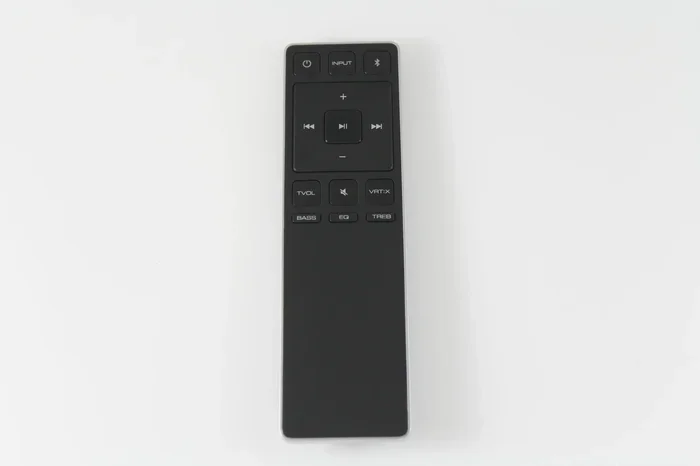
Fix Your Vizio Sound Bar Remote With These Easy Tips
Your Vizio sound bar remote can stop working for many simple reasons, from dead batteries to signal interference. This guide walks you through proven fixes that restore your remote in minutes. You will learn quick troubleshooting steps, pairing methods, and when to replace your remote entirely.
Key Takeaways
- Battery issues are the #1 cause of Vizio sound bar remote problems, and replacing them solves most cases.
- Resetting the remote often fixes unresponsive buttons and connection drops.
- Infrared sensor blockages can trick you into thinking the remote is broken when it is not.
- Pairing your remote via Bluetooth or HDMI ARC restores functionality after a power outage or factory reset.
- A universal remote or direct replacement is an affordable backup if the original remote is damaged beyond repair.
- Keeping your remote clean and stored properly prevents most issues from returning.
📑 Table of Contents
Why Your Vizio Sound Bar Remote Stops Working
There is nothing more frustrating than grabbing your remote and finding it does nothing. Your Vizio sound bar remote can stop working for a variety of reasons. Most of them are simple to fix.
The remote uses either infrared signals or Bluetooth to communicate with your sound bar. When something interrupts that connection, the buttons seem dead. Understanding the root cause helps you pick the right fix fast.
Common culprits include low batteries, sensor blockages, signal interference, and software glitches. Sometimes the remote simply needs a reset. Other times, the internal circuitry has worn out after years of use.
Before you call for help or buy a new one, try these steps. They cover the most frequent problems and take only a few minutes. Most users solve the issue without spending a dime.
Dead or Weak Batteries
This is the number one reason remotes fail. Batteries drain over time, especially if you leave the remote near heat sources. Weak batteries send a weaker signal that may not reach the sound bar.
Replace the batteries with fresh ones. Use high-quality alkaline batteries for the best results. Avoid rechargeable batteries if the remote still gives you trouble, as they sometimes output slightly lower voltage.
Infrared Sensor Blockage
Vizio remotes rely on a line of sight between the remote and the sound bar. If something blocks the infrared sensor on either device, the signal cannot get through.
Check for objects sitting in front of the sound bar. Dust and grime can also build up on the sensor. A quick wipe with a soft cloth often brings the signal right back.
Signal Interference From Other Devices
Other electronics in your entertainment area can cause interference. Wireless routers, microwaves, and even other sound bars can disrupt the remote signal.
Move competing devices a few feet away and try again. You will often see an immediate improvement. This simple change solves many puzzling remote problems.
Quick Fixes to Try First
Not all remote issues require technical knowledge. Some fixes take less than sixty seconds. Start with these simple steps before moving on to advanced troubleshooting.
1. Power Cycle Your Sound Bar
Unplug the sound bar from the wall outlet. Wait at least thirty seconds. Plug it back in and turn it on. This clears temporary glitches in the remote pairing memory.
Many users skip this step, but it works surprisingly well. Power cycling resets the internal processor and reestablishes the connection channel. It is the fastest first step you can take.
2. Remove and Reinsert the Batteries
Take the batteries out completely. Clean the battery terminals with a dry cloth. Put the batteries back in, making sure the positive and negative ends face the correct direction.
This simple act resets the electrical connection inside the remote. It also gives you a chance to check for corrosion or leaks on the battery contacts.
3. Point the Remote Directly at the Sensor
Make sure you are pointing the remote straight at the sound bar. Angle matters with infrared remotes. Even a slight tilt can weaken or block the signal.
Stand within six feet of the sound bar when testing. This eliminates distance as a variable and helps you confirm whether the remote is truly the problem.
4. Check for Button Sticking
Spills and crumbs can cause buttons to stick. Look closely at the remote keypad. Press each button and feel for any that seem stiff or unresponsive.
Clean around the buttons with a cotton swab dipped in rubbing alcohol. Let the remote dry fully before testing it again. This often restores full button function instantly.
Replacing Your Vizio Sound Bar Remote
Sometimes the remote simply cannot be saved. Internal damage from drops, liquid spills, or age can make replacement the only real option. The good news is that replacing a Vizio remote is straightforward and affordable.
You have several paths when it comes to getting a working remote again. Each option has its own benefits depending on your situation and budget.
Original Vizio Replacement Remote
Buying a direct replacement from Vizio ensures perfect compatibility. You can order one from the Vizio website or from major retailers. Make sure you have your sound bar model number handy before ordering.
The original remote comes pre-programmed in most cases. You simply insert batteries and start using it. This is the most reliable option if you want zero setup hassle.
Universal Remote Options
A universal remote works with multiple devices, including your Vizio sound bar. Brands like Logitech and SofaBaton make popular universal remotes that support Vizio models.
Programming a universal remote takes a few extra minutes. You will need to enter a code specific to your sound bar model. The process is well documented and easy to follow.
If you are exploring replacement options across different brands, you might want to check whether you can replace your TCL Roku TV remote as a comparison point for universal remote compatibility. The process for finding the right replacement remote shares many similarities across brands.
Smartphone as a Remote
Many Vizio sound bars connect to a smartphone app. Download the Vizio SmartCast app on your phone or tablet. This turns your mobile device into a remote control.
The app lets you adjust volume, change inputs, and power the sound bar on and off. It works over Wi-Fi, so you do not need a direct line of sight. This is a great temporary fix while you wait for a replacement remote to arrive.
Comparison of Remote Replacement Options
| Option | Cost | Setup Time | Compatibility |
|---|---|---|---|
| Original Vizio Remote | $15-$30 | Minimal | Vizio sound bars only |
| Universal Remote | $10-$25 | 5-10 minutes | Multiple devices |
| Smartphone App | Free | 2-3 minutes | Vizio sound bars with SmartCast |
| HDMI-CEC Control | Free | None (built-in) | Vizio sound bars via TV remote |
Using Your TV Remote to Control the Sound Bar
Many Vizio sound bars support HDMI-CEC control. This feature lets you use your TV remote to adjust the sound bar volume and power. It works when the sound bar connects to the TV through HDMI ARC.
To enable this feature, go to your TV settings and look for HDMI-CEC or a similarly named option. The exact name varies by TV brand. Once enabled, your TV remote can handle basic sound bar functions.
This is a handy backup when your dedicated remote is not working. You will not need to buy anything extra. Just make sure your sound bar and TV are connected via HDMI ARC for full functionality.
Paired and Repaired: Programming Your Remote
If you have a new remote or have reset your old one, you need to pair it with your sound bar. The pairing process is simple but varies slightly depending on your Vizio model.
Pairing via Bluetooth
Many newer Vizio sound bars use Bluetooth for remote communication. Put your sound bar into pairing mode by pressing and holding the Bluetooth button on the control panel.
Next, hold the pairing button on the remote for three to five seconds. The LED light on the remote should blink rapidly. Once it stops blinking and stays solid, the pairing is complete.
If the remote does not pair, move closer to the sound bar and try again. Remove any objects that might block the Bluetooth signal between the two devices.
Pairing via Infrared
Infrared remotes do not need formal pairing. They work automatically as long as the sensor is unobstructed. If your infrared remote stops responding, try pointing it at the sound bar from a closer distance.
You can also test the remote using your phone camera. Point the remote at your phone camera and press any button. You should see a purple or white light flicker in the camera view. This confirms the remote is sending a signal.
Resetting the Remote to Factory Settings
A factory reset clears any stored pairing data and starts fresh. To reset most Vizio remotes, remove the batteries. Press and hold the power button for fifteen seconds. Wait one minute, then reinsert the batteries.
This process wipes any corrupted settings from the remote memory. It is one of the most effective fixes for remotes that work intermittently or respond slowly. After the reset, try using the remote again before considering a replacement.
Common Mistakes That Cause Remote Problems
Many users accidentally create remote problems without realizing it. Avoid these common mistakes to keep your Vizio sound bar remote working smoothly.
- Using the wrong batteries. Cheap or expired batteries cause weak signals and intermittent operation. Always use fresh, name-brand alkaline batteries.
- Storing the remote in direct sunlight. Heat damages the internal circuitry over time. Keep the remote in a cool, dry place when not in use.
- Ignoring firmware updates. Vizio releases firmware updates that improve remote compatibility. Check the Vizio app periodically for updates.
- Pressing too hard on buttons. This wears out the button contacts faster. A gentle press is all you need for a response.
- Placing the sound bar behind closed cabinets. Enclosed spaces block both infrared and Bluetooth signals. Ensure the sound bar has clear space around it.
Quick Tips for Remote Longevity
- Wipe the remote down once a week with a dry microfiber cloth.
- Store the remote in a dedicated spot so it does not get lost or damaged.
- Replace batteries every six months even if they still seem to work.
- Keep the remote away from liquids and moisture at all times.
- Test the remote monthly to catch problems early before they worsen.
When to Seek Professional Help
Most Vizio sound bar remote issues resolve with the steps above. However, some problems need professional attention. Knowing when to stop troubleshooting saves you time and frustration.
If the remote physically damaged, such as a cracked casing or stuck buttons that do not respond to cleaning, replacement is usually the best path. Internal circuit damage from drops or liquid exposure cannot be repaired at home.
Similarly, if your sound bar itself stops receiving signals from any remote, the problem may lie in the sound bar, not the remote. A Vizio technician can diagnose whether the internal receiver module needs replacement.
Check your warranty before purchasing a new remote. Many Vizio sound bars come with a warranty that covers remote replacements. Contact Vizio customer support to start a warranty claim if you are still within the coverage period.
Preventing Future Remote Problems
Once your remote is working again, a few simple habits keep it that way. Prevention is always easier than troubleshooting.
Store the remote in a protective case or designated spot. Avoid dropping it or placing heavy objects on top of it. Keep it away from heat sources like radiators, TVs, and gaming consoles that generate warmth.
Update your sound bar firmware regularly. Manufacturers release updates that improve remote performance and fix known bugs. The Vizio SmartCast app makes this process easy and automatic.
Consider keeping a spare universal remote on hand. It serves as a backup if your primary remote ever fails unexpectedly. A universal remote also comes in handy when you have guests who are unfamiliar with your setup.
Taking these small steps adds up over time. Your remote will last longer, and you will spend less time dealing with frustrating interruptions. A little prevention goes a long way toward uninterrupted listening.
Final Thoughts
Fixing your Vizio sound bar remote does not have to be complicated. Most problems come down to simple causes like dead batteries, sensor blockages, or a need to reset. The steps in this guide cover the full range of fixes, from the quickest solutions to more involved troubleshooting.
Start with the basics: fresh batteries, a clean sensor, and a direct line of sight. Move on to pairing and resetting if those do not work. Replacement is always an option if the remote is physically damaged beyond repair.
Remember that your TV remote can also serve as a backup through HDMI-CEC and HDMI ARC connections. The Vizio SmartCast app gives you yet another way to control your sound bar from your phone. You are never truly stuck without options.
Keep your remote clean, store it properly, and update your firmware regularly. These habits prevent most issues before they start. With the right care, your Vizio sound bar remote will keep working reliably for years to come.
Frequently Asked Questions
Why is my Vizio sound bar remote not working even with new batteries?
New batteries should solve most power-related issues. If the remote still does not work, the infrared sensor or Bluetooth module may be damaged. Try resetting the remote by removing the batteries and holding the power button for fifteen seconds. Also check for obstructions between the remote and the sound bar sensor.
Can I use a universal remote with my Vizio sound bar?
Yes, most universal remotes work with Vizio sound bars. You will need to enter the correct device code during setup. Check the universal remote manual for the Vizio code list. Many popular universal remotes from brands like Logitech and SofaBaton support Vizio sound bars out of the box.
How do I know if my sound bar remote needs replacement?
If the remote has physical damage like a cracked case or stuck buttons that do not respond to cleaning, replacement is the best choice. You can also test the remote with your phone camera to see if it sends a signal. If no light appears when you press buttons, the internal circuitry is likely broken.
Does the Vizio SmartCast app work as a remote replacement?
Yes, the Vizio SmartCast app turns your smartphone or tablet into a fully functional remote. It works over Wi-Fi and does not require a direct line of sight. The app supports volume control, input switching, and power functions for most Vizio sound bars with SmartCast capability.
How long do Vizio sound bar remote batteries typically last?
With normal daily use, Vizio sound bar remote batteries last about four to six months. Heavy use or signal interference can drain them faster. Replacing the batteries every six months as a preventive measure helps avoid unexpected remote failures.
What should I do if my remote pairs but still does not control the sound bar?
This usually indicates a firmware mismatch or a software glitch. Try updating your sound bar firmware through the Vizio SmartCast app. If that does not work, perform a factory reset on both the sound bar and the remote. Reprogram the remote after the reset and test again.
=== CONCLUSION ===
Dealing with a broken Vizio sound bar remote is annoying, but it is almost always fixable. The tips in this guide give you everything you need to diagnose and solve the problem yourself. From simple battery swaps to advanced pairing steps, you have all the tools to get your sound bar working again.
Start with the quick fixes and work your way through the list. Most users find their solution in the first few steps. If all else fails, a replacement remote or a universal alternative gets you back to enjoying your sound bar without delay.
Take action today. Your ears and your entertainment setup will thank you. Do not let a small remote problem ruin your listening experience any longer.