Does Roku Doorbell Require A Subscription To Work Properly
The Roku Doorbell can work without a subscription for basic functions like live viewing and motion alerts. However, a subscription unlocks advanced features such as cloud video storage, extended event history, and enhanced motion detection. Most users find the free tier sufficient for everyday needs, but the paid plan adds meaningful value for home security.
So you are thinking about getting a Roku Doorbell and want to know if you need to pay a monthly fee. That is a smart question to ask before spending any money. The short answer is no, a subscription is not required for the doorbell to function. But the full picture is a bit more nuanced than that.
A smart doorbell like the Roku model gives you the ability to see who is at your door from your phone. It sends you alerts when someone approaches. And it lets you talk to visitors through a built-in speaker and microphone. All of this works right out of the box without paying a dime extra.
But if you want to save videos, review past events, or get smarter motion alerts, a subscription opens those doors. In this article, we will break down everything you need to know about the Roku Doorbell subscription situation. You will learn what works for free, what costs extra, and whether paying is worth it for your household.
Key Takeaways
- The Roku Doorbell works without a subscription for core features like live video and basic alerts.
- Subscription plans unlock cloud storage, video history, and advanced motion detection tools.
- The free tier covers most casual users who only need doorbell notifications and live feeds.
- Monthly and annual plans are available, with the annual option offering better value.
- Video quality and two-way audio work on all tiers, paid or free.
- Smart home integration remains accessible even without a paid plan.
- You can cancel anytime without losing access to basic doorbell functions.
📑 Table of Contents
- What Does the Roku Doorbell Offer for Free?
- What Does the Roku Doorbell Subscription Include?
- How Much Does the Roku Doorbell Subscription Cost?
- Do You Really Need a Subscription?
- Setting Up Your Roku Doorbell Without a Subscription
- Common Mistakes People Make With the Roku Doorbell
- Expert Tips for Getting the Most Out of Your Roku Doorbell
- Final Thoughts
What Does the Roku Doorbell Offer for Free?
The free experience with the Roku Doorbell is actually quite solid. Roku designed the device so that basic users get a great experience without ever opening their wallet. Here is what you get at no cost.
Live Video Streaming
You can watch a live feed from your doorbell at any time. Simply open the Roku mobile app on your phone or tablet. The live video stream starts immediately. This works whether you are at home or away. The video quality is clear and responsive, making it easy to see who is standing at your door.
Motion Detection Alerts
The doorbell uses built-in sensors to detect movement. When someone walks up to your porch, you get a push notification on your phone. This feature works in real time and does not require any paid add-on. It is one of the most useful parts of having a video doorbell in the first place.
Two-Way Audio
You can speak with whoever is at your door through the app. The microphone on the doorbell picks up your voice, and the speaker outside plays it back. This works perfectly on the free plan. It is great for telling a delivery driver where to leave a package or asking a visitor to leave a note.
Basic Event Notifications
You will receive alerts whenever the doorbell button is pressed or motion is detected. These notifications include a thumbnail image from the event. You can tap on the notification to jump straight into the live feed. This gives you quick awareness of what is happening at your front door.
What Does the Roku Doorbell Subscription Include?
If you decide to upgrade, the Roku Doorbell subscription adds a layer of convenience and security. The paid plan focuses on storage, history, and smarter detection features. Let us look at what you get when you pay.
Cloud Video Storage
This is the biggest reason people pay for a subscription. Without a plan, your doorbell does not save recorded videos. With a subscription, every event gets uploaded to secure cloud servers. You can then go back and watch clips of who came to your door, even hours or days later.
The storage capacity depends on the plan you choose. Most plans give you enough space to keep several weeks of footage. This is incredibly helpful if you need to review a delivery or check on a suspicious visitor.
Extended Event History
The free tier only keeps a limited window of recent events. With a paid plan, you get access to a much longer event history. You can scroll back through days or weeks of activity. This makes the doorbell a much more powerful home security tool.
Advanced Motion Detection
Subscribers get access to smarter motion zones. You can set specific areas of your camera view to monitor more closely. For example, you might want to track movement on your porch but ignore the sidewalk. This level of customization helps reduce false alerts and keeps you focused on what matters.
Person Detection
Some subscription tiers include person detection. This means the doorbell can tell the difference between a person walking by and a passing car or animal. You get more relevant alerts and less noise in your notification feed. It is a small feature that makes a big difference in day-to-day use.
How Much Does the Roku Doorbell Subscription Cost?
Pricing is an important factor when deciding whether to subscribe. Roku keeps its subscription options straightforward and competitive. Here is a general breakdown of what to expect.
Monthly plans typically cost around $3 to $5 per month. This gives you access to cloud storage and all the premium features. It is a low-cost way to test the paid experience without a long-term commitment.
Annual plans usually offer a discount compared to paying month by month. You might save 15 to 20 percent by choosing the yearly option. If you know you will use the features regularly, the annual plan is the better value.
Keep in mind that pricing can change over time. Roku may adjust rates or introduce new tiers. Always check the official Roku website or app for the latest subscription pricing before committing.
| Feature | Free Plan | Paid Plan |
|---|---|---|
| Live Video | Yes | Yes |
| Motion Alerts | Yes | Yes |
| Two-Way Audio | Yes | Yes |
| Cloud Video Storage | No | Yes |
| Event History | Limited | Extended |
| Advanced Motion Zones | No | Yes |
| Person Detection | No | Yes |
| Notification Thumbnails | Yes | Yes |
Do You Really Need a Subscription?
This is the question most people ask, and the honest answer is it depends on your needs. Let us walk through a few scenarios to help you decide.
When the Free Plan Is Enough
If you just want to see who is at your door and get alerts when someone rings the bell, the free plan covers you. Many households use their smart doorbell this way. You do not need to save every clip or track detailed history. For casual users, paying extra does not add much value.
The free plan also works well if you already have other home security measures in place. Maybe you have cameras elsewhere or a neighbor who keeps an eye on things. In that case, the doorbell acts as a simple notification tool, and the free tier handles that job perfectly.
When the Subscription Makes Sense
If you travel often, a subscription becomes more appealing. When you are away from home, you rely on your doorbell to capture and store any activity. Without cloud storage, you miss out on those recordings entirely. The subscription fills that gap and gives you peace of mind.
Families with kids or frequent delivery drivers also benefit from the paid plan. Having a long event history helps you keep track of packages, school drop-offs, and visitors. The advanced motion zones reduce false alerts, which saves you from constantly checking your phone for non-events.
Comparing With Other Smart Doorbells
It helps to compare the Roku Doorbell with other brands on the market. Some smart doorbells require a subscription from day one, even for basic features. Others, like the Roku model, give you a generous free experience and let you upgrade at your own pace.
When you look at the bigger picture, the Roku doorbell offers one of the more flexible approaches. You are never locked into a payment just to use the device. And the paid features are reasonably priced compared to competitors. This makes it a great choice for people who want options, not obligations.
You might also wonder how the Roku Doorbell fits into your broader smart home setup. If you already use other smart devices, the doorbell integrates smoothly into the ecosystem. Even without a subscription, you can connect it to your smart home network and control it alongside your other gadgets.
Setting Up Your Roku Doorbell Without a Subscription
Getting started with the Roku Doorbell is simple, and you do not need a subscription to complete the setup. Here is a quick overview of the process.
- Download the Roku app on your smartphone. The app is free and available on both iOS and Android.
- Create a Roku account if you do not already have one. This takes just a minute and uses your email address.
- Connect the doorbell to your Wi-Fi network. Make sure your Wi-Fi is stable and strong at the installation location. A weak signal can cause lag or missed alerts.
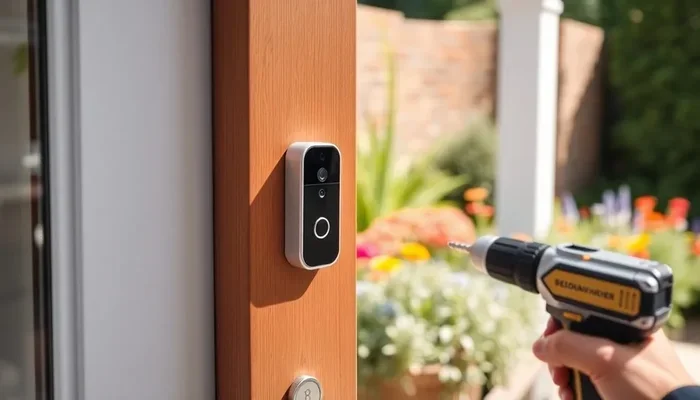
- Mount the doorbell near your front door. Follow the included instructions for wiring or battery installation.
- Pair the device with the app by scanning the QR code or entering the setup code.
- Test the live feed and alerts to make sure everything is working correctly.
Once setup is complete, you can start using the doorbell right away. No subscription is needed to view the live stream or receive motion alerts. The entire device setup process is designed to be beginner-friendly, so even if you are not tech-savvy, you should feel comfortable.
It is worth noting that a strong Wi-Fi connection is essential for the best experience. If your home has weak signal in the front entry area, consider upgrading your router or adding a range extender. A reliable network makes all the difference with any smart doorbell or home security device.
Common Mistakes People Make With the Roku Doorbell
There are a few pitfalls that new users fall into. Knowing about them ahead of time can save you frustration.
- Assuming all features are free. Many users expect cloud storage and extended history to come standard. They are not. These are part of the paid subscription, and you need to opt in to use them.
- Ignoring Wi-Fi strength. A weak Wi-Fi signal leads to poor video quality and delayed alerts. Test your signal at the installation spot before mounting the doorbell.
- Not adjusting motion zones. On the free plan, you get standard motion detection. But even on the paid plan, failing to set custom zones means you will get alerts for every passing car or animal.
- Forgetting to check notification settings. Make sure your phone notifications are turned on for the Roku app. Otherwise, you will miss doorbell alerts even when the device is working perfectly.
- Keeping the subscription when you do not need it. If you find that the free plan covers your needs, cancel the paid subscription. You can always resubscribe later if your needs change.
Expert Tips for Getting the Most Out of Your Roku Doorbell
Whether you use the free plan or the paid one, a few tips can help you get the most out of your Roku Doorbell experience.
First, place the doorbell at the right height. Most experts recommend installing it between four and five feet from the ground. This height captures faces clearly and covers the area directly in front of your door. It also keeps the camera out of reach of potential tampering.
Second, regularly check your Wi-Fi connection. A stable network ensures smooth live streaming and timely alerts. If you notice lag or delays, it might be time to troubleshoot your home network or consider a mesh Wi-Fi system.
Third, use the event history feature wisely. Even on the free plan, you can review recent events quickly. On the paid plan, you have a much longer window to look back. Make it a habit to check the app after you leave home or before you go to bed.
Fourth, keep your firmware updated. Roku releases updates that improve performance, fix bugs, and add new features. The doorbell will usually update automatically, but it is good to check the app periodically to make sure you are running the latest version.
Finally, think about your overall home security strategy. The doorbell is one piece of the puzzle. Consider pairing it with good outdoor lighting, secure locks, and awareness of your surroundings. A smart doorbell works best when it is part of a broader safety plan.
Final Thoughts
The Roku Doorbell gives you a lot of value without requiring a subscription. You get live video, motion alerts, two-way audio, and a solid notification system all for free. That alone makes it a compelling choice for anyone looking for a basic smart doorbell experience.
If you want more, the subscription plan unlocks cloud storage, extended history, and advanced detection features. These extras are nice to have but not essential for everyone. The key is to understand what you need and choose the plan that fits your lifestyle.
One thing is for sure: the Roku Doorbell gives you flexibility. You are never forced into a subscription, and you can always change your mind later. That kind of freedom is rare in the smart home world, and it is something to appreciate.
So go ahead and explore what the Roku Doorbell has to offer. Start with the free plan, test it out, and upgrade only if you feel the paid features are worth it. You will be making a smart, informed decision either way.
Frequently Asked Questions
Can I use the Roku Doorbell without paying anything?
Yes, the Roku Doorbell works fully without a subscription for basic features. You get live video, motion alerts, two-way audio, and event notifications at no cost. The free plan covers everything most users need for everyday doorbell alerts and live viewing.
What happens if I cancel my Roku Doorbell subscription?
If you cancel, you will lose access to cloud storage and advanced features. Your live video, motion alerts, and two-way audio will continue to work normally. You can always resubscribe later if you decide the paid features are useful again.
Is the Roku Doorbell subscription worth the cost?
It depends on your needs. If you travel often or want to review past video events, the subscription adds real value. For casual users who only need doorbell alerts and live feeds, the free plan is more than enough. The low monthly cost makes it easy to try and cancel if it does not fit your routine.
How long can I store videos with the Roku Doorbell subscription?
Storage length depends on your specific plan. Most subscription tiers keep several weeks of event footage in the cloud. You can access and download clips anytime through the Roku app. The exact retention period may vary, so check the latest details in the app or on the Roku website.
Does the Roku Doorbell work without Wi-Fi?
No, the doorbell requires a Wi-Fi connection to function. It sends alerts, streams live video, and uploads clips through your home network. If you have a weak signal, consider improving your network setup. You can also look into whether your existing router supports better range or consider a mesh system.
Can I use the Roku Doorbell alongside other smart home devices?
Yes, the Roku Doorbell integrates with your broader smart home setup. It works alongside other connected devices and fits into most home automation ecosystems. Even without a subscription, you can control the doorbell through the Roku app and pair it with other smart gadgets in your home.