Can I Connect To Bluetooth Without Service Yes You Can
Yes, you can connect to Bluetooth without service. Bluetooth is a short-range wireless technology that works entirely on its own, no internet or cellular connection needed. Whether you want to pair wireless headphones, a Bluetooth speaker, or your smartwatch, the process stays the same even when you have no signal. This guide walks you through everything you need to know about Bluetooth without service, from setup steps to troubleshooting tips.
Have you ever been in a place with no cell signal or Wi-Fi and still wanted to use your wireless headphones or Bluetooth speaker? Maybe you are on a long flight, hiking in the woods, or just in a basement with terrible reception. The good news is that Bluetooth does not need a service connection to work. You can pair and use Bluetooth devices all on your own, without ever touching the internet.
This is something a lot of people do not realize. Many folks think Bluetooth needs a data plan or a Wi-Fi network to function. That is simply not true. Bluetooth is its own wireless technology that connects devices directly to each other using radio waves. It is short-range, fast, and works completely offline. In this article, we will walk you through exactly how this works, what you need to know, and how to get the most out of your Bluetooth connection without any service at all.
Whether you are trying to pair a new set of wireless earbuds, connect a Bluetooth keyboard to your tablet, or just figure out why your smartwatch is not syncing, this guide has you covered. We will break it all down in simple, easy-to-follow steps. No tech degree required. Let us dive in.
Key Takeaways
- Bluetooth works offline: You do not need Wi-Fi or cellular data to pair and use Bluetooth devices.
- Pairing is simple: Just turn on Bluetooth, put both devices in pairing mode, and select the device from your list.
- Many devices rely on Bluetooth alone: Wireless headphones, speakers, fitness trackers, and keyboards all function without any internet connection.
- Range matters: Bluetooth typically works within 30 feet, so keep your devices close for the best wireless connection.
- Troubleshooting is easy: Restarting devices, toggling Bluetooth off and on, and checking for updates solves most issues.
- Bluetooth profiles control what you can do: Different profiles handle audio streaming, file transfers, and more.
- No service means no cloud sync: Some features like streaming online music will not work offline, but local playback still does.
📑 Table of Contents
- What Is Bluetooth and How Does It Work?
- Can You Use Bluetooth Without an Internet Connection?
- Common Devices That Use Bluetooth Without Service
- How to Connect Bluetooth Without Service (Step by Step)
- Troubleshooting Bluetooth Connection Issues Without Service
- Expert Tips for Better Bluetooth Connections
- What Bluetooth Cannot Do Without Service
- Conclusion
What Is Bluetooth and How Does It Work?
Bluetooth is a wireless technology standard that lets devices talk to each other over short distances. It uses radio waves instead of cables or internet signals. You have probably used Bluetooth a hundred times without even thinking about it. When you connect your phone to a car’s audio system or tap your wireless headphones to your laptop, Bluetooth is doing the heavy lifting.
Here is the key thing to understand. Bluetooth does not need the internet. It does not need a cell tower. It does not need a router. It just needs two Bluetooth-enabled devices that are close enough to each other. The technology creates a tiny personal network called a piconet. One device acts as the master, and the other acts as the slave. They exchange data back and forth through radio frequencies around 2.4 GHz.
This is why Bluetooth works without service. The connection happens directly between the devices. Your phone does not need to look up anything online. It just needs to find the other device and establish a link. Think of it like a private walkie-talkie between your gadgets. No outside network is involved.
How Bluetooth Pairing Works Offline
When you pair two Bluetooth devices, they exchange a small amount of information. This includes things like device names, supported profiles, and security keys. All of this happens locally, right on the devices themselves. There is no need to send data to a server or download anything from the cloud.
Once paired, the devices remember each other. The next time you turn on Bluetooth, they will reconnect automatically. This is why your wireless headphones jump back onto your phone the moment you turn them on, even if you are in airplane mode. The pairing information is stored right on the devices.
What Bluetooth Needs to Function
So what does Bluetooth actually need to work? Not much. Here is a simple list:
- Two Bluetooth-enabled devices: Your phone, laptop, speaker, headphones, or any gadget with a Bluetooth chip.
- Power: Both devices need battery charge or to be plugged in.
- Proximity: Most Bluetooth devices work within about 30 feet of each other.
- Bluetooth turned on: Both devices need to have Bluetooth enabled in their settings.
That is it. No internet. No service plan. No Wi-Fi password. Just those four things. Of course, some Bluetooth features do require an internet connection. For example, streaming music from Spotify or downloading a podcast needs data. But the Bluetooth connection itself does not. Once the connection is made, local audio files will play just fine through your Bluetooth speaker or wireless headphones.
Can You Use Bluetooth Without an Internet Connection?
The short answer is yes. The longer answer is yes, and here is why it matters. Many people confuse internet connectivity with Bluetooth connectivity. They are two completely different things. Your phone can have zero bars of cellular signal and still connect perfectly to a Bluetooth speaker in the same room.
Think about all the things you do with Bluetooth that do not need the internet. Playing music stored on your phone through a wireless speaker. Typing on a Bluetooth keyboard connected to your iPad. Transferring photos from your phone to your laptop. Tracking your steps on a fitness tracker that syncs to your phone via Bluetooth. None of these need a single byte of internet data.
Now, some advanced features do rely on the internet. Smart Bluetooth speakers with voice assistants like Alexa or Google Assistant need Wi-Fi or cellular data to process voice commands. But the basic audio playback through Bluetooth works offline. The same goes for wireless headphones with built-in storage. You can load up playlists and listen without any connection at all.
What Bluetooth Needs to Function
Let us break down exactly what Bluetooth technology requires versus what it does not:
- Needs: Bluetooth hardware in both devices, power, proximity, and Bluetooth enabled.
- Does not need: Wi-Fi, cellular data, a service plan, or an internet connection.
- Nice to have: Updated firmware, charged batteries, and a clear line of sight for best wireless connection quality.
Understanding this difference is important. It frees you from worrying about your connection status when you just want to use your favorite Bluetooth devices. You can relax, put your phone in airplane mode, and still enjoy your music, podcasts, or hands-free calls through a Bluetooth headset.
Common Devices That Use Bluetooth Without Service
Almost every modern gadget uses Bluetooth technology. Many of these devices work fully offline. Here are some of the most common ones you probably already own.
Wireless Headphones and Earbuds
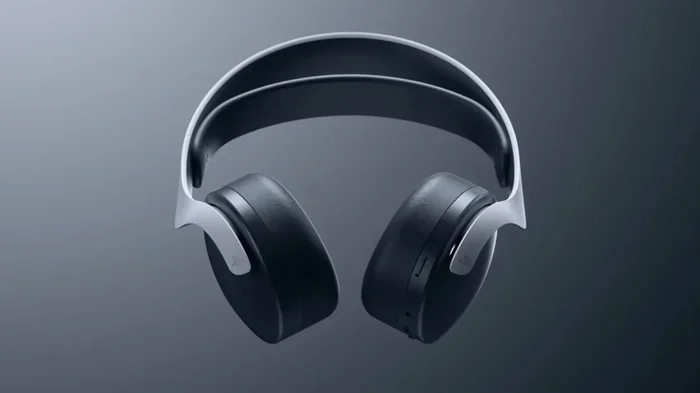
Wireless headphones are probably the most popular Bluetooth device in the world. Whether you have Apple AirPods, Sony WH-1000XM5s, or a budget pair from any brand, they all connect via Bluetooth without needing any service. You can listen to music stored on your phone, audiobooks, or even record voice memos through your headphones, all without a single internet connection.
Some premium wireless earbuds also have onboard memory. This means you can download songs directly to the earbuds and listen without your phone even being nearby. The Bluetooth connection handles the audio stream, and the internet is not part of the equation.
Bluetooth Speakers
Portable Bluetooth speakers are a blast. You can take them to the beach, the backyard, or a camping trip. As long as your phone has music stored locally, you can pump it through a Bluetooth speaker with zero service. The pairing happens directly between the two devices, and the audio flows through the air.
Some Bluetooth speakers also support FM radio or can read files from a USB drive. These features work entirely without any internet or cellular service. It is a great way to enjoy music in remote areas where your phone has no signal.
Smartwatches and Fitness Trackers
Your smartwatch and fitness tracker rely heavily on Bluetooth connectivity to sync data with your phone. The good news is that this sync happens locally, over Bluetooth, not through the internet. Your watch tracks your steps, heart rate, and sleep, and then sends that data to your phone when they are near each other.
You do not need a service connection for this to work. Even if your phone has no signal, the Bluetooth connection will still transfer your fitness data once you are back in range. Some watches can even store music for offline workouts, which you can play through wireless headphones connected to the watch directly.
Other Bluetooth Devices Worth Mentioning
- Bluetooth keyboards and mice: Great for tablets and laptops. They work offline every time.
- Game controllers: Many wireless controllers connect to phones and tablets via Bluetooth for offline gaming.
- Car audio systems: Most modern cars support Bluetooth hands-free calling and audio streaming without any internet.
- Printers: Some Bluetooth printers let you print photos and documents directly from your phone without Wi-Fi.
- Beacons and sensors: Smart home sensors often use Bluetooth Low Energy to communicate with your phone locally.
How to Connect Bluetooth Without Service (Step by Step)
Now that you know Bluetooth works without service, let us walk through the actual pairing process. It is straightforward and takes less than a minute once you know the steps.
Step 1: Turn on Bluetooth on Both Devices
Go to your phone’s settings and flip the Bluetooth switch to on. On most phones, you can also swipe down from the top of the screen and tap the Bluetooth icon for quick access. Do the same on the device you want to pair. Make sure the Bluetooth setting is enabled on both sides.
Quick tip: If Bluetooth is already on but acting up, toggle it off and back on. This simple trick fixes a surprising number of Bluetooth connection issues.
Step 2: Put the Receiving Device in Pairing Mode
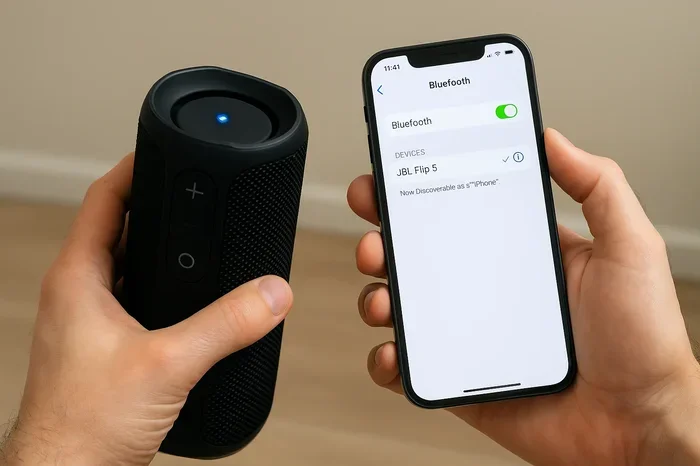
The device you want to connect to needs to be discoverable. For wireless headphones or a Bluetooth speaker, this usually means holding down the power button or a dedicated Bluetooth button until a light starts flashing. The flashing light tells you the device is ready to be found.
Each device is a little different. Check the manual if you are not sure. But most Bluetooth devices have a clear pairing mode indicator. Some will say “Pairing” on a small screen, and others will flash a colored light.
Step 3: Find and Select the Device on Your Phone
Go back to your phone’s Bluetooth settings. You should see a list of available devices. Tap on the device you want to pair with. Your phone will connect, and you will see a confirmation. That is it. You are now paired and ready to go.
Once paired, the devices will remember each other. Next time you turn on Bluetooth on both devices, they should connect automatically. No need to go through the pairing process again. This is the beauty of Bluetooth device pairing.
Step 4: Test the Connection
Play some music or start a video to make sure the audio is flowing through the Bluetooth device. Check both sides. If you hear sound, you are good to go. If not, do not panic. Move on to the troubleshooting section below.
Troubleshooting Bluetooth Connection Issues Without Service
Sometimes things do not go smoothly. Maybe your Bluetooth speaker will not pair, or your wireless headphones keep disconnecting. Here are some common issues and how to fix them, even when you have no internet or cellular service.
Bluetooth Not Showing Up on Your Device
If the other device is not appearing in your Bluetooth settings, try these fixes:
- Make sure both devices are close together: Bluetooth range is typically about 30 feet. Get them within a few feet of each other.
- Toggle Bluetooth off and on: A quick reset of the Bluetooth connection can work wonders.
- Restart both devices: A fresh start clears out any temporary glitches in the Bluetooth settings.
- Check if the device is in pairing mode: Many Bluetooth devices only show up when they are actively trying to pair.
- Remove old pairings: If you have paired the device before, delete it from your list and try fresh.
Devices Won’t Stay Paired
If your devices connect but keep dropping, here is what to try:
- Move closer together: Walls, furniture, and other electronics can interfere with Bluetooth signals.
- Check for interference: Wi-Fi routers, microwaves, and USB 3.0 ports can all disrupt Bluetooth connectivity.
- Update your device software: Even without internet, some updates can be sideloaded or applied when you next get a connection.
- Reset the Bluetooth device: Most Bluetooth speakers and headphones have a reset button or a reset procedure in the manual.
Expert Tips for Better Bluetooth Connections
Want to get the most out of your Bluetooth devices? Here are some pro tips that make a big difference.
Keep Devices Close Together
Bluetooth range is limited, usually around 30 feet for most devices. The closer your devices are, the stronger and more stable the wireless connection will be. If you are using wireless headphones, keep your phone in your pocket or close by. If you are using a Bluetooth speaker, place it within the same room.
Keep Your Devices Updated
Bluetooth firmware updates can improve connectivity and fix bugs. When you do have internet access, check for updates on both your phone and your Bluetooth devices. Many modern Bluetooth speakers and headphones update through their companion apps.
Manage Your Paired Devices List
Your phone remembers every Bluetooth device you have ever paired with. Over time, this list can get cluttered. Old devices that you no longer use can interfere with new pairings. Go through your Bluetooth settings periodically and remove devices you do not need anymore. This keeps things clean and running smoothly.
Use Bluetooth Low Energy When Possible
Many modern devices support Bluetooth Low Energy (BLE). This uses less battery while still maintaining a solid wireless connection. Fitness trackers, smart home sensors, and some wireless headphones use BLE. It is a great way to extend battery life without sacrificing Bluetooth connectivity.
What Bluetooth Cannot Do Without Service
It is important to know the limits too. While Bluetooth works without service for many things, there are some things it cannot do offline.
- Streaming online music: Services like Spotify, Apple Music, and YouTube Music need internet. You cannot stream through a Bluetooth speaker without a connection.
- Voice assistants: Siri, Google Assistant, and Alexa need the internet to process your voice commands, even if the audio comes through a Bluetooth headset.
- Cloud syncing: Some smartwatches and fitness trackers sync data to the cloud. Without service, this sync will wait until you have a connection again.
- Firmware updates: Updating your Bluetooth devices usually requires an internet connection through a companion app.
But here is the thing. For the core functions of most Bluetooth devices, none of these limitations matter. You can still play local music, type on a Bluetooth keyboard, track your steps, and make hands-free calls (if your phone has a signal). The Bluetooth connection itself is always there, waiting to work.
Conclusion
The answer to “Can I connect to Bluetooth without service?” is a clear and definitive yes. Bluetooth technology is designed to work independently of the internet and cellular networks. It connects devices directly to each other using radio waves, right there in the room with you. Whether you are pairing wireless headphones, a Bluetooth speaker, a smartwatch, or a Bluetooth keyboard, the process is the same whether you have service or not.
All you need are two Bluetooth-enabled devices, some battery power, and a short distance between them. That is it. No Wi-Fi, no data plan, no cell signal required. This makes Bluetooth one of the most reliable and versatile wireless technologies in your pocket.
Now that you know how offline Bluetooth works, you can use your devices with confidence anywhere. On a plane, in the mountains, in a basement, or anywhere else where service is spotty. Your Bluetooth connection will keep working. Just pair your devices, enjoy your music, and never worry about your service status again. Happy connecting.
Frequently Asked Questions
Can I connect Bluetooth headphones without cellular service?
Yes, absolutely. Bluetooth headphones connect directly to your device using radio waves, not cellular data. As long as both devices have Bluetooth enabled and are paired, your headphones will work perfectly without any cellular service or Wi-Fi connection.
Do I need Wi-Fi to pair a Bluetooth speaker?
No. Pairing a Bluetooth speaker does not require Wi-Fi at all. The pairing process happens directly between your phone and the speaker over Bluetooth. Once paired, you can play local music stored on your device without any internet connection.
Why does my Bluetooth keep disconnecting when I have no service?
Lack of service should not affect Bluetooth connectivity. If your devices keep disconnecting, it is likely due to distance, interference from other electronics, or low battery. Try moving closer to the device, reducing interference, and checking the battery levels on both devices.
Can I use a Bluetooth keyboard without internet?
Yes. A Bluetooth keyboard works entirely offline. It connects directly to your tablet, phone, or laptop through Bluetooth. You can type documents, send messages, and navigate your device without ever needing an internet connection.
Does Bluetooth use data?
No. Bluetooth does not use any cellular data or Wi-Fi data. It uses its own low-power radio frequency to transmit data between devices. You can pair and use Bluetooth devices without consuming any of your data plan.
Can I stream music through Bluetooth without service?
You can stream music that is stored locally on your device through a Bluetooth speaker or headphones without service. However, streaming from online services like Spotify or Apple Music requires an internet connection. Download your playlists ahead of time for offline listening over Bluetooth.