Do You Need A Smartphone For Aura Digital Photo Frame
You do not always need a smartphone to use an Aura digital photo frame. The frame can connect to your WiFi network and pull photos from the cloud, email, or a USB drive. However, having a smartphone makes setup easier and unlocks extra features like remote control and instant photo sharing.
Have you been eyeing the Aura digital photo frame but wondering if you actually need a smartphone to make it work? It is a fair question. These sleek frames look simple on the outside, but they come packed with smart features that can feel confusing at first glance. The good news is that you do not always need a phone to enjoy one.
An Aura frame can pull photos from the cloud, connect to your home WiFi, and even receive images through email. You can set it up and forget about it. But if you want the full experience, having a smartphone opens up a lot of doors. In this guide, we will walk through everything you need to know. We will cover setup, features, and what you can do with or without a phone.
Whether you are a tech beginner or a seasoned smart home user, this article will help you decide if the Aura frame is right for you. Let us dive in.
Key Takeaways
- Basic use works without a phone: You can set up and run an Aura digital photo frame using WiFi and cloud services alone.
- A smartphone simplifies setup: The Aura frame app makes initial configuration faster and more intuitive.
- Multiple ways to add photos: You can use email, USB drives, Google Photos, Dropbox, and cloud sync without touching a phone.
- Remote control needs a phone: If you want to manage the frame from afar, a smartphone is very helpful.
- WiFi is essential: A strong wireless connection is the most important requirement, whether or not you own a phone.
- Family sharing is easier with a phone: Loved ones can send photos directly to the frame through the app.
📑 Table of Contents
- What Is an Aura Digital Photo Frame?
- How Does the Aura Frame Work Without a Smartphone?
- Setting Up Your Aura Frame: What You Actually Need
- The Aura Frame App: Smartphone vs. No Smartphone
- WiFi and Connectivity: Keeping Your Frame Online
- Is It Worth Getting an Aura Frame Without a Phone?
- Common Mistakes to Avoid With Aura Frames
- Expert Tips for Getting the Most From Your Aura Frame
- Final Thoughts
What Is an Aura Digital Photo Frame?
The Aura digital photo frame is a smart display designed to show your favorite pictures in high resolution. It looks like a regular picture frame but connects to your home WiFi network. This connection lets it pull photos from the cloud, update automatically, and even play slideshows with music.
Unlike a digital picture frame from ten years ago, the Aura frame uses modern photo frame technology to make setup simple. It has a matte display that looks great in any room. The frame comes in different sizes, and the wood finish options make it blend naturally with home decor.
Here are some key Aura frame features that set it apart:
- WiFi connectivity for automatic photo updates
- Cloud photo sync with Google Photos and Dropbox
- Email photo receiving so anyone can send you pictures
- USB drive support for offline photo viewing
- Slideshow mode with customizable timing
- Remote control through the Aura frame app
The frame is designed to feel like a smart home display without being complicated. You place it on a shelf, plug it in, and it starts working. But the real magic happens when you understand how to connect it properly.
How Does the Aura Frame Work Without a Smartphone?
This is the big question. Can you really use an Aura frame without a phone? The short answer is yes. The frame is built to work as a standalone device. You do not need to keep a phone nearby or tied to the frame at all times.
Setting Up With WiFi Only
To get started without a phone, you need a stable WiFi connection. During setup, the frame will guide you through connecting to your network using the buttons on the device itself. This process is straightforward and does not require any other device.
Once connected, the frame can pull photos from several sources:
- Google Photos — link your Google account and the frame pulls your albums automatically
- Dropbox — connect your Dropbox account for cloud access
- Email — send photos directly to your frame’s unique email address
- USB drive — load photos onto a USB stick and plug it into the frame
Each of these methods works independently. You do not need a phone to send an email with a photo attachment. You do not need a phone to access your Google Photos account from the frame. The frame handles everything on its own once it is set up.
Keeping the Frame Connected
A strong WiFi connection is the backbone of your Aura frame. If your home WiFi is weak in the room where the frame sits, you might experience slow photo updates or connection drops. In that case, it helps to boost your WiFi at home using a mesh system or a WiFi extender. A reliable connection ensures your photos load quickly and your frame stays online.
You can also use the frame’s built-in settings to check your connection status. If the frame loses WiFi, it will try to reconnect automatically. This makes the wireless photo frame experience much more hands-off.
Setting Up Your Aura Frame: What You Actually Need
Let us break down exactly what you need to get an Aura frame up and running. The requirements are simple, but knowing them ahead of time saves frustration.
Essential Requirements
- A WiFi network — 2.4GHz band is required. The frame does not support 5GHz networks.
- A power outlet — the frame plugs into a standard wall outlet using the included power adapter.
- An Aura account — you create this during setup. It links your cloud services to the frame.
- Photos to display — these can come from any source the frame supports.
That is it. You do not need a smartphone, a tablet, or a computer once the frame is set up. Everything runs through the cloud and your WiFi network.
Optional but Helpful
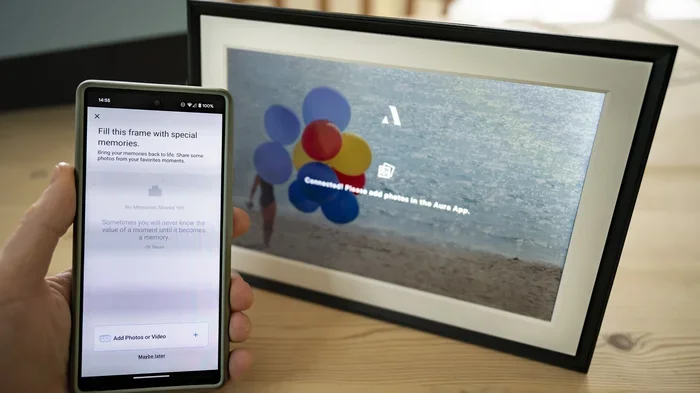
While not required, having a smartphone makes certain tasks much easier. The Aura frame app lets you control the frame from your phone. You can change slideshows, add new photo sources, and adjust settings without walking over to the frame. If you are tech-savvy, you can handle all of this through the frame’s small screen and buttons. But for most people, the app is a nice convenience.
Also, if your home WiFi is weak, consider adding mesh to your existing router to improve coverage. This ensures the frame stays connected and photos update without delay.
The Aura Frame App: Smartphone vs. No Smartphone
The Aura frame app is available for both iPhone and Android devices. It serves as the main control center for your frame. But is it necessary? Let us look at what the app offers versus what you can do without it.
What the App Gives You
The app makes life easier in several ways:
- Quick setup — you can configure the frame in minutes using your phone
- Remote control — change photos, adjust brightness, or switch slideshow themes from anywhere
- Instant photo sharing — send photos directly to the frame from your phone
- Album management — organize which photos appear and in what order
- Firmware updates — the app notifies you when updates are available
These features are very convenient. If you already use your phone for most smart home tasks, the app feels like a natural extension of your routine.
What You Can Do Without the App
Without the app, you can still do the following:
- Connect the frame to WiFi using the on-screen menu
- Link cloud accounts like Google Photos and Dropbox
- Receive photos via email
- Use USB drives to load photos
- Adjust basic settings using the frame’s buttons
You lose some convenience, but you do not lose functionality. The frame works perfectly well on its own. The app simply adds a layer of ease and flexibility.
It is also worth noting that the smart frame benefits go beyond just photo display. Some users use their Aura frame as a digital gallery for family memories. Others use it to showcase vacation photos or artwork. Whatever your use case, the frame delivers without a phone.
WiFi and Connectivity: Keeping Your Frame Online
Since the Aura frame relies on WiFi for most of its features, your network setup matters. A weak or unstable connection can cause frustration. Let us talk about how to keep your frame running smoothly.
Best Practices for Frame Connectivity
Here are some tips to ensure your Aura digital photo frame stays connected:
- Place the frame within range of your WiFi router
- Use the 2.4GHz band, which has better wall penetration than 5GHz
- Avoid placing the frame near microwaves or other devices that cause interference
- Restart your router if the frame loses connection frequently
- Consider a WiFi booster if the frame is in a distant room
If you have guests over and they connect to your guest WiFi, keep in mind that some smart devices may not work well on guest networks due to isolation settings. Make sure your frame is on the main network for best performance.
Privacy and Security Considerations
Any smart device connected to your home network raises privacy questions. The Aura frame connects to your WiFi and accesses cloud services. This means your data travels through your network. While Aura has privacy protections in place, it is always good practice to use a strong WiFi password and keep your router firmware updated.
If you are concerned about privacy on shared networks, be mindful of how your smart display device interacts with other connected devices in your home. Keeping your network secure protects all your devices, not just the frame.
Is It Worth Getting an Aura Frame Without a Phone?
This comes down to your personal situation and preferences. Let us look at the pros and cons of using an Aura frame without a smartphone.
Pros of Going Phone-Free
- Less screen time — you are not tied to your phone for frame management
- Simpler setup for non-tech users — the frame walks you through everything
- No app required — fewer apps to download and maintain
- Standalone operation — the frame works even if your phone is off or lost
- Easy to gift — a phone-free frame is simpler to set up for less tech-savvy recipients
Cons of Going Phone-Free
- Slower setup — navigating the frame’s small screen takes more steps
- No remote control — you must walk to the frame to make changes
- Harder to share photos instantly — without the app, sending photos to the frame takes more steps
- Limited album management — organizing photos is more cumbersome without the app
For most people, the pros outweigh the cons. If you are comfortable with basic tech tasks, going phone-free is absolutely doable. The frame will still deliver a beautiful photo display experience.
On the other hand, if you love smart home gadgets and want full remote control, having a smartphone makes the experience much more seamless. It is really about how much convenience you value.
Common Mistakes to Avoid With Aura Frames
Setting up an Aura frame is not difficult, but a few common mistakes can cause problems. Here is what to watch out for:
- Using a 5GHz WiFi network — the frame only supports 2.4GHz. This is the most common setup mistake.
- Placing the frame too far from the router — weak signal means slow updates and connection drops.
- Forgetting to create an Aura account — you need the account to link cloud services.
- Not testing photo sending — before relying on the frame, send a test photo to make sure email receiving works.
- Ignoring firmware updates — updates fix bugs and add new features. Keep your frame up to date.
Avoiding these simple mistakes saves a lot of headache and keeps your digital photo frame running smoothly from day one.
Expert Tips for Getting the Most From Your Aura Frame
Here are some insider tips that help you get the best experience from your Aura digital photo frame:
- Use a dedicated email address for sending photos to the frame. This keeps your photo inbox clean and organized.
- Create a shared Google Photos album and link it to the frame. Family members can add photos, and the frame updates automatically.
- Set the slideshow timing to 10-15 seconds per photo for the best viewing experience.
- Place the frame at eye level on a shelf or mantelpiece for the most natural look.
- Use high-resolution photos — the frame displays them best when images are at least 1920×1080.
These small steps make a big difference in how your frame looks and performs day to day.
Final Thoughts
So, do you need a smartphone for an Aura digital photo frame? The clear answer is no. The frame is designed to work as a standalone device. You can set it up, connect it to WiFi, and enjoy your photos without ever touching a phone. It works with cloud services, email, and USB drives to keep your photos flowing.
That said, having a smartphone adds convenience. The Aura frame app gives you remote control, faster setup, and easy photo sharing. If you already own a smartphone, using the app enhances the experience. But it is not a requirement.
The most important thing is a strong WiFi connection. Without that, even the best smart photo frame cannot function properly. Make sure your home network is solid, and your Aura frame will deliver beautiful photo displays for years to come.
Whether you are buying one for yourself or as a gift, the Aura frame is a wonderful addition to any home. It brings your memories to life without the hassle of complicated setup. Give it a try, and you will see why so many people love having their favorite photos right there on the wall.
Frequently Asked Questions
Can I set up an Aura frame without any smartphone at all?
Yes, you can. The frame has a built-in screen and buttons that guide you through the entire setup process. You connect it to WiFi, create an account, and link your cloud services all from the frame itself. No phone is needed at any point.
What happens if my WiFi goes down while the Aura frame is running?
The frame will continue displaying the last set of photos it loaded. Once your WiFi comes back, it automatically reconnects and syncs new photos. You do not lose any photos or settings during an outage.
Can family members send photos to the Aura frame without having the Aura app?
Yes. Anyone can send a photo to the frame using email. The frame has a unique email address assigned to it. As long as someone knows that address, they can send photos as attachments without needing any app or account.
Does the Aura frame work with Alexa or other smart home assistants?
The Aura frame works as a standalone smart display device. While it does not directly integrate with Alexa, it does connect to your home WiFi and operates independently. If you already use smart home devices, the frame fits right into your connected home setup without requiring extra integration.
Can I use the Aura frame in a room with weak WiFi signal?
You can, but the experience will be better with a strong signal. If your WiFi is weak in that room, consider using a WiFi extender or mesh system to improve coverage. A stable connection ensures photos load quickly and the frame stays online.
Is the Aura frame difficult to use for older adults who are not tech-savvy?
Not at all. The Aura frame is designed to be simple and intuitive. The on-screen setup guides walk you through every step. Once set up, the frame operates mostly on its own. It is one of the more user-friendly digital photo frames available, making it a great choice for all ages.