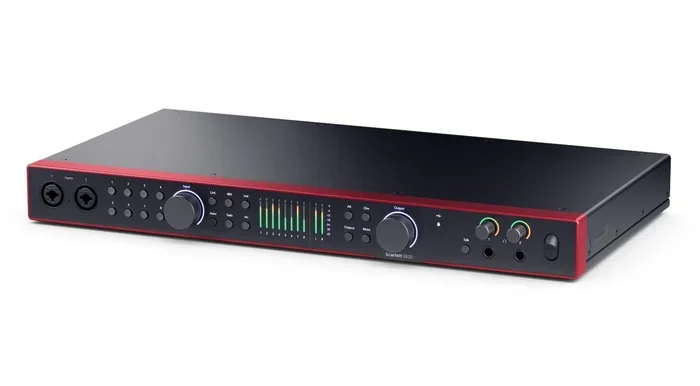
Do I Really Need An Audio Interface For Music Production
An audio interface is not always necessary for music production, but it becomes essential when you need better sound quality, lower latency, and professional recording capabilities. This guide breaks down exactly when you need one, when you can skip it, and how to choose the right model for your setup.
So you have been thinking about making music. Maybe you have a laptop, a microphone, and some free software. But then someone mentions an audio interface, and suddenly you are not sure what to do. Do you really need one? The short answer is: it depends on what you are trying to achieve. This guide will walk you through everything you need to know about the audio interface and whether it belongs in your recording setup.
Music production has become more accessible than ever. You can record a full song on your phone if you want to. But if you are serious about sound quality, there is a big difference between using your computer’s built-in sound card and using a dedicated audio interface. Think of it this way: your laptop is a great all-purpose tool, but it was not built specifically for capturing and processing audio. An audio interface fills that gap. It handles audio input and output with much better precision, lower noise, and far less delay.
Key Takeaways
- An audio interface improves sound quality: It gives you cleaner recordings, better preamps, and lower latency than a built-in sound card.
- USB microphones can replace an audio interface: For simple podcasts or single-instrument recording, a USB mic often does the job.
- Multiple inputs matter for band recording: If you record several instruments at once, an audio interface with multiple inputs is a must.
- Latency kills your recording experience: An audio interface reduces delay, making recording and monitoring much smoother.
- You do not need the most expensive model: Budget-friendly audio interfaces offer great value for beginners and home studios.
- Your workflow depends on your needs: Match your audio interface to what you actually produce, not what you think you should buy.
📑 Table of Contents
- What Is An Audio Interface And Why Does It Matter
- When You Actually Need An Audio Interface
- When You Can Skip The Audio Interface
- Audio Interface vs USB Microphone: The Big Debate
- How To Choose The Right Audio Interface For Your Needs
- Setting Up Your Audio Interface For The First Time
- Common Mistakes People Make With Audio Interfaces
- Expert Insights On Audio Gear And Your Home Studio
- Conclusion
What Is An Audio Interface And Why Does It Matter
An audio interface is a device that connects your microphones, instruments, and headphones to your computer. It converts analog sound into digital data your computer can understand, and it does the reverse too. Without one, you rely on your computer’s basic sound card, which is designed for playing YouTube videos and video calls, not for music production.
How An Audio Interface Works
Inside every audio interface, there are two key parts. The first is an analog-to-digital converter, or ADC. This takes the sound waves from your microphone or instrument and turns them into digital audio. The second is a digital-to-analog converter, or DAC. This takes digital audio from your computer and turns it back into sound you can hear through your studio monitor or headphones.
The quality of these converters matters a lot. A cheap sound card might introduce noise, distortion, or weak signal-to-noise ratio. A good audio interface keeps your recordings clean and true to the original sound. It also provides a dedicated headphone amplifier, which lets you monitor your sound without any interference from your computer’s audio output.
Another important role of the audio interface is reducing latency. Latency is the tiny delay between when you play a note and when you hear it through your headphones. On a basic sound card, this delay can be frustrating. It makes recording feel out of sync. A good audio interface with a quality audio driver keeps latency low so you can record and monitor in real time.
When You Actually Need An Audio Interface
Not everyone needs an audio interface. But if your situation matches any of the following, one is probably a smart investment.
Recording Multiple Instruments At Once
If you want to record a full band or layer several tracks at the same time, you need multiple audio inputs. A basic laptop sound card usually has one input, if that. An audio interface with four, eight, or even sixteen inputs lets you capture everything at once. This is called multitrack recording, and it is a game changer for any serious music production workflow.
For example, imagine recording drums, bass, guitar, and vocals all in one session. Without multiple inputs, you would have to record each part separately and hope the performance stays consistent. With a multi-input audio interface, you can capture everything live. The energy and feel stay intact.
Professional Sound Quality Requirements
If you are producing music for release, podcasting for a brand, or any project where sound quality matters, an audio interface is non-negotiable. Built-in sound cards have high noise floors and poor preamps. Your recordings will sound thin, noisy, or distorted compared to what an audio interface can deliver.
The microphone preamp inside an audio interface is much cleaner and more powerful. It gives your microphone the gain it needs without adding unwanted hiss or hum. This directly impacts your sound quality and makes a huge difference in the final mix. If you want your music to sound professional, the audio interface is where it starts.
Using Studio Monitors And External Speakers
If you want to listen to your music on proper studio monitors, you need an audio interface with dedicated audio outputs. Most laptops only have a 3.5mm headphone jack, which is not designed to drive studio monitors properly. An audio interface gives you clean, balanced outputs that feed your studio monitor with accurate sound.
And if you are wondering about connecting external speakers to your computer, you might ask yourself, can I plug speakers into my laptop? The answer is yes, but the sound quality and control will be limited without an audio interface.
When You Can Skip The Audio Interface
Here is the good news. You do not always need an audio interface. There are plenty of situations where you can create great music without one.
Using A USB Microphone Instead
A USB microphone has a built-in audio interface right inside it. You plug it straight into your computer, and it handles all the analog-to-digital conversion on its own. For podcasters, voiceover artists, and solo musicians, a USB microphone is often all you need.
The sound quality of a good USB microphone is surprisingly close to what you get from a standalone audio interface. You lose some flexibility, like adding multiple microphones at once or swapping out preamps, but for many creators, that does not matter. If you are just starting out, a USB microphone is a simple and affordable way to begin your music production journey without extra gear.
Basic Podcasting And Voiceover Work
If your main goal is podcasting or voiceover work, you might not need an audio interface at all. A single USB microphone, a quiet room, and a decent digital audio workstation are all you need to get started. The audio workflow for spoken word content is much simpler than for full music production.
That said, if you ever want to bring in guest speakers, add sound effects, or record music alongside your voice, an audio interface becomes more useful. It all comes down to what you are trying to do and how complex your audio workflow needs to be.
Casual Music Making And Demos
If you are just making beats, sketching ideas, or recording rough demos, your computer’s built-in sound card might be fine. The goal here is not perfection. It is capturing inspiration. Many famous producers started with nothing more than a laptop and a free digital audio workstation. You can always upgrade later when you are ready to take things more seriously.
Audio Interface vs USB Microphone: The Big Debate
This is one of the most common questions in home studios. Should you buy an audio interface or just get a USB microphone? The answer depends on your goals.
A USB microphone is simpler. You plug it in, open your recording software, and go. It is perfect for beginners who want to start recording right away. But a USB microphone locks you into one microphone input. You cannot add another mic, and you are stuck with the preamp and converter built into that one device.
An audio interface gives you flexibility. You can plug in any microphone, any instrument, and any pair of headphones or monitors. You can upgrade individual pieces of your audio gear over time without replacing the whole setup. If you plan to grow your recording setup, an audio interface is the better long-term choice.
Think of it this way. A USB microphone is like a Swiss Army knife. It does a lot of things well enough. An audio interface is like a dedicated kitchen setup. It takes more space and effort, but it gives you much better results when you know what you are doing.
How To Choose The Right Audio Interface For Your Needs
Not all audio interfaces are the same. Choosing the right one means understanding what matters most for your music production setup.
Count Your Inputs And Outputs
How many microphones or instruments do you need to record at once? If you are a solo artist recording vocals and guitar, two inputs are usually enough. If you are recording a full band, look for eight inputs or more. For outputs, make sure you have at least one pair for your studio monitor and a dedicated headphone output.
Check The Preamp Quality
The preamp is what amplifies the signal from your microphone. A clean preamp makes your recordings sound professional. A noisy preamp adds unwanted hiss. Look for audio interfaces with reputable preamp brands like Focusrite, Universal Audio, or PreSonus. These names are known for clean, transparent gain.
Consider Your Connectivity
Most audio interfaces connect to your computer via USB. But some use Thunderbolt, which offers faster data transfer and even lower latency. If your computer supports Thunderbolt, that is a great option. You might wonder, can I plug USB C into Thunderbolt? The short answer is that USB C and Thunderbolt share the same connector shape, but not all USB C cables support Thunderbolt speeds. Make sure you have the right cable for the best performance.
Set A Budget
Audio interfaces range from around 50 dollars to over 2000 dollars. You do not need to spend a fortune to get great sound. Budget-friendly models from brands like Focusrite Scarlett, PreSonus AudioBox, and Behringer offer excellent value. They give you clean preamps, low latency, and reliable build quality at a price that makes sense for most home studios.
Setting Up Your Audio Interface For The First Time
Getting started with a new audio interface is easier than most people think. Follow these steps, and you will be recording in no time.
- Install the audio driver. Most audio interfaces need a driver installed on your computer. Visit the manufacturer’s website and download the latest version. This ensures your audio interface communicates properly with your operating system and keeps latency as low as possible.
- Connect your studio monitor. Use the outputs on your audio interface to connect your studio monitor. This gives you the most accurate representation of your sound.
- Plug in your microphone. Connect your microphone to the input on the audio interface. Turn on phantom power if you are using a condenser microphone.
- Set your buffer size. In your digital audio workstation, adjust the audio buffer size. A lower buffer size reduces latency but uses more processing power. A higher buffer size is more stable but adds delay. Find the sweet spot that works for your system.
- Test your recording levels. Do a test recording and check your levels. You want the signal to be strong but not clipping. Aim for peaks around negative six decibels.
Once your audio interface is set up, your entire audio workflow will feel more professional and smooth. You will notice the difference in sound quality, monitoring clarity, and overall ease of use right away.
Common Mistakes People Make With Audio Interfaces
Even with the right gear, mistakes can hold you back. Here are a few to avoid.
- Skipping the driver update. Outdated audio drivers cause latency, crashes, and compatibility issues. Always keep your drivers current.
- Using cheap cables. Bad cables introduce noise and signal loss. Invest in decent cables for your audio input and audio output connections.
- Ignoring room acoustics. Even the best audio interface cannot fix a bad room. Treat your space with basic acoustic panels or soft furnishings to improve your sound.
- Overloading inputs. Pushing too much gain into your preamp creates distortion. Start with lower gain and increase only as needed.
Avoiding these simple mistakes will help you get the most out of your audio interface and your recording setup.
Expert Insights On Audio Gear And Your Home Studio
Many professional producers agree that the audio interface is one of the most important pieces of audio gear in any home studio. It sits at the center of your audio workflow, connecting everything from your microphone to your digital audio workstation. The right audio interface can elevate your recordings from amateur to professional sounding.
But here is the thing no one tells you. The best audio interface is the one that fits your actual needs. You do not need ten inputs if you only record one microphone at a time. You do not need the most expensive preamp if you are just making beats. Focus on what you do every day, and build your setup around that.
Also, remember that an audio interface is just one piece of the puzzle. Your microphone, your room, your software, and your skills all matter just as much. Invest in each area thoughtfully, and your music production will improve steadily over time.
Conclusion
So do you really need an audio interface for music production? The honest answer is: it depends on your goals. If you are making casual music, recording demos, or doing simple voiceover work, you can probably skip it. A USB microphone and your laptop will get the job done.
But if you care about sound quality, want to record multiple tracks, or plan to produce music seriously, an audio interface is one of the best investments you can make. It gives you cleaner audio, lower latency, better preamps, and the flexibility to grow your recording setup over time.
Start with what you have. Experiment. Learn what works for you. And when you are ready, add an audio interface to your setup. Your ears will thank you. The difference in sound quality is real, and once you hear it, you will never want to go back to your computer’s basic sound card again.
Take the time to understand your needs, choose the right model, and set it up properly. Your home studio will be better for it. And your music will sound the way it was meant to sound.
Frequently Asked Questions
Can I use a USB microphone instead of an audio interface?
Yes, a USB microphone has a built-in converter and preamp, so you can skip a standalone audio interface for simple recording tasks. However, you lose the flexibility of adding multiple microphones or instruments at once.
Does an audio interface improve sound quality?
Yes, a dedicated audio interface provides better converters and preamps than your computer’s built-in sound card. This results in cleaner recordings with less noise and a better signal-to-noise ratio.
What is latency and why does it matter?
Latency is the delay between when you play a sound and when you hear it back through your headphones. An audio interface with a good audio driver keeps latency low, making recording and monitoring feel real time and natural.
Do I need an audio interface for podcasting?
For a solo podcaster using a USB microphone, an audio interface is not strictly necessary. But if you want to bring in multiple guests or add sound effects, an audio interface with multiple inputs makes the process much easier.
How much should I spend on an audio interface?
Great audio interfaces are available at every price point. Budget models around 50 to 150 dollars offer excellent value for beginners. Spend more only if you need extra inputs, better preamps, or professional-grade converters.
Can I connect studio monitors directly to my laptop?
You can, but the sound quality will be limited by your laptop’s basic audio output. An audio interface provides dedicated, clean outputs that drive studio monitors properly and give you a much more accurate listening experience.