Can You Watch Tv Through A Projector For Amazing Viewing
Yes, you can absolutely watch TV through a projector and turn any room into a cinematic home theater. Whether you want to stream movies, sports, or shows on a big screen, a projector delivers a stunning viewing experience that a standard TV simply cannot match. In this guide, we walk you through everything you need to know about setting up your projector for TV, choosing the right equipment, and avoiding common pitfalls that ruin the experience.
Can you watch TV through a projector? The short answer is a resounding yes. Projectors have become one of the best ways to enjoy television content on a massive screen without breaking the bank. Whether you are a movie buff, a sports fan, or someone who just loves binge-watching your favorite series, using a projector opens up a whole new world of entertainment.
For years, people assumed projectors were only for boardrooms or dark home theaters with expensive setups. That is no longer true. Today, projectors come in all shapes, sizes, and price points. You can find compact portable models that fit in your backpack and powerful home theater projectors that deliver 4K resolution. The technology has made it easier than ever to turn any wall or screen into a giant TV.
In this article, we will cover everything you need to know about watching TV through a projector. We will look at how to set one up, what equipment you need, which projectors work best, and how to get the most out of your viewing experience. By the end, you will have a clear picture of whether a projector is the right choice for your TV watching habits.
Key Takeaways
- Watching TV on a projector is totally doable: You just need the right cables, settings, and placement.
- A projector gives you a bigger screen: Enjoy 100-inch and larger displays that make movies and sports feel immersive.
- Smart projectors make streaming easy: Many models come with built-in apps so you can watch Netflix and other content directly.
- Ambient light matters a lot: A dark room gives you the best picture quality and contrast.
- HDMI is the go-to connection: Use a quality HDMI cable for reliable audio and video transfer.
- Avoid common mistakes: Don’t skip keystone correction, ignore speaker quality, or place your projector in the wrong spot.
📑 Table of Contents
Yes, You Can Watch TV Through A Projector
Watching TV through a projector is not some futuristic dream. It is something millions of people do every single day. A projector takes the video signal from your TV source and displays it on a much larger surface than any standard television can. This means you get a bigger, more immersive picture that fills your field of vision.
The process works because most modern projectors accept HDMI inputs. Your cable box, streaming stick, gaming console, or laptop can all connect to a projector just like they connect to a TV. The projector then projects that image onto a wall or a dedicated screen. It is really that simple.
How Does a Projector Display TV Content
When you watch TV through a projector, the device receives the video signal through an input port, usually HDMI. The projector’s internal light source shines through a tiny chip or panel that contains the image data. That light then passes through the lens and projects the picture onto your wall or screen.
Different types of projectors use different technologies. Some use DLP chips with tiny mirrors. Others use LCD panels or LCoS chips. Each type has its own strengths. But for the purpose of watching TV, they all do the same basic job: they take a signal and display it big.
Most people find that watching TV on a projector feels more cinematic than watching on a standard set. The larger image size creates a sense of being inside the action. This is especially true for movies, sports events, and epic TV shows with stunning visuals.
What You Need to Watch TV on a Projector
To get started, you need a few basic things. First, you need a projector. Second, you need a source for your TV content. This could be a cable box, a streaming device like a Roku or Fire Stick, a laptop, or even a gaming console. Third, you need a way to connect them. An HDMI cable is the most common and reliable option.
You will also want a place to project the image. A dedicated projector screen works best, but a clean white wall can do the job too. If you are looking for a budget-friendly alternative, you might even consider using a white sheet. Some people have great results with a simple bedsheet hung on the wall.
How To Set Up Your Projector For TV Watching
Setting up a projector for TV is easier than most people think. You do not need to be a tech expert. With a few simple steps, you can have your projector displaying TV content in no time.
Step 1: Choose the Right Location
Where you place your projector matters a lot. You want to position it so that the beam hits your screen or wall at the right angle. Most projectors work best when they are placed directly in front of the screen, either on a table or mounted on the ceiling.
Think about the throw distance. This is the space between the projector and the screen. Short-throw projectors need less distance, while standard projectors need more room. Check your projector’s manual for the recommended throw distance based on the screen size you want.
Also consider the height of the projector. If you mount it on the ceiling, make sure it is centered and level. An off-center projector will create a distorted image. Many projectors have keystone correction to fix this, but it is always better to get the placement right from the start.
Step 2: Connect Your TV Source
Once your projector is in position, connect your TV source using an HDMI cable. Plug one end into your cable box or streaming device and the other end into the projector’s HDMI port. Turn on both devices and switch the projector to the correct input.
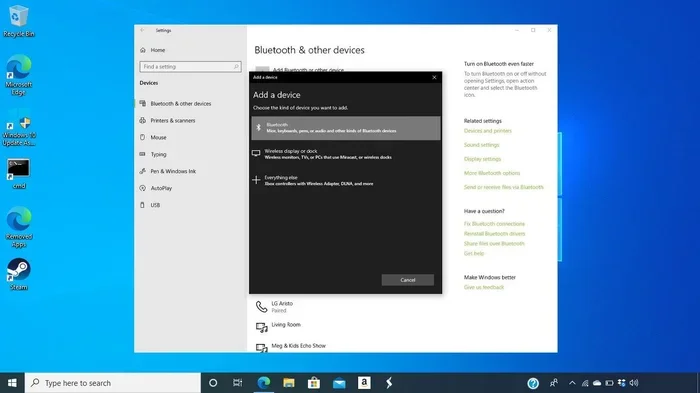
If you want to watch content from your phone or laptop, you can also use an HDMI adapter. This lets you mirror your device’s screen onto the big display. Some people prefer to pair their phone to the projector for wireless streaming, though a wired connection tends to be more stable.
Step 3: Adjust the Image Settings
After connecting everything, take a moment to adjust the image. Use the projector’s menu settings to fine-tune the brightness, contrast, and color. In a dark room, you can lower the brightness slightly for a more comfortable viewing experience. In a room with some ambient light, you may need to boost the brightness.
Most projectors also let you adjust the aspect ratio. For TV content, 16:9 is the standard. Make sure your projector is set to this ratio to avoid black bars on the sides of the screen.
Best Projectors For Watching TV
Not all projectors are created equal when it comes to watching TV. Some models are designed specifically for home entertainment, while others are better suited for presentations. Here are some things to look for when choosing a projector for TV.
Resolution Matters
The resolution of your projector determines how sharp and detailed the image looks. For the best TV watching experience, look for at least a 1080p Full HD projector. If you want top-notch quality, a 4K projector will deliver incredible detail that makes every scene pop.
Keep in mind that you can use a 4K HDMI cable on a non-4K TV or projector without any issues. The cable will work, but the resolution will be limited by the device that receives the signal. So if your projector is only 1080p, a 4K cable will still work perfectly fine.
Brightness and Contrast
Brightness is measured in lumens. For watching TV in a dark room, a projector with 1,500 to 2,000 lumens is usually enough. If you plan to watch during the day or in a room with windows, you will need a brighter model with 3,000 lumens or more.
Contrast ratio is also important. A higher contrast ratio means deeper blacks and brighter whites. This makes the image look more vibrant and realistic. Look for projectors with a contrast ratio of at least 10,000:1 for good results.
Smart Projectors Make Life Easier
Smart projectors come with built-in operating systems and streaming apps. This means you can watch Netflix, YouTube, and other content directly on the projector without needing a separate streaming device. They are incredibly convenient and cut down on cable clutter.
Some smart projectors even have voice control built in. You can use voice commands to search for content, adjust volume, or change inputs. This adds a layer of convenience that makes the whole experience smoother.
Projector vs TV: Which Is Better For Viewing
This is a question many people ask when they are deciding between a projector and a traditional TV. Both have their strengths, and the right choice depends on your preferences and situation.
| Feature | Projector | TV |
|---|---|---|
| Screen Size | 80 to 150+ inches | 40 to 85 inches |
| Picture Quality | Great in dark rooms | Excellent in all lighting |
| Portability | Very portable | Bulky and heavy |
| Cost for Large Screen | More affordable | Expensive for large sizes |
| Setup | Requires mounting or placement | Plug and play |
| Ambient Light Performance | Struggles in bright rooms | Handles bright rooms well |
| Lifespan | Lamp needs replacement | Long-lasting LEDs |
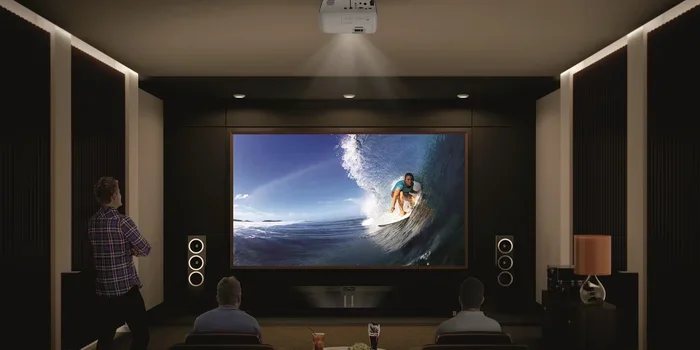
For many people, the projector wins when it comes to creating a cinematic experience at home. There is nothing quite like watching a movie on a 100-inch screen. It transforms your living room into a personal theater.
However, if you watch TV in a bright room during the day, a TV might be the better option. Projectors struggle with ambient light and can look washed out in well-lit environments. If you have a dedicated home theater room with blackout curtains, a projector will shine.
Some people even use a projector for window displays during outdoor movie nights. This is a fun and unique way to enjoy TV and movies in a completely different setting. It is a great option for summer gatherings and parties.
Tips For The Best TV Viewing Experience With A Projector
Getting the most out of your projector for TV watching takes a little effort. Here are some practical tips that make a big difference.
Control the Ambient Light
The single biggest factor in projector picture quality is ambient light. A dark room gives you the best contrast, deepest blacks, and the most vibrant colors. Consider installing blackout curtains in your viewing room to block out sunlight and streetlights.
If you cannot fully darken the room, try to reduce light sources near the screen. Even small lights can wash out the projected image. A dimly lit room makes a noticeable difference in how your content looks.
Use a Quality Screen
While a white wall works, a dedicated projector screen enhances the image significantly. Screens are designed to reflect light evenly and boost brightness and contrast. They also prevent the image from looking faded or uneven.
You do not need to spend a fortune on a screen. Even an affordable pull-down screen can improve your viewing experience dramatically. Some people use a white bedsheet as a temporary screen and are surprised by how well it works.
Get the Audio Right
Most projectors have small built-in speakers that do not deliver great sound. For a truly immersive TV watching experience, consider connecting external speakers or a soundbar. A good audio setup makes just as big a difference as the picture quality.
You can connect speakers via Bluetooth or through the projector’s audio output jack. Some people even connect their sound system directly to the TV source rather than the projector. This gives you more flexibility and better sound control.
Manage Your Cables
A clean setup looks better and reduces tripping hazards. Use cable ties or cable channels to keep your HDMI cables and power cords organized. If you mount your projector on the ceiling, run the cables through the wall for a clean look.
Running TV cable behind a wall is a great way to hide unsightly cords. It keeps your entertainment area looking neat and professional. Just make sure you use the right type of cable for in-wall installation to meet safety standards.
Maintain Your Projector
Projectors have a limited lamp life, typically between 3,000 and 10,000 hours depending on the model. Keep track of your usage so you know when it is time to replace the lamp. A worn-out lamp will produce a dim and dull image.
Clean the projector’s air filter regularly to prevent overheating. Dust buildup can shorten the lifespan of the internal components. A little maintenance goes a long way in keeping your projector performing at its best.
Common Mistakes To Avoid
Even though setting up a projector for TV is straightforward, people often make mistakes that hurt their viewing experience. Here are some common pitfalls to watch out for.
Skipping keystone correction. If your projector is not perfectly aligned with the screen, the image will look like a trapezoid instead of a rectangle. Most projectors have digital keystone correction to fix this. However, using too much keystone correction can reduce image quality. Try to get the physical placement right first.
Ignoring the throw distance. Placing your projector too close or too far from the screen will give you an image that is too small or too blurry. Measure your space before you buy and choose a projector that fits your room.
Using the wrong cable. A cheap or damaged HDMI cable can cause signal problems, flickering, or no picture at all. Invest in a good quality cable to ensure a reliable connection.
Forgetting about input lag. If you plan to watch sports or play games through your projector, input lag matters. Look for projectors with low input lag for smooth, responsive viewing. Standard movie projectors may have higher lag that makes fast action look choppy.
Not considering the projector’s placement relative to the viewer. You do not want the projector’s fan noise or light beam to distract you during your favorite show. Ceiling mounting is usually the best solution because it keeps the projector out of your line of sight.
Final Thoughts
Watching TV through a projector is one of the best upgrades you can make to your home entertainment setup. The big screen experience is unmatched. Whether you are hosting a movie night with friends or enjoying a quiet evening with your favorite show, a projector brings content to life in a way that a standard TV simply cannot.
The setup process is simpler than most people expect. With the right projector, a quality HDMI cable, and a bit of attention to placement and lighting, you can create a stunning viewing experience in any room. The key is to take your time, get the settings right, and enjoy the process.
If you are still on the fence, consider starting with an affordable model and testing it out. You might be surprised at how much you enjoy watching TV on a big screen. Once you experience the difference, you will wonder how you ever watched content on a small TV again.
So go ahead and give it a try. Set up your projector, grab some popcorn, and enjoy your favorite shows and movies the way they were meant to be seen. The big screen experience is waiting for you.
Frequently Asked Questions
Can I watch regular cable TV through a projector?
Yes, you can watch regular cable TV through a projector. Simply connect your cable box to the projector using an HDMI cable. Make sure both devices are turned on and set to the correct input on the projector. The projector will display your cable TV channels just like a standard television would.
Do I need a special screen to watch TV on a projector?
You do not need a special screen, but using one greatly improves picture quality. A white wall works in a pinch, and even a clean white bedsheet can produce decent results. A dedicated projector screen reflects light more evenly and gives you a brighter, sharper image. If you want the best experience, a screen is worth the investment.
Can I stream Netflix on a projector?
Absolutely. You can stream Netflix on a projector by connecting a streaming device like a Roku or Amazon Fire Stick via HDMI. If you have a smart projector with built-in Netflix, you can stream directly without any extra devices. Some people also project Netflix from their laptop to a projector using an HDMI cable or wireless connection.
Is it better to watch TV on a projector or a TV?
It depends on your preferences and viewing environment. A projector gives you a much bigger screen and a more cinematic feel. A TV performs better in bright rooms and requires less setup. For a dedicated home theater in a dark room, a projector is usually the better choice. For everyday casual viewing in a bright living room, a TV might be more practical.
How do I connect my phone to a projector for TV streaming?
You can connect your phone to a projector using an HDMI adapter or cable. Simply plug the adapter into your phone and connect an HDMI cable from the adapter to the projector. Alternatively, some projectors support wireless screen mirroring through Wi-Fi or Bluetooth. Check your projector’s manual for supported connection methods.
What is the best room setup for watching TV on a projector?
The best setup is a dark room with a dedicated projector screen and comfortable seating positioned directly in front of the screen. Minimize ambient light by using blackout curtains. Keep the projector at the recommended throw distance for your screen size. A quiet room with good speakers or a soundbar completes the experience and makes it feel like a true home theater.
=== CONCLUSION ===
Can you watch TV through a projector? The answer is a clear and definitive yes. A projector transforms your TV watching experience by delivering a big, bright, and immersive picture that fills your entire field of vision. Whether you are a casual viewer or a dedicated home theater enthusiast, setting up a projector for TV content is easier and more affordable than ever before.
By following the tips in this guide, you can avoid common mistakes and get the most out of your projector. Choose the right model, control your ambient light, invest in a quality screen, and keep your cables organized. These small steps make a huge difference in the quality of your viewing experience.
Take the leap and try watching your favorite shows and movies through a projector. Once you see the difference a big screen makes, you will never want to go back to a small TV again. Your home theater adventure starts today.