Can You Use Bluetooth On A Motorcycle And Stay Connected
Yes, you can use Bluetooth on a motorcycle and enjoy hands-free calls, music streaming, and GPS navigation while riding. Modern Bluetooth motorcycle helmets and intercom systems make it easy to stay connected without taking your hands off the handlebars. This guide covers everything from choosing the right gear to setting up your system safely.
Riding a motorcycle gives you a sense of freedom that few other activities can match. The wind, the open road, and the roar of the engine all combine into something truly special. But that freedom does not mean you have to be disconnected from the world. Can you use Bluetooth on a motorcycle? The short answer is yes, and it is easier than you might think. Today, riders can stream music, take calls, and get GPS directions without ever lifting a hand from the handlebars. This guide walks you through everything you need to know about adding Bluetooth to your motorcycle setup.
Bluetooth technology has come a long way in recent years. What used to be a clunky and unreliable connection is now fast, stable, and built into helmets, speakers, and communication systems designed specifically for riders. Whether you are a daily commuter or a weekend cruiser, there is a Bluetooth solution that fits your needs. Let us dive into the details and explore how you can stay connected on two wheels.
Key Takeaways
- Bluetooth on a motorcycle is safe and legal in most areas when used with a hands-free setup or helmet-integrated system.
- Bluetooth motorcycle helmets and intercoms are the two most popular ways to add wireless connectivity to your ride.
- Setting up Bluetooth takes only minutes once you have the right device and follow a simple pairing process.
- Safety should always come first — keep volume low and avoid distracting calls while riding at high speeds.
- Range and battery life vary by device, so choose gear that matches your riding style and distance needs.
- Troubleshooting common issues like static, dropped connections, and pairing failures is straightforward with the right knowledge.
📑 Table of Contents
- What Bluetooth On A Motorcycle Means And Why Riders Love It
- How Bluetooth Technology Works In A Motorcycle Setup
- Best Bluetooth Devices For Motorcyclists
- Setting Up Your Bluetooth Motorcycle System
- Safety Tips For Using Bluetooth While Riding
- Troubleshooting Common Bluetooth Motorcycle Problems
- Final Thoughts On Bluetooth For Motorcyclists
What Bluetooth On A Motorcycle Means And Why Riders Love It
When we talk about Bluetooth on a motorcycle, we mean using wireless technology to connect your phone, GPS device, or music player to a device on your bike or helmet. This connection lets you do things like answer phone calls, listen to music, and hear turn-by-turn directions without stopping your ride.
Riders love Bluetooth for a few key reasons. First, it keeps your hands on the handlebars where they belong. Second, it reduces the temptation to pull out your phone while riding. Third, it makes longer rides more enjoyable because you can share music or have a conversation with a passenger or fellow rider. Bluetooth motorcycle technology has truly changed the way people ride.
How Bluetooth Changed The Riding Experience
Not too long ago, riders had to stop at gas stations or parking lots just to check a map or answer a call. Now, wireless riding connectivity lets you stay in contact with the world while you cruise down the highway. Bluetooth intercom systems allow riders to talk to each other in real time, which is great for group rides. You can also listen to podcasts or audiobooks, making those long solo rides feel shorter and more entertaining.
The beauty of modern motorcycle Bluetooth accessories is that they are designed to handle the unique challenges of riding. Wind noise, vibrations, and rain are all factors that older wireless technologies struggled with. Today’s Bluetooth devices are built to overcome these obstacles and deliver clear, reliable sound even at highway speeds.
How Bluetooth Technology Works In A Motorcycle Setup
Understanding how Bluetooth motorcycle communication works helps you make better buying decisions. At its core, Bluetooth is a short-range wireless technology that lets devices exchange data over short distances. When you pair your phone to a Bluetooth helmet or speaker, they create a small personal network called a piconet.
Here is how the process typically works on a motorcycle:
- Your phone or GPS device acts as the source of audio or data.
- A Bluetooth receiver built into your helmet or handlebar-mounted device picks up the signal.
- The audio is delivered through speakers or bone conduction drivers inside the helmet.
- A microphone picks up your voice and sends it back to the paired device for calls or intercom chat.
Bluetooth Range And What It Means For Riders
Most Bluetooth devices have a range of about 30 to 100 feet. This is plenty for helmet-to-helmet intercom communication between riders. However, if you are trying to connect your phone to a speaker on your motorcycle, the range is usually more than enough since your phone will likely be in your pocket or mounted nearby.
Keep in mind that obstacles like other vehicles, buildings, and even your own body can reduce the effective range. Bluetooth signal strength can also be affected by interference from other wireless devices. This is why it is important to choose a device with good range ratings and strong signal processing.
Bluetooth Versions And Why They Matter
Not all Bluetooth is created equal. Newer versions offer better sound quality, lower power consumption, and stronger connections. Most modern motorcycle Bluetooth headsets use Bluetooth 5.0 or higher, which provides excellent range and stability. When shopping for a Bluetooth motorcycle setup, look for devices that support the latest Bluetooth versions to ensure the best performance.
Best Bluetooth Devices For Motorcyclists
The market is full of options when it comes to Bluetooth gear for motorcycles. Choosing the right one depends on your riding style, budget, and what features matter most to you. Here are the most popular categories of Bluetooth devices for riders.
Bluetooth Motorcycle Helmets
A Bluetooth motorcycle helmet is one of the most popular choices among riders. These helmets come with built-in speakers and microphones, so there is nothing extra to install. You simply pair your phone and start riding. Some top models even include noise-canceling microphones that filter out wind noise, which makes conversations crystal clear even at high speeds.
When shopping for a Bluetooth helmet, pay attention to the following:
- Speaker quality — Look for helmets with high-fidelity speakers for great music sound.
- Battery life — A good Bluetooth helmet should last at least 8 to 12 hours on a single charge.
- Intercom range — If you ride with a group, choose a helmet with a long intercom range.
- Ease of use — Controls should be easy to reach and use without taking your hands off the bars.
Bluetooth Motorcycle Intercom Systems
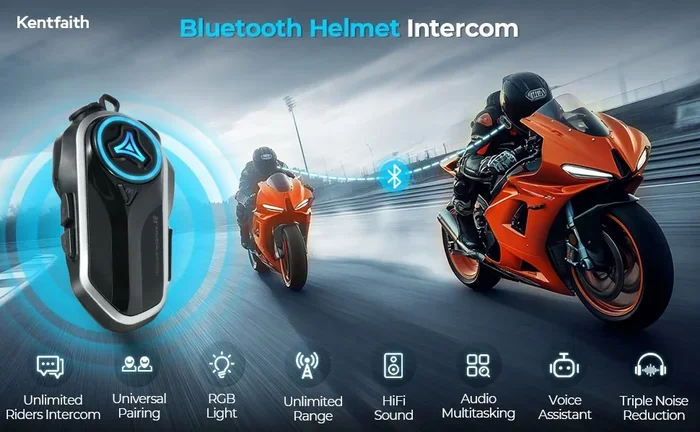
If you already have a favorite helmet, a Bluetooth intercom system is a great option. These are add-on kits that you install inside your existing helmet. They typically include speakers, a microphone, and a small control unit that mounts near the ear. Many riders prefer this approach because it lets them keep their current helmet while adding wireless communication capabilities.
Intercom systems also let you connect with other riders. This is perfect for group rides where you want to stay in touch or share directions. Some systems support connections with up to six riders at once, which is great for larger motorcycle clubs.
Bluetooth Speakers And Handlebar Mounts
For riders who want a simpler setup, Bluetooth speakers for motorcycles are a solid choice. These compact speakers mount to your handlebars or under your seat and connect directly to your phone. They are great for playing music during short rides or while stopped at a café. Some riders also use portable Bluetooth speakers that they can easily remove and carry into a restaurant or campsite.
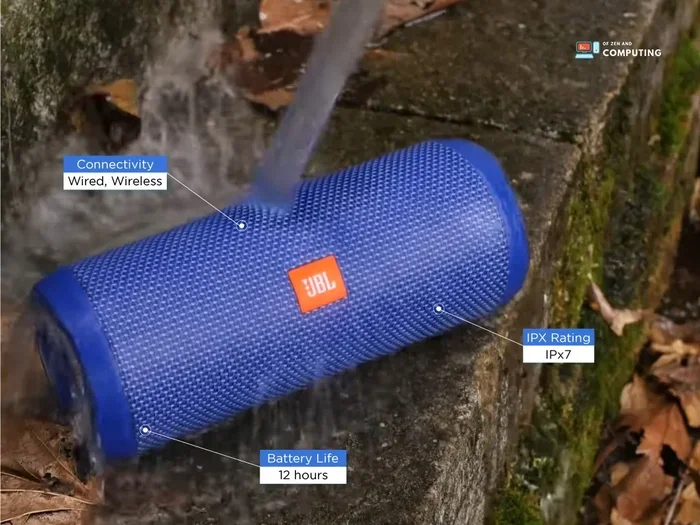
One thing to keep in mind is that handlebar speakers are exposed to the elements. Make sure you choose a model that is weather-resistant and can handle vibration from the road. A motorcycle Bluetooth speaker with an IP rating for water and dust resistance will last much longer than a standard portable speaker.
Comparing Bluetooth Device Options
| Device Type | Best For | Average Battery Life | Intercom Range |
|---|---|---|---|
| Bluetooth Helmet | All-in-one convenience | 8-12 hours | 300-1000 ft |
| Intercom System | Adding Bluetooth to an existing helmet | 6-10 hours | 300-800 ft |
| Handlebar Speaker | Simple music playback | 4-8 hours | N/A (phone only) |
| Bone Conduction Headset | Safety-conscious riders | 5-8 hours | 30-50 ft |
Each option has its strengths. The best choice depends on how you ride and what you want to get out of your Bluetooth experience.
Setting Up Your Bluetooth Motorcycle System
Setting up Bluetooth on your motorcycle is simpler than you might expect. Most modern devices follow a similar pairing process, and manufacturers have made it as user-friendly as possible. Here is a step-by-step guide to get you started.
Step 1: Charge Your Device Fully
Before you begin, make sure your Bluetooth device is fully charged. A low battery can cause pairing problems and unstable connections. Most devices take about 1 to 2 hours to charge fully, and a full charge should give you several hours of riding time.
Step 2: Turn On Bluetooth On Your Phone
Go to your phone’s settings and turn on Bluetooth. Make sure your phone is discoverable. Most phones will automatically become visible to nearby Bluetooth devices when the Bluetooth setting is turned on.
Step 3: Put Your Motorcycle Device In Pairing Mode
Every Bluetooth device has a pairing mode. Usually, you need to hold down a button for a few seconds until a light starts flashing. This tells the device it is ready to connect with a new phone. Check your device’s manual if you are unsure how to enter pairing mode.
Step 4: Find And Select The Device On Your Phone
Go back to your phone’s Bluetooth settings and look for the device name in the list of available devices. Tap on it to begin the pairing process. You may need to enter a PIN, which is usually “0000” or “1234” for most devices.
Step 5: Test Your Connection
Once paired, play some music or make a test call to make sure everything works correctly. Adjust the volume to a comfortable level and check that the microphone picks up your voice clearly. If you experience any issues, try turning Bluetooth off and on again, or restart both devices.
If you have ever used Bluetooth with other devices, you already know the basics. The process is very similar whether you are connecting to a speaker, a headset, or a motorcycle-specific communication system. For more on how Bluetooth works across different devices, check out whether you can use Bluetooth headphones for communication in other settings.
Safety Tips For Using Bluetooth While Riding
Staying connected is great, but safety always comes first when you are on a motorcycle. Using Bluetooth while riding can be perfectly safe as long as you follow some basic guidelines. Here are the most important safety tips every rider should keep in mind.
Keep The Volume Low
This is probably the most important rule. You need to be able to hear traffic, sirens, and other sounds around you. Keep your music volume at a level where you can still hear what is happening on the road. Many riders find that keeping the volume at about 50 to 60 percent gives them enough enjoyment without sacrificing awareness.
Use Noise-Canceling Microphones
Wind noise can make it hard for the person on the other end of a call to hear you. A good Bluetooth motorcycle headset with a noise-canceling microphone solves this problem. These microphones filter out wind and road noise so your voice comes through clearly. This means you can take calls safely without having to shout or strain your voice over engine noise.
Avoid Complex Calls While Riding
Hands-free does not mean distraction-free. While Bluetooth lets you answer calls without taking your hands off the handlebars, any conversation takes mental focus. Try to keep calls short and avoid deep or emotional discussions while riding. If a call requires too much of your attention, it is better to pull over and take it.
Use Voice Commands When Possible
Most modern Bluetooth motorcycle systems support voice commands. You can ask your system to play music, answer a call, or give you directions without touching your phone. This keeps your eyes on the road and your hands on the handlebars. Voice control is one of the best features of motorcycle Bluetooth technology and something every rider should take advantage of.
Know Your Local Laws
Laws about using Bluetooth and wireless devices while riding vary by location. Some places allow any hands-free device, while others have restrictions on earpieces or speakers. Before you ride with Bluetooth, make sure you understand the laws in your area. Staying legal keeps you safe and avoids costly tickets.
For general tips on using Bluetooth devices safely in different situations, you might want to read about how Bluetooth headphones connect to different devices to better understand pairing and connectivity across platforms.
Troubleshooting Common Bluetooth Motorcycle Problems
Bluetooth technology is reliable, but it is not perfect. Every rider will run into occasional connection issues. The good news is that most problems are easy to fix. Here are the most common issues and how to solve them.
Static Or Crackling Audio
If you hear static or crackling while listening to music or taking a call, the first thing to check is your signal strength. Moving closer to your phone or turning off other nearby Bluetooth devices can help. Wind noise can also cause interference with the microphone, so make sure your helmet or intercom is properly sealed around the microphone area.
Another common cause is a low battery. When a Bluetooth device’s battery drops below 20 percent, the connection can become unstable. Keep your device charged and carry a spare charging cable on long rides.
Device Won’t Pair
If your motorcycle Bluetooth device will not pair with your phone, try these steps:
- Turn Bluetooth off on both devices and then turn it back on.
- Delete the old pairing from your phone’s Bluetooth memory and try again.
- Make sure your device is in pairing mode (the flashing light usually indicates this).
- Restart both your phone and the Bluetooth device.
- Move closer to the device to ensure a strong signal during pairing.
Most pairing issues are resolved with these simple steps. If the problem persists, check for firmware updates for your Bluetooth device. Manufacturers often release updates that fix connectivity bugs and improve performance.
Connection Keeps Dropping
A dropping connection is frustrating but usually fixable. The most common cause is distance — if your phone is too far from the Bluetooth device, the signal weakens. Make sure your phone is in a secure, close mount on your motorcycle. Interference from other wireless devices can also cause drops, so try turning off unnecessary Bluetooth connections in your area.
Sometimes the issue is with the Bluetooth version. Older devices may not connect as reliably as newer ones. If you are using an older phone or headset, consider upgrading to a device that supports Bluetooth 5.0 or higher. The improved range and stability make a noticeable difference on the road.
For more on how Bluetooth connectivity works across different devices and platforms, you can explore whether Bluetooth headphones work with different devices to understand compatibility better.
Final Thoughts On Bluetooth For Motorcyclists
Using Bluetooth on a motorcycle is one of the best upgrades you can make to your riding setup. It keeps you connected, entertained, and safe without sacrificing the freedom that motorcycling is all about. From Bluetooth helmets to handlebar speakers and intercom systems, there is a solution for every type of rider and every budget.
The key is to choose the right device for your needs, set it up correctly, and always prioritize safety. Keep the volume at a reasonable level, use voice commands when possible, and stay aware of your local laws. With the right Bluetooth setup, every ride becomes more enjoyable and more connected.
Technology keeps improving, and so do the options for riders. Whether you are a casual weekend rider or a daily commuter, Bluetooth motorcycle gear has something to offer. Start with the basics, experiment with different setups, and soon you will wonder how you ever rode without it. Stay connected, stay safe, and enjoy the ride.
Frequently Asked Questions
Is It Legal To Use Bluetooth On A Motorcycle?
In most places, yes. Using a Bluetooth headset or helmet with built-in communication is legal as long as it is hands-free. However, laws vary by state and country, so always check your local regulations before riding with any Bluetooth device.
Can I Listen To Music Through Bluetooth While Riding?
Absolutely. Most Bluetooth motorcycle helmets and intercom systems allow you to stream music from your phone. Just remember to keep the volume low enough that you can still hear traffic and other important sounds on the road.
How Far Can Bluetooth Devices Connect On A Motorcycle?
Most Bluetooth devices have a range of 30 to 100 feet for helmet-to-helmet communication. For phone connections, the range depends on your phone’s signal strength and the Bluetooth version. Bluetooth 5.0 offers significantly better range and stability than older versions.
Do I Need A Special Helmet To Use Bluetooth?
No, you do not need a special helmet. You can add a Bluetooth intercom system to almost any full-face or open-face helmet. Bluetooth helmets are also a great option if you are in the market for a new one and want everything built in.
How Long Does A Bluetooth Motorcycle Device Battery Last?
Battery life varies by device, but most Bluetooth helmets and intercom systems last between 6 and 12 hours on a full charge. Handlebar speakers typically last 4 to 8 hours. Always charge your device fully before a long ride.
Can I Use Bluetooth On My Motorcycle In The Rain?
Most Bluetooth motorcycle devices are water-resistant, but not all are waterproof. Check the IP rating of your device before riding in wet conditions. A device with at least an IPX4 rating should handle rain just fine, but it is always best to protect your electronics when possible.