Can You Make An Old Car Radio Bluetooth And Stream Music
Yes, you can make an old car radio Bluetooth and stream music with a few affordable options. Whether you use a Bluetooth FM transmitter, a receiver adapter, or swap in a new head unit, adding wireless streaming to your old car radio is easier than most people think. This guide covers every method, cost, and step so you can start listening to your favorite playlists on the road today.
Key Takeaways
- A Bluetooth FM transmitter is the cheapest and easiest way to make an old car radio Bluetooth ready in minutes.
- A Bluetooth receiver adapter offers better audio quality and works with existing AUX or CD inputs.
- Replacing the entire stereo unit gives you full modern features like hands-free calling and voice control.
- Costs range from $15 to $300 depending on the method you choose.
- Compatibility depends on your car model and current radio setup, so check before buying.
- You do not need technical skills to install most Bluetooth adapters yourself.
📑 Table of Contents
- Why You Should Make Your Old Car Radio Bluetooth
- How To Make An Old Car Radio Bluetooth
- Step-by-Step Guide To Adding Bluetooth To Your Car Radio
- Benefits Of Adding Bluetooth To Your Old Car
- Common Mistakes To Avoid When Adding Bluetooth
- Expert Tips For The Best Bluetooth Car Audio Experience
- How Bluetooth Car Audio Compares To Other Options
- Frequently Asked Questions
- Conclusion
Why You Should Make Your Old Car Radio Bluetooth
Your old car radio still works. But let us be honest. It does not have Bluetooth. And you want to stream music from your phone without digging around for cables or CDs. This is a problem millions of drivers face every single day.
The good news is that you can make an old car radio Bluetooth without spending a fortune or visiting a mechanic. Whether you drive a classic sedan or a reliable older SUV, there is a solution that fits your budget and your car. Let us walk through everything you need to know.
Many people assume upgrading car audio means a huge project. Not true. In most cases, you can have Bluetooth working in under 30 minutes. No tools required. No mechanic bills. Just a simple device and a few minutes of your time.
Wireless audio streaming has become the standard for how we listen to music. Spotify, Apple Music, podcasts, and audiobooks all work best when you can connect them directly to your car speakers. If your radio was built before Bluetooth became common, you are missing out.
Think about it. Your phone holds thousands of songs. Your favorite radio stations are available as apps. Podcasts and audiobooks keep you entertained on long drives. All of that is useless if you cannot get the audio into your car speakers easily. Making your old car radio Bluetooth changes that completely.
How To Make An Old Car Radio Bluetooth
There are three main ways to add Bluetooth capability to an older car stereo. Each method has its pros and cons. Your choice depends on your budget, your car, and how much you want to change your current setup.
Let us break down each option so you can pick the best one for your situation.
Option 1: Bluetooth FM Transmitter
This is the most popular and affordable method. A Bluetooth FM transmitter plugs into your car’s cigarette lighter or USB port. It connects to your phone wirelessly and broadcasts music through an FM frequency your car radio picks up.
Why people love this option:
- Costs as little as $15 to $40
- Plugs in and works immediately
- No installation or tools needed
- Works in almost any car
- Some models include USB charging ports
The downside is that FM transmitters can sometimes have static or interference. The audio quality is decent but not perfect. If you live in an area with crowded FM frequencies, you might notice some noise. Still, for most drivers, this is the easiest and most cost-effective solution.
You can think of a Bluetooth FM transmitter as a bridge between your phone and your old radio. It does not change your radio at all. It just sends the audio signal wirelessly. If you have ever wondered about how to connect a Bluetooth device to a non-Bluetooth system, this is the answer.
Option 2: Bluetooth Receiver Adapter
A Bluetooth receiver adapter is a small device that connects directly to your car radio. You plug it into an AUX port, a CD changer input, or even an FM antenna port. Then your radio plays music through the adapter, which receives audio from your phone via Bluetooth.
This option gives you better sound quality than an FM transmitter. There is no FM signal involved. The audio goes directly from the adapter to your speakers. It also avoids the static and interference issues that FM transmitters sometimes have.
Here are the key benefits:
- Better audio quality than FM transmitters
- No FM frequency hunting needed
- Small and discreet
- Works with AUX or CD inputs
- Easy to remove if you want your car stock again
The main limitation is that your car needs an available input. If your radio does not have an AUX port or CD player, this option might not work. You can check your radio first and then decide if this is the right path for you.
Option 3: Replace the Entire Stereo Unit
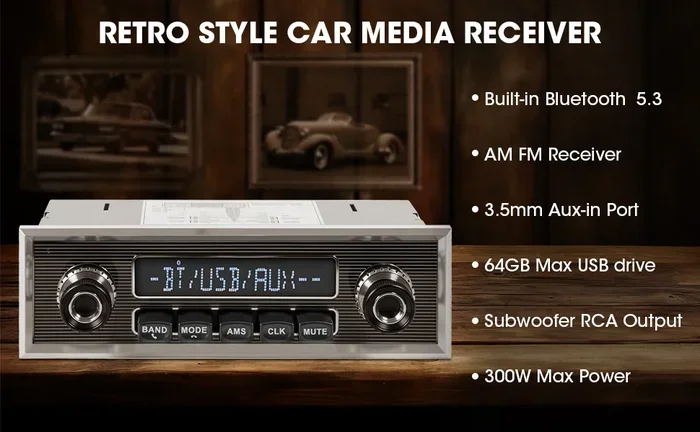
If you want the full experience, replacing your old car radio with a new one that has built-in Bluetooth is the way to go. Modern head units offer Bluetooth streaming, hands-free calling, GPS navigation, and even smartphone integration with Apple CarPlay or Android Auto.
This option costs more but gives you the most features. A basic Bluetooth-enabled head unit starts around $100. More advanced units with screens and smart features can go up to $300 or more.
Here is what you get with a new stereo unit:
- Built-in Bluetooth for streaming and calls
- Better audio processing and clarity
- USB ports for charging and music
- Sometimes GPS or backup camera support
- A modern interface that is easy to use
Replacing a car stereo is not as hard as it sounds. Many units use a standard dash kit. You can find adapter wiring harnesses that match your car exactly. Plenty of drivers handle this as a weekend DIY project.
Step-by-Step Guide To Adding Bluetooth To Your Car Radio
Now let us get practical. Here is a simple walkthrough for the most common method: using a Bluetooth FM transmitter.
Step 1: Plug the transmitter into your car. Insert it into the cigarette lighter or 12V power port. Make sure it has power and the LED light turns on.
Step 2: Set your car radio to an open FM frequency. Pick a frequency that does not have a radio station on it. Common choices are 88.1, 89.3, or 107.9. The transmitter manual will suggest frequencies to try.
Step 3: Pair your phone to the transmitter. Go to your phone Bluetooth settings. Find the transmitter name in the list of available devices. Tap to connect. You should hear a confirmation tone.
Step 4: Start playing music on your phone. Open Spotify, Apple Music, or any app. The audio should now play through your car speakers. Adjust the volume on both your phone and your car radio for the best balance.
Step 5: Fine-tune the sound. If you hear static, try a different FM frequency. Move the transmitter closer to the radio antenna if possible. Some transmitters let you adjust the audio balance and bass levels too.
That is it. You just made your old car radio Bluetooth. The whole process takes less than 10 minutes once you have the device.
If you want to explore other ways to stream audio in your car, you might also enjoy learning about how to play radio using Bluetooth for additional streaming methods.
Benefits Of Adding Bluetooth To Your Old Car
Adding Bluetooth to an older car stereo brings more than just music streaming. Let us look at the real benefits you will notice every day.
1. Hands-Free Calling
When your phone connects to your car via Bluetooth, you can answer calls through your car speakers. You do not need to hold your phone. This is safer and more convenient. Many Bluetooth car kits also include a microphone so the person you are calling can hear you clearly.
2. No More CDs or Cassettes
If you still have a CD player or cassette deck in your car, you know they are outdated. Bluetooth lets you ditch physical media entirely. Everything lives on your phone or tablet now. You carry thousands of songs in your pocket.
3. Better Sound Quality
Modern Bluetooth codecs like aptX and AAC deliver much better audio than older Bluetooth versions. Even a basic Bluetooth adapter will sound better than a scratched CD or a worn-out cassette tape. Your old car speakers might surprise you with how good they sound when fed a clean digital signal.
4. Keep Your Car Stock
Using a transmitter or receiver means you do not permanently alter your car. You can remove the device anytime. This is great if you plan to sell the car or if you share it with someone who does not want Bluetooth connected all the time.
5. Easy Switching Between Devices
Most Bluetooth adapters remember multiple paired devices. You and your passenger can both connect your phones and switch between them easily. No re-pairing needed. Just select the device you want to use.
Common Mistakes To Avoid When Adding Bluetooth
Many people run into problems when trying to make an old car radio Bluetooth. Here are the most common mistakes and how to avoid them.
Mistake 1: Buying the wrong adapter for your car. Not all Bluetooth adapters work with every radio. Check your car radio inputs before purchasing. If you have no AUX port, an FM transmitter is your best bet. If you have a CD changer port, a receiver adapter will work better.
Mistake 2: Choosing the cheapest option without reading reviews. A $10 Bluetooth transmitter might seem like a great deal. But cheap devices often have poor battery life, weak connections, and bad audio quality. Spending a little more on a reputable brand saves frustration later.
Mistake 3: Ignoring firmware updates. Some Bluetooth adapters receive firmware updates that improve performance. Check the manufacturer website after purchase and update if needed. This simple step can fix connection issues and improve sound quality.
Mistake 4: Placing the transmitter too far from the radio. Bluetooth signals weaken with distance. Keep the transmitter close to your car radio for the strongest connection. The glove box or center console area is usually best.
Mistake 5: Forgetting to charge the device. If your Bluetooth transmitter or receiver has a built-in battery, it needs regular charging. Some models charge through the car’s USB port. Others use a separate cable. Make it a habit to charge it whenever you park.
Mistake 6: Not testing before a long trip. Always test your new Bluetooth setup at home before relying on it on a road trip. Make sure the connection is stable, the audio sounds good, and you know how to troubleshoot if something goes wrong.
Expert Tips For The Best Bluetooth Car Audio Experience
Getting Bluetooth working in your old car is just the start. Here are expert tips to make sure you get the best experience possible.
Tip 1: Use a high-quality Bluetooth codec if your devices support it. Look for adapters that support aptX or AAC. These codecs deliver much better sound than the basic SBC codec that most devices use by default. The difference is especially noticeable with music that has a lot of detail.
Tip 2: Keep your phone close to the adapter. Bluetooth works best when devices are within a few feet of each other. Keep your phone in a cupholder or on the dashboard near the adapter. Avoid putting it in the back seat or trunk.
Tip 3: Reduce interference from other devices. USB chargers, dash cams, and other electronics can sometimes interfere with Bluetooth signals. If you notice dropouts, try unplugging other USB devices and see if the connection improves.
Tip 4: Clean your car’s power ports regularly. Dust and lint can build up in your cigarette lighter or USB port. This can cause connection problems and charging issues. A quick wipe with a dry cloth keeps everything working smoothly.
Tip 5: Consider a Bluetooth car kit with a built-in microphone. If you want hands-free calling, a kit with a good microphone makes a big difference. You can talk and hear clearly without holding your phone. Some kits clip onto your sun visor for the best microphone position.
Tip 6: Pair with multiple devices for flexibility. If you share your car, set up Bluetooth pairing for both your phone and a passenger’s phone. Most adapters support multiple paired devices and let you switch between them easily.
For more ideas on enhancing your car audio setup, you might also want to read about adding a speaker to your car for even better sound coverage.
How Bluetooth Car Audio Compares To Other Options
Let us compare the three main ways to stream music in your car. This table helps you see which option fits your needs best.
| Feature | Bluetooth FM Transmitter | Bluetooth Receiver Adapter | New Stereo Unit |
|---|---|---|---|
| Cost | $15 – $40 | $20 – $80 | $100 – $300+ |
| Audio Quality | Good | Very Good | Excellent |
| Installation | None needed | Plug and play | Moderate |
| Hands-Free Calling | Some models | Yes | Yes |
| Reversibility | Fully reversible | Fully reversible | Not easily reversible |
| Extra Features | USB charging | None | GPS, CarPlay, Android Auto |
As you can see, each option has its place. If you want the simplest and cheapest solution, go with an FM transmitter. If you want better sound without replacing your radio, a receiver adapter is perfect. If you want a full upgrade and have the budget, a new stereo unit is the way to go.
Some drivers also look into making other old devices Bluetooth ready. For instance, if you have an old Bose Wave radio, similar Bluetooth adapter principles apply. The goal is always the same: bring wireless streaming to devices that were not designed for it.
Frequently Asked Questions
Can I make any old car radio Bluetooth?
Yes, you can make almost any old car radio Bluetooth with the right adapter. FM transmitters work with any car that has a power outlet. Receiver adapters need an AUX or CD input. Replacing the stereo unit works with any car that has a standard dash size. Check your current radio setup first to find the best method.
How much does it cost to add Bluetooth to an old car radio?
The cost depends on the method you choose. A Bluetooth FM transmitter costs $15 to $40. A Bluetooth receiver adapter runs $20 to $80. A new stereo unit with Bluetooth can cost $100 to $300 or more. The FM transmitter is the most affordable option and works well for most drivers.
Will adding Bluetooth affect my car radio quality?
Adding Bluetooth generally improves the experience even if it does not change the raw audio quality. Bluetooth streaming is cleaner than FM radio static and more convenient than CDs or tapes. A Bluetooth receiver adapter provides the best audio quality because it bypasses FM signals entirely and sends a digital audio signal directly to your speakers.
Can I use Bluetooth on my car radio without buying extra equipment?
Most older car radios do not have built-in Bluetooth. You need some form of adapter or transmitter to add Bluetooth functionality. However, if your car has an AUX port and a Bluetooth-enabled device like a smartphone, you can use a Bluetooth receiver adapter that plugs into the AUX port. This is the simplest way without replacing the entire radio.
Is it hard to install a Bluetooth adapter in my car?
No, it is not hard at all. Bluetooth FM transmitters and receiver adapters are plug-and-play devices. You do not need any tools or technical knowledge. Just plug the device in, pair it with your phone, and you are ready to go. Replacing a stereo unit takes a bit more effort but is still manageable for most DIYers with basic tools.
Can I stream music from any app using Bluetooth in my car?
Yes, once your phone is connected to your car via Bluetooth, any app that plays audio will stream through your car speakers. This includes Spotify, Apple Music, YouTube Music, podcast apps, audiobook apps, and even video apps. The Bluetooth connection handles all audio output from your phone automatically.
Conclusion
Making an old car radio Bluetooth is one of the best upgrades you can make to your vehicle. It costs little, takes minutes to set up, and transforms how you listen to music on the road. Whether you choose a Bluetooth FM transmitter, a receiver adapter, or a full stereo replacement, the result is the same: wireless streaming, hands-free calling, and a modern audio experience in an older car.
The methods covered in this guide work for almost any vehicle and any budget. Start with the simplest option if you are unsure. You can always upgrade to a better solution later. The important thing is to take that first step and bring your old car radio into the wireless era.
Your favorite playlists, podcasts, and audiobooks deserve to be heard through your car speakers. Do not let an outdated radio hold you back. Pick your preferred method, follow the steps, and start streaming today. Your old car radio can sound better than you ever imagined with just a little Bluetooth magic.