Can I Use My Existing Router With Mesh WiFi at Home
Yes, you can use your existing router with a mesh WiFi system in most cases. This setup lets you keep your current hardware while boosting whole-home WiFi coverage. You will need to put your old router in access point mode or connect it as a satellite node. The process is simpler than most people think, and it saves money on buying a brand-new router. Let us walk you through every step so you can upgrade your home network without the hassle.
You just bought a mesh WiFi system, and you are excited to ditch those dead zones in your house. But then you look at your old router sitting in the corner and wonder — can I use my existing router with mesh? The good news is that in most situations, the answer is yes. You do not need to throw away your current wireless router just because you are upgrading to a mesh network setup.
Using your existing router with a mesh WiFi system is a smart move. It saves you cash, reduces clutter, and still gives you the whole-home coverage you want. Whether you have a dual-band router or something a bit older, there is usually a way to make it work. In this guide, we will show you exactly how to do it, what to watch out for, and when it makes sense to just buy a new router instead.
Key Takeaways
- Existing routers can work with mesh systems by using access point mode or Ethernet backhaul connections.
- Putting your router in AP mode disables its routing functions and turns it into a simple signal broadcaster.
- Compatibility matters — check if your router supports bridge mode before buying a mesh system.
- Using your old router with mesh saves money and reduces electronic waste.
- Placement is critical — position your existing router correctly to avoid signal conflicts with mesh nodes.
- Some mesh systems work better than others when paired with third-party routers.
- You may need to replace your router if it is too old or lacks the necessary features for mesh integration.
📑 Table of Contents
- What Is a Mesh WiFi System and How Does It Work?
- Can You Use Your Existing Router With a Mesh System?
- How to Set Up Your Existing Router With Mesh WiFi
- Benefits of Using Your Existing Router With Mesh
- Common Mistakes to Avoid When Using Mesh With an Old Router
- When Should You Replace Your Router Instead of Using It With Mesh?
- Comparison: Using Old Router With Mesh vs. Replacing It Entirely
- Frequently Asked Questions
- Final Thoughts
What Is a Mesh WiFi System and How Does It Work?
A mesh WiFi system is a type of home network setup that uses multiple devices, called nodes or satellites, to spread WiFi coverage across your entire house. Unlike a traditional single router that broadcasts signal from one spot, a mesh network creates a web of connected WiFi sources. Each node talks to the others, creating a seamless network with one name and password.
The main nodes connect to your modem or ISP gateway, and then the satellite nodes bounce the signal around your home. This is very different from a WiFi extender, which just repeats the signal from one router. A mesh system is designed to work as one unified unit. The nodes communicate with each other intelligently, choosing the fastest path for your data.
Most mesh systems today are dual-band or tri-band. Dual-band means they use two frequency bands — 2.4 GHz and 5 GHz. Tri-band adds a third dedicated band for backhaul, which is the communication between mesh nodes. This backhaul band keeps your internet speed fast even when the signal travels between nodes.
Can You Use Your Existing Router With a Mesh System?
The short answer is yes, in most cases. But the way you set it up depends on your current router and the mesh system you choose. Not every combination works perfectly, so it helps to understand the options before you dive in.
Option 1: Use Your Router as an Access Point
The most common way to connect an existing router with a mesh system is to put the router into access point mode. When a router is in AP mode, it stops acting as a router and becomes a simple WiFi access point. It just broadcasts the mesh network’s signal instead of creating its own separate network.
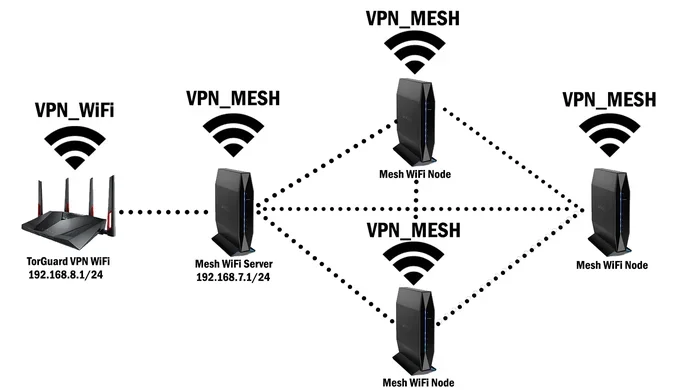
Here is how it works in practice. Your mesh system’s main node connects directly to your modem. The mesh nodes around your house create the primary WiFi network. Then you connect your old router to one of the mesh nodes using an Ethernet cable. The old router runs in access point mode and extends the mesh network’s coverage to another part of your home.
This method works really well if you have a decent-quality router that supports AP mode. Almost all modern routers from brands like TP-Link, Netgear, ASUS, and Linksys offer this feature. You just need to log into your router’s admin panel and toggle the setting.
Option 2: Connect Your Router as a Wired Satellite
Some mesh systems allow you to add a wired satellite node. If your existing router has an Ethernet port, you can connect it to a mesh node using a cable. The mesh system will treat the old router as a satellite node that extends the network.
This approach works best when you have an Ethernet cable running between the mesh node and the old router. It gives you a stable, wired backhaul connection, which means better speed and lower latency. This is a great option if your router is newer and supports gigabit Ethernet speeds.
Option 3: Use Wireless Backhaul With Your Old Router
Some people try to use their old router wirelessly with a mesh system. This means the router connects to the mesh network without a cable. While this can work, it is not always the best approach. Wireless connections can lose speed and stability, especially if the old router is far from the main mesh node.
If you go this route, make sure your router is close enough to a mesh node for a strong signal. Also, check that your router supports wireless bridging or repeater mode. Not all routers have this feature, so check the manual or the manufacturer’s website before you try it.
Router Compatibility Checklist
Before you try to use your existing router with a mesh system, run through this quick checklist:
- Does your router support access point mode or bridge mode? This is the most important feature you need.
- Is your router relatively modern? Routers older than five years may not work well with newer mesh systems.
- Does your router have an Ethernet port? You will need at least one LAN port for a wired connection to the mesh node.
- Is your router dual-band or tri-band? Dual-band routers work fine, but tri-band routers offer better performance.
- Check the mesh system’s compatibility list. Some mesh brands list supported third-party routers on their website.
How to Set Up Your Existing Router With Mesh WiFi
Setting up your old router with a mesh system is not as hard as it sounds. Follow these steps to get everything running smoothly.
Step 1: Set Up Your Mesh System First
Before you touch your old router, set up the mesh system on its own. Connect the main mesh node to your modem using an Ethernet cable. Download the mesh system’s app and follow the on-screen instructions to complete the initial setup. Make sure all your mesh nodes are placed and working before you involve your old router.
Step 2: Reset Your Existing Router
Factory reset your old router before you begin. This clears any old settings that might cause conflicts with the mesh system. Most routers have a small reset button on the back. Press and hold it for about 10 seconds with a paperclip. The router will reboot and return to its default settings.
Step 3: Put Your Router in Access Point Mode
Log into your router’s admin panel. You can usually do this by typing 192.168.1.1 or 192.168.0.1 into your browser’s address bar. Look for a setting called “Access Point Mode,” “Bridge Mode,” or “AP Mode.” Enable it and save your changes. The router will restart, and you will notice it no longer broadcasts its own network name.
Step 4: Connect the Router to the Mesh Network
Now connect your old router to one of the mesh nodes using an Ethernet cable. Plug the cable into the mesh node’s LAN port and into one of the old router’s LAN ports. Do not plug the cable into the old router’s WAN port — that is a common mistake. Using a LAN port keeps the router in the correct mode.
Step 5: Test Your Connection
Once everything is connected, walk around your home and test the WiFi signal. Check different rooms, especially the ones that used to have weak coverage. Run a speed test to make sure you are getting good speeds. If something is not working, double-check the cable connections and make sure AP mode is enabled on the old router.
Quick Tips for a Smooth Setup
- Use a Cat6 Ethernet cable for the best speeds between the mesh node and your old router.
- Keep your old router’s firmware updated to avoid compatibility issues.
- Change the old router’s admin password after resetting it to something new and secure.
- Place the old router in a central location where it can broadcast the mesh signal effectively.
- Disable DHCP on the old router when it is in AP mode to prevent IP address conflicts.
Benefits of Using Your Existing Router With Mesh
There are several real advantages to keeping your old router and pairing it with a mesh WiFi system. Here is why this approach makes sense for many homeowners.
You Save Money
The biggest benefit is cost savings. A good mesh WiFi system can cost anywhere from $100 to $400 or more. If you already have a decent router, you do not need to spend extra on a replacement. The mesh system handles the whole-home coverage, and your old router handles the extra access point duty.
You Reduce Electronic Waste
Throwing away a perfectly good router contributes to electronic waste. By reusing it with a mesh system, you give it a second life. This is better for the environment and saves you from buying new hardware you do not really need.
You Get the Best of Both Worlds
Your old router might have features you love, like USB ports for file sharing or a strong external antenna design. By keeping it in the setup, you get to use those features while also enjoying the seamless coverage of a mesh network. It is a win-win situation for your home network.
Easy to Undo
If the setup does not work out, you can always revert to using your old router on its own. Just reset it and take it out of AP mode. There is no permanent change to your hardware, so you are not locked into anything.
Common Mistakes to Avoid When Using Mesh With an Old Router
Even though this setup is straightforward, there are a few mistakes that trip people up. Knowing what to avoid can save you a lot of frustration.
Connecting the Cable to the Wrong Port
This is the number one mistake. Plugging the Ethernet cable into the old router’s WAN port instead of a LAN port will create a double NAT situation. This can cause slow speeds, connection drops, and devices failing to communicate properly. Always use a LAN port on the old router when it is in AP mode.
Forgetting to Disable DHCP
DHCP is what assigns IP addresses to devices on your network. If both your mesh system and your old router are running DHCP, they will fight over which device gets which address. This causes connection problems for your phones, laptops, and smart home devices. Disable DHCP on the old router when it is in access point mode.
Ignoring WiFi Channel Conflicts
If your old router and mesh system are broadcasting on the same channel, they can interfere with each other. This leads to slower speeds and weaker signals. Most mesh systems handle channel selection automatically, but it is worth checking your old router’s channel settings to make sure they are not clashing.
Using an Outdated Router
Not every old router is worth saving. If your router is more than seven or eight years old, it might not support modern WiFi standards like WiFi 5 or WiFi 6. Using a very old router with a new mesh system can bottleneck your speeds and limit what the mesh system can do.
Placing the Old Router in a Bad Spot
Where you put your old router matters a lot. Do not hide it in a closet or behind a TV. Place it in an open area, preferably on a higher shelf. The more obstructed the signal path, the weaker your coverage will be in that part of the house.
When Should You Replace Your Router Instead of Using It With Mesh?
Sometimes the best decision is to retire your old router and let the mesh system do all the work. Here are some signs that it is time to replace rather than reuse.
Your Router Does Not Support AP Mode
If your router does not have an access point or bridge mode option, you will struggle to integrate it with a mesh system. Some older or ISP-provided routers lock you out of advanced settings. In this case, it is better to return the router and use the mesh system as your primary router.
Your Router Only Supports WiFi 4 (802.11n)
WiFi 4 is ancient by today’s standards. If your router only supports this standard, it will drag down your mesh system’s performance. Modern mesh systems are built for WiFi 5 and WiFi 6 speeds, and pairing them with an old WiFi 4 router will not give you the speeds you are paying for.
Your Router Has Known Stability Issues
If your old router crashes frequently, overheats, or drops connections, it will cause problems for your entire mesh network. A flaky router in the setup can undermine the reliability that mesh systems are known for. In this case, replacement is the smarter choice.
You Need Advanced Features
Modern mesh systems come with features like parental controls, device prioritization, guest networks, and security updates. If your old router lacks these features and you need them, it makes sense to let the mesh system handle everything and get rid of the old hardware.
Expert Insight: What Networking Pros Recommend
Most networking professionals agree that using an existing router with a mesh system is a viable option — as long as the router is less than five years old and supports AP mode. They recommend checking the mesh manufacturer’s compatibility list before purchasing. Some pros also suggest running a wired backhaul connection whenever possible, as it delivers the most stable and fastest performance. If your router is older or does not support the features needed, they advise investing in a mesh system that can serve as your main router and access point combined.
Comparison: Using Old Router With Mesh vs. Replacing It Entirely
To help you decide which path to take, here is a quick comparison of both approaches.
| Factor | Use Old Router With Mesh | Replace Router Entirely |
|---|---|---|
| Cost | Lower — you reuse existing hardware | Higher — you buy a new router |
| Setup Complexity | Moderate — requires AP mode configuration | Simple — plug and play |
| Performance | Good — depends on old router quality | Best — all components are modern |
| Compatibility | May have issues with older routers | Guaranteed compatibility |
| Features | Limited by old router’s capabilities | Full access to modern features |
| Environmental Impact | Lower — less e-waste | Higher — old router may be discarded |
Frequently Asked Questions
Can I use any router with any mesh WiFi system?
Most modern routers can work with mesh systems, but compatibility depends on the features your router supports. Your router needs to have access point mode or bridge mode, and it should be less than about five years old for best results. Check the mesh system’s website for a list of compatible third-party routers before you buy.
Will using my old router with mesh slow down my internet speed?
It can, but only if your old router is outdated or if the connection between the mesh node and the router is weak. Using an Ethernet cable for the backhaul connection helps maintain full speeds. If your old router supports gigabit Ethernet and is in good working condition, you should not notice a significant speed drop.
Do I need any special cables to connect my old router to a mesh system?
A standard Ethernet cable (Cat5e or Cat6) is all you need. Make sure the cable is long enough to reach from your mesh node to the old router’s location. Avoid using damaged or very old cables, as they can limit speeds and cause connection issues.
Can I use my ISP-provided router with a mesh system?
In most cases, yes. ISP-provided routers usually support bridge mode or access point mode. However, some ISPs lock down their routers and restrict advanced settings. Contact your ISP or check the router’s manual to confirm whether AP mode is available. If it is not, you may need to put the ISP router in bridge mode first.
What happens if I forget to put my old router in access point mode?
If you skip this step, your old router will create its own separate network. This causes double NAT issues, where two routers are both trying to assign IP addresses. Devices may have trouble connecting to the internet, and speeds can drop significantly. Always enable AP mode before connecting the router to the mesh network.
Is it worth using an old router with mesh, or should I just buy a new one?
If your old router is less than five years old and supports AP mode, it is absolutely worth reusing it. You save money and get the same coverage benefits. But if your router is old, slow, or lacks modern features, it is better to let the mesh system serve as your main router. The performance gain from a modern setup is worth the investment.
Final Thoughts
So, can I use my existing router with mesh? The answer is a confident yes for most people. As long as your router supports access point mode and is not too old, you can pair it with a mesh WiFi system and enjoy better whole-home coverage without spending extra money. The setup process is straightforward, and the benefits — cost savings, reduced e-waste, and extended coverage — are hard to ignore.
Just remember to follow the steps carefully. Put your router in AP mode, use the right Ethernet ports, disable DHCP, and place the router in a good location. Avoid the common mistakes we covered, and you will have a smooth and reliable home network.
If your old router is simply too outdated to work well with a modern mesh system, do not feel bad about replacing it. Sometimes a fresh start with a single, powerful mesh system is the cleanest and fastest solution. The most important thing is that your home WiFi works well in every room, and that is what both approaches aim to achieve.
Take some time to evaluate your current router and your home’s coverage needs. With the right setup, your existing router and a new mesh system can work together beautifully to give you the fast, reliable WiFi you deserve.