Can You Bring A Laptop Backpack On A Plane Travel Tips
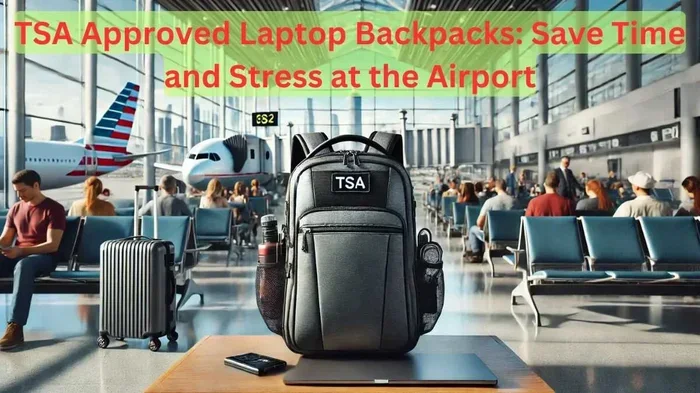
Yes, you can bring a laptop backpack on a plane, but there are rules you need to follow. The TSA allows laptops in carry-on bags, and most airlines treat a laptop backpack as either a personal item or carry-on luggage. Knowing the laptop backpack guidelines, TSA rules, and airline regulations ahead of time saves you stress at the airport. This guide covers everything from carry on luggage limits to electronics on planes so you can travel with confidence.
Traveling with a laptop can feel stressful. You worry about damage, security, and whether your bag even makes it on the plane. The good news is that can you bring a laptop backpack on a plane has a simple answer. Yes, you can. But knowing the details makes all the difference between a smooth trip and a frustrating morning at the airport.
A laptop backpack is one of the best ways to carry your computer and essentials on a flight. These bags are designed to be compact, comfortable, and organized. They fit easily under seats or in overhead bins. But every airline and airport has its own set of airline regulations and TSA rules you must follow. This guide walks you through everything you need to know.
Whether you are a frequent flyer or planning your first trip with a travel backpack, this article has you covered. We will look at TSA screening procedures, airline size limits, packing tips, and common mistakes travelers make. By the end, you will feel ready and confident about your next flight with your laptop in tow.
Key Takeaways
- Laptop backpacks are allowed on planes: The TSA and most airlines permit them as carry-on or personal items.
- TSA rules apply to electronics: You may need to remove your laptop for screening at airport security.
- Size and weight limits matter: Each airline has different carry on luggage dimensions and weight restrictions.
- Choose the right backpack: Look for TSA approved backpack features, padded compartments, and anti-theft design.
- Pack smart: Use a laptop sleeve, follow TSA liquid rules, and keep accessories organized.
- International travel has extra rules: Different countries may have additional aviation rules for electronics.
📑 Table of Contents
- Understanding TSA Rules For Laptop Backpacks
- Airline Regulations For Carry-On Backpacks
- Choosing The Right Laptop Backpack For Air Travel
- Packing Your Laptop Backpack For A Flight
- Common Mistakes Travelers Make With Laptop Backpacks
- International Travel And Laptop Backpacks
- Expert Tips For Stress-Free Laptop Travel
- Final Thoughts
Understanding TSA Rules For Laptop Backpacks
The Transportation Security Administration sets the rules for what you can bring through airport security. These rules apply to all flights within the United States and at U.S. airports. Understanding them is the first step toward a hassle-free trip.
TSA Guidelines For Electronics
The TSA requires travelers to remove large electronics from their bags for screening. A laptop typically falls into this category. When you go through the airport security checkpoint, you will need to take your laptop out of your backpack and place it in a bin.
Here is what you need to know:
- Laptops 13 inches and larger must be removed from bags.
- Tablets and smaller devices may stay in your bag, but check with TSA officers.
- TSA approved backpack designs feature a laptop sleeve that opens flat, making screening faster.
- Portable chargers and power banks must go in your carry-on, not checked luggage.
- Wireless chargers can stay in your bag unless they are large.
The TSA officer may ask you to turn on your laptop to confirm it is a real device. Always keep your laptop charged enough to power on during screening. A dead battery can lead to extra questions or delays.
TSA Liquid Rules And Your Backpack
Your laptop backpack likely holds more than just your computer. You probably carry a water bottle, toiletries, or a travel mug. The TSA liquid rules apply here too.
All liquids must be in containers of 3.4 ounces or less. These containers go inside a single quart-sized clear zip-top bag. Each passenger gets one bag. This includes items like shampoo, toothpaste, and hand sanitizer. If your backpack has a separate organizer pocket for liquids, it makes the screening process much faster.
Airline Regulations For Carry-On Backpacks
While the TSA sets federal security rules, individual airlines control carry on luggage policies. These policies cover size limits, weight restrictions, and how many bags you can bring. Your laptop backpack must fit within these guidelines.
Personal Item vs Carry-On Bag
Most airlines allow one carry-on bag and one personal item. A laptop backpack often qualifies as a personal item if it is compact enough. A personal item typically must fit under the seat in front of you.
Here is a quick look at common airline policies:
| Airline | Carry-On Size | Personal Item Size | Weight Limit |
|---|---|---|---|
| Delta | 22 x 14 x 9 in | 18 x 11 x 11 in | No strict limit |
| American Airlines | 22 x 14 x 9 in | 18 x 11 x 11 in | No strict limit |
| United | 22 x 14 x 9 in | 17 x 10 x 9 in | No strict limit |
| Southwest | 24 x 16 x 10 in | 18 x 11 x 11 in | No strict limit |
| JetBlue | 22 x 14 x 9 in | 17 x 13 x 8 in | No strict limit |
Always check your airline’s website before flying. Policies can change, and budget airlines sometimes have stricter limits. A carry on backpack that fits the personal item dimensions gives you the most flexibility.
Weight Limits And Overhead Bin Space
Even if your airline does not enforce a strict weight limit for carry-ons, you still need to lift your bag into the overhead bin. A heavy travel backpack with a laptop, charger, and accessories can weigh 15 to 25 pounds. If you struggle to lift it, it may not fit safely overhead.
Tips for managing weight:
- Use a lightweight computer backpack with sturdy straps.
- Pack only what you need for the trip.
- Wear heavier items on your body rather than in the bag.
- Choose a backpack with wheels if you have a long walk through the airport.
Choosing The Right Laptop Backpack For Air Travel
Not all backpacks are created equal for plane travel. The right laptop backpack makes your trip easier and keeps your gear safe. Here is what to look for.
Padded Laptop Compartment
The most important feature of a laptop backpack is padding. Your computer needs protection from bumps, drops, and pressure during travel. Look for a bag with a dedicated padded sleeve that fits your laptop snugly.
A good laptop sleeve prevents scratches and absorbs shocks. Some backpacks even have a suspended laptop compartment that floats the device away from the sides of the bag. This extra layer of protection is worth the investment.
Anti-Theft Features
Airports and planes are busy places. Pickpockets and thieves know travelers carry valuable electronics. An anti-theft backpack with lockable zippers, slash-proof straps, and hidden pockets keeps your belongings safer.
Features to look for include:
- Lockable zipper pulls that work with a TSA-approved lock.
- Hidden pockets on the back panel or against your body.
- RFID-blocking sleeves for credit cards and passports.
- Water-resistant or waterproof material for unexpected rain or spills.
Comfort And Ergonomics
You may be on your feet for hours at the airport. A comfortable backpack for travel makes a big difference. Look for padded shoulder straps, a breathable back panel, and a sternum strap to distribute weight evenly.
If you carry your backpack for long periods, consider one with a hip belt. This shifts weight from your shoulders to your hips and reduces fatigue. A well-designed travel backpack should feel light even when fully loaded.
Packing Your Laptop Backpack For A Flight
How you pack your backpack matters just as much as which backpack you choose. Smart packing saves time at security and keeps your laptop safe during the flight.
Organizing Your Bag
Start by placing your laptop in its padded compartment. This should be the first thing you pack because it needs the most protection. Next, add your charger, cables, and accessories in a dedicated electronics pocket.
Use the front organizer pocket for small items like your passport, boarding pass, pen, and earbuds. The main compartment can hold clothing, a water bottle, and snacks. Keeping everything organized means you spend less time digging through your bag at security.
Following TSA Liquid Rules
Remember the TSA liquid rules. All liquid containers must be 3.4 ounces or smaller and fit in a quart-sized bag. Pack your toiletries in this bag and place it in an easily accessible part of your backpack. During screening, you will need to remove this bag separately.
Pro tip: Use solid alternatives when possible. Solid shampoo bars, deodorant sticks, and toothpaste tablets skip the liquid rules entirely. This speeds up your time at the checkpoint.
Keeping Your Laptop Accessible
Choose a laptop backpack with a clamshell or fold-flat design. This means the bag opens like a suitcase with the laptop compartment facing up. When you reach the TSA checkpoint, you can lay the bag flat and the laptop stays visible for quick screening.
This design also helps you access your laptop during the flight without unpacking the entire bag. You can pull the laptop out, work, and slide it back in easily. It is a small feature that makes a big difference.
Common Mistakes Travelers Make With Laptop Backpacks
Even experienced travelers make mistakes when bringing a laptop backpack on a plane. Avoid these common errors to save time and stress.
Forgetting To Remove The Laptop
The most common mistake is forgetting to take the laptop out at security. TSA officers will stop you and ask you to do so. This slows down the line and causes embarrassment. Get in the habit of checking your bag before you reach the front of the line.
Overpacking The Bag
A full backpack is harder to screen and may not fit under the seat or in the overhead bin. Airlines sometimes force passengers with oversized bags to check them at the gate. This means your laptop and valuables go into the cargo hold where they are more vulnerable.
Stick to essentials. A laptop backpack should carry your computer, a change of clothes, toiletries, and a few personal items. If you need more space, check a second bag.
Ignoring Airline Size Limits
Every airline has specific carry on luggage dimensions. A backpack that fits under your arm at home may be too large for the overhead bin. Always measure your backpack before your trip and compare it to your airline’s policy.
Not Securing Your Laptop
During turbulence or turbulence-like movements, an unsecured laptop can slide around inside your bag. A loose laptop can get scratched or damaged by other items. Always use the padded compartment and strap your laptop in place if the bag has one.
International Travel And Laptop Backpacks
Flying internationally adds a few extra considerations. Different countries may have slightly different aviation rules for electronics and carry-on items. The good news is that most international airports follow similar screening procedures to those in the United States.
When traveling abroad, keep these tips in mind:
- Check the airline regulations of your destination country and any layover airports.
- Some countries require laptops to be removed for screening just like in the U.S.
- Voltage and plug types differ by country. Bring the right adapter for your portable charger.
- Keep important documents like your passport and boarding pass in an easy-to-reach pocket.
- Be aware of customs rules for electronics when entering certain countries.
A TSA approved backpack that works well for U.S. travel will generally work fine internationally. The core principles remain the same. Your laptop is allowed, but you may need to remove it for screening.
Expert Tips For Stress-Free Laptop Travel
seasoned travelers and airline professionals share a few tips that make flying with a laptop backpack easier.
Arrive early. Give yourself plenty of time at the airport. Security lines can be long, and removing your laptop adds a few extra minutes to the process. Arriving 2 hours before a domestic flight and 3 hours before an international flight gives you a comfortable buffer.
Use a TSA checkpoint friendly backpack. These bags are designed with a laptop sleeve that opens flat to 180 degrees. This lets the bag lie flat on the conveyor belt without unpacking everything. It is a small change that speeds up screening significantly.
Label your bag. Attach a luggage tag with your name and contact information. If your travel backpack gets mixed up with another identical bag at the overhead bin, a label helps reunite you quickly.
Keep a change of clothes in your backpack. Airlines sometimes lose checked bags. If your laptop backpack is your only bag, having a spare outfit in the main compartment gives you peace of mind.
Back up your data. Before any trip, back up your laptop files to the cloud or an external drive. If anything happens to your bag, your data stays safe.
Final Thoughts
Can you bring a laptop backpack on a plane? Absolutely. The answer is yes, and millions of travelers do it every day. The key is knowing the rules and preparing ahead of time. Follow TSA guidelines for electronics, respect airline regulations for size and weight, and choose a well-designed laptop backpack with the right features.
Pack smart, stay organized, and give yourself extra time at the airport. A carry on backpack with your laptop is one of the most convenient ways to travel. It keeps your gear close, your hands free, and your computer safe from the rough handling of checked luggage.
Now that you have all the information you need, plan your next trip with confidence. Your laptop backpack is allowed, and with the right preparation, your travel experience will be smooth and stress-free. Safe travels.
Frequently Asked Questions
Can I bring a laptop backpack as my only bag on a plane?
Yes, most airlines allow a laptop backpack as a personal item or carry-on. Just make sure it fits the airline’s size and weight limits. Check your specific airline’s policy before you travel to avoid any surprises at the gate.
Do I need to remove my laptop from my backpack at TSA security?
Yes, the TSA requires you to remove laptops from bags for screening. Place your laptop in a separate bin before it goes through the X-ray machine. This speeds up the process and keeps everyone safe.
What size laptop backpack is allowed as carry-on luggage?
Most airlines allow personal items up to about 18 x 11 x 11 inches. A laptop backpack that fits within these dimensions typically qualifies as a personal item. Always check your airline’s specific carry on luggage size requirements.
Can I bring a portable charger in my laptop backpack?
Yes, portable chargers and power banks must go in your carry-on bag, not checked luggage. They are not allowed in checked bags due to lithium battery safety rules. Keep your charger accessible in your laptop backpack for the flight.
Are there any restrictions on bringing a laptop backpack internationally?
Most international airports follow similar TSA rules for electronics screening. However, some countries have additional regulations. Always check the aviation rules of your destination and any layover airports before you travel.
What is the best type of laptop backpack for air travel?
The best travel backpack has a padded laptop compartment, anti-theft features, and a clamshell design that opens flat for TSA screening. Look for TSA approved backpack options with comfortable straps and enough space for your essentials.