How Can I Extend My Att Wifi Coverage Throughout My Home
Extending your AT&T WiFi coverage is easier than you think. Whether you are dealing with dead zones in the basement or weak signals in the backyard, there are several proven methods to boost your signal. You can use a mesh WiFi system, a range extender, or even adjust your current router settings. This guide walks you through every option so you can pick the best solution for your home and AT&T internet plan.
Have you ever walked into a room and found your WiFi signal completely drops? You are not alone. Many AT&T customers deal with WiFi dead zones that make it impossible to stream, work, or even browse the web comfortably. The good news is that there are real, practical ways to fix this problem.
Whether you live in a small apartment or a large multi-story house, extending your AT&T WiFi coverage is totally doable. You do not need to be a tech expert either. In this guide, I will walk you through every method that works, from simple free fixes to more advanced solutions like mesh networks and external antennas.
By the end of this article, you will know exactly what is causing your weak signal and how to fix it. Let us get started.
Key Takeaways
- Mesh WiFi systems are the best long-term solution for whole-home coverage.
- AT&T WiFi extenders and repeaters offer a quick and affordable fix for dead zones.
- Router placement matters a lot — moving it to a central location can dramatically improve your signal.
- Adding an external antenna boosts range without buying new equipment.
- AT&T Smart Home Manager lets you monitor and optimize your network easily.
- Dual-band WiFi helps reduce congestion and improves speed across your home.
📑 Table of Contents
- Why Your AT&T WiFi Signal Might Be Weak
- Free and Easy Ways to Improve Your AT&T WiFi
- AT&T WiFi Extenders and Repeaters
- Mesh WiFi Systems for Whole-Home Coverage
- Adding an External Antenna to Your Router
- Using AT&T Smart Home Manager to Optimize Your Network
- Outdoor WiFi Coverage Solutions
- Common Mistakes That Hurt Your WiFi Signal
- When to Call AT&T Support or Upgrade Your Plan
- Conclusion
Why Your AT&T WiFi Signal Might Be Weak
Before you try any fixes, it helps to understand why your signal is weak in the first place. Several common factors can cause poor WiFi coverage in your home.
Distance From the Router
The farther you are from your wireless router, the weaker your signal becomes. Walls, floors, and furniture all block the signal. If your AT&T gateway sits in one corner of the house, the opposite end of the home may get very little signal at all.
Interference From Other Devices
Microwaves, baby monitors, Bluetooth devices, and even neighboring WiFi networks can all interfere with your signal. This is especially true on the 2.4GHz band, which is more crowded than the 5GHz band.
Outdated Equipment
Older routers and gateways may not support the latest WiFi standards. If your equipment is several years old, it might simply not be powerful enough to cover your entire home. This is a common reason people look into how to extend AT&T WiFi in the first place.
Thick Walls and Building Materials
Concrete, brick, and metal studs can block WiFi signals almost completely. Homes with these materials often struggle with network coverage no matter where the router is placed.
Free and Easy Ways to Improve Your AT&T WiFi
Before you spend any money, try these simple steps. Many people are surprised by how much improvement they get from these no-cost fixes.
Move Your Router to a Central Location
This is the single most impactful thing you can do. Place your router in the middle of your home, preferably on a higher shelf. Avoid hiding it inside a closet or behind a TV. The more open and central it is, the better your WiFi signal will reach every room.
Restart Your Router Regularly
A simple reboot can clear up many connectivity issues. Unplug your AT&T gateway, wait 30 seconds, and plug it back in. This refreshes your connection and can temporarily boost your broadband signal.
Switch to the 5GHz Band
If your router supports dual-band WiFi, try connecting to the 5GHz network instead of 2.4GHz. The 5GHz band is less crowded and offers faster speeds, though it has a shorter range. For rooms close to the router, this can make a big difference.
Update Your Router Firmware
AT&T regularly releases firmware updates that improve performance and fix bugs. Check the AT&T Smart Home Manager app to see if an update is available. Keeping your firmware current ensures your equipment is running at its best.
AT&T WiFi Extenders and Repeaters
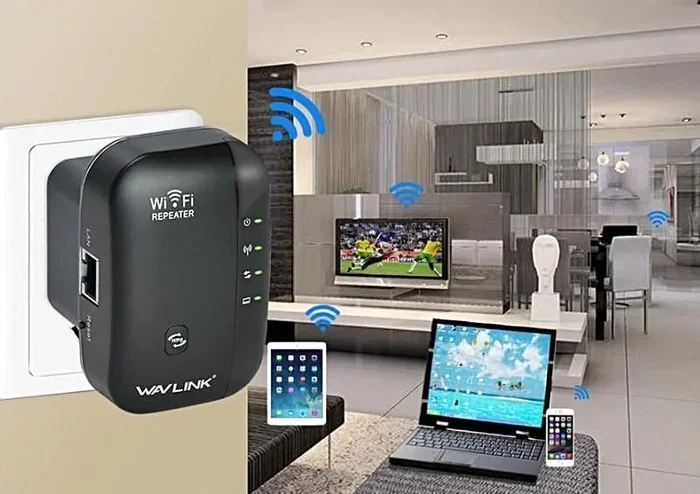
If the free fixes do not solve your problem, the next step is to add a WiFi extender or repeater. These devices pick up your existing signal and rebroadcast it to areas with weak coverage.
How WiFi Extenders Work
A WiFi extender connects to your existing network and creates a second broadcast point. Think of it like a relay runner passing a baton. The extender receives the signal from your router and sends it further into your home. This is one of the most popular ways to extend AT&T WiFi without replacing your entire setup.
Best AT&T WiFi Extenders to Consider
AT&T sells its own branded extenders that work seamlessly with AT&T gateways. You can also use third-party extenders from brands like TP-Link, Netgear, and Linksys. Here are a few things to keep in mind when choosing one:
- Compatibility: Make sure the extender works with your AT&T gateway model.
- Dual-band support: Look for extenders that support both 2.4GHz and 5GHz bands.
- Ease of setup: Many extenders now offer simple plug-and-play setup through a mobile app.
- Coverage area: Check how many square feet the extender can cover before buying.
Limitations of WiFi Extenders
Extenders are affordable and easy to set up, but they do have downsides. They typically cut your bandwidth in half because they use the same radio to receive and transmit data. This means your speed may drop in extended areas. For light browsing and email, this is usually fine. But for heavy streaming or gaming, you may notice a slowdown.
Mesh WiFi Systems for Whole-Home Coverage
If you want the best possible solution, a mesh WiFi system is the way to go. Unlike traditional extenders, mesh systems create a seamless network across your entire home with multiple nodes working together.
What Is a Mesh WiFi System?
A mesh system includes a main router and several satellite nodes placed around your home. Each node communicates with the others to create a single, unified network. You can walk from room to room without ever losing your connection. This is why more and more people are choosing mesh systems to extend AT&T WiFi coverage.
Benefits of Mesh Over Traditional Extenders
- Seamless roaming: Your devices automatically connect to the strongest node.
- No speed loss: Mesh systems use dedicated backhaul channels, so your speed stays strong.
- Easy management: Most mesh systems come with intuitive apps for monitoring and controlling your network.
- Scalable: You can add more nodes as your home or coverage needs grow.
Can You Use a Mesh System with AT&T?
Yes, you can. Many customers connect their own mesh system to the AT&T gateway in bridge mode. This lets the mesh system handle all the WiFi duties while the AT&T gateway just manages the internet connection. If you are considering this route, check out our guide on connecting Wi-Fi 6 mesh to a Wi-Fi 5 router for helpful setup tips.
Popular Mesh Systems to Consider
Some of the top-rated mesh systems include Google Nest WiFi, Amazon Eero, TP-Link Deco, and Netgear Orbi. Each offers different coverage areas and features. Choose one that matches the size of your home and your budget.
Adding an External Antenna to Your Router
Did you know you can boost your WiFi signal just by upgrading the antenna on your router? This is a simple and often overlooked method to improve your WiFi range.
When to Add an External Antenna
If your AT&T gateway has internal antennas that cannot be replaced, you may need a different approach. However, if you have a router with detachable antennas, adding a high-gain external antenna can significantly extend your coverage. This is especially helpful for homes with thick walls or multiple floors.
Types of External Antennas
- Omnidirectional antennas: Broadcast signal in all directions. Great for general home coverage.
- Directional antennas: Focus the signal in one direction. Ideal for reaching a specific faraway area like a shed or garage.
If you are interested in this option, our guide on adding an external antenna to your router covers everything you need to know about compatibility and setup.
Using AT&T Smart Home Manager to Optimize Your Network
AT&T provides a free app called Smart Home Manager that helps you manage and optimize your home network. This is a powerful tool that many customers do not take full advantage of.
What Can You Do with the App?
- Run a WiFi speed test: Check your signal strength in different rooms.
- View connected devices: See which devices are using your network and how much bandwidth they consume.
- Restart your gateway: Refresh your connection without physically unplugging the device.
- Set up parental controls: Manage screen time and content filters for your family.
- Create a guest network: Keep your main network secure while giving visitors access.
Using the Smart Home Manager app regularly can help you identify problem areas and track improvements as you make changes to boost your WiFi coverage. It is one of the easiest ways to stay on top of your home network performance.
Outdoor WiFi Coverage Solutions
Many AT&T customers also struggle with weak WiFi outside their home. Whether you want to work on the patio, stream music in the yard, or connect a security camera, outdoor coverage matters.
Tips for Extending WiFi Outdoors
- Place an extender near a window: Point the extender toward your outdoor area for the best signal reach.
- Use a weatherproof extender: If you plan to place the device outside, make sure it is rated for outdoor use.
- Consider a mesh node on the porch: Placing a mesh satellite near an exterior wall can push signal into your yard.
For more ideas on boosting your signal beyond your walls, check out our article on boosting your WiFi signal outside. You may also be interested in extending WiFi to an outbuilding like a shed — we cover that in detail in our guide on extending WiFi to your shed.
Common Mistakes That Hurt Your WiFi Signal
Avoiding these mistakes can save you a lot of frustration and help you get the most out of your AT&T WiFi setup.
Placing the Router on the Floor
WiFi signals broadcast outward and downward. Placing your router on the floor means the signal has to fight through furniture and flooring before reaching your devices. Always elevate your router on a shelf or table.
Hiding the Router in a Closed Space
Putting your router inside a cabinet or closet blocks the signal. WiFi needs open air to travel effectively. Keep your router in an open, visible area for the best performance.
Ignoring Network Congestion
If too many devices are connected at once, your WiFi bandwidth gets stretched thin. Disconnect devices you are not using and consider upgrading your AT&T internet plan if you consistently have many devices online at the same time.
Using Old Equipment
Technology moves fast. Routers that are 5 or more years old may not support modern WiFi standards like WiFi 5 or WiFi 6. Upgrading your equipment can make a dramatic difference in your network coverage area and overall speed.
When to Call AT&T Support or Upgrade Your Plan
Sometimes the problem is not your equipment at all. If you have tried everything and still experience poor coverage, it may be time to reach out to AT&T support. They can run diagnostics on your line and gateway to identify issues you cannot fix on your own.
You should also consider upgrading your internet plan if your current plan does not meet your household needs. A faster plan with a better gateway can improve both your wired and wireless performance across the board.
Conclusion
Extending your AT&T WiFi coverage does not have to be complicated or expensive. You have many options available, from simple free fixes like repositioning your router to more advanced solutions like mesh WiFi systems and external antennas. The key is to identify your specific problem areas and choose the right solution for your home and budget.
Start with the free tips, and if they are not enough, move on to an extender or mesh system. Whatever you choose, the goal is the same: a strong, reliable WiFi signal in every corner of your home. With the right setup, you can say goodbye to dead zones and hello to seamless connectivity everywhere you go.
Frequently Asked Questions
What is the easiest way to extend AT&T WiFi at home?
The easiest way is to move your router to a central, elevated location and restart it regularly. If that does not work, a WiFi extender is the most affordable and simple plug-and-play solution. Many AT&T customers see immediate improvement with just a small extender placed in the problem area.
Do I need a mesh WiFi system if I already have a WiFi extender?
Not necessarily. A mesh system is best for larger homes or homes with many dead zones. If you only have one or two weak spots, a single extender may be all you need. Mesh systems shine when you want seamless coverage across a big or multi-story home.
Can I use my own router with AT&T internet?
Yes, you can use your own router with AT&T internet. You will need to put the AT&T gateway in bridge mode so it only handles the internet connection and lets your router manage the WiFi. This gives you more control over your network setup and equipment choices.
Why does my WiFi signal get worse at night?
Your WiFi signal may get worse at night because more devices are using the network at the same time. Streaming, gaming, and downloads all compete for bandwidth. This congestion slows down your connection. Using a dual-band router or a mesh system can help distribute the load more evenly.
How can I check my WiFi coverage in different rooms?
You can use the AT&T Smart Home Manager app to run speed tests in different rooms. You can also download free WiFi analyzer apps on your phone that show signal strength throughout your home. Walking around with the app open will reveal exactly where your signal is weak.
Will an AT&T WiFi extender slow down my internet speed?
A WiFi extender can reduce your speed slightly because it rebroadcasts the signal. However, modern dual-band extenders minimize this loss. If you need maximum speed, a mesh WiFi system is a better choice because it uses dedicated backhaul channels to maintain full speed across all nodes.