Do Wi Fi Pods Work Discover the Truth Before You Buy
Wi Fi pods are small wireless devices that extend your home network coverage by creating a mesh system throughout your house. They work by communicating with your main router and each other to deliver a strong, steady signal to every room. Many homeowners struggle with Wi-Fi dead zones and slow speeds, and pods offer a simple plug-and-play solution. In this guide, we break down exactly how they work, their pros and cons, and whether they are worth your money.
Key Takeaways
- Wi Fi pods use mesh technology to spread your wireless signal evenly across your home.
- They are easy to set up and require no technical expertise or complicated wiring.
- Wi Fi pods work best in homes with multiple floors or thick walls that block signals.
- They are not the same as traditional extenders and offer better performance in most cases.
- Your internet speed depends on your provider, not just the pods you use.
- Common mistakes include placing pods too far apart or using outdated routers.
- Wi Fi pods are worth buying for most households looking to improve whole-home coverage.
📑 Table of Contents
What Are Wi Fi Pods and Why Do People Use Them?
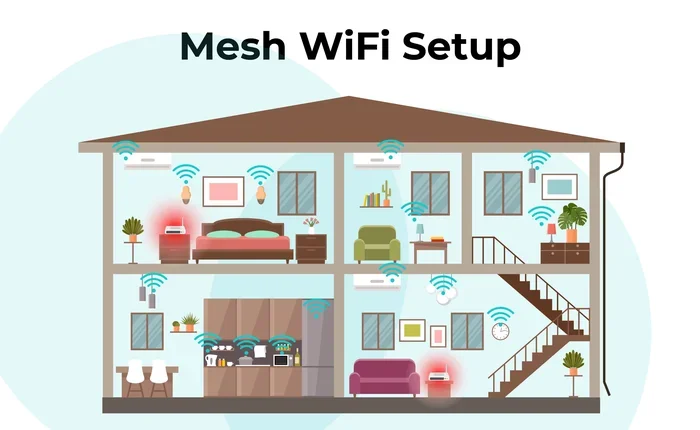
If you have ever walked into a bedroom or basement and found your phone losing signal, you know how frustrating weak Wi-Fi coverage can be. Wi Fi pods are small, compact devices designed to spread your wireless signal to every corner of your home. They work together with your main router to create what is called a mesh network.
Unlike old-school wireless range extenders, pods communicate with each other seamlessly. This means your phone or laptop stays connected to the strongest signal without you having to switch networks manually. Think of them as tiny helpers that carry your internet connection to places your router cannot reach on its own.
Most pods plug directly into a wall outlet. There is no complicated setup. You just connect one pod to your router, place the others around your home, and you are good to go. This simplicity is why so many people are turning to pods instead of buying a whole new router.
If you are tired of buffering videos or dropped calls, Wi-Fi pods might be the fix you need. They are especially helpful in larger homes or buildings with thick walls that block wireless signals. Let us dive deeper into how they actually work.
How Do Wi Fi Pods Actually Work?
Understanding how Wi Fi pods function is simpler than you might think. They use a technology called mesh networking to create a single, unified wireless network throughout your home. Here is how it works step by step.
First, your main router connects to your internet service provider. This is the source of your broadband signal. Then, you plug a Wi Fi pod into an outlet in another room. The pod talks to your router wirelessly and creates a new node in the network.
Each additional pod you add becomes another connection point. They all share the same network name and password. So when you walk from your living room to your backyard, your device smoothly switches between pods without losing connection.
Most modern pods support dual-band or even tri-band Wi-Fi. This means they can send data on multiple frequencies at the same time. Dual-band pods use both 2.4 GHz and 5 GHz bands. Tri-band adds an extra dedicated backhaul band for faster communication between pods.
The Role of Your Main Router
Your main router is the brain of the network. Pods do not replace your router. They work alongside it. If your router is old or weak, adding pods alone may not solve all your problems. In some cases, you may need to change your Wi-Fi router to get the best results from your pods.
How Pods Communicate With Each Other
Pods use a dedicated wireless channel to talk to each other. This is called the backhaul connection. It keeps your main internet traffic separate from the pod-to-pod communication. This is why mesh systems often feel faster and more stable than traditional extenders.
Some pods also use your home’s electrical wiring to send data. These are called powerline Wi-Fi pods. They send internet signals through your wiring and then broadcast Wi-Fi from each outlet. This can be a great option if wireless signals struggle to reach certain rooms.
Wi Fi Pods vs Traditional Extenders
Many people confuse Wi-Fi pods with traditional Wi-Fi extenders. They are not the same thing. Understanding the difference can save you money and frustration.
| Feature | Wi Fi Pods (Mesh) | Traditional Extenders |
|---|---|---|
| Network Name | Single network name for all pods | Often creates a separate network |
| Signal Switching | Seamless and automatic | Manual switching required |
| Setup | Plug in and follow app instructions | More complicated configuration |
| Speed | Better speed retention | Often cuts speed in half |
| Coverage | Whole-home mesh coverage | Spot coverage in one area |
| Price | Higher upfront cost | Lower cost per unit |
The biggest advantage of pods is the seamless handoff. When you move around your home, your device connects to the strongest pod automatically. With a traditional extender, you often have to manually switch between your main network and the extender network.
Another key difference is speed. Traditional extenders often cut your bandwidth in half because they use the same radio to receive and send data. Mesh pods handle this much better, especially tri-band systems that have a dedicated backhaul channel.
However, pods can be more expensive. If you only have one problem room, a single extender might be enough. But for whole-home coverage, a mesh pod system is usually the better long-term investment.
Benefits of Using Wi Fi Pods
Wi-Fi pods offer several real-world benefits that make them popular with homeowners. Here are the main advantages.
1. Easy Setup Most pod systems come with a simple app. You follow the prompts, and the system sets itself up in minutes. You do not need to be a tech expert. Even if you are not comfortable with networking, you can get it done quickly.
2. Whole-Home Coverage Pods spread your signal evenly. Whether you are in the kitchen, basement, or backyard, you can stay connected. This is a huge upgrade for homes with Wi-Fi dead spots.
3. No Signal Loss Because pods communicate intelligently, you do not lose speed as you move from room to room. The system picks the best path for your data.
4. Support for Smart Home Devices Modern pods can handle many devices at once. Smart cameras, smart speakers, and smart home devices all work better with a strong mesh network.
5. Scalability You can start with two or three pods and add more as needed. This makes mesh systems flexible for any home size.
6. Better Streaming and Gaming With a strong, stable connection, you can stream 4K videos and play online games without lag. This is especially important if you connect your Wi-Fi directly to your TV or use wireless gaming consoles.
Quick Tips for Getting the Most From Your Pods
- Place your first pod within 10 to 15 feet of your main router.
- Do not hide pods behind furniture or inside closed cabinets.
- Keep pods on different floors if you have a multi-story home.
- Restart your pods once a month to keep the system running smoothly.
- Update your pod firmware whenever a new version is available.
Common Problems With Wi Fi Pods
Despite their benefits, Wi-Fi pods are not perfect. Here are some common issues you should know about before buying.
1. Pods Need Power Every pod needs a wall outlet. This can be a problem if your outlets are few or hard to reach. You also need to make sure the outlet is not controlled by a light switch, or the pod will turn off when you flip the switch.
2. Distance Between Pods Matters If you place pods too far apart, the signal between them weakens. A good rule of thumb is to keep pods within range of each other. If you are trying to boost your Wi-Fi signal outside, standard indoor pods may not be enough. You might need outdoor-rated equipment instead.
3. They Do Not Increase Your Internet Speed Pods spread your existing signal better, but they do not make your internet faster. Your speed still depends on your internet plan and your provider. If you have a slow plan, pods will not fix that.
4. Compatibility Issues Some older routers do not work well with modern mesh pods. Before buying, check that your router supports mesh networking or consider upgrading. You might also want to look into whether you can connect Wi-Fi 6 mesh to a Wi-Fi 5 router for better compatibility.
5. Cost Pod systems can be pricey, especially for larger homes. A three-pack can cost anywhere from $150 to $400 depending on the brand and features. This is more expensive than a single extender, but the performance is usually much better.
Common Mistakes People Make
- Placing the first pod too far from the router.
- Expecting pods to fix a slow internet plan.
- Ignoring firmware updates that improve performance.
- Buying pods without checking if they work with your current router.
- Not considering the number of devices connected to the network.
Expert Insights on Wi Fi Pods
Networking experts generally agree that mesh pod systems are one of the best ways to improve home wireless coverage. The technology has matured significantly in the last few years, and most modern systems are very reliable.
According to industry reviews, top mesh systems from brands like Google Nest, Eero, and TP-Link Deco consistently deliver strong performance. These systems are designed for everyday users who want reliable home network coverage without technical headaches.
Experts also recommend checking whether your Wi-Fi card or device supports the latest Wi-Fi standards. Older devices may not take full advantage of modern mesh systems. Upgrading your device’s wireless adapter can sometimes make a bigger difference than adding more pods.
If you are renting or living in a smaller space, you might want to explore portable Wi-Fi options instead of a full mesh system. Portable hotspots and mobile routers can be a great alternative for people who do not need permanent whole-home coverage.
One thing experts always stress is the importance of your internet plan. No mesh system can deliver speeds that your provider does not supply. Always make sure your plan matches your household needs before investing in new equipment.
Are Wi Fi Pods Worth Buying?
The short answer is yes, for most households. If you have a home larger than 1,500 square feet or multiple floors, Wi-Fi pods can transform your internet experience. They eliminate dead zones, boost signal strength, and make your smart home devices work better.
However, they are not a magic fix. You still need a decent internet plan and a compatible router. If your current router is very old, consider upgrading it first or replacing it with a mesh system that includes built-in pods.
For smaller apartments or homes, a single range extender might be enough. Pods really shine in larger spaces where coverage is a real challenge. If you have ever struggled with weak signals in the garage or backyard, a mesh system is worth the investment.
Before you buy, think about your needs. How many devices are connected? How large is your home? Do you game or stream a lot? Answering these questions will help you choose the right system.
Also, check whether your provider offers a mesh rental option. Some internet companies let you rent a mesh system for a small monthly fee. This can be a good way to test the technology before committing to a purchase.
Frequently Asked Questions
Do Wi Fi Pods Work Without a Router?
No, pods need a router or modem to connect to the internet. They extend your existing network but cannot create a connection on their own. Your main router provides the internet source, and the pods simply spread that signal throughout your home.
How Many Wi Fi Pods Do I Need for My Home?
It depends on your home size. For small apartments, one or two pods usually work well. For larger homes over 2,000 square feet, you may need three or more pods. A good starting point is one pod for every 1,000 square feet of space.
Can Wi Fi Pods Improve My Internet Speed?
Pods do not increase your internet speed from your provider. What they do is deliver your existing speed more reliably to every room. If your router currently struggles to reach certain areas, pods can make the speed you already pay for available in those spots.
Are Wi Fi Pods the Same as a Mesh System?
Yes, most Wi Fi pods are part of a mesh system. The terms are often used interchangeably. A mesh system includes a main router and satellite pods that work together to create one seamless wireless network across your home.
Do Wi Fi Pods Work With Any Internet Provider?
Most pods work with any standard modem or router from any provider. However, you should always check compatibility before buying. Some pod systems work best with specific types of modems or routers, so it is worth verifying before you purchase.
Can I Use Wi Fi Pods Outdoors?
Standard indoor pods are not designed for outdoor use. If you need coverage in your yard or garage, look for outdoor-rated mesh devices or consider other solutions like outdoor access points. Placing indoor pods near windows facing the yard can sometimes help, but results vary.
Final Thoughts
Wi-Fi pods are a practical and effective way to improve your home network. They solve the problem of weak signals and dead zones that frustrate so many of us. With easy setup, seamless connectivity, and scalable coverage, they have become one of the most popular solutions for modern homes.
Just remember that pods work best when paired with a solid internet plan and a compatible router. They are not a substitute for good internet service, but they are a powerful tool to get the most out of it.
Before you make a purchase, assess your home size, your device count, and your connectivity needs. Start small if you are unsure, and add more pods as needed. The beauty of mesh systems is their flexibility. You can grow your network over time without starting from scratch.
If you are still unsure about your setup, consider consulting with a networking professional or exploring options like portable Wi-Fi devices for a quick test. The goal is simple: strong, reliable Wi-Fi coverage everywhere in your home. Wi-Fi pods make that goal much easier to achieve.