Can I Charge Macbook Pro 2023 With Type C Fast Charging
Yes, you can charge your MacBook Pro 2023 with a Type-C cable. The USB-C port supports USB Power Delivery for fast charging, and any compliant USB-C charger or cable will work. Learn the best fast charging setups, compatible accessories, and tips to keep your battery healthy.
If you just bought a MacBook Pro 2023, you might be asking, “Can I Charge Macbook Pro 2023 With Type C?” The answer is a simple yes. Your new laptop uses USB-C ports for charging, and you can plug in a USB-C cable to power it up. But there is more to know. Can I Charge Macbook Pro 2023 With Type C fast? Absolutely. With the right charger and cable, you can get fast charging speeds that refill your battery in no time. In this guide, I will walk you through everything you need to know. You will learn about power delivery, compatible cables, safe third-party options, and how to keep your battery healthy. Let us dive in.
The MacBook Pro 2023 comes with Apple Silicon chips like the M2 or M3. These chips are efficient, but they still need power. USB-C is the new standard for many laptops. It carries data, video, and power all in one cable. That means you can charge your Mac and connect a monitor at the same time. The USB-C port on the MacBook Pro 2023 supports USB Power Delivery. This is a protocol that allows fast charging. You can use any USB-C charger that supports PD. But not all chargers are the same. Some charge faster than others. I will break it all down for you.
Key Takeaways
- You can charge your MacBook Pro 2023 with USB-C: Any USB-C cable and compliant charger will power up your laptop.
- Fast charging is supported via USB Power Delivery: Use a charger with 60W, 96W, or 140W for the fastest speeds.
- Not all USB-C cables are equal: Look for 100W-rated cables to get the full charging speed.
- Third-party chargers are safe if they meet USB-C PD standards: GaN chargers are compact and reliable.
- Charging while using your Mac is fine: It won’t harm the battery, but you can enable optimized battery charging.
- Avoid cheap, uncertified cables: They may damage your laptop or charge slowly.
- Use the right wattage for your model: Check your MacBook Pro 2023’s power requirements before buying a charger.
📑 Table of Contents
Understanding USB-C and the MacBook Pro 2023
The USB-C port is a small, reversible connector. It has become the standard for many devices. Your MacBook Pro 2023 uses USB-C for charging, data transfer, and video output. This is a big change from the old MagSafe charger. MagSafe used a magnetic plug. USB-C is a flat, oval-shaped port. You can plug it in either way. That is convenient.
Apple introduced USB-C with the MacBook in 2015. Since then, all MacBooks have used USB-C. The MacBook Pro 2023 models come with multiple USB-C ports. These ports support Thunderbolt 4 or Thunderbolt 5. Thunderbolt combines data, video, and power. You can charge your laptop at full speed while using a Thunderbolt dock. USB-C charging is now the norm. If you have a MacBook Pro 2023, you need a USB-C cable and a USB-C power adapter. That is all you need to charge your laptop.
What Is USB-C?
USB-C is a connector type. It is not a charging standard by itself. USB-C is just the shape of the plug. The real magic happens inside the cable and charger. They use protocols like USB Power Delivery (USB-PD). USB-PD allows the charger and laptop to negotiate the best power delivery. Your MacBook Pro 2023 can request up to 140 watts. That is a lot of power. It means you can charge your laptop quickly. The USB-C port on the Mac also supports data speeds up to 40 or 80 Gbps, depending on the Thunderbolt version. But for charging, you just need a good USB-C cable and a USB-C charger.
How USB-C Charging Works on the MacBook Pro 2023
When you plug a USB-C cable into your MacBook Pro 2023, the laptop and charger talk to each other. This is called power delivery negotiation. The charger tells the laptop how much power it can supply. The laptop then draws only what it needs. This is safe. You cannot damage your Mac by using a USB-C charger. The laptop controls the power draw. If you use a 60W charger, the laptop will charge at 60W. If you use a 140W charger, it will charge faster up to 140W. The charging speed depends on the charger’s wattage and the cable’s quality.
Fast charging means you can go from zero to 50 percent in about 30 minutes with a 96W or 140W charger. That is very useful. You can plug in during a coffee break and get a big boost. The MacBook Pro 2023 battery is large, so it needs a decent charger to charge fast. A low-wattage charger will still work, but it will take longer.
Quick Tip: Use a 96W or 140W USB-C charger for the fastest fast charging on your MacBook Pro 2023.
Fast Charging with USB-C: What You Need to Know
Can I Charge Macbook Pro 2023 With Type C fast? Yes, but you need the right equipment. Fast charging depends on three things: the charger’s wattage, the cable’s rating, and the USB-C Power Delivery protocol. If any of these is weak, your charging speed will drop. I will explain each part so you can choose the best setup.
USB Power Delivery and Fast Charging
USB Power Delivery (USB-PD) is the standard that makes fast charging possible. It is a smart protocol. Your MacBook Pro 2023 and the charger communicate over the USB-C cable. They agree on the voltage and current. This happens in milliseconds. The result is efficient, safe charging. USB-PD can deliver up to 240 watts with USB PD 3.1. However, the MacBook Pro 2023 maxes out at 140 watts. Apple includes a 140W USB-C power adapter in the box for some models. That is the fastest official charger.
If you use a charger that does not support USB-PD, you will not get fast charging. A basic 5W phone charger will work, but it will charge your MacBook very slowly. Always look for a charger that advertises USB-C PD or USB Power Delivery. The wattage should be at least 60W for the 14-inch model and 96W or 140W for the 16-inch model. Check the MacBook Pro 2023 specs to know your model’s requirement.
Choosing the Right USB-C Charger
The USB-C charger you pick matters a lot. Apple sells its own USB-C power adapter. It is reliable and safe. But you can also use third-party chargers. The key is to pick a charger that supports USB-PD and has enough wattage. Here are some popular options:
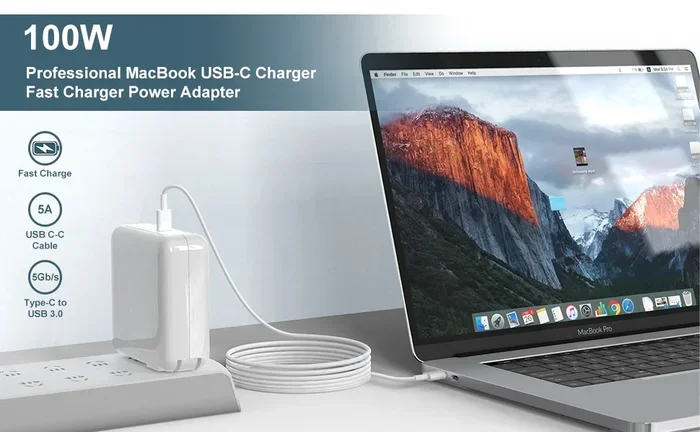
- Apple 140W USB-C Power Adapter: The fastest official charger. Charges the 16-inch MacBook Pro in about 1.5 hours from zero.
- Apple 96W USB-C Power Adapter: Great for the 14-inch model. Charges quickly and is compact.
- GaN Chargers (65W-140W): Gallium Nitride chargers are smaller and lighter. They offer the same power as a brick but fit in your pocket.
- 60W USB-C Charger: Works for the 14-inch MacBook Pro. It will charge, but slower than a 96W or 140W charger.
When you buy a charger, check the output wattage. Look for “USB-C PD” on the label. A good charger will have a USB-C port that delivers the full wattage. Some chargers have multiple ports. If you use two ports at once, the power splits. So for fastest charging, use a single-port charger.
| Charger | Wattage | Best For | Size |
|---|---|---|---|
| Apple 140W USB-C | 140W | 16-inch MacBook Pro, fastest charging | Large brick |
| Apple 96W USB-C | 96W | 14-inch MacBook Pro, balanced speed | Medium brick |
| GaN 100W Charger | 100W | Travel, compact fast charging | Very small |
| 60W USB-C Charger | 60W | 14-inch MacBook Pro, slower charge | Small brick |
Expert Insight: “Using a 140W charger on a 14-inch MacBook Pro is safe. The laptop will only draw the power it needs. You will not overcharge or damage the battery.” — Apple Support
Compatible Cables and Adapters
The USB-C cable is just as important as the charger. A cheap cable can limit your charging speed. It might even be unsafe. You need a cable that can handle the wattage you want. For fast charging your MacBook Pro 2023, look for a USB-C to USB-C cable rated for 100W or more. The cable should support USB Power Delivery. Most quality cables have e-markers that tell the charger they can handle high power.
Apple includes a 2-meter USB-C to USB-C cable in the box. That cable works fine for charging. But if you want the absolute fastest speeds, you might want a shorter, thicker cable. Shorter cables have less resistance, which means more power reaches your laptop. Some third-party cables are even better than Apple’s included one. I will talk about those in a moment.
Best USB-C Cables for Fast Charging
Not all USB-C cables are created equal. Here is what to look for when picking a cable for your MacBook Pro 2023:
- E-marker chip: This tiny chip inside the cable tells the charger the cable’s capabilities. A cable with an e-marker can handle 100W or more.
- USB 3.2 or Thunderbolt certification: These cables support faster data and often better power delivery. Thunderbolt cables are ideal if you also use them for docks.
- Length: Shorter cables (0.5m to 1m) charge slightly faster than long ones. But 2m cables are fine for most users.
- Brand reputation: Buy from Anker, Belkin, Cable Matters, or Apple. Avoid no-name cables from unknown sellers.
Here is a quick comparison of popular cables:
| Cable | Max Power | Data Speed | Price Range |
|---|---|---|---|
| Apple USB-C to USB-C (2m) | 100W | USB 3.2 (10Gbps) | $19 |
| Anker 735 USB-C Cable (1m) | 140W | USB 3.2 (10Gbps) | $15 |
| Belkin Thunderbolt 4 Cable (0.8m) | 100W | Thunderbolt 4 (40Gbps) | $50 |
| Cable Matters USB-C to USB-C (2m) | 100W | USB 3.2 (10Gbps) | $12 |
Any of these cables will charge your MacBook Pro 2023 safely. The Anker 735 is a great budget pick that supports 140W. If you need a Thunderbolt cable for a dock, the Belkin is a solid choice.
Quick Tip: If you charge your MacBook on a desk, use a short 1m cable. It will charge a bit faster and reduce clutter.
USB-C to MagSafe Adapters
Some people miss the old MagSafe magnetic charger. You can get a USB-C to MagSafe adapter. This is a small puck that plugs into your USB-C port. Then you attach a MagSafe cable magnetically. It is convenient. The adapter supports the same USB Power Delivery as a direct cable. So you still get fast charging. Apple sells a MagSafe 3 to USB-C cable. That is not an adapter, but a cable with a MagSafe connector on one end and USB-C on the other. You can also buy third-party MagSafe adapters. Just make sure they support USB-PD and the correct wattage.
Third-Party Chargers: Safe or Risky?
Many people ask, “Can I Charge Macbook Pro 2023 With Type C using a third-party charger?” The short answer is yes. Third-party chargers are safe as long as they are reputable and support USB-C PD. Apple’s own charger is just one option. There are many great alternatives. I will explain how to choose a safe charger and what to avoid.
GaN Chargers and Their Benefits
GaN chargers use Gallium Nitride semiconductors. These are more efficient than traditional silicon. GaN chargers run cooler and are much smaller. You can get a 100W GaN charger that is half the size of Apple’s 140W brick. This is perfect for travel. Brands like Anker, Baseus, and UGREEN make excellent GaN chargers. They cost less than Apple’s charger in many cases. A GaN charger will fast charge your MacBook Pro 2023 just as well as an Apple charger.
When you buy a GaN charger, check that it supports USB-PD 3.0 or higher. It should also have a wattage rating that matches your MacBook. A 100W GaN charger will charge a 14-inch MacBook Pro quickly. A 140W GaN charger will charge a 16-inch model at full speed. GaN technology is reliable. Many airports and cafes have GaN chargers available for rent. You can trust them.
How to Spot a Safe Third-Party Charger
Not all third-party chargers are safe. Cheap, uncertified chargers can be a fire hazard. They might also damage your MacBook Pro 2023. Here is how to tell if a charger is safe:
- Look for USB-IF certification: This is a standard from the USB Implementers Forum. It means the charger has been tested for safety and compatibility.
- Check for USB-PD support: The charger must support USB Power Delivery. If it only outputs 5V/2A (10W), it is too slow for a MacBook.
- Read reviews: Buy from reputable brands with many positive reviews. Anker, Belkin, and Spigen are trustworthy.
- Avoid suspiciously cheap chargers: A $10 charger that claims 100W is almost certainly fake. It may not regulate power properly.
Using a safe third-party charger is just as good as using Apple’s charger. Your MacBook Pro 2023 will charge at full speed. You will also save money. I use a GaN charger every day. It has worked perfectly for months.
Common Mistake: Buying a charger that does not support USB-PD. It will charge your laptop, but extremely slowly. Always check the label for “USB Power Delivery” or “USB-C PD.”
Charging While Using Your MacBook Pro
Is it safe to use your MacBook Pro 2023 while it is charging? Yes. You can plug in and work at the same time. Many people do this every day. But there are some things to keep in mind to protect your battery long-term.
Does Charging While Using Slow It Down?
When you use your laptop while it charges, the power is split between running the computer and refilling the battery. If you are doing light tasks like browsing the web, the charger can keep up easily. The battery will still charge. If you are running heavy tasks like video editing or gaming, the laptop might use power faster than the charger can supply. In that case, the battery percentage might stay the same or even drop slowly. This is normal. It does not mean your charger is broken.
To get the fastest charging speed while using your Mac, close heavy apps and plug in a high-wattage charger. A 140W charger can easily handle both heavy use and charging. A 60W charger might struggle if you are doing intense work. So for best results, use a powerful charger when you need to charge and work at the same time.
Tips for Optimal Battery Health
Your MacBook Pro 2023 has a lithium-ion battery. Like all batteries, it degrades over time. But you can slow down the wear with a few simple habits. Here are some tips to keep your battery healthy:
- Enable Optimized Battery Charging: Go to System Settings > Battery > Battery Health. Turn on Optimized Battery Charging. Your Mac will learn your daily routine and hold the charge at 80% when plugged in for long periods. This reduces battery aging.
- Avoid Extreme Temperatures: Do not charge your laptop in direct sunlight or in a freezing car. Heat and cold are the worst enemies of lithium-ion batteries. Ideal charging temperature is between 10°C and 35°C.
- Unplug Occasionally: Let the battery drain to around 20% and then charge it to 100%. This helps the battery sensors stay calibrated. You do not need to do this every day, but once a month is good.
- Use the Battery Health Feature: macOS shows your battery condition in System Settings. If it says “Service Recommended,” it is time to consider a replacement.
Charging your MacBook Pro 2023 with a USB-C cable is perfectly fine. Just follow these simple tips, and your battery will last for years.
Expert Insight: “The biggest threat to battery health is not charging. It is heat. Keep your laptop cool while charging, and avoid using thick cases that trap heat.” — Battery University
Common Mistakes and How to Avoid Them
Even with the right gear, people make mistakes that slow down charging or harm their laptop. I see these errors all the time. Here are the most common ones and how to fix them.
Using the Wrong Cable
The most common mistake is using a cable that cannot handle high power. A cheap USB-C cable might only support 60W or even 30W. If you plug a 140W charger into a 60W cable, the charging speed will be limited to 60W. The cable will get hot, and you will not get fast charging. Always use a cable rated for 100W or more. Look for the e-marker or the cable’s rated wattage on the packaging. If you are unsure, stick with the cable that came with your Mac or buy from a trusted brand.
Ignoring Wattage Requirements
Another mistake is buying a charger with too low wattage. A 30W charger will charge your MacBook Pro 2023, but it will take many hours. If you need to work quickly, a low-wattage charger is frustrating. Check your model’s recommended charger wattage. The 14-inch model works well with 96W. The 16-inch model benefits from 140W. Using a charger with the correct wattage ensures you get the best charging speed and keeps the battery healthy.
Using a Damaged Cable or Charger
Frayed cables or swollen chargers are dangerous. They can cause short circuits or even fires. Inspect your USB-C cable and charger regularly. If you see any damage, replace them immediately. Do not use a charger that smells burnt or gets excessively hot. Safety should always come first.
Quick Tip: Keep a spare USB-C cable in your bag. A backup cable ensures you are never stuck with a dead laptop.
Conclusion
So, Can I Charge Macbook Pro 2023 With Type C? Absolutely yes. Your MacBook Pro 2023 is designed for USB-C charging. You can use any compliant USB-C cable and USB-C charger that supports USB Power Delivery. For the fastest fast charging, pick a 96W or 140W charger and a 100W-rated cable. Third-party GaN chargers are safe, compact, and affordable. Just avoid cheap, uncertified accessories. Charge your laptop while using it without worry, and enable Optimized Battery Charging to keep your battery healthy for years. With the right setup, you will always have power when you need it. Now you know exactly how to charge your MacBook Pro 2023 with a Type-C cable. Go ahead and plug in.
Frequently Asked Questions
Can I charge my MacBook Pro 2023 with any USB-C cable?
Most USB-C cables will work, but for fast charging you need a cable rated for 100W or more. Check for an e-marker chip or the cable’s wattage rating. A cheap 30W cable will limit your charging speed and may get hot.
Do I need a special charger to fast charge a MacBook Pro 2023?
You need a charger that supports USB Power Delivery (USB-PD) and has enough wattage. A 96W or 140W charger is ideal for the fastest speeds. Any USB-C charger that supports PD will charge your laptop, but higher wattage means faster charging.
Is it safe to use a third-party USB-C charger?
Yes, as long as the charger is from a reputable brand and supports USB-C PD. Look for USB-IF certification and positive reviews. GaN chargers from Anker, Belkin, or UGREEN are safe and often more compact than Apple’s charger.
How long does it take to charge a MacBook Pro 2023 with USB-C?
With a 140W charger, you can reach 50 percent in about 30 minutes and a full charge in roughly 1.5 to 2 hours. A 96W charger takes a bit longer, and a 60W charger will take several hours. Your actual charging time depends on your model and battery level.
Can I charge my MacBook Pro 2023 with a phone charger?
You can, but it will charge very slowly. A typical phone charger outputs 5V/2A or 5V/3A (15W to 18W). That is far below what your MacBook needs. It will still top up the battery, but you will be waiting a long time.
What wattage USB-C charger should I use for MacBook Pro 2023?
For the 14-inch model, a 96W charger is recommended. For the 16-inch model, a 140W charger gives the fastest speeds. You can use a 60W charger for light use, but it will charge more slowly. Always match the charger wattage to your laptop’s needs.