Basic Elements Of A Computer System Explained Simply
The basic elements of a computer system include hardware, software, input devices, output devices, and the central processing unit. Understanding these core components helps you use your computer more effectively and troubleshoot common issues. This guide breaks down every element in simple, easy-to-understand language.
Have you ever wondered what makes a computer actually work? It is easy to think of a computer as one single thing. But inside, there are many parts that each play a specific role. The basic elements of a computer system are the building blocks that come together to create the device you use every day. Whether you are browsing the web, writing an email, or playing a game, these elements are all working behind the scenes.
Understanding these components does not require a tech degree. In fact, once you know the basics, everything starts to make more sense. This guide will walk you through each part of a computer system in simple terms. You will learn what hardware is, how software fits in, and why every piece matters. By the end, you will have a clear picture of how your computer works from the inside out.
The basic elements of a computer system can be grouped into a few main categories. These include hardware components, software programs, input devices, output devices, and the central processing unit. Each category handles a different job, but they all depend on each other. Let us dive into each one and see how they fit together.
Key Takeaways
- Hardware and software work together: Every computer needs both physical parts and programs to function properly.
- The CPU is the brain: It processes all instructions and keeps your system running smoothly.
- Input and output devices are essential: They let you communicate with your computer and receive results.
- Memory and storage serve different purposes: RAM handles short-term tasks while storage saves data long-term.
- The motherboard connects everything: It is the main circuit board that links all components together.
- The operating system manages it all: It acts as the bridge between you and the computer hardware.
- Cooling and power matter too: Without proper power supply and cooling, your computer cannot run safely.
📑 Table of Contents
- What Are The Basic Elements Of A Computer System?
- The Hardware Components Inside Your Computer
- Input Devices You Use Every Day
- Output Devices That Show You The Results
- How Software And The Operating System Work Together
- The Role Of Memory And Storage In Your Computer
- How All The Basic Elements Work Together
- Common Mistakes People Make With Computer Components
- Final Thoughts On The Basic Elements Of A Computer System
What Are The Basic Elements Of A Computer System?
When we talk about the basic elements of a computer system, we are referring to the parts that make a computer function. A computer is not just one thing. It is a combination of physical pieces and programs that work as a team. Think of it like a car. A car needs an engine, wheels, a steering wheel, and fuel. Without any one of those, it cannot drive. A computer works the same way.
The main elements fall into two big groups: hardware and software. Hardware means the physical parts you can touch. This includes the screen, keyboard, and internal parts like the motherboard. Software means the programs and instructions that tell the hardware what to do. Together, hardware and software create the complete computer experience.
Why Understanding These Elements Matters
Knowing the basic elements helps you in many ways. First, it makes troubleshooting easier. If your computer slows down, you can check whether it is a memory issue or a storage problem. Second, it helps you make better buying decisions. When you know what each part does, you can choose the right computer for your needs. Third, it builds your confidence. You will not feel lost when someone talks about RAM or the CPU.
Here are some quick reasons why learning about the basic elements is worth your time:
- It helps you fix simple problems on your own.
- It saves money by helping you avoid unnecessary upgrades.
- It improves your overall tech literacy.
- It makes you more confident when shopping for a new computer.
- It gives you a foundation for learning more advanced topics later.
Quick Tip: When learning about computer parts, start with the big picture first. Understand what each category does before diving into the details. This makes everything easier to remember.
The Hardware Components Inside Your Computer
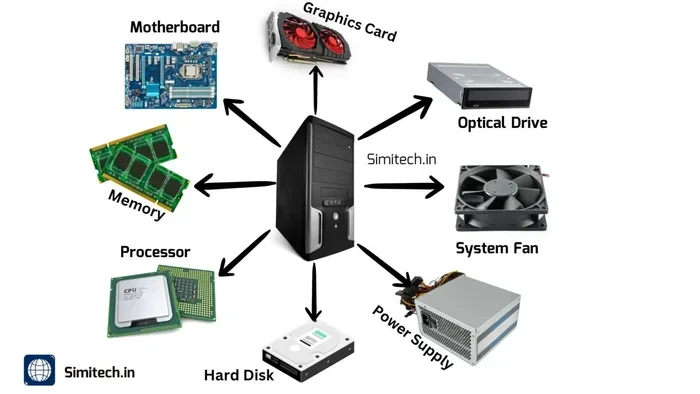
Hardware is the physical side of your computer. You can see it and touch it. The basic elements of a computer system include several hardware parts that work together. Let us look at the most important ones inside the system unit.
The Motherboard
The motherboard is the main circuit board inside your computer. It connects all the other parts together. Think of it as the backbone or the nervous system. Every component, from the CPU to the RAM, plugs into the motherboard. Without it, nothing else could communicate.
The motherboard has slots and ports for different parts. It also has chips that help manage data flow between components. When you build or upgrade a computer, the motherboard determines what other parts you can use. It is one of the first things you need to choose when building a custom PC.
The Central Processing Unit
The CPU, or central processing unit, is often called the brain of the computer. It handles all the calculations and instructions. When you open a program or save a file, the CPU processes that request. It works incredibly fast, completing millions of tasks every second.
There are two main CPU brands most people know: Intel and AMD. Both make excellent processors for different needs. If you want a computer for basic tasks like browsing and email, a mid-range CPU works great. For gaming or video editing, you need a more powerful one.
Random Access Memory
RAM, or random access memory, is your computer’s short-term memory. It holds data that the CPU needs right now. When you open multiple browser tabs or run several programs at once, RAM keeps them all active. The more RAM you have, the smoother your computer runs.
Most computers come with 8GB of RAM these days. For heavy tasks like video editing or gaming, 16GB or more is better. RAM is temporary storage. When you turn off your computer, the data in RAM disappears. That is why it is different from long-term storage.
Storage Devices
Storage devices save your data permanently. This includes your documents, photos, videos, and installed programs. The two main types of storage are hard disk drives (HDD) and solid-state drives (SSD).
HDDs are older and use spinning disks to read and write data. They are slower but offer more space at a lower price. SSDs use flash memory and are much faster. They make your computer boot up and load programs quickly. Most modern computers use SSDs as the main storage drive.
The Power Supply Unit
The power supply unit, or PSU, provides electricity to all the parts inside your computer. It converts power from your wall outlet into the right form for each component. Without a working PSU, your computer simply will not turn on.
PSUs come in different wattages. A basic computer needs around 400 to 500 watts. High-end gaming PCs may need 750 watts or more. It is important to choose a reliable PSU because it protects your other components from power surges.
The Cooling System
All computer parts generate heat when they work. The cooling system keeps temperatures safe. Most computers use fans to circulate air inside the case. High-performance computers may use liquid cooling for better heat management.
Overheating can cause serious problems. It can slow down your computer or even damage components. That is why a good cooling system is one of the essential basic elements of a computer system that people often overlook.
Expert Insight: Many people underestimate the importance of the cooling system. Even a basic desktop needs proper airflow. Keep your computer’s vents clean and dust-free to maintain good cooling performance.
Input Devices You Use Every Day
Input devices are the parts you use to send data to your computer. They are how you tell the computer what to do. Without input devices, you could not interact with your computer at all. They are a vital part of the basic elements of a computer system.
Common Input Devices
Here are the most common input devices you use daily:
- Keyboard: You use it to type text, enter commands, and navigate. It is one of the most essential input devices.
- Mouse: The mouse lets you point, click, and drag items on the screen. It makes navigating your computer intuitive.
- Touchpad: Laptops have built-in touchpads that serve the same purpose as a mouse.
- Microphone: You use a microphone to record voice or give voice commands.
- Webcam: A webcam captures video for calls, recordings, and streaming.
- Scanner: A scanner converts physical documents into digital files.
How Input Devices Work
Input devices convert physical actions into digital signals. When you press a key on your keyboard, it sends an electrical signal to the computer. The computer then interprets that signal as a specific character or command. This process happens in milliseconds.
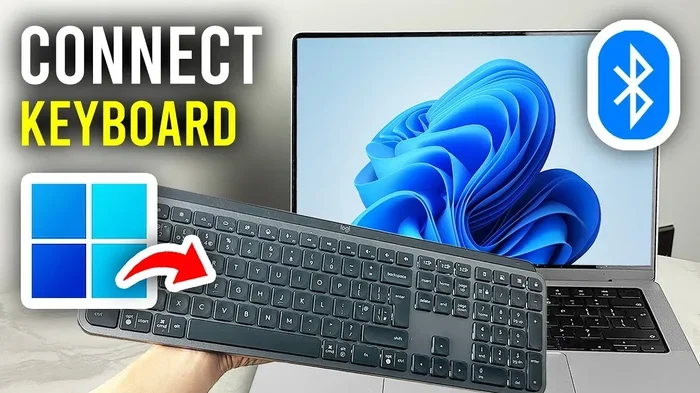
Modern input devices use wireless connections like Bluetooth or USB receivers. This gives you more freedom and less cable clutter. Wireless keyboards and mice are now standard in most homes and offices.
Common Mistakes: Many people ignore the quality of their input devices. A comfortable keyboard and a responsive mouse make a big difference in your daily productivity. Do not settle for cheap, uncomfortable peripherals.
Output Devices That Show You The Results
Output devices do the opposite of input devices. They take data from the computer and present it to you in a way you can understand. They are the final step in the basic elements of a computer system workflow.
Common Output Devices
Here are the output devices you interact with most often:
- Monitor: The monitor displays visual output. It shows everything from text to videos to graphics.
- Speakers: Speakers output audio. They let you hear music, voice calls, and system sounds.
- Printer: A printer produces physical copies of digital documents and images.
- Headphones: Headphones deliver audio directly to your ears for private listening.
The Difference Between Input and Output
Some devices can do both input and output. A touchscreen, for example, lets you input commands by touching the screen and also displays output visually. A USB flash drive can both receive data (input) and send data (output). Understanding this difference helps you see how data flows through your computer.
Here is a simple comparison of input and output devices:
| Feature | Input Devices | Output Devices |
|---|---|---|
| Direction of Data | Sends data to the computer | Receives data from the computer |
| Examples | Keyboard, mouse, microphone | Monitor, speakers, printer |
| Function | Captures user commands | Displays or presents results |
| User Interaction | You control the device | The device communicates to you |
How Software And The Operating System Work Together
Software is the set of programs that tell your computer what to do. Without software, hardware is just a collection of parts. The basic elements of a computer system are incomplete without software. It is the instructions that bring everything to life.
What Is Software?
Software includes all the programs and applications on your computer. This covers everything from your web browser to your word processor to your games. Software is written in programming languages and installed onto your computer’s storage.
There are two main types of software: system software and application software. System software includes the operating system and drivers. Application software includes the programs you use for specific tasks like writing emails or editing photos.
The Role Of The Operating System
The operating system, or OS, is the most important software on your computer. It manages all the hardware and software resources. Popular operating systems include Windows, macOS, and Linux. Each one provides a user interface that lets you interact with your computer easily.
The OS handles tasks like managing memory, controlling input and output devices, and running applications. When you click on an icon, the OS processes that command and opens the program. It acts as the middleman between you and the computer hardware.
Drivers And Their Importance
Drivers are small programs that help the operating system communicate with hardware. Every piece of hardware needs a driver to work properly. When you connect a new printer or graphics card, the OS uses the driver to understand how to use that device.
Most modern operating systems include drivers for common devices. But for specialized hardware, you may need to download drivers from the manufacturer’s website. Keeping your drivers updated ensures smooth performance and compatibility.
Quick Tip: Keep your operating system and drivers updated. Updates often include security patches and performance improvements that keep your computer running smoothly.
The Role Of Memory And Storage In Your Computer
Memory and storage are two of the most important basic elements of a computer system. People often confuse them, but they serve very different purposes. Understanding the difference helps you make the right choices for your computer.
Memory (RAM) vs Storage
RAM is your computer’s short-term memory. It holds data temporarily while the CPU processes it. Storage is your computer’s long-term memory. It saves data permanently, even when the computer is turned off.
Think of it this way. RAM is like your desk where you work on documents right now. Storage is like a filing cabinet where you keep documents for the long term. You need both to get work done efficiently.
How Much Memory Do You Need?
The amount of RAM and storage you need depends on what you do with your computer. Here is a simple guide:
- Basic use: 8GB RAM and 256GB SSD is enough for web browsing and email.
- Mid-range use: 16GB RAM and 512GB SSD works well for office work and light gaming.
- Heavy use: 32GB RAM and 1TB SSD or more is ideal for video editing and intensive tasks.
Storage needs also depend on your habits. If you store lots of photos and videos, you will need more space. Cloud storage is a great option to free up local storage space.
Key Takeaways:
- RAM handles temporary data for active tasks.
- Storage keeps your files safe permanently.
- More RAM means smoother multitasking.
- SSDs are faster than HDDs for everyday use.
- Cloud storage can supplement your local storage needs.
How All The Basic Elements Work Together
Now that you know about each part, let us see how they all work together. A computer is a system where every element depends on the others. The basic elements of a computer system form a complete workflow from start to finish.
The Data Flow Process
Here is what happens when you type a document and save it:
- You press keys on your keyboard (input device).
- The keyboard sends signals to the motherboard.
- The motherboard sends the signals to the CPU.
- The CPU processes the keystrokes and displays them on the screen (output device).
- The data is temporarily stored in RAM.
- When you save the file, the CPU writes it to the storage drive.
- The storage drive keeps the file safe even after you turn off the computer.
This entire process happens in seconds. Every element plays its part. If one part fails or is too slow, the whole system suffers. That is why each of the basic elements of a computer system deserves attention and care.
Keeping Your System Balanced
A balanced computer has all the right parts working well together. You do not need the most expensive components. You need the right components for your needs. A basic office computer does not need a powerful graphics card. A gaming computer needs a strong CPU and plenty of RAM.
Regular maintenance also keeps your system balanced. Clean your computer periodically, update your software, and back up your data. These simple habits extend the life of your computer and keep it running at its best.
Expert Insight: Many people focus only on one or two components when building a computer. A balanced approach works much better. Invest in a good motherboard, adequate RAM, and reliable storage for the best overall experience.
Common Mistakes People Make With Computer Components
Even people who use computers every day make mistakes when it comes to understanding their basic elements. Here are some common errors to avoid.
Confusing RAM With Storage
As mentioned earlier, RAM and storage are not the same thing. When your computer feels slow, adding more RAM might help. But if you are running out of space for files, you need more storage. Buying the wrong upgrade wastes money and does not solve the problem.
Ignoring Software Updates
Some people skip software updates because they seem annoying. But updates fix bugs, patch security holes, and improve performance. Ignoring them can leave your computer vulnerable to threats and running less efficiently.
Overlooking Cooling And Power Needs
People often focus on the CPU and RAM but forget about cooling and power. A powerful computer without proper cooling will overheat. A cheap power supply can damage other components. Always consider the full system, not just the flashy parts.
Using The Wrong Cables Or Ports
Connecting devices to the wrong ports can cause problems. For example, plugging a USB device into the wrong port might limit its speed. Always check your motherboard manual or device instructions for the right connections.
Quick Tip: Before buying any computer part, check what is compatible with your current system. Not all parts work with all motherboards or power supplies. Compatibility is key to a smooth upgrade.
Final Thoughts On The Basic Elements Of A Computer System
The basic elements of a computer system are not as complicated as they might seem at first. Each part has a clear job to do. The hardware provides the physical foundation. The software brings it to life. Input devices let you communicate with the computer. Output devices show you the results. And the CPU, memory, and storage handle all the processing and saving.
When all these elements work together, you get a computer that runs smoothly and efficiently. Understanding them gives you the power to troubleshoot problems, make smart upgrades, and get the most out of your machine. Whether you are a student, a professional, or just someone who uses a computer for fun, this knowledge serves you well.
Take some time to explore your own computer. Open the task manager and check your RAM usage. Look at your storage to see how much space you have left. Familiarize yourself with the input and output devices you use daily. The more you know about the basic elements of a computer system, the more confident and capable you will become.
Computers are tools, and like any tool, they work best when you understand how they work. Start with the basics, build your knowledge step by step, and you will be surprised at how much you can learn. Your computer is waiting for you to explore it.
Frequently Asked Questions
What are the basic elements of a computer system?
The basic elements of a computer system include hardware components like the CPU, motherboard, RAM, and storage devices. They also include software like the operating system and application programs. Input devices, output devices, and the power supply unit are also essential parts of the system.
What is the difference between hardware and software?
Hardware refers to the physical parts of a computer that you can touch, such as the monitor, keyboard, and internal components. Software refers to the programs and instructions that tell the hardware what to do. Both are necessary for a computer to function properly.
Why is RAM important in a computer system?
RAM, or random access memory, serves as the computer’s short-term memory. It holds data that the CPU needs to access quickly while you are working. More RAM allows for smoother multitasking and faster performance when running multiple programs at the same time.
Can I upgrade the basic elements of my computer system?
Yes, many computer components can be upgraded. Common upgrades include adding more RAM, replacing a hard drive with an SSD, or upgrading the graphics card. Always check compatibility with your motherboard and power supply before making any upgrades.
What role does the operating system play in a computer system?
The operating system manages all the hardware and software resources on your computer. It provides a user interface, controls input and output devices, allocates memory, and runs applications. Popular operating systems include Windows, macOS, and Linux.
How do input and output devices work together?
Input devices send data to the computer, such as when you type on a keyboard or click a mouse. Output devices receive data from the computer and present it to you, such as when a monitor displays text or speakers play audio. Together, they create the interaction loop between you and your computer.