Do Hdmi Splitters Exist Everything You Need To Know
Yes, HDMI splitters absolutely exist and they are one of the most useful accessories for anyone who needs to share a single source across multiple screens. These handy devices take one HDMI signal and split it into two or more outputs so you can watch the same content on different displays. In this guide, we cover everything from how they work to which type you should buy for your setup.
If you have ever looked at your TV or monitor and thought, “I wish I could show this same content on another screen,” then you are not alone. People run into this need all the time. Maybe you want to mirror your laptop on a projector for a presentation. Perhaps you want to play the same game on two different televisions in your home. Whatever the reason, the question naturally comes up: do HDMI splitters exist?
The short answer is a resounding yes. HDMI splitters are real, they work, and they are available at many price points. But there is more to know than just “they exist.” You need to understand how they work, what types are available, and which one fits your specific needs. This guide walks you through all of that in plain, simple language.
Whether you are setting up a home theater setup, building a digital signage wall, or just trying to share a console between two screens, this article has you covered. We will look at the technical side without getting too geeky. You will walk away knowing exactly what to buy and why.
Key Takeaways
- HDMI splitters are real and widely available: They come in many forms, from simple passive boxes to powered units that support 4K resolution.
- They solve a common problem: You can share one source device across multiple display devices without buying extra content.
- Not all splitters are equal: Powered splitters handle longer cable runs and higher resolutions better than passive ones.
- Signal quality matters: Cheap splitters can cause signal degradation, so choose reputable brands that support HDCP and EDID protocols.
- They have many practical uses: From home theater setups to gaming setups and digital signage, HDMI splitters are incredibly versatile.
- Match your splitter to your needs: Consider the number of outputs, resolution support, and whether you need audio extraction features.
📑 Table of Contents
- What Exactly Are HDMI Splitters?
- How HDMI Splitters Work
- Types of HDMI Splitters You Can Buy
- How to Choose the Right HDMI Splitter for Your Setup
- Common Uses for HDMI Splitters
- Potential Issues and How to Solve Them
- Quick Tips for Getting the Most From Your HDMI Splitter
- Frequently Asked Questions
- Conclusion
What Exactly Are HDMI Splitters?
An HDMI splitter is a small device that takes a single HDMI input and copies that signal to multiple outputs. Think of it like a water pipe splitter. Water flows in one end and comes out of two or more ends at the same time. An HDMI splitter does the same thing with audio and video data.
The device has at least one input port and two or more output ports. You plug your source device into the input. Then you connect your display devices to each output. The splitter duplicates the signal so every display shows the same content at the same time.
These devices are part of a broader category called HDMI distribution equipment. You might also hear people call them an audio video splitter or simply a splitter box. The core function remains the same regardless of what name people use.
Passive vs Powered HDMI Splitters
Not all splitters work the same way. There are two main types that you should know about.
A passive splitter does not need external power. It simply splits the electrical signal that comes through the HDMI cable. These are usually cheaper and work well for short distances. However, they can weaken the signal over longer cable runs.
A powered splitter uses an external power source, usually a small AC adapter. This power boosts the signal as it splits. Powered splitters handle longer cable runs much better. They also tend to support higher resolutions like 4K HDMI splitters more reliably than passive versions.
How HDMI Splitters Work
Understanding how an HDMI splitter works does not require a degree in engineering. The basic concept is straightforward. When your source device sends a signal through the HDMI cable, it carries both video and audio data together. The splitter reads this data and creates identical copies for each output port.
Inside the splitter, there is a chip that manages the signal distribution. This chip also handles communication protocols like EDID and HDCP. EDID tells the source device what resolution the display supports. HDCP is a copy protection system that content creators use to prevent unauthorized duplication.
When you connect a splitter, it must communicate properly with both the source and the display devices. If the EDID handshake fails, you might get no picture or a lower resolution than expected. This is why quality matters when choosing a splitter.
The Role of Signal Quality
Signal quality is a big deal with any HDMI setup. When you split a signal, you are essentially sharing the bandwidth across multiple outputs. A good splitter maintains strong signal integrity across all ports. A cheap one might cause signal degradation, which shows up as flickering, sparkles, or no picture at all.
Longer HDMI cables make signal quality even more important. If you run a 50-foot cable after a splitter, the signal has to travel further. A powered splitter with a built-in signal booster helps maintain a clean picture over those longer distances.
Types of HDMI Splitters You Can Buy
The market offers several varieties of HDMI splitters. Each one serves a slightly different purpose. Here are the most common types you will encounter.
Basic 1×2 HDMI Splitter
This is the most popular type. It has one input and two outputs. You plug in one source and get two identical displays. These are great for simple setups like mirroring a laptop on a TV and a monitor at the same time.
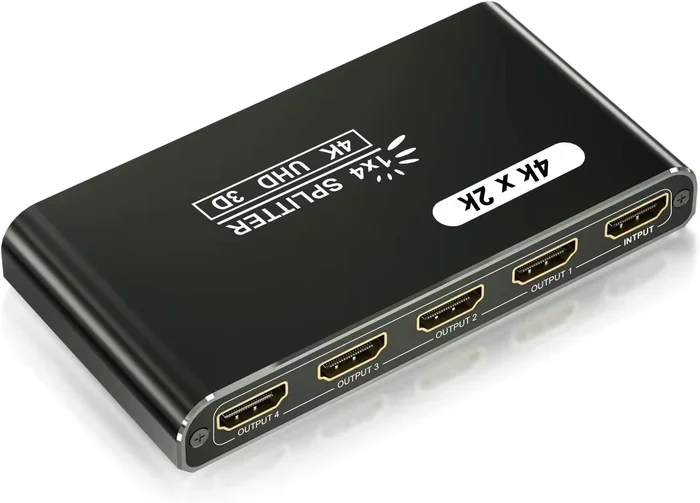
1×4 and Higher Distribution Splitters
Need more than two screens? You can find 1×4, 1×8, and even 1×16 splitters. These are common in commercial settings like restaurants, stores, and conference rooms. They allow one source to feed many screens at once. These are often called HDMI matrix switches when they also allow switching between multiple sources.
HDMI Splitter with Audio Extraction
Some splitters include extra features like audio extraction. This means you can pull the audio signal out through an optical or 3.5mm jack while still sending video to your displays. This is handy for setups where you want sound through a separate speaker system.
4K and High-Resolution Splitters
If you have a 4K TV or monitor, you need a splitter that supports that resolution. Not all splitters handle 4K. Look for ones specifically labeled as 4K HDMI splitters. These support resolutions up to 3840×2160 and often include HDR compatibility.
How to Choose the Right HDMI Splitter for Your Setup
Choosing the right splitter depends on several factors. Do not just grab the cheapest option. Take a moment to think about what you actually need.
Consider the Number of Outputs
How many display devices do you need to connect? If you only need two, a 1×2 splitter works perfectly. If you need four or more, look at higher-output models. Always buy one or two more outputs than you currently need. This gives you room to expand later.
Check the Resolution Support
Make sure the splitter supports the resolution of your display devices. If you have a 4K TV, buy a 4K HDMI splitter. If your setup is only 1080p, you can save money with a lower-resolution model. But going forward-compatible never hurts.
Think About Cable Length
How far do your HDMI cables need to run? If your displays are close to the source device, a passive splitter might work fine. If you need to run cables across a room or through walls, invest in a powered splitter with a signal booster.
Look for HDCP Compliance
If you plan to watch copyrighted content like Netflix, Blu-ray movies, or subscription streaming services, your splitter must be HDCP compliant. Non-compliant splitters will block protected content. This is a common mistake that catches people off guard.
Power Requirements
Check whether the splitter needs external power. Some plug into a wall outlet. Others draw power through the HDMI cable itself. Powered splitters generally perform better and are more reliable for demanding setups.
Brand Reputation and Reviews
Stick with well-known brands or products with strong customer reviews. A reliable splitter box from a reputable manufacturer will save you headaches. Cheap no-name splitters often have compatibility issues and poor build quality.
Common Uses for HDMI Splitters
HDMI splitters are incredibly versatile. People use them in many different scenarios. Here are some of the most common and practical uses.
Home Theater Setup
Want to watch a movie on your main TV and a second TV in the kitchen or bedroom? An HDMI splitter lets you do that easily. One Blu-ray player or streaming device feeds both screens. Everyone in the house can enjoy the same content in different rooms.
Gaming Setup
Gamers love HDMI splitters too. You can connect your console to a TV in the living room and another screen in the bedroom. This works great for parties or when family members want to play different games in different rooms while sharing the same console.
Business Presentations
In office settings, HDMI splitters are essential. You can connect a laptop to a projector and a large monitor simultaneously. This ensures everyone in the room can see the presentation clearly, whether they are sitting front row or back row.
Digital Signage
Restaurants, retail stores, and offices use HDMI splitters for digital signage. One media player feeds multiple screens throughout a building. This creates a consistent, synchronized display for advertising or information sharing.
Dual Monitor Workstation
Some people use a splitter to extend or mirror their computer desktop across two monitors. While an HDMI switch might be better for extending, a splitter works well for mirroring the same image on two screens for presentations or collaborative work.
Potential Issues and How to Solve Them
HDMI splitters are not without their quirks. Here are the most common problems people run into and how to fix them.
No Picture on One or More Displays
If one display shows a picture but another does not, check the cable connections first. A loose HDMI cable is the most common culprit. If cables are secure, the splitter might not be sending a strong enough signal to that particular output. Try a powered splitter or a shorter cable for the problematic display.
Resolution Drops After Splitting
Sometimes the picture looks great on one screen but looks fuzzy or lower resolution on another. This usually happens because of EDID handshake issues. Make sure your splitter supports the resolution of all connected displays. Updating the firmware on your source device can also help.
HDCP Errors and Black Screens
If you see a black screen or get an error message about copy protection, your splitter might not be HDCP compliant. This is especially common with streaming content from Netflix, Disney+, or Blu-ray discs. Replace your splitter with an HDCP-compliant model to fix this.
Audio and Video Sync Issues
Rarely, you might notice the audio and video are out of sync after passing through a splitter. This tends to happen with longer cable runs or cheaper splitters. Using a powered splitter with quality HDMI cables usually resolves this problem.
Signal Degradation Over Distance
Signal degradation is the enemy of long HDMI runs. If your picture looks pixelated or flickers, the signal is weakening. A signal booster built into a powered splitter helps. You can also use active HDMI cables that have their own amplification.
Quick Tips for Getting the Most From Your HDMI Splitter
Here are some practical tips to help you get the best performance from your splitter.
- Use high-quality HDMI cables: Cheap cables cause more problems than splitters do. Invest in certified cables.
- Keep cables as short as possible: Shorter runs mean stronger signals and fewer issues.
- Update your device firmware: Sometimes a simple firmware update fixes compatibility problems.
- Test each output individually: Before mounting anything on a wall, test all outputs with short cables first.
- Give powered splitters their own power outlet: Do not rely on USB power from your TV if the splitter needs more juice.
- Check HDCP compatibility before buying: If you watch protected content, this is non-negotiable.
Frequently Asked Questions
Do HDMI splitters really exist and are they worth buying?
Yes, HDMI splitters absolutely exist and they are widely available online and in electronics stores. They are worth buying if you need to share one source device across multiple screens. For home theater setups, gaming setups, business presentations, or digital signage, a good splitter solves a real problem and delivers reliable performance.
Can an HDMI splitter reduce picture quality?
A quality HDMI splitter should not reduce picture quality. However, cheap or passive splitters can cause signal degradation, especially over long cable runs. This might show up as a lower resolution, flickering, or sparkles on screen. Buying a powered splitter from a reputable brand helps maintain full picture quality on all outputs.
What is the difference between an HDMI splitter and an HDMI switch?
An HDMI splitter takes one input and sends it to multiple outputs. An HDMI switch takes multiple inputs and sends them to one output. They do opposite things. People often confuse the two, so make sure you buy the right one for your needs. If you want to show the same content on multiple screens, you need a splitter.
Do HDMI splitters work with 4K and HDR content?
Many HDMI splitters do support 4K and HDR, but not all of them. You must check the product specifications before buying. Look for splitters specifically labeled as 4K HDMI splitters with HDR support. These will handle high-resolution content properly without downscaling the picture.
Can I use an HDMI splitter to extend a cable run?
An HDMI splitter is not the same as an HDMI extender, but powered splitters can help with longer runs. They boost the signal as it distributes to multiple outputs. For very long cable runs, consider using an HDMI extender or active HDMI cables in combination with your splitter to maintain signal quality.
Do I need to pay a lot for a good HDMI splitter?
No, you do not need to spend a fortune. Good HDMI splitters are available at various price points. A basic 1×2 powered splitter with 4K support can be found for a reasonable price. The key is to avoid the absolute cheapest no-name brands and instead choose products with solid reviews and clear specifications for resolution, HDCP, and EDID support.
Conclusion
So do HDMI splitters exist? Yes, they do, and they are one of the most practical accessories you can add to your entertainment or workspace setup. Whether you need a simple 1×2 splitter for your home theater setup or a powerful 4K HDMI splitter for a commercial digital signage wall, there is a solution that fits your needs.
The key is understanding what you need before you buy. Consider the number of outputs, the resolution your displays support, whether you need HDCP compliance, and how far your cables will run. Take these factors into account and you will find the perfect splitter for your situation.
Remember to choose a powered splitter for the best reliability, use quality HDMI cables, and always check that your splitter supports the content protection standards used by your source devices. With the right setup, you can share any HDMI source across multiple screens effortlessly.
HDMI splitters are simple, effective, and incredibly useful. Now that you know everything about them, you are ready to make the right choice for your setup. Happy viewing!